Paying a price to use free software: the dark side of Comodo products
September 23, 2009 84
Email article | Print article
Comodo is a popular name in the software business. Comodo provides multiple free, and excellent, products for home users including, but not limited to, the award winning Comodo Firewall (now bundled with Comodo Internet Security). Comodo has also recently become a big name in multiple front-page controversies including the issuance of its SSL security certificates to known malware distributors/scam websites and a row with Softpedia over the inclusion of a third party toolbar in their software. For those that don’t know I will do a quick recap for you:
- Comodo has been caught selling its popular SSL certificate to malware distributors/scan websites. Now in Comodo’s defense, whenever a malware distributor/scan website which has Comodo’s certificate is brought to their attention, they remove it; furthermore the purpose of the SSL certificate, technically, is not to verify the contents of the website but rather to verify how secure it is to buy from (the irony). However the question of why Comodo is repeatedly selling the certificates to known malware distributors/scam websites (there have been cases where a website with the same exact layout, interface, and “product” except different name has been issued a certificate even though their earlier one was revoked) is still a significant one and still an on going issue.
- Softpedia, once upon a time, labeled Comodo Internet Security as “malware” because CIS included SafeSurf, an optional third party toolbar considered to be malware by Softpedia. Of course Comodo did not like that, so they tried to get Softpedia to remove the label. Softpedia, standing by their high standards, refused. So in the end the result was (is) Comodo Internet Security was (is) removed from Softpedia’s download database.
Whatever side you are on for the above two issues, this post is not to discuss them; that is for another time. I am creating this post to address another (potentially more important) issue with Comodo products.
Today as I was checking my e-mail, I got an e-mail from a dotTechie informing me of the fact Comodo Backup, a free backup solution provided by Comodo, was recently updated to v2 with major changes and I should check it out (yes – I do read the e-mails I am sent even if I forget to reply… surprise, surprise). So, naturally, I was intrigued and went to download Comodo Backup. While installing Comodo Backup I glanced over its EULA (End User License Agreement) and was shocked by what I saw:
I am not legal mind, but to me this says if you install Comodo Backup, Comodo will collect data from your computer such as how you use Comodo Backup. Not only will Comodo collect data, but the data can potentially be personally identifiable: Comodo won’t disclose the data to a third party in a manner which will personally identify you but that means if they are taking a deliberate and conscious action to make sure the data is not personally identifiable when being passed on to a third party, the data is personally identifiable when Comodo themselves have it. Am I understanding it properly or am I being paranoid?
Now it is not just Comodo wanting to collect data from you while you use their software. Many software developers ask you if you want to send anonymous usage statistics to the developer while using their program; however you can always opt out if you do not want to. I looked up, down, left, right, in, and out – no where in Comodo Backup did I see an option to opt out of sending data to Comodo. At best I found an option under settings named “Enable log” which a user can check or uncheck; however there is no clear indication if this “log” refers to the data collection done by Comodo or a different program function. Shame on you Comodo; not only are you collecting questionable data but the user has no clear way to opt out if they find this action less than desirable (bar blocking the program with Firewall of course and/or not installing the program in the first place).
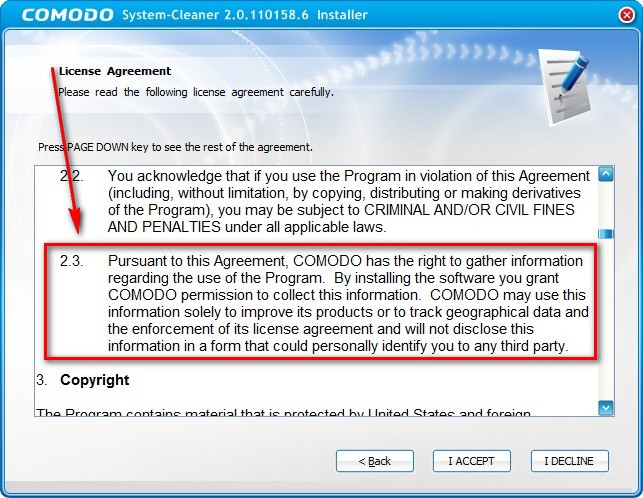
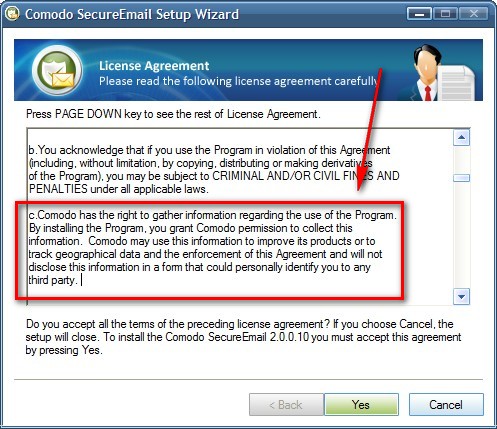
After I got done with Comodo Backup, I was curious to see if other Comodo software do the same thing as Comodo Backup. I found indeed there are other perpetrators which do the exact same thing…
Comodo System Cleaner
Comodo SecureEmail
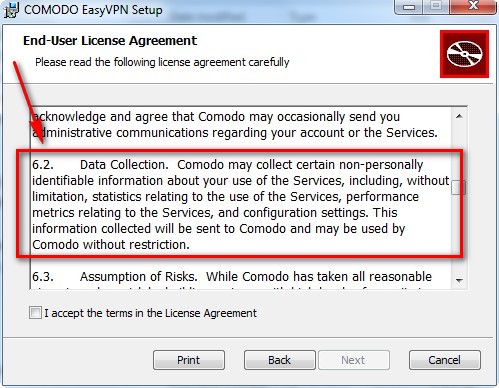
…and other Comodo software which do something similar except explicitly state the information collected will be non-personally identifiable:
Comodo EasyVPN
Comodo Internet Security
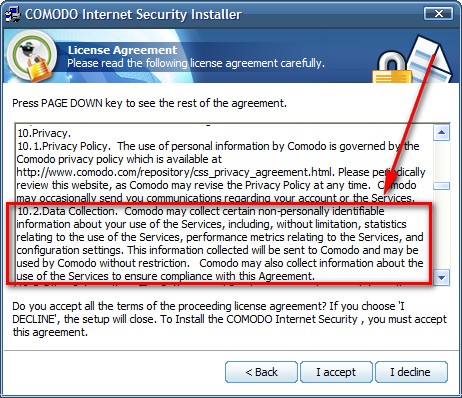
CIS is the bundle which contains Comodo Firewall, AntiVirus, and AntiMalware solutions.
Since EULAs are long, and Comodo did not exactly help by not properly formatting some of the EULAs for some of their software, I may have missed a software or two which act in the same way as Comodo Backup; so if you find another Comodo product which collects data (personally identifiable or not) without an ethical and clear declaration and a user opt-out, please post below and I will be sure to update this post.
Furthermore, I visited the privacy policy link you see provided in CIS’s EULA. The description on how user personal data is used is vague at best:
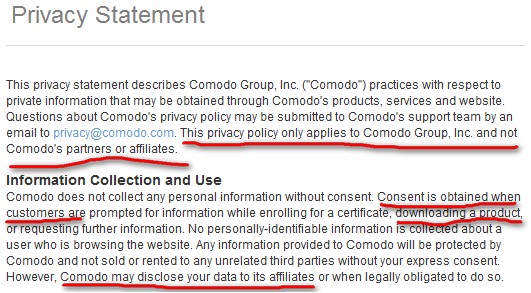
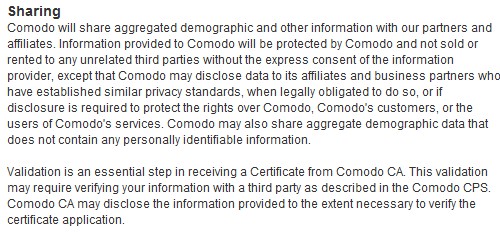
So who exactly are Comodo’s affiliates and what are their privacy policies? Farther down the page Comodo does state more explicitly its partners and affiliates have “similar” privacy policies…

…but I am not really impressed in the first place by Comodo so I don’t know what to think.
To make matters even more confusing, it turns out there is another privacy policy currently linked to Comodo’s website (this one was last updated in July as opposed to April for the other one). This one is a little bit more definitive about exactly what Comodo does:
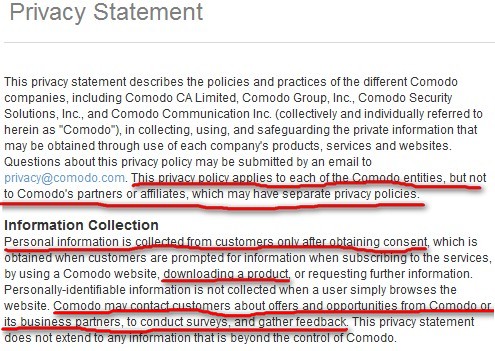
Of course Comodo states the affiliates and/or partners have “similar privacy standards” but I am not particularly impressed by Comodo’s “standards” when it collects data related to its programs without obvious user consent and/or clear opt-out option.
So what do you guys think. Am I being a daft, paranoid idiot or is Comodo pulling a fast one over all of us? Please, dotTechies, lawyers, Comodo reps, and everyone else: post your thoughts below. As it stands, I don’t know about everyone else, but Comodo has lost at least one potential customer: me.
***Update***
Let me make this clear: If potential data collection is not a concern for you, by all means use Comodo products (I have stated time and time again, at face value, Comodo programs are great). However me, and many others, deplore this practice of data collection without clear notification and/or opt-out option and will probably never use Comodo products again.
84 Comments »
Leave A Response »


Hi Ashraf
I was just about to download the new version of Frostwire v4.18.3 and i thought I’d use the EULAlyzer to check it over and interestingly enough this has come up:
By clicking on the “Next” or “Install” button below, you agree that OpenCandy may collect and use certain information obtained in connection with this software installation in accordance with the policies and practices set forth in OpenCandy’s Privacy Policy, which can be read at http://www.opencandy.com/privacy-policy.
I visited the URL/website and there I read this:
We (OpenCandy, Inc.) know that you care about how your personal information is used and shared, and we take your privacy seriously. By visiting our website at http://www.OpenCandy.com (”OpenCandy.com”), or using any of our services or products, including the OpenCandy recommendation network, you acknowledge that you accept the practices and policies outlined in this Privacy Policy.
They then go on to say that by visiting the site they’ve already installed a cookie for them to track my pc and also downloaded information from my browser and a good deal more.
Now forgive me if I’m wrong here but I never gave them any permission to do any of this and yet they’ve already done it by me just checking them out and trying to clarify what their EULA is stating about their privacy policy. So in effect their privacy policy has already overridden my right to my privacy by me just visiting their website!
All this information about Comodo is very interesting but I am afraid it comes too late after the fact for me. For the past 3 weeks or so I have been trying to uninstall the Comodo firewall using Revo Uninstall, Glary Utilities, and the Windows XP built-in uninstaller program.
I cannot find any uninstall program that shows Comodo to have files remaining on my computer. However the Windows security panel shows that the Comodo firewall is operational. Apparently some aspect of Comodo is active because is it is blocking file transfers to GOTO server.
I have not manually gone through the registry looking for a Comodo entry because I feel that Comodo has a sister program, using another name, that is keeping the Comodo firewall program active. The Comodo firewall continues to start each time that I boot Windows and yet I can find no entry for it in any of my startup editor programs. I have been having a like problem with some Google applications (sister applications opening and keeping alive Google files that I have killed using taskmaster. I have even had Yahoo do the same. I am moving away from ever using gift horse files made available for free or attached to an offer from a big portal company that is too good to be true.
@Comodo Security Solutions/Everyone: I do not use any products that collect info from you (whether or not it’s anonymous) UNLESS I opt in . I do send Microsoft usage info for 1 computer, I do send some opensource developers usage info… but I WILL NOT USE ANY SOFTWARE THAT USES MY INFO WITHOUT ASKING ME. PERIOD. How anonymous is anonymous? A certain 3RD party collected ‘non identifiable info’ on a relative of mine. How do I know that? It was on the internet with their name next to it. Because of the way the EULA was written, it was 100% LEGAL. :-C *angry face* Also, I saw a company giving out ‘anonymous’ info including usernames and email addresses. Not bad unless your username is KevinP and your email address is kparker@-ISP- . That, my IP address, and usage information could give people almost all my info INCLUDING my REAL ADDRESS.
Maybe I should stop my rant and cool down.
OH well.
God bless,
Kev93
Thanks, Ashraf. That was one LAME “response” from Comodo. Maybe they would think we wouldn’t actually follow their links and read them? To claim their policy is ‘tamer” than those others is just flat-out wrong. For me, it just makes them seem even MORE deceptive!
There is an easy workaround for most apps like this. With a good properly functioning firewall, no app can tell anyone anything about you or your usage statistics without your permission. If you like Comodo Backup, but hate the spying, simply create a rule to forbid it from communicating with the outside world.
@Booger: Technically thats illegal.
When will people finally wake up and understand that this company has dark desires.
Come on, nothing’s free, especially not for those into malware.
If you compare the childish colorful icons and program interfaces from Comodo, you understand that they’re in the same boat as those colorful fake anti-virus “”companies”"….
Comodo appears to couch their EULA (and their response to your article) in corporate “hype”. I get the impression that they are deliberately doing this to keep the backdoor (as well as two side doors) open, because they are uncertain about the ethics/morality of what they are doing.
By referring to an “industry standard”, they are perpetuating a dubious “standard” that the majority of consumers do not want and which is detrimental to the industry as a whole. Also, this is not “the” standard, but, in fact, an “alternative” standard, as many software authors/distributors do not subscribe to it. And most of those who do, do not go about it in the manner that they seem to prefer.
Anyway, I think it’s stupid to defend themselves by hiding behind the “bigger” sins of others. It’s like saying someone is innocent if he robs you with a knife, rather than with a gun.
It’s also a bad idea to defend themselves by attacking a popular website like yours – It’s not going to win them any friends. Pity, because Comodo is generally considered a nice product. Maybe they should revamp their management/marketing approach. This would never have happened if they had been more upfront and clear about the subject.
What disappointments me the most is the fact that Comodo really does make great products (albeit not everyone is happy, in general Comodo products = quality). The sneaky data collection just kills what otherwise is a good thing.
I will NEVER Trust Comodo AGAIN!!!
Just Uninstalled it!
Gone for Ever!!!
I suppose that you never use Google to search something on the Web ? ;-)
Damn me for being lazy.
I never read those license agreements, and have been using comodo products for quite some time now.
Thanks for pointing out, uninstalling their shit as we speak.
I suggest you look at the EULA for other security product vendors. You may be surprised to see almost this exact section in many of the more popular ones, which include for example, Norton.
This is FUD against Comodo, nothing more.
Listen to all of the sissys uninstalling their Comodo software because of this non-issue (which is old news by the way. I recall there being a fuss about this a year or two ago.) At worst, their eulas are vague and inconsistent but in the end the’re about the same as any of the security vendors. FUD indeed.
@Mobius:
Total paranoia, I could say more but those two words sum it up.
@Trel, Bud, and Dch48 : I made sure to view the EULA of other software, such as of my favorite free security software Avira, and found nothing similar to what is found in Comodo’s stuff. Check it out for yourself:
http://www.avira.com/documents/general/pdf/en/avira_eula_en.pdf
I have been using COMODO Internet security(CIS) suite since when I had been using XP and now Vista x64.
It’s great I feel secured though I’m aware it’s the internet no one firewall protects against ALL.
Anyway I really like Comodo’s CIS and with regard to it potentially gathering data well people do you not use google everyday?
Every time you type something into google that keyword is stored even perhaps with your personal identification such as IP and such and such.
If you go to sooo many sites you’ll find trackers in those sites such as Google analytics, google blablabla, Quantcast, and such and such. They are named trackers because they collect information from visitors.
I just think if you are really concern about your privacy you should worry about google and such companies instead of COMODO. Google doesn’t give you anything in return while COMODO does. Right now I’ll stick with CIS.
@John Smith:
John, are you sure that your uninstall got rid of everything related to Comodo?
After running uninstalls on Comodo firewall program using several uninstallation programs, including “Revo uninstall”, I manually counted approximately 210 Comodo registry entries remaining. After backing up my registry, I used several registry cleaning programs to see if they would remove the Comodo entries. I was able to watch the details flying by while several of the registry cleanup programs were analyzing registry. During the analysis, I noticed that Comodo entries were frequently being flagged.
When I allowed the registry cleanup programs to remove the errors that they said they found I recounted the number of Comodo entries still in the registry. Every cleanup program left approximately 200 Comodo registry entries even though I all many entries being flagged.
I have to think that maleware was installed by the Comodo firewall installation program and that this maleware kept registry entries from being deleted.
@Bigun:
It’s not malware. Most security programs dive themselves DEEP into your registry and machine, so that viruses and other spyware can’t remove them. Those registry entries cannot be deleted because they’re associated with an actively running process, so maybe the only way to remove is with AppRemover, a great tool that specializes in removing security applications.
http://billmullins.wordpress.com/2009/09/23/appremover-2-1-remove-security-applications-easily/
Adrian
P.S. Comodo’s software is clean, but it maybe steals your information, so it’s up to you to choose whether to continue using them.
The fact that Google and other sites track your web activity, is irrelevant. It requires a separate debate with different issues involved. Just two examples of these issues:
1. They record web searches/trends and your IP address. They cannot LEGALLY COMPELL you to allow potential mining of information stored on your computer by way of a blanket EULA.
2. Sites that dig into private data on your machine or install unwanted code, do so illegally, unless you specifically grant them the right to do so.
3. .. etc., etc.
What is at issue here, is the fact that well known and trusted entities are, in essence, trying to sneak unpopular features onto your computer. Although they do refer to it in their EULAs, the issue is so contentious and emotional that most authors/distributors allow you to opt out, without affecting the use of the software or trying to downplay it. It is because of the heightened awareness about this matter that many state it clearly and make available an opt out feature.
Users who have a yielding or carefree attitude about disturbing issues, are free to walk away from it, but it remains important to pursue it if you want to prevent it from becoming even worse, which is what will happen, for sure!
The mere fact that this discussion is taking place, is proof of the degree to which this practice has already degenerated.
@Nickname and @Michael W: Josh took the words right out of my mouth. The discussion between information collection while on the web is a completely different issue than information collection done via program locally on your computer.
Unfortunately the web, by definition, is flawed in the area of privacy. Any website you visit can collect data like IP, what you do on the website, etc. You should know that before you use the Internet. If you are very concerned about that, you may use services like Tor, so any data collected will not be personal (unless you voluntarily give up personal information) and you can still make full use of any website. Of course none of this gives all companies the green light to collect all kinds of data, but lack of privacy on the internet is something which is to be expected.
Using a program locally is not like surfing a website. A user expects, and rightly deserves, privacy while using an offline program; in fact often times I prefer an offline program vs an online service which do the same thing because it is offline and more private. Now as I stated in my post many developers do like to collect program usage data. However the transparent and trustworthy developers clearly state they are collecting data (i.e. they give you an opt-out option) and often times they clearly state any data collected will not be personally identifiable. On both counts Comodo fails (although on some they do state they will only collect non-personally identifiable information).
Furthermore, to compare Google to Comodo is a joke in of itself. Have you read Google’s privacy policy? It is hell lot more detailed than Comodo’s.
Lastly, I again agree with Josh. If potential data collection is not a concern for you, by all means use Comodo products (I have stated time and time at face value, Comodo programs are great). However me, and many others, deplore this practice and will probably never use Comodo products again.
Sincere thanks to Ashraf for his work here.
Though some posters may feel this is a fuss about nothing — and they’re entitled to their views — there would seem to be cause for concern over a company whose corporate motto is Creating Trust Online, because once you drape yourself in that particular flag, you’d sure as heck better live up to it.
Flogging off user info to affiliates over whose privacy policies you have absolutely no control (as Comodo readily acknowledges in Ashraf’s screen shots, but fails entirely to mention in its contribution to this comment section) is so precise and exact the opposite of Creating Trust Online, as to render its meaning nonsensical, and its usage wilfully inappropriate.
Bigun:
I’m running Comodo 3.12 and haven’t yet attempted an uninstall.
In view of your posts, I’d be especially interested to hear from others here who have successfully uninstalled the Comodo firewall, bearing in mind the discussion on this particular thread which seems to have been running for nigh on three years:
http://forums.comodo.com/help_for_v2/how_to_uninstall_comodo_firewall-t1184.0.html
and which having begun with v2 problems seems now to embrace later versions.
That AppRemover that Adrian mentioned sounds pretty neat.
Has anyone else tried it?
http://billmullins.wordpress.com/2009/09/23/appremover-2-1-remove-security-applications-easily/
@etim: I have. In fact an article on AppRemover has been sitting as a draft (half completed) for a while now. I plan on finishing it sooner or later and publishing it…