
 Email article
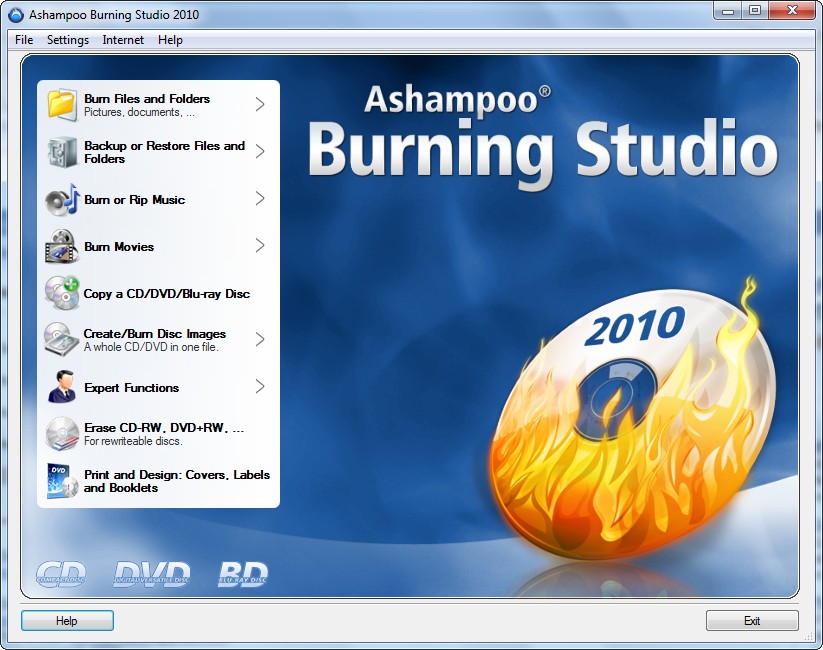 Update2: The promotion for Ashampoo Burning Studio 2010 is back (it works now) but from ComputerBild.de instead of ComputerBild.ru!
Update: The promotion for Ashampoo Burning Studio 2010 seems to have ended. If you still need a burning software, take a look at Ashampoo Burning Studio 2009 Advanced. The only difference between ABS10 and ABS09A is ABS10 supports Lightscribe while ABS09A does not.
One of the most popular freebies posted on dotTech is Ashampoo Burning Studio 2009. Recently I posted about how Ashampoo Burning Studio 2009 was available as an “Advanced” version which added more features and increased performance over the non-advanced version. Now here is your chance to grab the another free upgrade to the next software in line: Ashampoo Burning Studio 2010.
Unfortunately, besides the change of color scheme, there is only one “new” feature in Ashampoo Burning Studio 2010 which is not in Ashampoo Burning Studio 2009 Advanced:
- Supports Lightscribe.
For those that don’t know, “Lightscribe” is the ability of your CD/DVD/Blu Ray/HD-DVD burner to literally “draw” labels onto your CD/DVD/Blue Ray/HD-DVD (although I believe Ashampoo Burning Studio 2010 does not support HD-DVDs).
The thing about Lightscribe is Ashampoo Burning Studio 2010 itself will not give you the “Lightscribe” feature; Lightscribe is a hardware dependent feature. Your disk drive has to have it physically built in and the disk you are using has to be designed to work with Lightscribe. Ashampoo Burning Studio 2010 only removes the software limitations of Lightscribe. So for many upgrading from Ashampoo Burning Studio 2009 Advanced to Ashampoo Burning Studio 2010 is pointless because not everyone has a Lightscribe drive; however if you want, and can use, this Lightscribe feature, feel free to keep reading to learn how to grab Ashampoo Burning Studio 2010 for free.
As a quick recap, in addition to Lightscribe mentioned above, here are the full features of Ashampoo Burning Studio 2010:
- Burn and update data discs
Burn data to discs and update previously burned discs by adding and removing files and folders. - Back up your data to single or multiple discs
Back up your valuable data to one or more discs. Single backups can span multiple discs. Restore your backups in a single easy operation. - Rip and burn audio
Rip audio from CDs and burn to audio CDs and MP3 discs on CD, DVD and Blu-ray in a variety of formats. - Burn movies to DVDs and data discs
You can burn video DVDs, Video CDs (VCD), Super Video CDs (SVCD) and data video discs. - Copy CDs, DVDs and Blu-ray discs
Just insert a disc, select Copy and you’re ready to burn. - Create and burn disc images
You can both create and burn ISO, CUE/BIN and Ashampoo’s own special ASHDISC image formats. - Erase rewriteable discs
Quick and easy erase functions for reusing rewriteable discs. - Expert burn functions for full control
Burning experts can create modified copies of existing discs (read in data structure and make changes and additions) and burn discs of all kinds with full control of all main configuration options. - Label Designer
- Point-and-click label design
- Ready-to-use themes – just enter your title data
- Import track data from your disc
- Design and create:
- Disc labels
- Booklets
- Covers for jewel cases, slim cases, DVD and Blu-ray cases
- Add your own backgrounds, text objects, images and data tables
- Fast alignment and editing tools for images and text
- Burn and update data discs
Burn data to discs and update previously burned discs by adding and removing files and folders. - Back up your data to single or multiple discs
Back up your valuable data to one or more discs. Single backups can span multiple discs. Restore your backups in a single easy operation. - Rip and burn music
Rip music from CDs and burn music to audio CDs and MP3 discs on CD, DVD and Blu-ray in a variety of formats. - Burn movies and photos to DVDs and data discs
In addition to the new slideshow DVDs you can author and burn video DVDs, Video CDs (VCD), Super Video CDs (SVCD) and data video discs. Video files are automatically converted to the necessary formats. - Copy CDs, DVDs and Blu-ray discs
Just insert a disc, select Copy and you’re ready to burn. - Create and burn disc images
You can both create and burn ISO, CUE/BIN and Ashampoo’s own special ASHDISC image formats. - Erase rewriteable discs
Quick and easy erase functions for reusing rewriteable discs. - Expert burn functions for full control
Burning experts can create modified copies of existing discs (read in data structure and make changes and additions) and burn discs of all kinds with full control of all main configuration options. - Label Designer
- Point-and-click label design
- Ready-to-use themes – just enter your title data
- Import track data from your disc
- Design and create:
- Disc labels
- Booklets
- Covers for jewel cases, slim cases, DVD and Blu-ray cases
- Add your own backgrounds, text objects, images and data tables
- Fast alignment and editing tools for images and text
NOTE: As Mario and Amnesia pointed out in the comments of the post on Ashampoo Burning Studio 2009 Advanced, the only differences between Ashampoo Burning Studio v9 (the paid version from Ashampoo’s website) and Ashampoo Burning Studio 2009/2009 Advanced/2010 is v9 can author DVDs and create slideshows while 2009/2009 Advanced/2010 cannot.
To get Ashampoo Burning Studio 2010, follow these steps:
If you already have Ashampoo Burning Studio 2009 or Ashampoo Burning Studio 2009 Advanced installed, first be sure to uninstall them (preferably using RevoUninstaller) because ASB09 and ASB09A install into different folders than ABS10 and can co-exist side by side. In other words, installing ASB10 will not remove ASB09 or ABS09A automatically so you must do it manually.
Ashampoo Burning Studio 2010 officially works on Windows 2000/XP/Vista. Unofficially, I have it running in Windows 7 just fine.
- Visit the promotion page and download it.
- Install the software.
- During installation you should see this screen:
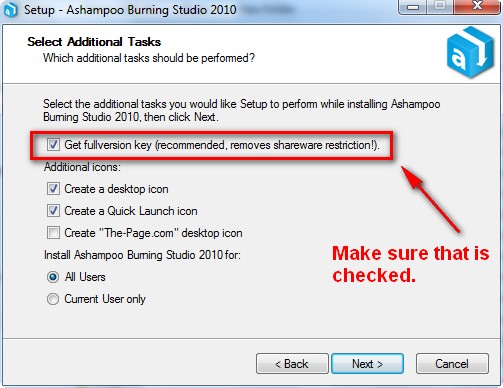
Make sure to leave “Get fullversion key…” checked. You may also want to consider unchecking “Create ‘The-Page.com’ desktop icon”.
- After installation the registration page should open in your browser. If it does not, visit it by clicking here.
- Enter your e-mail address and click “Send”:
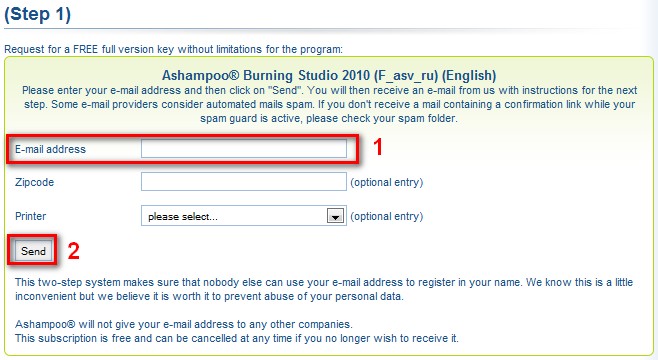
Take note when you register, you are automatically signed up for Ashampoo’s regular e-mail newsletters. If you don’t want the newsletters, you can manually unsubscribe from these newsletters after you registered by logging in via MyAshampoo, going to “Subscribe service letters”, and unchecking the ones you don’t want.
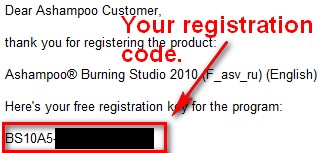
- After you have registered, go to the inbox of the e-mail you entered and look for an e-mail from “Ashampoo <MrReg@ashampoo.com>” with the subject of “Your registration – Ashampoo® Burning Studio 2010 (F_asv_ru) (English)”. Open the e-mail and find the registration code inside:
- If you have Ashampoo Burning Studio 2010 still open, go back to it and select “Enter Key” at the “Ashampoo Burning Studio 2010 Trial Information” window that should be open (if you do not have ABS10 open, open it and go to “Internet” -> “Buy/Register…” and the “Ashampoo Burning Studio 2010 Trial Information” should open):
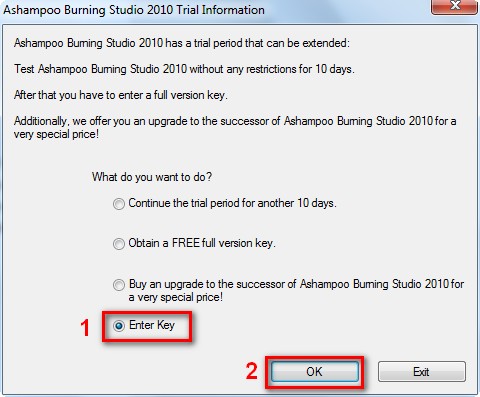
Enter in your registration key at the next window, hit “Register”. You may have to manually type it in instead of pasting (it wouldn’t let me paste for some reason).
- Enjoy your fully registered, never ending copy of ABS10 installed! Excellent free Nero alternative.
