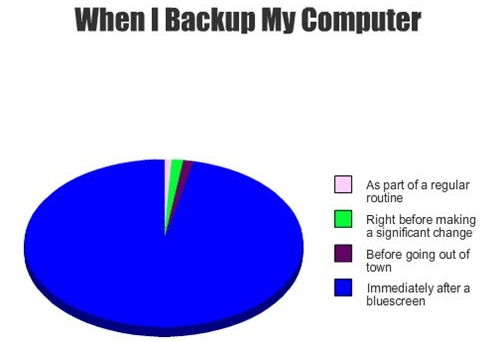
See, now you can never say Bluescreen of Death is useless — it tells you it is time to backup! And if you don’t have a backup program on hand, read out handy dandy guide on best free backup software for Windows.
[via GraphJam]

About the author: Ashraf View all posts by Ashraf
Happily married to the most beautiful woman ever, Ashraf is the founder of dotTech. Ashraf spends insane hours on dotTech (usually writing articles but sometimes doing absolutely nothing except staring). Yes he is weird, but he is also very friendly.
There is probably more truth in this pie chart than most people would think.
BSOD = panic = “OMG, my computer is dying” = relief that said computer restarted normally = “I better back my shit up NOW!”
I do a backup after I get a new machine set up the way I want it, with all the software I want on board. This is my “clean backup” – a reinstall without actually reinstalling, and with the added benefit of not having to add all the software back in. I do have to update windows and most programs, but it saves time over a true reinstallation.
After that, it’s weekly incremental backups.
Hello, all.
@ “Seamus McSeamus”:
The only problem w/ that strategy is my computer is *NEVER* “set up the way I want it”!
Have a GREAT day, neighbors!