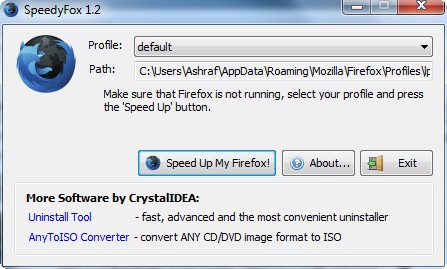
In the past week or so SpeedyFox has been featured in articles by many popular and respected tech websites which I read (occasionally). Until now I just gave it a short glance and passed over it. I say “until now” because I finally decided to give it a go; and now I can vouch for all the other websites which wrote about SpeedyFox because SpeedyFox really does speed up Firefox.
What SpeedyFox does is actually quite elementary if you stop and think about it. You see Firefox uses SQLITE databases to store its settings and other important stuff (one database per “profile”). The longer you use Firefox, the more that database grows. SpeedyFox simply compacts that database. Smaller database = faster Firefox = happy Ashraf.
That being said, obviously the speed increase you experience after using SpeedyFox will vary depending on how long you have used the specific Firefox profile you speed up with SpeedyFox. For most of us we have never created custom Firefox profiles so we only have one profile (“default”). In that case the speed increase you experience after using SpeedyFox will depend on how long you have been using Firefox (i.e. when was the last time you formatted or uninstalled/reinstalled Firefox and deleted the settings).
Using SpeedyFox is (almost) as easy as eating pie:
- You download SpeedyFox.
- You close Firefox if you have it open.
- You run SpeedyFox (no installation required):
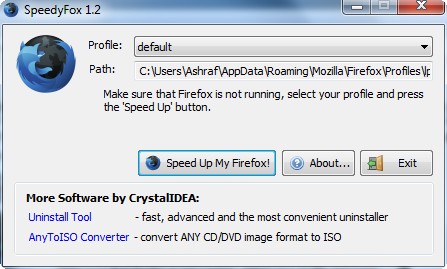
- You select the profile you want to speed up (most of us will only have one profile; in that case leave it at “default”).
- You click “Speed Up My Firefox!”.
- You wait:
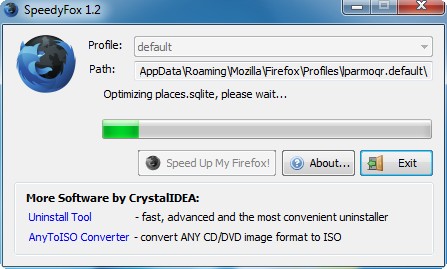
The compacting of the database will depend on how large your database is. According to the developer, it can vary from 5 minutes to an hour.
- You enjoy.
While it is hard for me to quantify in numbers the speed increase I am now enjoying, as I said the reason I am writing about SpeedyFox is because it does work.
You can download SpeedyFox from the following link:
Version Reviewed: v1.2
Supported OS: Windows 2000/XP/Vista/7






Email article


Greetings all! I saw this recently and it caught my attention. I am a long-time user of Firefox – and I love it. However, it is starting to annoy me to the point of wanting to find an alternative because of its increasingly outrageous CPU usage and excessive load and lag times that are becoming problematic (I really, really hope Mozilla can actually fix this one day – and that that day is not too far away). So I tried Speedyfox with high hopes, as others had reported instant speed jumps, but I really can’t notice any significant difference. I’d be interested to hear other dottechies’ experiences with this prog.
@Ozzie: I think your bad experience most likely has something to do with your profile. Try running Firefox in Safe Mode, and tick: Disable add-ons, Reset toolbars and controls, and Restore all user preference. Then Continue to Safe Mode.
If that did work, you can narrow down the problem later, and/or create a new profile and use it from now on. FEBE, OPIE, and CLEO can help you backup/transfer your private data, add-ons, and settings.
As for my experience in using this program, I didn’t notice much difference at all, but that is to be expected on my new Windows 7 OS.
I did use the vacuum commands before in XP though, it worked quite effectively.
@Ozzie: Hmmm. Not sure why you aren’t seeing too big of a speed increase (if any). Did you just recently format and/or change Firefox profiles? Are you using the profile in Firefox which you used in SpeedyFox?
@J. L.: Funny you should mention FEBE because there is an article sitting to be published on it as I type this. Just gotta wait till Locutus is done writing it.
Also, thanks for being a great helping hand around here in terms of addressing people’s problems in comments =).
@Ashraf: (-:
Gotta love those coincidences.
Have you guys tried CometBird ?
It is a faster leaner version of FF.
It uses the same add-ons.
@ J.L.: Thanks for the response. Appreciated. Actually, I tried this before, along with a number of other solutions that allegedly help the problem, but FF is still chewing up the CPU.
@ Ashraf: No, I haven’t made any changes to FF (except for the periodic version updates). And I’m pretty sure SpeedyFox is configured correctly. The folder is the correct one, so I dunno.
I even disabled a number of add-ons a while back, but even that didn’t do anything. When I looked into this online a little while back, I saw that many people were having problems with the browser being really slow and/or it chewing up the CPU. So at least I know I’m not alone with the problem. When it gets too slow and I’m trying to research stuff and don’t have time to sit twiddling my thumbs, I temporarily jump to IE (ugh) or Chrome (not a fan). Like I said, I just dunno why. Be nice to have a really speed Firefox though rather than the slow, old, arthritic, grey-haired fox I have at present.
@ Rob: I’ve never heard of CometBird, but I’ll look into it. Is it a Mozilla development project?
I use Firefox on all my machines/pc’s. It’s my favorite browser. My pc’s have different operating systems: Windows XP Home; Windows XP Professional; Windows Vista Home Premium; Snow Leopard (on an iMac 20″) and Ubuntu 9.04.
Firefox is fairly fast on all my systems, except on the XP machines. A cold start of Firefox on XP Home or XP Professional takes 20 seconds (Win XP Pro, on a one year old machine) or 40 seconds (!!) (Win XP Home, on a 5 year old machine). A warm start (starting Firefox, closing it and starting it again) takes less then 5 seconds on all the machines.
Using Speedyfox didn’t do anything. The optimization took just one second and I noticed no difference after that. I am using Firefox now for years on that 5 year old machine, and I have used the same profile all that time. It’s onely Firefox that is slow on that machine. The other programs are as fast as they were when I bought that pc, 5 years ago.
I also used Speedyfox on the pc of a friend and she thinks that the cold start of Firefox on her XP Home machine is a bit faster now.
All in all, I am not very impressed by Speedyfox.
@Ozzie:
I am pretty sure it is Mozilla
I scraped this off the CometBird’s ‘About’ box -
Mozilla/5.0 (Windows; U; Windows NT 5.1; en-US; rv:1.9.1.3) Gecko/20090910 Firefox/3.5.3 CometBird/3.5.3
My version of CometBird is 3.5.3
Seriously if there’s any speedup then TimeWarner cable (my ISP) kills it.
Maybe it’s the difference between 1.2 seconds speedup and 1.6 seconds speedup in a laboratory/benchmark. But I cannot tell on my laptop XP2 2GB.
“Yeah, That’s the ticket! Blame TW.” (…spoken like Jon Lovitz)
I was just looking up Cometbird and found this on McAfee site advisor: http://www.siteadvisor.com/sites/cometbird.com/summary/
I don’t know how old that is, but it would seem very un-Mozilla like. Also, I understand through my quick research, that unlike FF, Cometbird does not have open code (please correct me if I’m wrong). Seems to be a mixed bag of reviews. Some love it, some are indifferent saying it’s no faster or slower than FF, and some hate it because of some of its dodgy links. So I think I’ll stick with FF – even though it is causing me some grief.
@Ozzie:
This page is interesting -
http://www.videonetcast.com/2009/02/comet-bird-browser.html
The first post is not singing it’s praises, but I believe it dismisses fears of it being malware’ish
However the other comments are favorable, and I agree with them when they say –
1) It is faster
2) it uses less memory
I usually keep dozens of Tabs open, from session to session.
FF buckles at the knees (or at least kneecaps my PC) more than does CometBird.
@ Rob: I definitely agree with you that FF buckles at the knees with multiple tabs open. I always have multiple tabs open as it is so convenient, and that is when FF maxes out the CPU. Still don’t know about Cometbird, though. I’ve downloaded it, but am yet to install. I might just keep the file in my downloads until the next time FF drives me round the bend and then give it a whirl.
Trying to stay on topic: Firefox.
Does anyone know why Firefox will not print correct PDF files when using the Adobe PDF writer?
I have had to use IE because of my requirements to create correct PDF files from my web pages.
Thanks to all.
@ DCTECHGUY: “Trying to stay on topic”? Since when did this become a space when we could not discuss alternatives? And then you go on to ask about PDFs! If you don’t like parts of the the discussion, skip over those comments. Rob has been helpful in the past, and I am happy to listen to anything he/she/both has to say.
You know…I have this add on called Tweak Network that says it’s supposed to speed up Firefox. Has anyone ever used /that/?
Looking at the mixed reviews about SpeedyFox, I’m not sure I should try it. Would those who it didn’t work for recommend at least giving it a shot? (I know those who it did work for would.)
dear Ashraf, this is too good to be true! for years i just get frustrated with youtube, every second or so, buffering, buffering
and have to wait till the solid red line ends then have to replay, what a waste of time,
I downloaded this SpeedyFox- what do you know! I was chatting and got a link for youtube, without thinking I clicked it, oh wow! I couldn’t believe what I was hearing and seeing! Continuous play! Not even a shade of that buffering thing!! So I sent this link and they tried it immediately,(by the way, graduates of computer science) and they read your review and said “very very good” and got somewhat technical, I wouldn’t know anything about what they were really saying – ALL I KNOW IS THAT I GET TO WATCH YOU TUBE NOW! BTW, I clicked on another video-same thing, SO IT MUST BE SPEEDYFOX because that was the only thing I downloaded before clicking the youtube link.
So, thank you for your honest reviews, and the free software with keys,,,,take care,,,,
Firefox by default checks for incompatibilities between each of your addons and your current version of FF, and it also looks for updated versions of each one. I found FF started up a lot faster on my XP/Home and XP/Pro machines when I disabled these behaviors.
The “Speed Up My Firefox” process took less than 3 seconds for me, and I didn’t see much speed differences. Must be due to my lack of addons….
note:tested on both vista home and xp home
@Kraal FictionWriter: yes I would recommend trying speedy fox, it didn’t really speed up my fox, but it didn’t hurt it either. the worst it could do is well…. nothing.
I added Speedy Fox last week and immediately noticed that Firefox opens much quicker. Granted, I haven’t observed any other changes but I’ll take those 10 to 15 seconds I was losing, LOL!
@David Roper: I finally gave up TW RoadRunner after four years because it was slow and unreliable, had outages in my area all the time. I switched to ATT Elite and am speeding along, no blips, and I’m saving $10 each month.
Seeing as I just recently installed Windows 7 (and Firefox with it) I didn’t notice much of a difference. I’ll try it again in a few months. :P
Dear Ashraf,
I appreciate your work, but when I tried to get this I was told it is not compatible with the latest Firefox for Windows.
Assuming this is true, I think it should not have been featured, or else it should have been said in the first few sentences that it is not compatible with the latest Firefox. Otherwise it’s a waste of peoples time.
THank you for your hard work.
@gates13: It works just fine on the latest Firefox >.>’. What version are you using? I am running v3.5.3 and it works just fine.
@Jyo: Thanks for the advice.
Well, I ran it and….it took maybe 5 seconds. I’m not sure it did anything. Does that mean that my profile was already small anyway? Which sounds funny, because I’ve used Firefox for a long time…
All well. Like Jyo said, it didn’t hurt. Even if it didn’t do anything. I’ll hang on to the tool, because maybe it’ll work someday.
Gates13: I have also used it on Firefox 3.5.3. While it did nothing, it gave me no issues or complaint about the version. I run Firefox in Vista x64.
As a previous comment, it took about five seconds to compact my FF database too. I opened six FF tabs of varying page sizes- all opened in about ten seconds. Prior to this, it took about thirty to forty seconds for the same to load, so yeah…about a three to four hundred percent increase. Could be one of the better d/l’s I’ve run across in the past few months, indeed. Thanks!