Don’t have Microsoft Office and don’t want OpenOffice; so how about Ashampoo Office? Get Ashampoo Office 2008 for free!

October 2, 2009 21 Email article | Print article

I just posted about how you can purchase any Ashampoo software for $10; now I am posting about how to get yet another Ashampoo title for free; life is grand.

I have a riddle for you guys and gals. What can do word processing, create presentations, process spreadsheets, is 50 MB in size, can be installed onto a USB/flash drive, and is available for free? I will give you three guesses; anyone, anyone? Here is a hint: it starts with A and ends with 8. Ooohh, I think I heard it. Yes the answer is Ashampoo Office 2008!

Ashampoo Office 2008 is a productivity suite by Ashampoo which has three major components:

  • TextMaker 2008 (word processing; think Microsoft Word or OpenOffice Write).
  • Presentations 2008 (create powerpoint presentations; think Microsoft PowerPoint or OpenOffice Impress).
  • PlanMaker 2008 (work with spreadsheets; think Microsoft Excel or OpenOffice Calc).

Now the clever user may notice Ashampoo Office is missing components which Microsoft Office and OpenOffice have, such as a database or desktop publishing software (although there are built in database and drawing related features to Ashampoo Office which compensate to an extent). However the advantage of Ashampoo Office is how light it is on your computer (takes up a grand total of 50 MB of your hard drive space after being installed and uses about 1/4 the RAM of Microsoft Office) and the native support to run it from a USB/flash drive (to run Ashampoo Office 2008 from a USB/flash drive, run “usbstick.exe” found in the folder you installed Ashampoo Office into [by default it will be C:\Program Files\Ashampoo\Ashampoo Office 2008]). Best of all, importing and exporting Microsoft Office and OpenOffice format files is a breeze. However do take note Ashampoo Office does not support the new Microsoft Office 2007 generation .x formats (like .docx, .pptx, .xlsx, etc.)

Here is a short informational video on Ashampoo Office 2008:

While Ashampoo Office 2008 will not be replacing Microsoft Office or OpenOffice any time soon, it is definitely a worthy alternative to look into if you are lacking in the productivity suite genre.

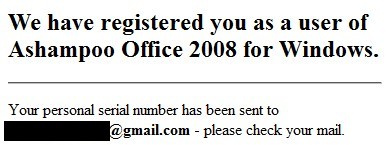
To get Ashampoo Office 2008 for free, follow these simple steps:

2009-10-02_205905

2009-10-02_205946

I don’t know if SoftMaker spams like Ashampoo so feel free to use the anti-spam services of Mailinator, 10MinuteMail, or Trashmail.

  • Check the inbox of the e-mail you entered. You should have an e-mail from “SoftMaker Software GmbH <info@softmaker.de>” with the subject of “Ashampoo Office 2008 for Windows: Your serial number”. If you can’t find the e-mail, be sure to check your spam/junk box (the e-mail landed in my spam box – I had to fish it out). In the e-mail you will find your registration information:
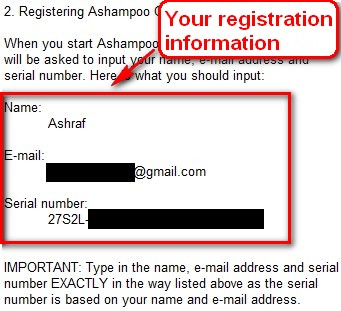
2009-10-02_214958

Copy the serial number and remember the name and e-mail.

  • Install Ashampoo Office 2008.
  • During installation you will be asked to enter your registration information:
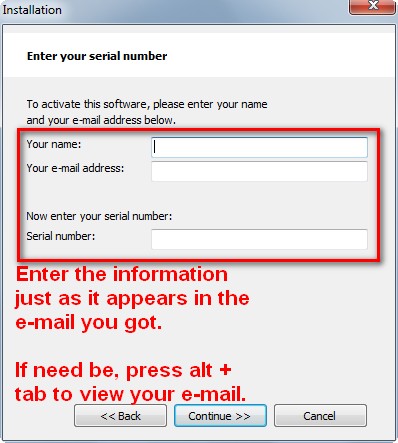
2009-10-02_214829

Type in the name and e-mail you registered with and paste in the serial number.

  • Finish installing.
  • After you have finished installing, if you go to “Help” -> “Check for updates” you will notice there is an update to download, hence why I told you to download an update patch. Therefore, before you even run Ashampoo Office 2008 after installing it, run the update patch I told you to download. When using the update patch, it will mention “SoftMaker Office 2008″; do not worry – Ashampoo Office 2008 and SoftMaker Office 2008 are the same thing so install the patch normally.
  • Enjoy!

If you have any problems, post below I will try to help.

Thanks djhightek!

21 Comments »

  1. Michael October 2, 2009 at 11:06 PM (comment permalink) -

    thanks for the offer on this one. now i am curious, does the textmaker 2008 read docx or doc files then? or does it create it’s own file extensions different from words? if it can read and edit ms words doc, then i will definitely go for this one in a heart beat.

    1
  2. Quro@75 October 2, 2009 at 11:08 PM (comment permalink) -

    Dear Ashraf,
    I’ve been using this suite for months (I got if from some promo out there for free). The best part is the portable version is all I want. The problem for me (or some body else perhaps) is this office suite don’t has compatibility with MS-Office 2007′s file, like *.DOCX, *.XLSX. The update patch from Softmaker didn’t has the ability to read files from MSO2007 too.
    Searching on internet for nothing (maybe I miss something or somewhere, I HOPE..). So, any suggestion where I can find this MS-Office_2007_Add_in for this Ashampoo, please?

    2
  3. Locutus October 2, 2009 at 11:28 PM (comment permalink) -

    @Michael: It can read .DOC but not .DOCX.

    3
  4. Michael October 2, 2009 at 11:37 PM (comment permalink) -
  5. Ashraf October 3, 2009 at 12:09 AM (comment permalink) -
    Mr. Boss

    @Michael:

    Best of all, importing and exporting Microsoft Office and OpenOffice format files is a breeze. However do take note Ashampoo Office does not support the new Microsoft Office 2007 generation .x formats (like .docx, .pptx, .xlsx, etc.)

    :)

    @Quro@75: I am looking bro. I will let you know if I find one.

    5
  6. Andrew Newmann October 3, 2009 at 3:31 AM (comment permalink) -

    You should also try SSuite Office for a free office suite. They have a whole range of office suites that are free for download.

    Their software also don’t need to run on Java or .NET, like so many open source office suites, so it makes their software very small and efficient.

    You may try these links:

    http://www.ssuitesoft.com/index.htm
    or
    http://ssuite5element.webs.com/thefifthelement.htm

    6
  7. Al Hall October 3, 2009 at 8:00 AM (comment permalink) -

    Hi Ashraf,

    I this a limited time offer or, can we pick it up anytime?

    7
  8. Ashraf October 3, 2009 at 10:28 AM (comment permalink) -
    Mr. Boss

    @Andrew Newmann: I ran into SSuite Software while doing my research on Ashampoo. It looks interesting.

    @Al Hall: I think you can pick it up anytime. However I am not 100% sure so if I were you I would register, download the files and keep both registration information and installers in a safe place because once you register and have the installers, you can install it whenever you want.

    Hope that helps.

    8
  9. janet October 4, 2009 at 5:57 AM (comment permalink) -

    I just sent this lettr to SoftMaker:

    “In your Autoshape comparison at http://www.softmaker.com/english/ofwcomp_en.htm , am I correct in understanding that you are showing a Planmaker file as it appears in MS Excell and in OpenOffice? I make this assumption because e.g., the Venn diagram is correct in the Planmaker display but not in either of the other two programs. This would seem to show that Planmaker files are not compatible with the other two programs….:-(….Explanation?

    Thank you for your help,
    Janet”

    Also, in light of Andrew Newmann’s post: does this program require .NET?

    9
  10. Steve October 6, 2009 at 5:11 PM (comment permalink) -

    I use this small program to convert DOCX files for importing into Ashampoo Office 2008.
    Docx2Rtf converts Word 2007 docx and OpenOffice (odt and sxw) files to rtf. get it here http://www.nativewindsofmontana.com/
    I made mine portable with JauntePE. Out of interest, microsoft offer a free converter program for the docx & other new file types – But keep this in mind – it is about 90 MB installed! twice the size of the entire Ashampoo office suite.

    10
  11. Ashraf October 6, 2009 at 5:38 PM (comment permalink) -
    Mr. Boss

    @Steve: I just ran into Docx2RTF yesterday! Small world…

    11
  12. Jim October 7, 2009 at 10:08 AM (comment permalink) -

    One bad thing about this program, when you install it it puts up a splash screen that fills the monitor with no way to minimize it. Make sure you have the serial number copied and don’t need to get at anything while its installing.

    12
  13. Ashraf October 7, 2009 at 10:21 AM (comment permalink) -
    Mr. Boss

    @Jim: Press Alt+Tab to go to other windows.

    13
  14. Jim October 7, 2009 at 3:19 PM (comment permalink) -

    @Ashraf:

    I did that to get the serial and it aborted the installation. Maybe it was just a glitch on my end.

    Nice program regardless, I’m using TextMaker now to write my latest movie review, and it’s much lighter on resources than Open Office Writer.

    14
  15. Shueygal October 22, 2009 at 10:59 AM (comment permalink) -

    Has anyone found out how to open Microsoft Excel [up to and including 2007] with this software? Thanks
    Shueygal

    15
  16. Taz October 22, 2009 at 2:41 PM (comment permalink) -

    This is still working. Got it today.

    16
  17. Steelers6 November 21, 2009 at 9:50 AM (comment permalink) -

    Ok, I am way late to the Party, but what is better, Open Office, Star office or Ashampoo? or something else.

    I only use MS. Office because of my work, but I know a lot of people can’t afford it (I couldn’t if I didn’t get it for dirt cheap from work) so, tis the season, I saw Star Office free too.

    Let me know, I have some family members in need. I can’t test it with my MS. office on here.

    Vidimo Se!

    17
  18. Ashraf November 21, 2009 at 12:03 PM (comment permalink) -
    Mr. Boss

    @Steelers6: Well I would say OpenOffice is “better” because it has more features. However the appeal to Ashampoo is the fact that it is so small in size and it can be made easily portable.

    I belive StarOffice = OpenOffice.

    18
  19. Loo December 23, 2009 at 8:03 AM (comment permalink) -

    Dear Ashraf,

    Can this office2008 run in Windows 7?

    19
  20. Loo December 23, 2009 at 8:30 AM (comment permalink) -

    Please do let me know whether this Office2008 can run in Windows 7 as I have free upgrade to 7 but don’t whether it can run.

    20
  21. Medardo June 5, 2011 at 11:31 AM (comment permalink) -

Leave A Response »