
Free Balesio FILEminimizer Office v5.0 (the latest version)!

October 8, 2009 22 Email article | Print article

Update: This promo seems to be over now =(.

Balesio FILEminimizer Office is a software that aims to help compress and reduce file sizes of Microsoft Office files:

  • .PPT/.PPTX
  • .DOC/.DOCX
  • .XLS/.XLSX

The great thing about FILEminimizer Office is you do not have to have Microsoft Office installed to use it. FILEminimizer is a completely standalone software; so if you create a .PPT/.DOC/.XLS format file with another software suite, such as Ashampoo Office or OpenOffice, you can still use FILEminimizer Office with those files.

Here are the full features of FILEminimizer:

  • Office compression for PowerPoint, Word and Excel by up to 98% – a 50MB document is compressed to 1MB in size
  • Compresses PowerPoint 2007, Word 2007, Excel 2007 files – full optimization of PPTX, DOCX, XLSX files
  • Compresses “old” PowerPoint 97 to 2003, Word 97 to 2003, Excel 97 to 2003 files – full optimization of PPT, DOC, XLS files
  • Compresses pictures and embedded objects and reduces the size of Office files
  • Keeps the original file format – simply edit, view and change it without the need to unzip
  • Compresses StarOffice and OpenOffice files provided they are saved in a Microsoft format
  • Compact edition runs directly from CD or USB flash drive – no installation required
  • Integrated search function finds all optimizable files on the PC
  • “Drag & Drop” files directly into FILEminimizer to optimize several files at once (batch processing)
  • Add-ins for Microsoft Outlook, PowerPoint, Word, Excel and Windows Explorer

Here is a short video by the developer demonstrating how to use FILEminimizer Office:
2009-10-08_144858

To view the video click above. If you have JavaScript disabled you will not be able to view the video by clicking above so instead click here.

To get Balesio FILEminimizer Office v5.0 (v5.0 is the latest version of FILEminimizer Office) follow these simple steps:

Zebulon.fr is the website sponsoring this promotion of free Balesio FILEminimizer v5.0 so be sure to drop by and give them a nice “thank you”.

2009-10-08_142856

I don’t know if Balesio spams or not so feel free to make use of Mailinator, 10MinuteMail, or Trashmail anti-spam services.

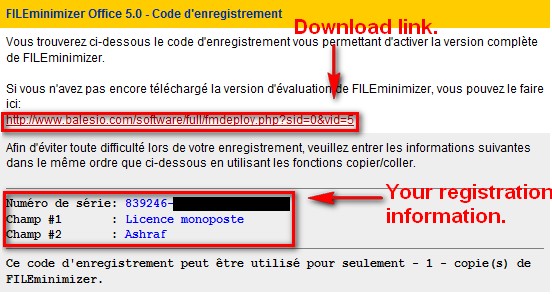
  • After you hit “Obtenir to licence” you will see a page which has your registration information and the download link:
2009-10-08_143405

Download FILEminimizer Office and keep the registration information in a safe place. Don’t worry about language of the software – it will be in English.

  • Install FILEminimizer Office.
  • Run FILEminimizer Office.
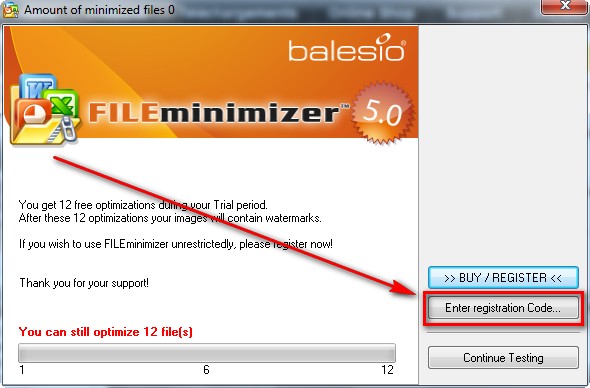
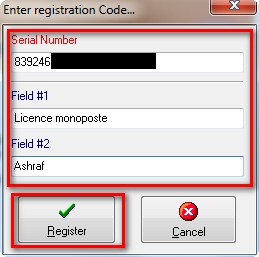
  • You should be prompted to either use the trial, purchase the software, or enter registration information. Enter your registration information:
2009-10-08_143525

2009-10-08_143624

2009-10-08_143653

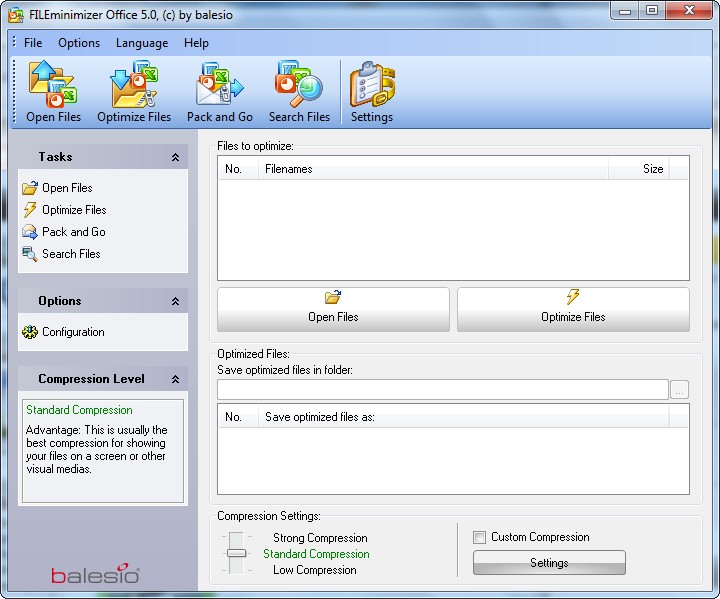
  • Enjoy your new, and free, Balesio FILEminimizer v5.0:
2009-10-08_143722

If you have any trouble getting FILEminimizer, post below… I will try to help.

22 Comments »

  1. Gerry Locke October 8, 2009 at 3:46 PM (comment permalink) -

    Hey Ashraf, you really are THE man!

    1
  2. Ashraf October 8, 2009 at 3:55 PM (comment permalink) -
    Mr. Boss

    @Gerry Locke: I will take that as a “I really like this software”. :)

    2
  3. Ozzie October 8, 2009 at 7:33 PM (comment permalink) -

    Greetings all! Thanks for this Ashraf. It looks like a useful program. But I have a question. I often have to send large-sized PPT files via email, which can be problematic. I can see from the video that the process of minimising files is very straightforward. However, can I then send those files to someone and have them open and view them without any problems? I’d be grateful for your advice.

    3
  4. Mr.J October 8, 2009 at 7:59 PM (comment permalink) -

    @Ozzie: I think this program is only doing the stuffs that we can manually do by ourselves (actually tedious stuffs). So there should be no problem for the designated person to open the files after optimization provided that said person has the appropriate software that is capable of accessing said file :D.

    4
  5. Ozzie October 8, 2009 at 8:04 PM (comment permalink) -

    @ Mr.J: Thanks for the reply. So in other words you’re saying that the receiver will also have to have the program installed? Hmmm, might not be what I need then.

    5
  6. Mr.J October 8, 2009 at 8:16 PM (comment permalink) -

    @Ozzie: Sorry for the confusion, but when I said “the appropriate software that is capable of accessing said file”, I was mentioning the program that is used to open your document in a normal condition. In your case, it would be a PowerPoint viewer, this viewer does not need anything extra to be able to access the file :). If an Office Suite is used, there is no need for any add-on stuffs, you’re ready to go.
    I have just tried it with an outdated presentation I created since Office 2003, it said 80% of hard drive usage was saved, and the file after optimization worked flawlessly so far.

    6
  7. Bill Gates II October 8, 2009 at 8:20 PM (comment permalink) -

    @Ozzie
    I think you miss understude Mr. J. What he ment is that the program does things that we can do our selves to make office files smaller, and that the out put is still a valid file. One thing it may do is image compression. When you insert a picture into a Word document, for instance, the no mater what size you have the picture as the picture will take up the same amount of space the original on your hard drive would. So if you add a 500 MB picture, no matter how small you make it in Word it will add 500 MBs to your document. But there is a setting in Word that compresses the images to just what is being used. I suspect that all this program does is do stuff like that for you.

    7
  8. Ozzie October 8, 2009 at 8:56 PM (comment permalink) -

    @ Mr.J: Thanks muchly for the clarification!
    @ Bill Gates II: Thanks a lot for the tip! I think I need to become much better friends with Office!

    8
  9. Dr Nitin October 8, 2009 at 11:11 PM (comment permalink) -

    Dear Ashraf,
    Do I need to uninstall the previous version ?
    Thanks
    Dr Nitin

    9
  10. Adrian October 9, 2009 at 2:09 AM (comment permalink) -

    I’m surprised that nobody pointed out this problem yet.

    “You should be promoted to either use the trial…”

    Shouldn’t that be…

    “You should be prompted to either use the trial…”?

    10
  11. Shankar October 9, 2009 at 5:18 AM (comment permalink) -

    Since it compresses Image files, can it used to compress & decompress ISO files too?

    11
  12. Adrian October 9, 2009 at 6:41 AM (comment permalink) -

    @@Shankar: Image files refer to JPG, BMP, PNG, etc. picture files and not CD Image files, so it cannot compress ISO files.

    12
  13. Albert Born October 9, 2009 at 7:28 AM (comment permalink) -

    Thanks for the tip! This minimizer will really come in handy for me. Balesio also has the more useful software which is the image minimizer. I wonder if and when they’ll also give it for gratis…

    13
  14. Bill Gates II October 9, 2009 at 9:46 AM (comment permalink) -

    @Shankar: It does not compress the images, Word does. It just tells word what to do.

    14
  15. rk October 9, 2009 at 2:29 PM (comment permalink) -

    I am getting trouble getting the registration download form FILEminimizer,
    need your help
    thanx

    15
  16. Ashraf October 9, 2009 at 2:42 PM (comment permalink) -
    Mr. Boss

    @rk: I think the promo is over now.

    16
  17. rk October 10, 2009 at 12:16 AM (comment permalink) -

    @Ashraf:
    Ashraf
    What a pity!.But all in all thx for all the great things you post.
    And thanx again 4 the prompt reply.

    rgds

    17
  18. Doru October 13, 2009 at 12:11 PM (comment permalink) -

    Another solution that work in simple situation,i didn’t try at complex(link,images,video),maybe in future i will try,is:1. save in pdf(with Adobe Acrobat,oppen Office,tomahawk,etc.;
    -2.convert pdf to swf with this free(open source).In swf you can browse like for a document.
    http://www.swftools.org/
    Players for SWF:Total Video Player(from Effect Matrix),SWF&FLV Player,KM Player,Gom Player,ARFlashPlayer(version portable,only 231 K,no need install),etc.

    18
  19. Doru October 13, 2009 at 1:41 PM (comment permalink) -

    Also if you want to use what is into Swf container,you must to decompile this swf with:Bytescout SWf to Image Gui(free),Swf Decompiler Premium Free,Decompile Flash Free,Swfextractor,Flare etc.

    19
  20. Douglas Huddle, Jr. October 14, 2009 at 10:38 AM (comment permalink) -

    I only find dowloads for trialware on the site now. I don’t load trialware because my experience has been that it never removes all of its files and tracks.

    The program does sound useful though.

    20
  21. József October 27, 2009 at 7:46 AM (comment permalink) -

    I,m a little disappointed find this page late, when this promo finished.

    21
  22. christian January 9, 2010 at 12:03 AM (comment permalink) -

    too bad the promo has ended.. ouch

    22

Leave A Response »