
 Email article
As mentioned in my recent article on Paragon Backup & Restore Free, I have written about many free image backup software – 10 to be exact. Out of all my articles, three were my top picks: Paragon Backup & Restore Free, Macrium Reflect Free, and EASEUS Todo Backup. I decided it is now time to do a clear and comprehensive comparison of all three to see which one is “best”. Although I am not a big fan of it, I decided to include DriveImage XML in this comparison also because many people have requested me to review it (even though I already did include it in my other article) and I am afraid they may stab me in my sleep if I don’t write about it now. Furthermore, even though Acronis True Image Home is a commercial image backup software while the other four are free image backup software, I have been asked to include Acronis in this comparison and considering how popular it is, I am more than obliged. However keep in mind because Acronis is a commercial program, it will have many goodies that free image backup software don’t have so it really wouldn’t be a fair fight in terms of features.
When comparing image backup software, the two things to compare are features and performance (user friendliness is also important, but most image backup software are point and click anyway). So lets get to it.
Features
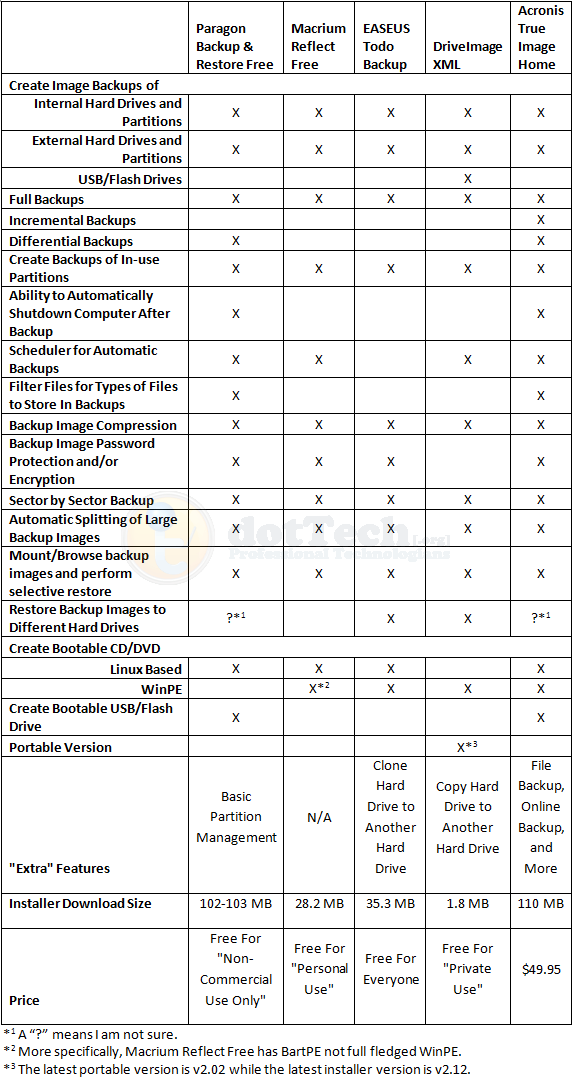
As you can see, for the most part the main features are present in all five software. Here are the feature differences I would like to highlight:
- Interestingly enough, DriveImage XML is the only one that is able to create a backup image of a USB/flash drive. Even Acronis did not detect my USB/flash drive and give me the option to create an image backup of it (unless of course, I missed it but I highly doubt that).
- Amongst the free image backup software, Paragon is the only one that can do differential backups; all others can only do full backups.
- Amongst the free image backup software, Paragon is the only one that can create a bootable USB/flash drive.
- EASEUS Todo Backup is the only one that is free for everyone – commercial and non-commercial use.
- DriveImage XML is the only one with a portable version (as far as I know).
- DriveImage XML is a less than 2 MB download while the other software are much, much larger.
Performance
All image backup software were tested under the similar conditions on the same computer: a laptop running Windows 7 Professional 32-bit with 3GB of RAM, a Radeon HD 2600 512MB graphics card, and an Intel T8300 2.4GHz Core 2 Duo processor.
Each image backup software was made to do a full image backup of a 10.4 GB (4.77 GB filled) partition. Each program was set to the highest compression setting available for the program. This is how they all performed:
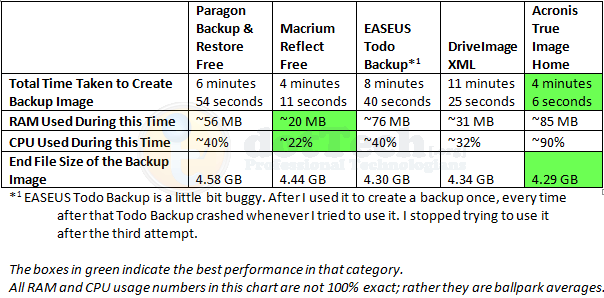
Not surprisingly, Acronis has the best figures in speed and compression. However it is worth noting Acronis is also the more heavy on computer resources. Both EASEUS And DriveImage performed well in terms of compression but both are really slow. Macrium was the least resource intensive, and yet it was the second fastest; however compression can be improved for Macrium seeing as it is beat out by EASEUS, DriveImage, and Acronis in that category.
One weird thing worth mentioning is after I ran EASEUS the first time, from which I got the above results, I went back to test EASEUS again to make sure my results were accurate and consistent. However EASEUS kept locking up my computer about 15 seconds into the image backup and I would have to hard reset. This happened three times. Not sure what is up.
Conclusion
Personally speaking, if I had the money to purchase Acronis True Image, I would because the two things I like most for image backup software are speed and compression. However, for those that don’t want to purchase Acronis don’t fret; as you can see by my results posted about, Paragon Backup & Recovery Free, Macrium Reflect Free, EASEUS Todo Backup, and DriveImage XML are all great, and well performing, free image backup software. It is hard to go wrong with either of them (except maybe EASEUS Todo Backup; users may want to wait until the developer updates it a little bit more and fixes the bugs). Which one you will use depends on your needs. If you want a free image backup software that is small in size and has the best compression, go with DriveImage XML (however before you go with DriveImage XML, be sure to Google and learn how to create the bootable CD/DVD – see the How-To-Geek forum link which is the fourth one down – because creating a bootable disk is quite difficult with DriveImage XML). If you want a fast and light on computer resources software, go with Macrium Reflect Free. If you are on a netbook and don’t have a CD/DVD drive, grab Paragon Backup & Recovery Free so you can make use of the bootable USB/flash drive. Personally, my favorite is still Macrium Reflect Free because it is fast but still light on computer resources.
Whichever one you decide to go with, you can grab them from the following links:
Paragon Backup & Restore Free
Version reviewed: v10 Build 8927 (30.09.09 ) Free Edition
Supported OS: Windows 2000, XP, Vista, Win7
License limitation: Non-commercial use only
dotTech full review on Paragon Backup & Restore Free
Paragon Backup & Restore Free Edition homepage
[Direct download – 32-bit version]
[Direct download – 64-bit version]
Macrium Reflect Free
Version reviewed: v4.2 build 2082
Supported OS: Windows XP, Vista, Windows 7
License limitation: For personal use
dotTech article on Macrium Reflect Free
EASEUS Todo Backup
Version reviewed: v1.0
Supported OS: Windows 2000/2003/XP/Vista/2008
License limitation: No limitation – free for everyone
dotTech article on EASEUS Todo Backup
DriveImage XML
Version reviewed: v2.12
Supported OS: Windows XP, 2003, Vista, or Windows 7
License limitation: For private use
Acronis True Image Home
Version reviewed: 2010 build 5,055
Supported OS: Windows XP, Vista, Win7
Price: $49.99




