
Paragon Backup & Restore Free vs Macrium Reflect Free vs EASEUS Todo Backup vs DriveImage XML vs Acronis True Image Home: Which one should you use?
November 3, 2009 106
Email article | Print article
As mentioned in my recent article on Paragon Backup & Restore Free, I have written about many free image backup software – 10 to be exact. Out of all my articles, three were my top picks: Paragon Backup & Restore Free, Macrium Reflect Free, and EASEUS Todo Backup. I decided it is now time to do a clear and comprehensive comparison of all three to see which one is “best”. Although I am not a big fan of it, I decided to include DriveImage XML in this comparison also because many people have requested me to review it (even though I already did include it in my other article) and I am afraid they may stab me in my sleep if I don’t write about it now. Furthermore, even though Acronis True Image Home is a commercial image backup software while the other four are free image backup software, I have been asked to include Acronis in this comparison and considering how popular it is, I am more than obliged. However keep in mind because Acronis is a commercial program, it will have many goodies that free image backup software don’t have so it really wouldn’t be a fair fight in terms of features.
When comparing image backup software, the two things to compare are features and performance (user friendliness is also important, but most image backup software are point and click anyway). So lets get to it.
Features
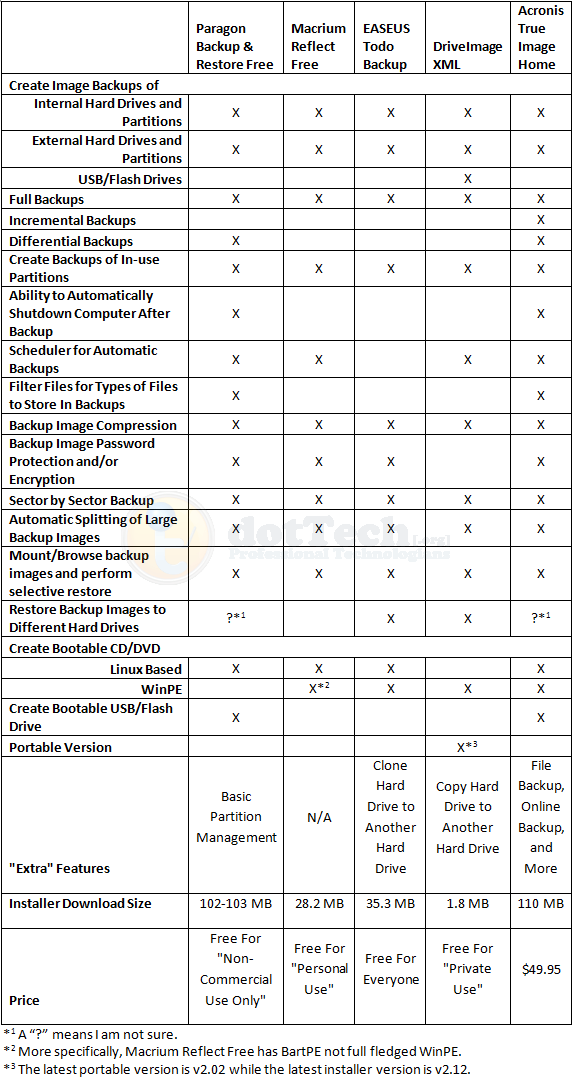
As you can see, for the most part the main features are present in all five software. Here are the feature differences I would like to highlight:
- Interestingly enough, DriveImage XML is the only one that is able to create a backup image of a USB/flash drive. Even Acronis did not detect my USB/flash drive and give me the option to create an image backup of it (unless of course, I missed it but I highly doubt that).
- Amongst the free image backup software, Paragon is the only one that can do differential backups; all others can only do full backups.
- Amongst the free image backup software, Paragon is the only one that can create a bootable USB/flash drive.
- EASEUS Todo Backup is the only one that is free for everyone – commercial and non-commercial use.
- DriveImage XML is the only one with a portable version (as far as I know).
- DriveImage XML is a less than 2 MB download while the other software are much, much larger.
Performance
All image backup software were tested under the similar conditions on the same computer: a laptop running Windows 7 Professional 32-bit with 3GB of RAM, a Radeon HD 2600 512MB graphics card, and an Intel T8300 2.4GHz Core 2 Duo processor.
Each image backup software was made to do a full image backup of a 10.4 GB (4.77 GB filled) partition. Each program was set to the highest compression setting available for the program. This is how they all performed:
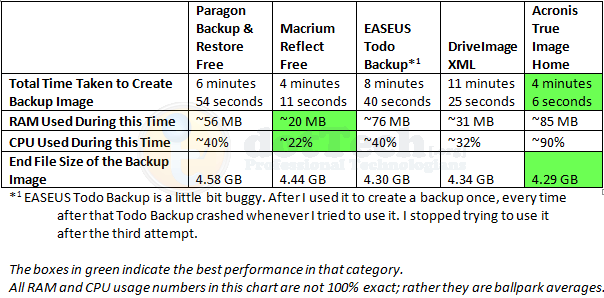
Not surprisingly, Acronis has the best figures in speed and compression. However it is worth noting Acronis is also the more heavy on computer resources. Both EASEUS And DriveImage performed well in terms of compression but both are really slow. Macrium was the least resource intensive, and yet it was the second fastest; however compression can be improved for Macrium seeing as it is beat out by EASEUS, DriveImage, and Acronis in that category.
One weird thing worth mentioning is after I ran EASEUS the first time, from which I got the above results, I went back to test EASEUS again to make sure my results were accurate and consistent. However EASEUS kept locking up my computer about 15 seconds into the image backup and I would have to hard reset. This happened three times. Not sure what is up.
Conclusion
Personally speaking, if I had the money to purchase Acronis True Image, I would because the two things I like most for image backup software are speed and compression. However, for those that don’t want to purchase Acronis don’t fret; as you can see by my results posted about, Paragon Backup & Recovery Free, Macrium Reflect Free, EASEUS Todo Backup, and DriveImage XML are all great, and well performing, free image backup software. It is hard to go wrong with either of them (except maybe EASEUS Todo Backup; users may want to wait until the developer updates it a little bit more and fixes the bugs). Which one you will use depends on your needs. If you want a free image backup software that is small in size and has the best compression, go with DriveImage XML (however before you go with DriveImage XML, be sure to Google and learn how to create the bootable CD/DVD – see the How-To-Geek forum link which is the fourth one down – because creating a bootable disk is quite difficult with DriveImage XML). If you want a fast and light on computer resources software, go with Macrium Reflect Free. If you are on a netbook and don’t have a CD/DVD drive, grab Paragon Backup & Recovery Free so you can make use of the bootable USB/flash drive. Personally, my favorite is still Macrium Reflect Free because it is fast but still light on computer resources.
Whichever one you decide to go with, you can grab them from the following links:
Paragon Backup & Restore Free
Version reviewed: v10 Build 8927 (30.09.09 ) Free Edition
Supported OS: Windows 2000, XP, Vista, Win7
License limitation: Non-commercial use only
dotTech full review on Paragon Backup & Restore Free
Paragon Backup & Restore Free Edition homepage
[Direct download - 32-bit version]
[Direct download - 64-bit version]
Macrium Reflect Free
Version reviewed: v4.2 build 2082
Supported OS: Windows XP, Vista, Windows 7
License limitation: For personal use
dotTech article on Macrium Reflect Free
EASEUS Todo Backup
Version reviewed: v1.0
Supported OS: Windows 2000/2003/XP/Vista/2008
License limitation: No limitation – free for everyone
dotTech article on EASEUS Todo Backup
DriveImage XML
Version reviewed: v2.12
Supported OS: Windows XP, 2003, Vista, or Windows 7
License limitation: For private use
Acronis True Image Home
Version reviewed: 2010 build 5,055
Supported OS: Windows XP, Vista, Win7
Price: $49.99
106 Comments »
Leave A Response »


Thanks, Ashraf!
I bought a copy of ATIH 11.0 maybe 2 years ago during a silly promotion, maybe US$10. I’ve been pretty happy with it, though some of my restores have been super-slo-mo, maybe because it uses my (IBM TP40′s) USB2.0 port as a USB1.0?
A few months ago, I set up my sister’s two laptop computers for quick-and-easy “user-friendly” backup routines to her external HDD.
Mostly on your say-so, I set her up with Macrium Reflect Free. (They probably wouldn’t mind the cost, but I was also in a rush.)
My main disappointment was that the Linux-based boot CDs wouldn’t work on either of her (different) laptops.
Eventually, I got them both set up with the BartPE boot CDs. It wasn’t very simple, and I was up WAY too late making it work. But now, all they have to do to make a new backup is to hook up the Ext. HDD and click on an icon, and off it goes! (I figure that I’ll be visiting again long before the 500GB HDD starts filling up!)
FWIW, I don’t think Acronis would let me set up a single click-and-go icon the way Macrium did!
Hi Ashraf,
Nice review! Are you sure Macrium Reflect Free won’t restore to a different HDD? I can’t see anything on their site which states this limitation and the full version certainly says that it does!
hi,thanks for your article,
i have the same problem in todo,it failed to backup my partition after the first successful backup.
also the size of archive you wrote is a little wired, in my system size of acronis archive is almost half of the used space in drive C with XPsp3.
also paragon obviously does more compression than you mentioned above
To answer my own question :) I actually e-mailed Macrium and got the following reply:
————–
Hi
Thanks for contacting us.
You can restore an image to any disk as long as it is the same size or larger than the original.
Kind Regards
Nick Sills – Macrium Support
support (_at_) macrium.com
————–
Good article.I went ahead and downloaded Paragon I’m going to give a try-out this afternoon.As it may come in handy I been thinking of doing a reformat on this drive to clean things up. so If i can save a ton of stuff that I use all the time all will be grand.
To update downloaded it it gave me all my numbers in the email they sent me but I can’t install it. as it keeps saying invalid ser.# sent support an email no reply so i’m going to try “macrium”
Dear Ashraf,
Norton Ghost 15 has arrived!
30-day trial download (119 MB): http://spftrl.digitalriver.com/pub/symantec/2004/NGH150_AllWin_EnglishTryBuy30.exe
Best,
B
Hello guys, I just want to share my experience with Paragon Backup and Restore. The backup of my laptop took 80 minutes (vs 1 hour with ghost 14). The restore, however, took forever. It said “0 minutes left”, but it’s been 7 hours already and it is still not finished. I was very happy with Paragon Backup and Restore at first because its restore CD was one of the very few (along with Ghost 14) that were able to detect the SATA controller in my laptop (even Acronis failed there). However, given the ridiculously slow (and somewhat simple) restore process, I would not recommend it.
Thanks for a great comparison!
I’m using Paragon’s backup software and so far having no problems with it. I’ve downloaded it because it has the most attractive features set among other freebies.
Thanks Ashraf, an excellent article and a great introduction to dottech. I shall be exploring further. I wanted to comment because, following your article, I’ve installed and started using Macrium Reflect. One feature your table suggests is missing is restoring to a different hard disk. I’ve not done it but the option appears to be there in the GUI as you work through the restore wizard, so far I’ve stopped short of doing one.
So as Sam says above I think it’s there.
Cheers,
Mark
Excellent job Ashraf. An article that will be helpful to many people. Trouble with your site is that it’s way too attractive and interesting and I’ve been known to still be meandering through it at 2 am. It’s got a particularly good and friendly relaxed atmosphere which draws some of us back again and again.
BTW you’re not the only one who sits and stares at the computer screen. I usually become quite comatosed after a while :) It’s kind of mesmerising.
Currently I’m testing paragon and macrium free. Paragon does seem a bit slower, even more so on the restoring an image side than creating.
Macrium site does have a tutorial for creating incementals and scheduling them to auto run.
Macrium also includes the bartpe and how to create it, seems paragon does not, unless you purchase paid version. Same with winpe both say you can get it with paid versions.
BartPE is a nice addition for macrium, I don’t know if it works with vista or win7, maybe a 64 bit thing. But it does work on xp 32 bit great.
My ultimate goal is to test these out on my xp computers. When I find the one I like best trying it on my win7 computer. I just don’t want to mess it up. Hence the backup software, but it’s so new I’m afraid to put new software on it. Should be a fun project overall! Thanks for the reviews.
Did I miss it or did this review not include the single most important factor about backup software – how well it restores the backup image?
I’ve had experience with all of the free programs listed, and ONLY Paragon worked for me – over and over and flawlessly.
In fact, Paragon was the first I used (aside from Driveimage which is pretty much worthless), and so I expected Macrium and Easeus to perform pretty much the same way… boy was I surprised
Easeus took nine hours to back up 200 gigabytes, and took a lot more space to do it. I never tried to restore the resulting image since I’m not going to be doing nine-hour backups. It may work fine, or it may do what Macrium did…
Macrium took about an hour and a half to do an image backup, about the same as Paragon. But when I tried to restore the partition from the boot CD, it was so slow that I calculated it would take four days!
I’m not exaggerating. Now you may think what I thought – that the restore would pick up speed at some point – and it might. But I let it run for nine hours and it showed 9% restored, so I wasn’t willing to wait longer to find out. I popped in the Paragon rescue CD, restored that in an hour and a half, and I was back as if nothing had happened.
I subsequently contacted Macrium and was told that there must be a quirk in my system, (a controller or something that I feel I shouldn’t have to be concerned with) that caused the Linux CD to perform poorly, and I was referred to their paid version which the gentleman claimed had better version of Linux for the restore CD.
He may be right. It may work flawlessly. But I wasn’t willing to pay to find out considering that the free version wasn’t exactly great advertisement, and considering that Paragon had already proven itself over and over.
However… All that I’ve related above pertained to a Vista HP operating system. I haven’t had to use any restore since I’ve upgraded, and I hope I never will. But ironically, I’m not resting easy until I have trouble and I find that Paragon does the same job it did on Vista.
And the reason I was interested in looking beyond Paragon since it worked so well? It’s because Parqagon has a slow and clunky way of accessing backed up files if you only want to copy one you accidentally deleted… all the others were much better at that.
Ah we still use the old and mighty drive snapshot.
Easy gui and you can find many bat scripts for it.
The gui looks dull, but don’t let the looks fool you.
This program rocks http://www.drivesnapshot.de/en/
It has never failed me ;-)
FWIW, the images for *both* Easus and Macrium failed on my Win 7 system. The Easus thing was a *b8g-time* problem because I hadn’t tested it first and needed it later…surprise! By the time I tested Macrium, I’d learned, fortunately.
Don’t know why both Macrium & Easus failed but Paragon and Acronis (and Ghost) have worked flawlessly.
I still keep periodic backups but now I mainly use Comodo Time Machine & Shadow Defender (when testing something new). Haven’t had to restore an Acronis image in months.
I for one used Macrium to backup my old Vista install before installing 7. In fact, now I’m going through my C: drive and deleting everything from the root folder I don’t need. Did you know the Windows Phone 7 Series developer kit (I got it for the emulator!) spews things all over it?
Well this is funny because I tested these same programs after reading this crock and my were my results different with the default options. Macrium was the second fastest but the compression was totally different than yours. Macrium was way better than all else in compression and it can also restore to different hard drives. But you do have a good review here so great job. Acronis is the most unstable program I have ever used in my life, it is so buggy it is almost useless and you pointed this out. You said that Easeus is very buggy, well it is pretty much Acronis slimmed down in a different GUI. Just look at the options and you will see they are the same. Easeus is exactly the same as Seagate Disk Wizard which is an acronis product. Just thought you might be interested to know that. Great review
also if you want another comprehensive review on Disk Imaging check out techsupportalert.com. they have some very good reviews of free software and are also a very reputable site.
I’m not sure what you mean by “Restore backup images to different hard drives”. If you mean different than the original backed-up drive, isn’t the whole idea to restore to a different drive if your original one dies? Or does that mean something else?
Thanks
Well yes some people only want disk imaging for that reason so that if there hard drove dies they can restore an image to a different new drive. The software companies call it Hardware Independent Restore Capabilities when they list it with other features of programs. What most people don’t understand is that a lot of these programs do not have this ability which is crucial because each different hard drive only knows about its own internal structure and a lot are structured different. A lot of programs when you restore an image you also restore a detailed list that gives the hard drive information on each sector that was backed up. So if the sector structures are different then you might have problems such as the drive not booting. Most programs now will detect a drive ID and know if the drive is different. I never clone drive to drive when installing a new hard drive, I always make a regular image of only those parts of the disk that are in use. I have restored to new drives in this way with programs that say they do not have the ability to do this. It is different with every software, Acronis recommends to to restore to a new disk with the resize partition option.
Regards
@Dali, Thanks for reply that does clarify the issue. Apparently, both Macrium and Paragon (according to their web site, flagged as “new”) allow for any drive.
General question: regarding bootable recovery CD’s, I see there are two variations on these, Linux or Bart. Apparently, Bart is quite complicated to implement. Most seem to use the Linux platform, and apparently some systems won’t recognize these. How can I know ahead of time if my system is compatible? Or, what kinds of systems do not recognize them?
Sorry, I have to make a correction from my previous reply. Paragon’s website says that any device can by used for *backup*, but says nothing about for restore. So, this is still an open issue for Paragon. Can anyone confirm if Paragon can restore to “other’ disks? This would be a deal breaker for me…
Thanks
@Ron: Well there is a Win PE based and Linux base bootable CD and Bart PE is based on Win PE. Bart is great and it is straight forward to create the CD but unfortunately it is based on an older Win PE version and thus is not very compatible with Vista or 7. Now the Linux CD (being Linux based and not Windows) does not have support for as much hardware, or device drvers as Win PE and so while it will generally run on most every setup, it may not be stable or it may fail in the process of a restore. Some devs like Macrium have added debugging capabilities to the Linux CD to aid users in finding the problem and Macrium has also added a compatibility mode which will fix the problem for some computers. Also most of the Linux CD’s only allow for restoring images.
In general I cannot tell you what specific hardware has trouble with the Linux CD’s because it is always different but most of the problems do show up more in newer hardware. To be honest, and if you do not want to spend money for one of these programs and want something simple and very reliable you should take a look at PING(PartImage Is Not Ghost). It is an offline program ran from a CD or USB and it is very quick, simple, and very reliable. It can create incrementals, and it has about all of the other capabilities of the programs above except it cannot mount and restore individual files.
Maybe also a feature that is missing in the comparison table is the ability to use the Microsoft VSS Snapshot provider. My Acronis True Image Home 10 for example can only backup with its own snapapi snapshot provider. On the contrast Paragon Backup and Restore lets you also select to use Microsoft VSS if available on the installed system. This is interesting for applications that are VSS aware (Oracle, Exchange, SQL Server), so you can do a “hot” backup and databases are still in a consistent state.
Chart states that Macrium Free allows Password or encryption but I have not figured out how to do this. Is this incorrect?
Also, in my tests, EASEUS (v1.1) in lowest compression produced smaller file and was faster than Macruim using it’s default compression & its maximum compression! However, EASEUS with max compression was really slow. In future, might want to compare with both MAX & Defaults.



