
Paragon Backup & Restore Free vs Macrium Reflect Free vs EASEUS Todo Backup vs DriveImage XML vs Acronis True Image Home: Which one should you use?

November 3, 2009 106 Email article | Print article

As mentioned in my recent article on Paragon Backup & Restore Free, I have written about many free image backup software – 10 to be exact. Out of all my articles, three were my top picks: Paragon Backup & Restore Free, Macrium Reflect Free, and EASEUS Todo Backup. I decided it is now time to do a clear and comprehensive comparison of all three to see which one is “best”. Although I am not a big fan of it, I decided to include DriveImage XML in this comparison also because many people have requested me to review it (even though I already did include it in my other article) and I am afraid they may stab me in my sleep if I don’t write about it now. Furthermore, even though Acronis True Image Home is a commercial image backup software while the other four are free image backup software, I have been asked to include Acronis in this comparison and considering how popular it is, I am more than obliged. However keep in mind because Acronis is a commercial program, it will have many goodies that free image backup software don’t have so it really wouldn’t be a fair fight in terms of features.

When comparing image backup software, the two things to compare are features and performance (user friendliness is also important, but most image backup software are point and click anyway). So lets get to it.

Features
Image_Backup_Program_Comparisons2

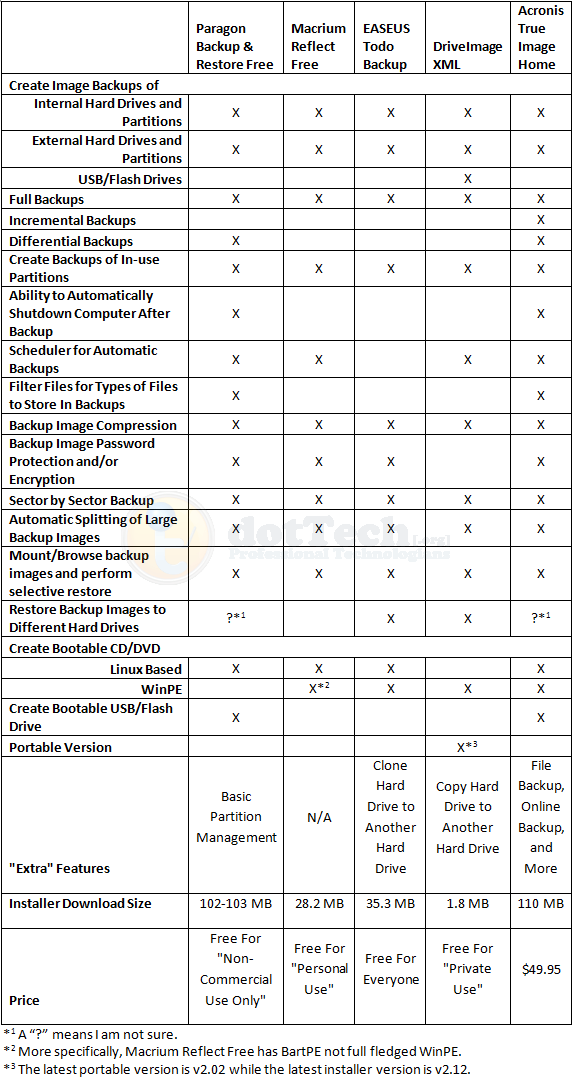
As you can see, for the most part the main features are present in all five software. Here are the feature differences I would like to highlight:

  • Interestingly enough, DriveImage XML is the only one that is able to create a backup image of a USB/flash drive. Even Acronis did not detect my USB/flash drive and give me the option to create an image backup of it (unless of course, I missed it but I highly doubt that).
  • Amongst the free image backup software, Paragon is the only one that can do differential backups; all others can only do full backups.
  • Amongst the free image backup software, Paragon is the only one that can create a bootable USB/flash drive.
  • EASEUS Todo Backup is the only one that is free for everyone – commercial and non-commercial use.
  • DriveImage XML is the only one with a portable version (as far as I know).
  • DriveImage XML is a less than 2 MB download while the other software are much, much larger.

Performance

All image backup software were tested under the similar conditions on the same computer: a laptop running Windows 7 Professional 32-bit with 3GB of RAM, a Radeon HD 2600 512MB graphics card, and an Intel T8300 2.4GHz Core 2 Duo processor.

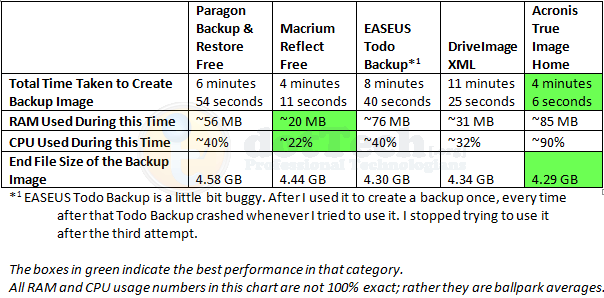
Each image backup software was made to do a full image backup of a 10.4 GB (4.77 GB filled) partition. Each program was set to the highest compression setting available for the program. This is how they all performed:
Image_Backup_Program_Comparisons4

Not surprisingly, Acronis has the best figures in speed and compression. However it is worth noting Acronis is also the more heavy on computer resources. Both EASEUS And DriveImage performed well in terms of compression but both are really slow. Macrium was the least resource intensive, and yet it was the second fastest; however compression can be improved for Macrium seeing as it is beat out by EASEUS, DriveImage, and Acronis in that category.

One weird thing worth mentioning is after I ran EASEUS the first time, from which I got the above results, I went back to test EASEUS again to make sure my results were accurate and consistent. However EASEUS kept locking up my computer about 15 seconds into the image backup and I would have to hard reset. This happened three times. Not sure what is up.

Conclusion

Personally speaking, if I had the money to purchase Acronis True Image, I would because the two things I like most for image backup software are speed and compression. However, for those that don’t want to purchase Acronis don’t fret; as you can see by my results posted about, Paragon Backup & Recovery Free, Macrium Reflect Free, EASEUS Todo Backup, and DriveImage XML are all great, and well performing, free image backup software. It is hard to go wrong with either of them (except maybe EASEUS Todo Backup; users may want to wait until the developer updates it a little bit more and fixes the bugs). Which one you will use depends on your needs. If you want a free  image backup software that is small in size and has the best compression, go with DriveImage XML (however before you go with DriveImage XML, be sure to Google and learn how to create the bootable CD/DVD – see the How-To-Geek forum link which is the fourth one down – because creating a bootable disk is quite difficult with DriveImage XML). If you want a fast and light on computer resources software, go with Macrium Reflect Free. If you are on a netbook and don’t have a CD/DVD drive, grab Paragon Backup & Recovery Free so you can make use of the bootable USB/flash drive. Personally, my favorite is still Macrium Reflect Free because it is fast but still light on computer resources.

Whichever one you decide to go with, you can grab them from the following links:

Paragon Backup & Restore Free

Version reviewed: v10 Build 8927 (30.09.09 ) Free Edition

Supported OS: Windows 2000, XP, Vista, Win7

License limitation: Non-commercial use only

dotTech full review on Paragon Backup & Restore Free

Paragon Backup & Restore Free Edition homepage

[Direct download - 32-bit version]

[Direct download - 64-bit version]

Macrium Reflect Free

Version reviewed: v4.2 build 2082

Supported OS: Windows XP, Vista, Windows 7

License limitation: For personal use

dotTech article on Macrium Reflect Free

Macrium Reflect Free homepage

[Download link]

EASEUS Todo Backup

Version reviewed: v1.0

Supported OS: Windows 2000/2003/XP/Vista/2008

License limitation: No limitation – free for everyone

dotTech article on EASEUS Todo Backup

EASEUS Todo Backup homepage

[Direct download]

DriveImage XML

Version reviewed: v2.12

Supported OS: Windows XP, 2003, Vista, or Windows 7

License limitation: For private use

DriveImage XML homepage

[Direct download]

[Portable version download]

Acronis True Image Home

Version reviewed: 2010 build 5,055

Supported OS: Windows XP, Vista, Win7

Price: $49.99

Acronis True Image Home homepage

[Direct buy link]

106 Comments »

  1. Dali April 10, 2010 at 6:18 PM (comment permalink) -

    @johnd: You are right about easeus compression it was the same in my tests but the time difference between Macrium and Easeus was like ten seconds but then if you add in all the times I tried to get easeus to run and it crashed and then finally getting it to run proper it sucks. But I say it again Easeus Todo is an Acronis program same backup same drivers, same software minus some features, and just as poor buggy and unstable as Acronis too

    51
  2. unicorn02 April 12, 2010 at 8:29 AM (comment permalink) -

    @johnd: Macrium Free creates .xml files for the jobs you define. The Gui only allows to specify a password. But have a look at the created xml files and edit them. It should be possible to enable the encryption there. I have not tested if it actually works, but chances are high as they also deliver a “AES.dll” with the free version… :-)

    52
  3. Marshall May 5, 2010 at 2:24 AM (comment permalink) -

    I have just run across this review.  I have used Acronis Home v8, 9, 11, 12, & 13 (2010) & have had paid licenses for v9, 11, 12, & 13.  The thing that has bugged me over the years is that every single version is very buggy.  Yes, I get the update versions from the Acronis web site & they are still very buggy.  About 1/2 of the backups don’t complete.  And of the backups that do complete, 1/2 of them won’t restore.  Yes, Acronis has many fancy features & does run faster than Paragon.  But Paragon always works to back up & restore.  When I was on Acronis Home v12 & the boot hard disk died, the backup refused to restore to the new hard drive.  It just gave an incomprehensible message, but it seemed to mean that there was something wrong with the brand new hard drive.  Fortunately, knowing that Acronis is unreliable in all it’s versions, I had also made a backup with Paragon before changing the hard drives around.  Paragon restored without a problem & saved the day.  So, for the last 2 years I have been gradually converting all of my backups to Paragon, I have logical data drives through ‘P’ + swap & drives with backups on them through ‘U’.  I am now running Win 7 x64.

    53
  4. Tony May 5, 2010 at 3:20 AM (comment permalink) -

    Useful reviews and also comments.

    I used to use EMC Retrospect for backups, which I found to be excellent, but I can’t justify the licence fees to buy a new copy.

    I am looking for something cheap/free but that will be fast and allow full as well as incremental backups. 

    I am using Karen’s Backup now, but it’s horribly slow for a 500gb drive, and with only 1 partiton an image is not the best way to backup I don’t think.  Karen’s does not do incremental backups either, so my data is at risk with only 1 copy.

    54
  5. MCHAL May 5, 2010 at 3:56 AM (comment permalink) -

    Try this: http://drivesnapshot.de/en/index.htm

    Just around 1 MB in size and beats them all above! – backups the same amount of data mentioned above in less than 4 minutes! Maybe even less! if you have a top performance system. (I am on a Celeron 2.2 GHz).

    55
  6. Peter May 9, 2010 at 12:40 PM (comment permalink) -

    While it is true that Drive Snapshot is very fast,it isn’t particularly inexpensive either and  neither is  Acronis, both are  @ $ 50
    The others are free.

    56
  7. Ken May 15, 2010 at 10:57 AM (comment permalink) -

    Just looking at Macrium Reflect Free on their website… Doesn’t look like many of the features are free which you have listed in your review (i.e. encryption, password etc)

    57
  8. Mike Landis May 21, 2010 at 8:36 PM (comment permalink) -

    I wish you’d query the developers of the packages that include 20-100MB installers.  You could field a lot of functionality in that much space – way beyond image and incremental backup.  What else is in there – spyware, adware, …?  To my way of thinking, given the difference in the size of their installers, Paragon should offer 50 times the functionality that DriveImageXML provides, but it doesn’t look like Paragon provides even three times the functionality of DriveImageXML.  Compression, encryption, and differential/incremental backup add complexity, but DriveImageXML has compression built in and encryption/decryption isn’t that complex (RC6 requires very little code and Rijndael-256 is only about 4 or 5 times as complex as RC6).  There is no way that code to manage incremental backup/restore is responsible for the rest.  Doesn’t anyone know how to write efficient code anymore?

    58
  9. David B June 10, 2010 at 7:46 AM (comment permalink) -

    I have been using Macrium Reflect Free for quite some time.  Unfortunately, I’ve never been able to get it to “rebuild” a drive image once my computer crashed.  It would say the files were corrupt. 

    I’ve since (recently) switched to Paragon in hopes this won’t have the same problems.

    59
  10. Yelpir August 1, 2010 at 1:02 AM (comment permalink) -

    I recently replaced my main hard drive with one of a different make and size. After making a bigger C: partition than I had before, I used Macrium Reflect Free to restore an image of my previous C: partition on my previous hard drive to the new C: partition on the new hard drive. It made a few comments about this being a different drive but successfully completed the restore and it has been running successfully ever since. The review above does not credit Macrium Reflect Free with this ability.

    60
  11. Ron August 15, 2010 at 9:20 AM (comment permalink) -

    Ashraf,
     With Macrium Reflect you can create a bootable rescue USB drive. Within Macrium’s program you can create a ISO file. The extra piece is to use Unetbootin to make your USB dive bootable. The instructions were a pain to find and can be found here. http://www.macrium.com/blog/2008/09/23/HowToCreateABootableLinuxUSBStick.aspx

    61
  12. Johan August 16, 2010 at 11:12 AM (comment permalink) -

    Hi Ashraf,
    I downloaded Easus Todo Backup, but apparently is is a 32 bit program. Does it support a 64 bit system (Win 7)? (I could not find the needed information on their site.)
    Thank you for a great site and excellent reviews.

    62
  13. Neil August 19, 2010 at 10:42 AM (comment permalink) -

    I’ve just given up on Acronis after 3-4 years of using it.  I don’t trust it.  Running a backup, then incremental backup automatically, when I go to browse a previous backup, it’s never clear which of the many files to point to, and even if I point to the one that’s in the log, it often doesn’t load.
    Moreover, it seems to be married to the drive letter, and even the disk number, which is simply based on the order they are loaded when you boot.  So sometimes, it complains it can’t find the backup on “Disk 8″ to continue with the incremental, but actually, that disk is there, but is Disk 7 this time.  And the cancel doesn’t work–it just keeps prompting for the backup on Disk 8.  So you have to kill the process.
    I’ll leave it installed for a while, for some other features, but I just disabled the automatic backups it was doing, and will go with Macrium Reflect (full version) instead.  It’s fast, and in the trial, seemed more reliable.

    63
  14. rezidue August 21, 2010 at 8:48 PM (comment permalink) -

    I tried Paragon Backup and Restore (free) and when I tried the restore it corrupted my netbook (Win 7).

    Stay clear…

    64
  15. normofthenorth August 22, 2010 at 10:10 AM (comment permalink) -

    I don’t think anybody’s mentioned “my fave” biggest problem with Acronis — corruption of files on restore!
    In Comment #26, I mentioned my association with Acronis and Macrium. Since then, I’ve used them both to make regular backups of my home computers. Macrium sometimes failed and froze when starting to back up, but I recently fixed that problem by searching online for solutions. Found it on the Macrium forum, IIRC, and it seems fine now.
    But I trusted Acronis so much that I used it once to “roll back” my main computer (Thinkpad T40) to an earlier state when I’d messed it up with a bad software install, I forget the details now. I’d very recently made a full image, and I restored it all to my HDD, using the ATI boot CD I’d made. I treated it as the simplest and easiest and most reliable way to roll back to the state I’d backed up. (Wrong!)
    Everything seemed to work perfectly and quickly. But soon afterwards, I noticed that my computer was running CHEKDSK (spelling?) every time it started up, unless I interrupted it. It never found or fixed anything, but it wouldn’t stop running on startup.
    I eventually found the source of the problem: I had a bunch of (maybe 300?) corrupt files! Most of them came in pairs on my HDD: There’s be a corrupt file with a normal filename and extension — say Autoexec.bat — and a readable file with the same filename but a weird lengthened extension with a tilde (~) in it — like Autoexec.bat~12349876#$% or some such. (I’m not looking at that HDD right now, just having upgraded to a used Thinkpad X60.)
    Microsoft and others have some online discussions of the “can’t stop CHKDSK from trying to run on startup” problem. Unfortunately, they don’t have any good SOLUTIONS that I could find, other than reformatting and starting from scratch (and losing all your GAOTD freebies!).
    The corrupt file problem is reportedly caused by a minor mis-match between the two versions of the filename in the two FATs, specifically a mis-match in CASE. E.g. one says the filename is Autoexec.bat, and the other says it’s autoexec.bat, or AUtoexec.bat or Autoexec.Bat or some such. Windows XP spots the problem, makes the file unreadable (and un-delete-able), so it triggers CHEKDSK — but CHKDSK can’t fix it!
    MS says the best way to fix it is to make a complete backup of your HDD, but just before making it, go through the file list and delete all the corrupt files from the list of files to be backed up! I’ve got maybe 300, and it’s much easier to find the GOOD copies (with the ~ in their extensions) than to find all the BAD files!
    I’ve tried using several extra-strong file deleters and unlockers to get rid of the bad files, no joy.
    I have discovered that xPUD (and probably lots of other Linux distros) can access the files that Windows XP can’t access, and can delete them. But deleting 300 files manually and renaming another 300 at the same time is more drudgery than I ever want to do for my computer.
    I’ve seen several online reports indicating that this problem is a long-standing bug in many versions of ATI. If so, I think it’s a deal-breaker, even for a free program — and ATI isn’t free.
    I’ve never actually restored a HDD from a Macrium FR image, or any other image-backup software, so I’m still ASSUMING that Macrium (& the others) would do the job right. I’m betting on it, because I’m continuing to make Macrium backups!

    65
  16. Howard Hoyt August 25, 2010 at 5:27 AM (comment permalink) -

    I have used TI and Macrium Reflect for some time.
    Your review is good but skips the deciding factor for me:
    As a heavy Linux user, I’ve switched to Paragon because of their EXT4 support (yes, I use UPS).
    Kudos to Paragon for filling this hole. Many linux ‘solutions’ but I really prefer writing an image that supports individual file exploration plus differential file support.
    My impression that TI/Macrium are slightly more efficient but the ext4 support gave me a total solution.
    Howard

    66
  17. Mr.Dave September 7, 2010 at 5:06 PM (comment permalink) -

    Good review of the freebies, thanks!  This is my experience with the PAID version of one of them.
    Disclaimer: I was unhappy with Macrium Reflect at first, now I highly recommend them, and no, I do not work for them!
    I’ve been using the PAID version of Macrium Reflect for over half a year now.  Started using the GAOTD version but backups won’t restore in Vista without Macrium’s WinPE boot disk, at least on my system (Dell XPS 420, Vista Home Premium sp2 32-bit). So when disaster hit, I had no choice but pay the $40 for full version with WinPE.
    Anyway, it was money WELL SPENT.  I was able to completely recover my system partition (250 GB about 80% full), and since then had to recover another partition, it worked great.  Recovery time is SLOW (over 8 hours for 250 GB) but I don’t know how that compares to other programs.  I use a full backup for each partition about once a month, and DIFFERENTIAL backups in between.  These backup only what’s changed since the full backups.  When the differential backups get too big I run another full backup. and delete the differentials.  I can do this per partition, so it’s very flexible.  Macrium Reflect also allows encryption, and you can “mount” encrypted (or not) backups and copy files from them just like another disk.  Very handy.  Differential backups usually take about 60 to 90 minutes (I would estimate about 50 GB being backed up) while a set of full backups might take 6-8 hours (two 500 GB drives).
    Macrium Reflect lets you create script files to control the backup process.  I modified two of their examples into a single program with one prompt.  I can enter a string like: “cgHLm#” to do differential backups on partitions C:, G:, M: and full backups on H: and L:, then shut down the PC when done (the “#” symbol), or I can enter “@” to open the program interface and check log files, etc..  If anyone wants this vbscript file, let me know in a reply here. It requires setting up the options for each partition for Full and Differential backups but that’s a one-time deal.  It’s very simple now!  I can easily pick & choose which partitions to back up and Full or Differential, so I can monitor disk usage and do what I have time or space to do.  I really like doing backups at the partition level because of the added flexibility.  They don’t all change all the time!
    An added benefit is the great customer support, they’ve always been very helpful and quick to respond (typically next day since they’re in England and I’m in the US).  Again, this is for the PAID version, but it’s been well worth the cost and one of the few programs I’ve bought in the past year.
    Sadly, Macrium Reflect fails on my wife’s Dell laptop because they put a single oddly-sized sector on the drive that Reflect doesn’t understand.  Paragon’s free backup handles that one nicely :-)


    67
  18. Keith September 17, 2010 at 2:10 AM (comment permalink) -

    Just tried Easeus todo backup and it’s one of the slowest I’ve ever tried. Watching my resources I noted an odd time lag and a frequent connection to the internet. The computer isn’t using the resources it could be to make the program run faster, not really a fraction when set to high priority and letting it run without anything else going. Has anyone else noticed this?! Free is great IF it’s not compromising the security of my financial and personal information! I’ve used many sector copy and disk cloning programs over the years and I’ve never seen this. Anyone have an idea what’s going on?! I’d stay away from easeus for now.

    68
  19. Fred September 23, 2010 at 9:29 AM (comment permalink) -

    There are two other features that should be included in the feature comparison.  1.  Does the program verify that it copied the data correctly.  2.  Can the program adapt the restored OS to different hardware?   Acronis can do No 1.  A “plus” version of it can do No. 2.  But it is buggy.   I was finally able to get Acronis to work by restricting myself to sector-by-sector copying, and not trying to resize the target partition.   Feature No 1. is very important to me.   I don’t know if any of the other mentioned programs do it.    I believe No. 2 can be done by some versions of Paragon.

    69
  20. DB Cooper September 28, 2010 at 12:41 PM (comment permalink) -

    You forgot one of the best:
    R-drive. Though its not free (but cheap) its fast, effective, and has probably the best compression of any of the competition.

    70
  21. Kevin September 30, 2010 at 10:02 AM (comment permalink) -

    I’ve used Acronis reliably versions 11 2009, 2010 and I just got my copy of 2011. I tried to use Paragon but you couldn’t back up to network location (i.e. \\192.168.*.*). Macrium I just found out about and I’m a little confused. Everyone is saying it is so good however I am unable to find one key feature; the ability to create an image from a bootable disc or usb drive. I created a rescue disc and that is what it is only good for, recovering an already existing image. I don’t want to have to install Macrium on every computer to create a back up of it and I don’t want it installed on every computer I restore. I simply want to get a machine like I want it, pop in a  bootable disc or usb drive, make an image to a network location and have the image saved for the next machine I need to use it on. Is this function being overlooked or is it just not present?

    71
  22. Max - The IT Pro October 4, 2010 at 1:23 AM (comment permalink) -

    Wow, very kool commenting plug-in!! Is this WordPress??
    Well, I downloaded Reflect but I think I’ll go for Paragon instead since it has the features I need.
    QUESTION: Does any1 know of a program (sync/backup) that can keep a data partition on, say, 3 computers in (ahem) sync?? I have a user down here in Nairobi who has a desktop system at home & the office plus a powerful laptop she uses between both locations. Assuming I have a large data partition (say D:) on all 3 machines and an external USB hard drive, HOW can I keep the data partitions in sync — regardless of if she changes a file on the either system???
    We’re using Windows 7.

    72
  23. robert madsen October 5, 2010 at 5:08 PM (comment permalink) -

    I downloaded Macrium Reflect Free and and ran images. How do I get rid of it and the image backups.

    Please help!

    73
  24. IndoMK November 25, 2010 at 9:20 PM (comment permalink) -

    Hmm… maybe I missed it someplace, but would any of these work for keeping an exact duplicate of a harddrive? I don’t want an image that has to be restored, or compressed archive/backup, but an exact working/bootable copy that can be put into the computer if something happens to the one currently in. It seems all the programs I look at involve making an image and then restoring that image onto a drive, but I don’t want that. I need to just be able to swap and go…

    Thanks for any ideas/help. :)

    74
  25. Samuel November 25, 2010 at 10:24 PM (comment permalink) -

    @IndoMK: EASEUS and DriveImage would both do that for you.

    75

Leave A Response »



