
Paragon Backup & Restore Free vs Macrium Reflect Free vs EASEUS Todo Backup vs DriveImage XML vs Acronis True Image Home: Which one should you use?

November 3, 2009 106 Email article | Print article

As mentioned in my recent article on Paragon Backup & Restore Free, I have written about many free image backup software – 10 to be exact. Out of all my articles, three were my top picks: Paragon Backup & Restore Free, Macrium Reflect Free, and EASEUS Todo Backup. I decided it is now time to do a clear and comprehensive comparison of all three to see which one is “best”. Although I am not a big fan of it, I decided to include DriveImage XML in this comparison also because many people have requested me to review it (even though I already did include it in my other article) and I am afraid they may stab me in my sleep if I don’t write about it now. Furthermore, even though Acronis True Image Home is a commercial image backup software while the other four are free image backup software, I have been asked to include Acronis in this comparison and considering how popular it is, I am more than obliged. However keep in mind because Acronis is a commercial program, it will have many goodies that free image backup software don’t have so it really wouldn’t be a fair fight in terms of features.

When comparing image backup software, the two things to compare are features and performance (user friendliness is also important, but most image backup software are point and click anyway). So lets get to it.

Features
Image_Backup_Program_Comparisons2

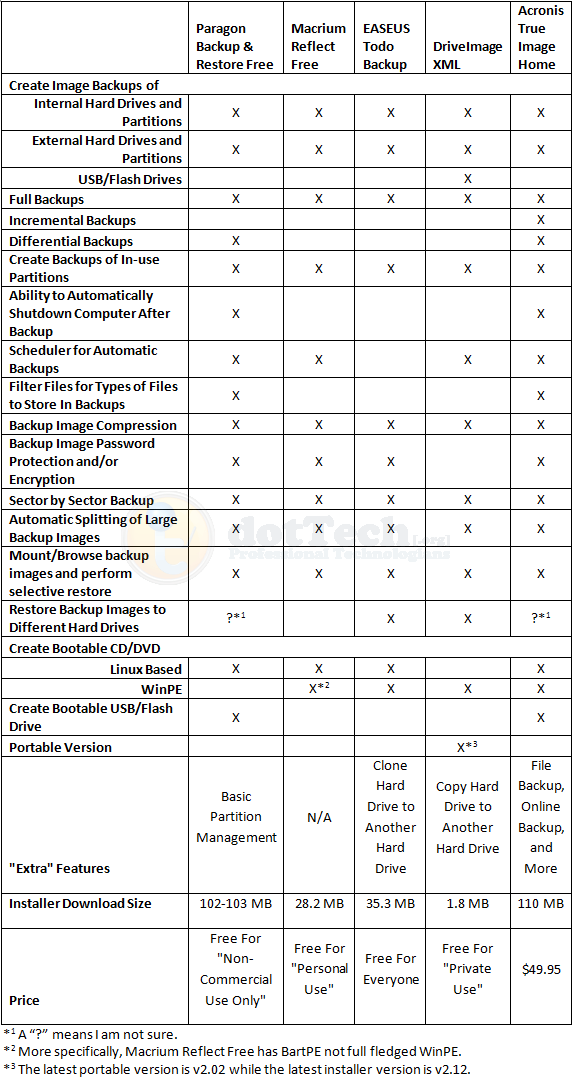
As you can see, for the most part the main features are present in all five software. Here are the feature differences I would like to highlight:

  • Interestingly enough, DriveImage XML is the only one that is able to create a backup image of a USB/flash drive. Even Acronis did not detect my USB/flash drive and give me the option to create an image backup of it (unless of course, I missed it but I highly doubt that).
  • Amongst the free image backup software, Paragon is the only one that can do differential backups; all others can only do full backups.
  • Amongst the free image backup software, Paragon is the only one that can create a bootable USB/flash drive.
  • EASEUS Todo Backup is the only one that is free for everyone – commercial and non-commercial use.
  • DriveImage XML is the only one with a portable version (as far as I know).
  • DriveImage XML is a less than 2 MB download while the other software are much, much larger.

Performance

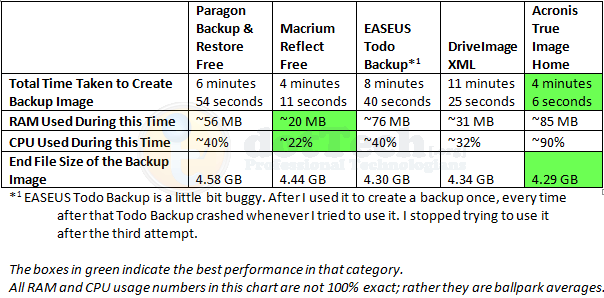
All image backup software were tested under the similar conditions on the same computer: a laptop running Windows 7 Professional 32-bit with 3GB of RAM, a Radeon HD 2600 512MB graphics card, and an Intel T8300 2.4GHz Core 2 Duo processor.

Each image backup software was made to do a full image backup of a 10.4 GB (4.77 GB filled) partition. Each program was set to the highest compression setting available for the program. This is how they all performed:
Image_Backup_Program_Comparisons4

Not surprisingly, Acronis has the best figures in speed and compression. However it is worth noting Acronis is also the more heavy on computer resources. Both EASEUS And DriveImage performed well in terms of compression but both are really slow. Macrium was the least resource intensive, and yet it was the second fastest; however compression can be improved for Macrium seeing as it is beat out by EASEUS, DriveImage, and Acronis in that category.

One weird thing worth mentioning is after I ran EASEUS the first time, from which I got the above results, I went back to test EASEUS again to make sure my results were accurate and consistent. However EASEUS kept locking up my computer about 15 seconds into the image backup and I would have to hard reset. This happened three times. Not sure what is up.

Conclusion

Personally speaking, if I had the money to purchase Acronis True Image, I would because the two things I like most for image backup software are speed and compression. However, for those that don’t want to purchase Acronis don’t fret; as you can see by my results posted about, Paragon Backup & Recovery Free, Macrium Reflect Free, EASEUS Todo Backup, and DriveImage XML are all great, and well performing, free image backup software. It is hard to go wrong with either of them (except maybe EASEUS Todo Backup; users may want to wait until the developer updates it a little bit more and fixes the bugs). Which one you will use depends on your needs. If you want a free  image backup software that is small in size and has the best compression, go with DriveImage XML (however before you go with DriveImage XML, be sure to Google and learn how to create the bootable CD/DVD – see the How-To-Geek forum link which is the fourth one down – because creating a bootable disk is quite difficult with DriveImage XML). If you want a fast and light on computer resources software, go with Macrium Reflect Free. If you are on a netbook and don’t have a CD/DVD drive, grab Paragon Backup & Recovery Free so you can make use of the bootable USB/flash drive. Personally, my favorite is still Macrium Reflect Free because it is fast but still light on computer resources.

Whichever one you decide to go with, you can grab them from the following links:

Paragon Backup & Restore Free

Version reviewed: v10 Build 8927 (30.09.09 ) Free Edition

Supported OS: Windows 2000, XP, Vista, Win7

License limitation: Non-commercial use only

dotTech full review on Paragon Backup & Restore Free

Paragon Backup & Restore Free Edition homepage

[Direct download - 32-bit version]

[Direct download - 64-bit version]

Macrium Reflect Free

Version reviewed: v4.2 build 2082

Supported OS: Windows XP, Vista, Windows 7

License limitation: For personal use

dotTech article on Macrium Reflect Free

Macrium Reflect Free homepage

[Download link]

EASEUS Todo Backup

Version reviewed: v1.0

Supported OS: Windows 2000/2003/XP/Vista/2008

License limitation: No limitation – free for everyone

dotTech article on EASEUS Todo Backup

EASEUS Todo Backup homepage

[Direct download]

DriveImage XML

Version reviewed: v2.12

Supported OS: Windows XP, 2003, Vista, or Windows 7

License limitation: For private use

DriveImage XML homepage

[Direct download]

[Portable version download]

Acronis True Image Home

Version reviewed: 2010 build 5,055

Supported OS: Windows XP, Vista, Win7

Price: $49.99

Acronis True Image Home homepage

[Direct buy link]

106 Comments »

  1. IndoMK November 30, 2010 at 7:09 PM (comment permalink) -

    @Samuel: Ah, ok. Thanks! I’ll look into both of those further.

    76
  2. User December 22, 2010 at 9:24 AM (comment permalink) -

    @Kevin (#71): I feel exactly the same. I don’t trust Volume Shadow Copy to create an image of a working system, I prefer to boot up from an usb and create a clean image. I know Acronis can do that, but Macrium, no matter how good people speak of it, can’t.

    77
  3. wenddle February 11, 2011 at 1:35 AM (comment permalink) -

    I feel really appreciated for the such wonderful article and comments. But if the writer can update the information, it would be perfect. Since all of the softwares are upgraded and serveral of them are added. For example, easeus todo backup is the one of them. Now easeus todo backup 2.0 was released not long before and has more great features. It also has free edition, so anyone who is interested in it can go and download it for trying.
    http://download.cnet.com/EASEUS-Todo-Backup-Home/3000-2242_4-10964460.html?tag=mncol;1

    78
  4. M S February 18, 2011 at 7:17 AM (comment permalink) -

    @Max – The IT Pro:
    Why would one wish to sync entire partitions across 3 different computers? Wouldn’t it make more sense to just sync folders (and files inside them, of course)?

    79
  5. Ade_Passau March 6, 2011 at 4:22 PM (comment permalink) -

    anyone can mention how long time spend to restore one partition for each program above. i used macrium reflect since 2 years ago, is fast to create image but slow to restore that….

    80
  6. FredySmith March 16, 2011 at 5:37 PM (comment permalink) -

    I noticed in the features list that Easus and DriveImage have ‘Restore Backup Images to Different Hard Drive’. Maybe I’m wrong but I would think that is an essential feature. If my hard drive fails I want to be able to restore its image to a new replacement drive.

    As this article is almost a year and a half old I’m wondering if some of the other programs now have this crucial feature?

    As is is such a vitally important part of computing i.e., ability to restore an image of the hard drive, it would be nice if someone with the technical know-how could update this article.

    81
  7. FIBER0PTIC March 22, 2011 at 11:40 AM (comment permalink) -

    @Mike Landis:

    Doesn’t anyone know how to write efficient code anymore? — Agree on this point 100%, if you want good code go find someone out of the Commodore 64 Warez Scene, when dealing with 1200/2400 baud and 664 blocks per disk we were forced to crunch crunch crunch…

    programmers must be getting paid per line – bloatware

    FIBER0PTIC HELL/Napalm & FBR World HQrs

    82
  8. Edwin Yip March 23, 2011 at 8:46 PM (comment permalink) -

    I just switched to Paragon Backup & Recovery 2011, and I have in real life used Acronis True Image Home 2009 and Window 7′s built-in system backup for a while.

    Here is my (personal) review of these three: My blog post.
    ::)

    83
  9. Ritchie April 4, 2011 at 9:25 AM (comment permalink) -

    paragon crashed on 2 computers. Bluescreen when the the laser touches the BU-file or when i click on it. to delete the files without a mouseclick under xp (= bluescreen) i booted Linux – live. The folder of DI-XML, once installed anywhere, can be used like a portable.

    84
  10. FIBER0PTIC May 1, 2011 at 1:32 PM (comment permalink) -

    ‘Doesn’t anyone know how to write efficient code anymore?’ – Still a classic.

    Will you grant me permission 2 use that in my Meta Tags? Only a few Bots & Webmasters that steal my Original Video/Image/Content will notice…

    Back in the day of 300/1200/2400 baud, Handy-Term/Hmodem created for the c64 by Dave Sharpless/Shamus is absolute wicked code, even the Sinus in the intro is sheer quality (YouTube has a clip or Google it).

    Note to Dave: Completed all Jumpman Lives or Jumpman Jr Levels, it’s been 26 years when are you going to update? Vice c64 Emulator works flawless and the full c64 Warez/Demo collection can be leeched via Torrent or from the scene FTP Server free of charge.

    The Atari 2600 collection will kill a few hours. ‘NitroRoms’ has a serious collection for download.

    Amiga Demo Scene in Europe had some good code but in the USA it sucked overall… Americans were lazy once drive space was not a factor(Quality Code=out the Window), blend that with lemming type company owners that pay programmers by the # of lines vs the quality of the code.

    “My program is 12,000 lines long & took over 6 months to create” vs. “My code is 500 lines and was final ready in less than 2 Weeks”. -Astral Warrior/FBR(Jason- Any earthquakes this week?) or Ronski/FBR(I seen your Recollection Article in Issue #2_Not Bad, I know you were censored from all our activities until all our files are closed), maybe it was Tristan/Napalm(Quality code from Canada? Sorry 2 hear you did 2 years Federal, TBB/FBR Did some time also for crimes he did not commit), Secret Service was just nailing Teachers/anyone with a voice, a popular BBS, Boxes, or those that posted in the top message boards(Dump Sysops keep logs=Bad) that said it. Google Bait never hurts pages like this… Above article is good and is in line with other reviews.

    Now I just need to convert this into a “me to” message and start the war dialer up. If your looking for more UNCENSORED retro/history or the 0day action goto the #pre or #warez channel on the server listed above.

    Remember – only 10 types of people in this world, those that know Binary and those that don’t…

    FIBER0PTIC HELL BBS/BUBBS v2.o1o will be started after I finish the USB_MonsterB00T/Multi-Loader, My weekend project(2-3days projected) is going on 4 months… Quality matters when everything on the net is archived with no mulligans (Tks TxTFiles.com, c64 Leets/Groups like Humble Guys, Fairlight, Razar1911 that holds the title to longest active group, TehParadox (some history) Mr. Peabody & The Wayback (Internet Archive) Machine).

    Be Safe -R

    85
  11. Marshall Savage May 4, 2011 at 11:54 AM (comment permalink) -

    Giveaway of the Day – EASEUS Todo Backup Professional – Free Today May 4, 2011

    http://www.giveawayoftheday.com/easeus-todo-backup-professional/
    This must be downloaded & installed before midnight today USA Pacific Daylight time.
    This is version 2.5. This backup is very slow with maximum compression of the archive. The speed is reasonable with “normal compression”. And it does not remember the options that you set.

    I have used all of the programs listed here, generally in several versions, except DriveImage XML. Acronis is by far the fastest, it uses multiple CPU cores. None of these other programs do that. The program that I use most is a non-free version of Paragon Backup. It is rather complicated but powerful. I have various of the free versions of Paragon Backup & they work well, but don’t have quite all of the features of a non-free version. I have 2 complaints about Paragon Backup. 1) For general use this does not have any way to auto-delete old backups. This is not a problem for me. 2) It can have problems doing differential backups from previous complete backups. This is particularly true if you have been moving your partitions around on your hard disks – I have been doing this recently. Fortunately, the restore is more permissive than the backup.

    My current favorite, but it is too expensive, is Macrium Reflect Full. It is powerful but easy to use. Macrium Reflect Free is my current general use free recommendation. And Macrium does update the free program – unlike GFI Backup 2009 Home Edition.

    86
  12. Tobias Schneider May 5, 2011 at 2:37 PM (comment permalink) -

    Well I was Acronis fan for years but as it is already said here lately all new versions are buggy in a way and can drive you crazy. Though TrueImage by Acronis still works if used and evoked by the LiveCd.

    I got Paragon too but I used it only for a P2V conversion.

    ATM I am with Symantec Ghost 15.1 ! and I really hope it is able to recover my PC if sometime it is needed. It is running flawlessly under Windows 7 and I like its features.

    Besides:
    I have for all three LiveCDs and I start them by Grub4Dos :) I have them all on a DVD, a USB Flshdrive, and my boot drive…. You never know.

    I LIKE SYMANTEC GHOST

    87
  13. KHamm May 25, 2011 at 7:02 AM (comment permalink) -

    @Ashraf

    It WOULD be nice to see an update. Also, it would be nice to see what format these programs use for the backup compression. Scenario: My C: drive crashes and burns. My backup program won’t do a restore for some reason. I need the data (if not the programs, which I can reload if I have to). If I can acces the data on the backup drive in an easy to open format (ie: ZIP), then at least I don’t lose the data. If it’s something propriatary, and I can’t get the backup program to run, I am sincerely screwed. Better yet, I want to be able to boot from my backup drive so I can at least run the programs I have while installing a new main drive. Any info on this stuff in an article would be handy…!

    88
  14. Dr. Peter Venkmann July 25, 2011 at 1:17 PM (comment permalink) -

    @normofthenorth: Macrium Free is a bad joke – infact most of the free ones are – except EASEUS , Clonezilla and Active Disc Image. And the public would know that IF YOU REVIEWERS ever did full-cycle tests that include the Restore Phase. But no, it takes too much time and you may find out somethings really rotten that I have over 5 years of USING FULL CYCLE each and every Imager I could buy or get for free. As to speed, in the Save Phase? No big deal if the software takes 1 hour or 2. Try it in reverse (Recovery Phase) to really find out who is fast and dependable! EASUS Saves my jammed 500 gigs in 2 hours and 27 minutes. Slow? A little bit, BUT it Recover it in 1 hour and 52 minutes. Macrium flashes through the Save Phase in 1 hour and 38 minutes, BUT in the Recovery Phase it took over 5 HOURS! Keep in mind that the data can flow no quicker to an external SATA hard drive than the speed limitations of the USB 2.0 ‘speed limit’ when you think about those times! EASUS was swinging between 2500 and 1000 per second. Macrium swung from a mind-boggling 200 to a roaring 800 for a few minutes. The winner? CLONEZILLA! Ugly and Brutally DOS-looking as it is, added to the fact it can’t even save from a desktop – it Saves and Restores from a CD – simply blows the others off the road, tearing through my jammed 500gigs in BOTH Save and Recover between 2300 and as high as 3100 per second (near the speed limit of USB 2.0 performance limit, I think) going both ways in 1 hour and 18 minutes.
    THE LOSER? ACRONIS TRUE IMAGE! Pretty, fast and deadly – like some women I’ve known. It can Save and Restore to your Desktop BUT…after doing an incremental or differential save more than three times on the initial full image CORRUPTS VISTA’S FEEBLE MBR (Master Boot Record), something you will only find out at Restore Time…Black Screen Of Death. This experiment was carried out 4 times with the same result. When it became Acronis’ time to be uninstalled, it went along willingly – on the surface – but I took a walk through my Registry ( as I always do after an uninstall) and FOUND 42 LOCKED, IMMOVABLE, UN-DELETABLE KEYS! The code-monkeys at Acronis are so malicious that not even Registry Assassin could shift them. Better yet, those blocked/locked keys stopped the installation of ANY OTHER IMAGING SOFTWARE I tried to install. I had to have them Forensically removed by a world-famous data recovery company. They said it was some of the most purposely designed, malicious code, they had ever dealt with – including stuff from ‘the bad guys’. So good luck with Acronis, you folks that installed and Save with it. Just hope you never have to Recover with it after several incrementals on the original image. And be prepared to re-format your hard drive at least THREE TIMES before you reload Vista or 7 – as the experts told me it pokes it’s nose through as many as two formats making your ‘fresh system’ run very queerly.

    89
  15. Mr John December 19, 2011 at 11:07 PM (comment permalink) -

    Hi ! I had problems with Acronis backup,got image corruption after a while (version 2011,2012),that took lots of time and work for me :(
    That was confirmed also by normofthenorth in these comments.
    I used many times Norton Ghost for DOS (v11),that was excellent software,images worked after years and years,NO corruption found,but it is not updated for new SATA drivers.Someone recommended DriveSnapshot,I’ll test that too.

    90
  16. TacoMagic January 25, 2012 at 2:27 PM (comment permalink) -

    And be prepared to re-format your hard drive at least THREE TIMES before you reload Vista or 7 – as the experts told me it pokes it’s nose through as many as two formats making your ‘fresh system’ run very queerly.

    That seems rather unlikely and is probably hyperbole from your expert, especially given that you’re talking about registry keys here and not a rootkit written into the HPA.

    While it is foreseeable that a poor format could leave errant registry keys behind that the OS would adopt, it’s about as unlikely a thing as one could imagine. However, I find that it’s a good practice to always do a full 1 pass wipe (zeroes or random, doesn’t really matter which) with error checking before formatting a drive. That more thoroughly removes anything that might be on the drive to muck up your shiny new data.

    I also agree with EaseUS ToDo being a very useful tool. I’ve used it for a while and have been happy with its performance both saving and restoring.

    92
  17. jimbo February 16, 2012 at 10:14 AM (comment permalink) -

    Beware of Macrium. True story. Did a laptop image backup. Actually did a full image restore from it successfully twice. Hard drive went bad, and I sent it in for warranty replacement. Get laptop back and attempt to do the Macrium image restore, but now Macrium doesn’t recognize the image files. The files are on my desktop HD, run Macrium there and still it doesn’t recognize the image files at all. I also do a Macrium image backup of my desktop drive and Macrium sees that image just fine on both the desktop and laptop. So, only conclusion I can draw is Macrium is unreliable. Really caused me huge grief.

    93
  18. cpusrvc March 16, 2012 at 6:39 AM (comment permalink) -

    @Max – The IT Pro: You could use one of the cloud backup / sync programs such as Dropbox (2.5 gig free) or 4shared Desktop (10 gig free + 5 gig free after verifying email address). Additional space can be purchased. These programs load on startup, and automatically keep files in sync to the provider’s web site and then across multiple computers and even makes the files available on smartphones if you load their app (they don’t move the actual file onto the phone for space reasons, just provide a link to download the file to your phone. These programs don’t work by the partition, but by using folders. For example, in Dropbox, you’d have to create the Dropbox folder in the root of the partition, and then move all the other folders and files in the partition into the Dropbox folder. Syncing then takes place within a few seconds to minutes depending on file size. Nice about Dropbox, they keep old versions of deleted / overwritten files on their site so you can restore an older version of a file.

    94
  19. cpusrvc March 16, 2012 at 7:06 AM (comment permalink) -

    I use Macrium Reflect and I like it a lot. I’ve done about 15 restores some full, some files only, all successful. I’ve also used DriveImage XML and it was fine but too slow, and back then it’s file size was twice Reflect’s.

    I always specify to VERIFY the files when both backing up and restoring. Backing up is too important to skip that step.

    I can see having a problem restoring an unbootable computer across a network, and perhaps Reflect’s software doesn’t handle that. Another solution might be using a Bart-PE Windows bootup CD or bootable USB (which I believe Reflect can be co-installed) so that you have access to the network. Even with Reflect not installed, keeping a copy of Reflect on the network with the backups might work also. You might have work at the network computer and restore to the CD/USB booted disk. Just a suggestion.

    95
  20. Merel May 7, 2012 at 11:30 AM (comment permalink) -

    This review has been followed for quite some time ! That’s because the subject of COMPARING the most popular backup software programs is so interesting.

    I think that I’m speaking for everyone by suggesting the need of an UPDATE .
    The versions are different now compared to what they were at the time when this review was made.
    WE WOULD WELCOME A NEW COMPARISON.

    The only programs which I want to write about, are Acronis products.

    - They are not free and you don’t get value for money.
    - Each version is as buggy as previous one or even worse. – There is no Support Service. Already only 30 days.
    - User Interface is problematic.
    - Connection probblems to network drives.
    - Countless installation problems
    - Online storage way too slow

    Ifyou don’t agree … just read user complaints , and the many angry reactions on the forum.

    96
  21. SeptimusFry June 2, 2012 at 1:08 AM (comment permalink) -

    Not being a computer geek, I have only used PowerQuest’s DriveImage (which is presumably different to the other of the same name), Acronis TIH (up to version 2010) and the native W7 backup.

    I have had occasion to build and rebuild my computer and those of family and friends from time to time and found that every one of those above, whatever their quirkiness, has functioned perfectly. Acronis particularly is my favourite. I can only assume that people who have problems are too clever and exercise the software far beyond my simple backup and restore requirements.

    The original review mentioned that Acronis cannot backup USB flash drives – that was an error, as it can and does. I have done this a number of times.

    In Post #89, this was said… “SATA hard drive than the speed limitations of the USB 2.0 ‘speed limit’ “… which I do not understand. Whatever this was meant to say, I am using eSATA on my external (backup devices) drives and they run at approx 90MB/s. The only USB 3.0 drivces which I have been able to try gets nowhere near this speed for some reason, possibly because my external devices consist of two drives working in Raid 0, whereas the USB 3 are single drives and their i/o drops off a cliff as the head moves towards the hub, they manage only about 40MB/s.

    Which is my more useful comment, I hope: that the hardware that your BU&R software is running on, may be more limiting than the software. I backup approx 600G in about 2 hours (even when the BU target is getting full). I have a friend who backs up about 100G overnight on USB 2, taking up to 4 hrs when the BU device is getting full.

    97
  22. Merel June 9, 2012 at 11:38 AM (comment permalink) -

    Interesting review, which was based on situation in 2009.
    The situation might be different now (June 2012)

    It’s time to evaluate the present situation.
    I suggest to update this review.

    98
  23. ghosttrack June 27, 2012 at 8:59 AM (comment permalink) -

    Hi everyone! I just want to confirm that Acronis can restore images on different hard disks. I’ve tried few times and all goes well at first, always.
    Paragon seems interesting to me but I wonder if it has, and the other programs in your review too, a boot restoring procedure, like Acronis, very useful in critical issues.
    Is it possible to compare even the restore speed? I mean, Acronis can restore my OS disk in few minutes, while backup takes almost thirty minutes ( yes my pc is obsolete, I know ), and I think this, like backup speed, is a very interesting parameter, right?
    Tnx, bye.

    99
  24. software free 24 July 19, 2012 at 7:54 AM (comment permalink) -

    Howdy! This is my first visit to your blog! We
    are a team of volunteers and starting a new initiative in a
    community in the same niche. Your blog provided us useful
    information to work on. You have done a wonderful job!

    100

Leave A Response »



