
 Email article
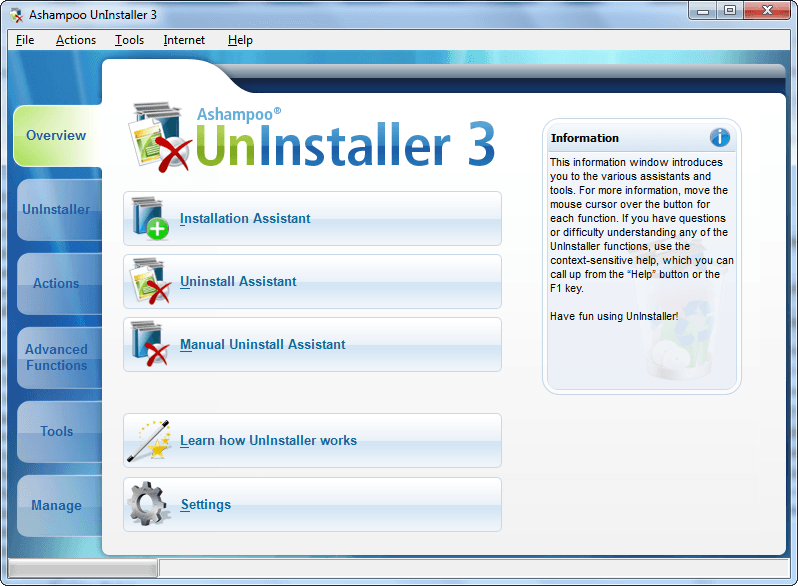 Recently Peter, our friend from Denmark, wrote an article on his favorite uninstallers. In his article he mentioned how he likes to use Ashampoo Magical Uninstall. Well Peter, this article is for you (and anyone else that uses Ashampoo Magical Uninstall or a similar program). Ashampoo Magical Uninstall is actually a 2+ year old program. Ashampoo has replaced Ashampoo Magical Uninstall with their Ashampoo UnInstaller line; in other words Ashampoo UnInstaller is the commercial, continually being updated version of Ashampoo Magical Uninstall and it has more features. Of course, Ashampoo UnInstaller 3 is not the latest version (as is the case with with/all Ashampoo freebies); Ashampoo UnInstaller 4 is actually the latest version. However Ashampoo UnInstaller 3 is still a great software worth taking a look at… even if you don’t use Ashampoo Magical Uninstall. These are all the features of Ashampoo UnInstaller 3:
- Monitor program installation automatically and manually
- Uninstall programs completely, without a trace
- Uninstall programs not monitored by Ashampoo UnInstaller
- Reinstaller – reinstall programs you have uninstalled
- Drag & Drop uninstaller.
- Find/Delete Duplicate Files.
- Find/Delete Temporary Files.
- Find/Delete Empty Folders.
- Start Menu Cleaner.
- Manage Windows Services.
- Manage Internet Explorer Add-Ons.
- File Backup
- Manage Restore Points
- Hard Drive Defragmenter
- Registry Cleaner
- Check Installed Program Entries
- Powerful Internet Cleaner with Firefox support
- Manage Fonts tool
- Full Vista compatibility
As you can tell, Ashampoo UnInstaller does more than just help you cleanly uninstall programs. As part of their 10 year anniversary, Ashampoo is giving Ashampoo UnInstaller 3 away for free! So, if you are still interested, the below directions will tell you how you can get Ashampoo UnInstaller 3 for free. Because getting UnInstaller 3 is a bit more tricky than the usual Ashampoo freebie (it took me a while myself to figure out how to do this), I have split up the directions below into two parts: part 1 is for people who already have accounts with Ashampoo (i.e. the people who have gotten an Ashampoo freebie in the past) and part 2 is for people who do not have an account with Ashampoo (i.e. the people who have never gotten an Ashampoo freebie in the past). Please follow the directions carefully:
Version being given for free: v3.1.2.0
Supported OS: Windows XP or Windows Vista. Full administrative rights are required to use the program. It also seems to work fine on Windows 7.
Part 1 – People with existing Ashampoo accounts
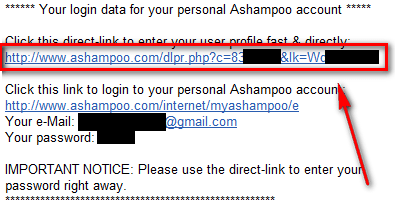
- Go to the inbox of the e-mail you have registered with Ashampoo. Look for an e-mail from Ashampoo you have gotten in the past for an Ashampoo freebie (simply searching for “Ashampoo” in your inbox will probably do the trick). In the e-mail, there should be a link that is says something like http://www.ashampoo.com/dlpr.php?c=#######&lk=XXXXXXXX:
If you cannot find an e-mail from Ashampoo, login to MyAshampoo, go to “My free reg. keys”, select one key (check the check box), and hit “Resend e-mails”. You should then have an e-mail which contains a link that I just mentioned.
If you don’t remember your Ashampoo account password or you are unable to resend yourself an e-mail, skip to part 2 because you will then need to create a new Ashampoo account.
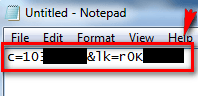
- From the link in the e-mail, copy the whole portion that starts after the question mark. In other words, you copy the c=#######&lk=XXXXXXXX. Open Notepad and paste it in there (do not close Notepad):
- Copy http://www.ashampoo.com/dre.php?lk=[login_key]&c=[id_email]&e=6128 and paste it into Notepad:
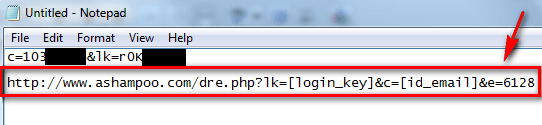
- Copy the c=#######&lk=XXXXXXXX you pasted into Notepad, highlight the lk=[login_key]&c=[id_email] portion of http://www.ashampoo.com/dre.php?lk=[login_key]&c=[id_email]&e=6128, and paste in the c=#######&lk=XXXXXXXX. In other words, you should have something like this:
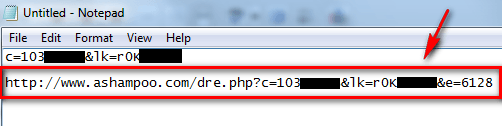
- Copy the whole http://www.ashampoo.com/dre.php?c=#######&lk=XXXXXXXX&e=6128 from your notepad and visit it by pasting it in your web browser. You should automatically be logged into your MyAshampoo account and have your Ashampoo UnInstaller 3 free registration key displayed to you:
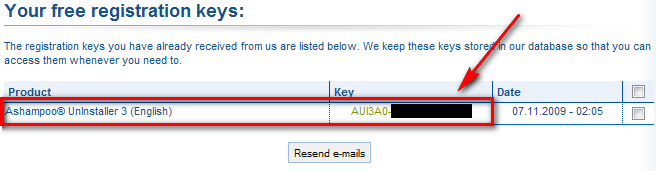
- Copy the key.
- Download Ashampoo UnInstaller 3 (click here).
- Install Ashampoo UnInstaller 3. During installation be sure to uncheck the option to get a trial key because you don’t need it:

- After installation has finished, Ashampoo UnInstaller 3 should automatically run. If it does not, run it manually.
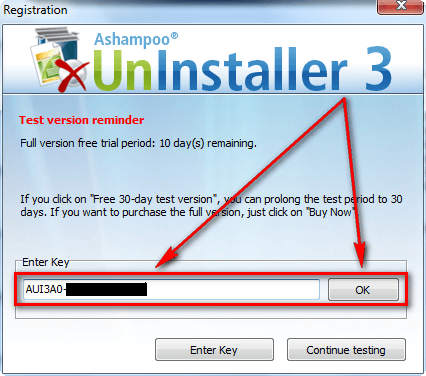
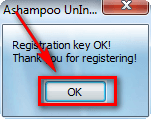
- Go to “Internet” -> “Enter Reg/Trial Key”. Click on the “Enter Key” button, paste in your key, click “OK”, click “OK” again and you are done:

- Enjoy!
Part 2 – Users without existing Ashampoo accounts
- Download Ashampoo UnInstaller 3 (click here).
- Install Ashampoo UnInstaller 3. During installation be sure to leave the option to get a trial key checked (don’t worry… you will get a full version key if you follow my directions – getting the trial key first is just part of the process):
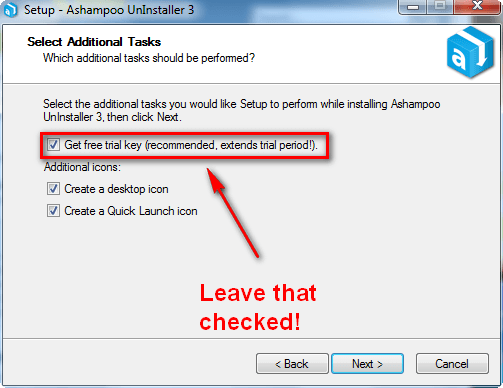
- After installation has finished, the trial key registration page should open in your web browser. Fill out the form:
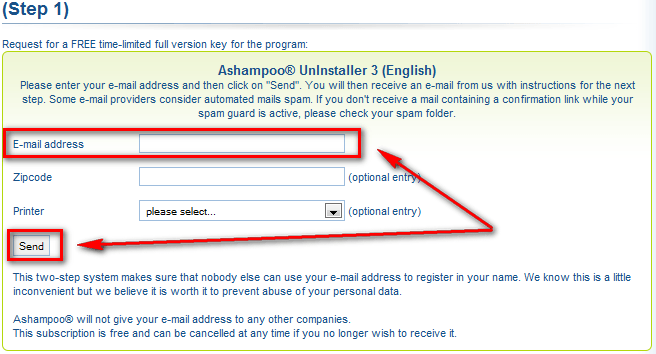
Ashampoo sends newsletters out on a regular basis (some may call it spam). To avoid this, either you can use one of your spam e-mails, a temporary e-mail account, or login to your Ashampoo account (after you signup) and manually unsubscribe from these newsletters (login via MyAshampoo, go to “Subscribe service letters” and uncheck the ones you don’t want). Since Ashampoo runs many promotions, I suggest you use a permanent e-mail address and just unsubscribe from the newsletters. This way you will be able to reuse your e-mail address for every Ashampoo product and you can login to MyAshampoo to grab all the keys you have registered for in the past incase you ever lose them.
- After you have filled out the form, check the inbox of the e-mail you registered with. There should be an e-mail from “Ashampoo <MrReg@ashampoo.com>” with the subject of “Registration (Step 1) … follow the link in this email to go on.” Click on the e-mail; inside the e-mail there will be a link for you to follow to confirm your account with Ashampoo:
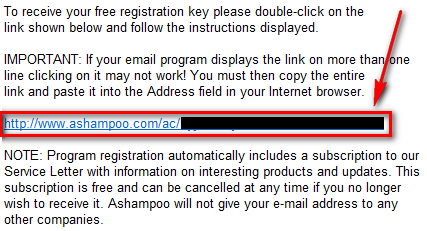
Click on the link or copy/paste it into your web browser.
- You will be asked to fill out a short form:
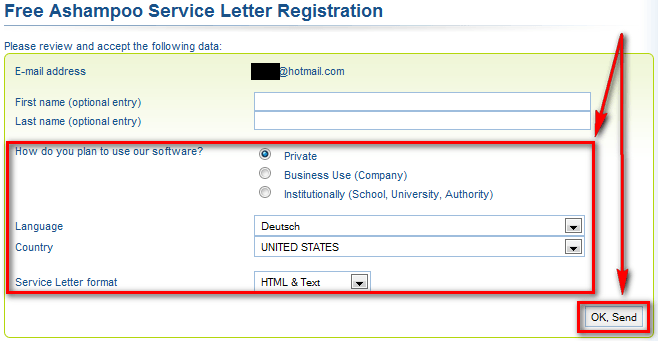
Fill it out and hit “OK, Send”.
- Go back to the inbox of the e-mail you registered with Ashampoo. There should be an e-mail from “Ashampoo <MrReg@ashampoo.com>” with the subject of “Your registration – Ashampoo® UnInstaller 3 (English)”. Open the e-mail. In the e-mail there will be a trial registration code and a URL that looks something like http://www.ashampoo.com/dlpr.php?c=#######&lk=XXXXXXXX:

Ignore the trial registration key – you don’t need it. Rather, from the link in the e-mail, copy the whole portion that starts after the question mark. In other words, you copy the c=#######&lk=XXXXXXXX.
- Open Notepad and paste it in there (do not close Notepad):
- Copy http://www.ashampoo.com/dre.php?lk=[login_key]&c=[id_email]&e=6128 and paste it into Notepad:
- Copy the c=#######&lk=XXXXXXXX you pasted into Notepad, highlight the lk=[login_key]&c=[id_email] portion of http://www.ashampoo.com/dre.php?lk=[login_key]&c=[id_email]&e=6128, and paste in the c=#######&lk=XXXXXXXX. In other words, you should have something like this:
- Copy the whole http://www.ashampoo.com/dre.php?c=#######&lk=XXXXXXXX&e=6128 from your notepad and visit it by pasting it in your web browser. You should automatically be logged into your MyAshampoo account and have your Ashampoo UnInstaller 3 free registration key displayed to you. However take note there will be two Ashampoo UnInstaller 3 keys displayed. One will be for “Ashampoo® UnInstaller 3 (English)” while the other will be for “Ashampoo® UnInstaller 3 (F_ash) (English)”. You want the “Ashampoo® UnInstaller 3 (F_ash) (English)” one not the “Ashampoo® UnInstaller 3 (English)” one:

Copy the key.
- Go back to the Ashampoo UnInstaller 3 program window if it is still open. If it Ashampoo UnInstaller 3 is not running, run it.
- Go to “Internet” -> “Enter Reg/Trial Key”. Click on the “Enter Key” button, paste in your key, click “OK”, click “OK” again and you are done:
- Enjoy!
Last but not least, as part of their anniversary present which includes Ashampoo UnInstaller 3, Ashampoo is also giving away Ashampoo Burning Studio 2009, Ashampoo WinOptimizer 2009 Advanced, Ashampoo PhotoCommander 6, and Ashampoo Slideshow Studio 2010. However, I have already written about how to attain all four of those software for free on dotTech before so if you want them, I suggest you read my other articles on them instead of going through this complex process again: Ashampoo Burning Studio 2010 (v2010 is newer than v2009 Advanced) Ashampoo WinOptimizer 5 (v5 is newer than v2009 Advanced), Ashampoo PhotoCommander 6, and Ashampoo Slideshow Studio 2010.
Thanks Roy and Ozzie!
