Free 1 year license of IObit Advanced SystemCare Pro now available – 24 hours only!

November 25, 2009 58 Email article | Print article

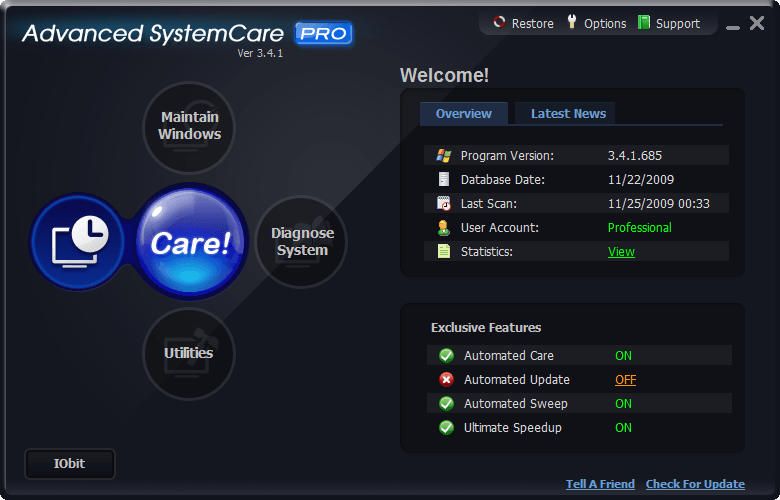
2009-11-25_004250Recall how I posted about IObit running a 24-hour only promo randomly between November 20 – November 27 giving out free 1 year licenses of Advanced SystemCare Pro? Well that promo has just started so get it fast!

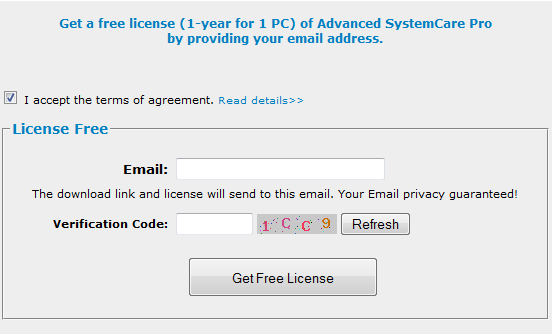
To get the free 1 year licenses of IObit Advanced SystemCare Pro follow these simple directions:

2009-11-25_002557

2009-11-25_002634

  • Check the inbox of the e-mail you entered. Look for an e-mail from “IObit Support <krissy.only@iobit.com>” with subject of “Advanced SystemCare PRO License Code”. In the e-mail you will find a download link, your account name, and license code:

2009-11-25_003003

Keep this e-mail open because you will need to copy + paste the account name and license code soon.
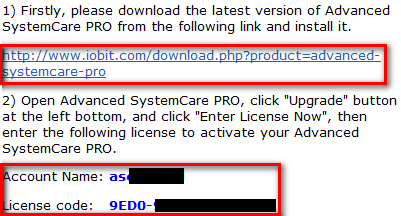
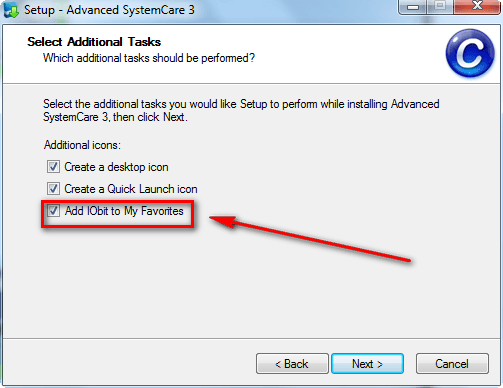
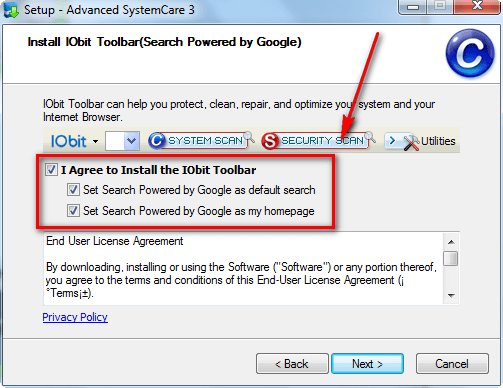
  • Download (click here) and install Advanced SystemCare Pro. Take note during installation options to add IObit to favorites and to install IObit’s toolbar are checked by default:
2009-11-25_003144

2009-11-25_003221

Uncheck them if you don’t want them (most people don’t want them because they are junk – I don’t want them).

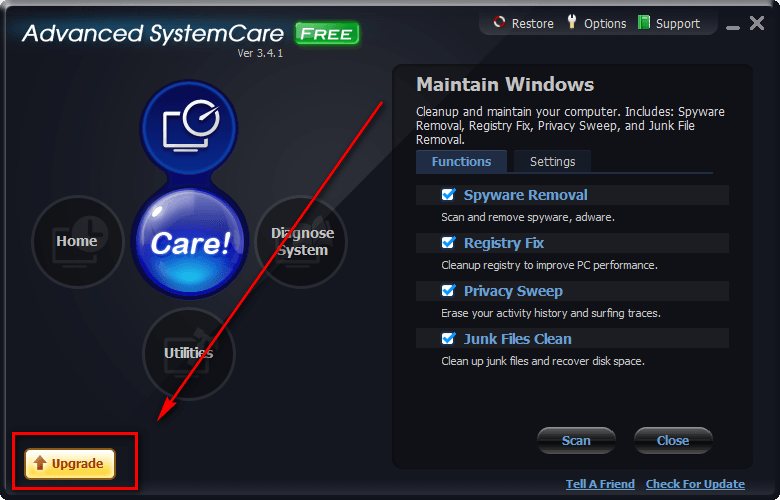
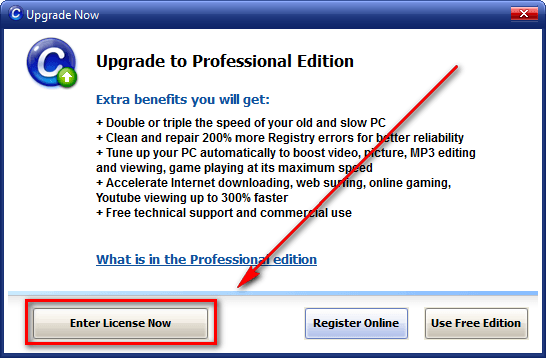
  • After installation, “upgrade” the Free version to Pro by entering the account name and license code you got in the e-mail:
2009-11-25_003353

2009-11-25_003418

2009-11-25_003432

2009-11-25_004108

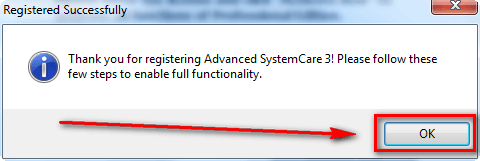
There will be a short four step wizard to follow after you click “OK” to setup the new features you unlocked by “upgrading” to Pro.

Update: If you are having trouble successfully upgrading to the Pro version, try these two tricks:

  • Disconnect your network connection temporarily, and try to activate Pro again. After successful activation, you can enable your network connection again.
  • Try disabling your live protection anti-virus/anti-spyware/firewall. You may re-enable it after successful activation.

Thank you everyone who has posted solutions below to try to help everyone out!

  • Enjoy!

58 Comments »

  1. jerrycw November 25, 2009 at 10:16 AM (comment permalink) -

    I’ve tried RoxAnne’s trick, too, but still get the error messages when I try to license it. (I used “network connections” to disable my Internet connection, and then enabled it. I presume that’s the fix that RoxAnne is suggesting.)

    I’ve even tried two different sets of codes that were sent to two different email systems/email addresses, but both sets result in error messages when I try to license it.

    Any other ideas?

    Thanks.
    jerrycw

    26
  2. Aesar November 25, 2009 at 11:03 AM (comment permalink) -

    I also tried the tricks exactly as jerrycw with the same results. How disappointing!

    27
  3. townie2 November 25, 2009 at 11:33 AM (comment permalink) -

    no joy. same as everyone else. got e-mail, copied and pasted, got the “cannot be activated, buy new license” message, twice, as i tried with both my e-mail accounts, and two different licenses. also tried disconnecting internet, and no reply from their support. very disappointed, and does not speak well for their product.

    28
  4. Ashraf November 25, 2009 at 11:35 AM (comment permalink) -
    Mr. Boss

    What is up with everyone not being able to activate? I activated just fine!

    Maybe if everyone sends an e-mail to IObit support they can help out.

    29
  5. ptldom November 25, 2009 at 12:01 PM (comment permalink) -
  6. mark c November 25, 2009 at 12:14 PM (comment permalink) -

    failed to upgrade to PRO version; waiting on response from IOBIT,
    frustration factor with these freebies increasing…

    31
  7. Wheezer November 25, 2009 at 12:17 PM (comment permalink) -

    @ Ashraf:

    Oops, the line “And yes, that you Ashraf for posting that the promotion had started” in my last post was supposed to say: And yes, -thank- you Ashraf for posting that the promotion had started.

    Sometimes these fingers do what they want when typing…

    32
  8. ruudster101 November 25, 2009 at 12:34 PM (comment permalink) -

    Hi people.To everyone who has trouble with activating the ASC PRO lisence…take a look at this link…http://www.iobit.com/hotquestions.html
    It did the job for me…now i was able to activate…though i must apply the #4 at the bottom…
    Never heard of such a complicated way…
    Hope this will help u guys.

    33
  9. Mike November 25, 2009 at 12:40 PM (comment permalink) -

    Note that when the “be on the alert” info. was posted at dottech earlier, someone nicely had posted in the Comments a simple back-door registration process which results in a perpetual license. It works–you may want to check it out.

    34
  10. mark c November 25, 2009 at 12:42 PM (comment permalink) -

    thanks to ruudster101

    UPDATE: this worked for me:
    “4. If you still can not successfully register the product, here’s a fix: disconnect your network connection temporarily, and re-enter your license to activate PRO. After successful activation, you can enable your network connection again.”

    35
  11. Aesar November 25, 2009 at 12:43 PM (comment permalink) -

    Ah, yes. Thanks ruudster101. One must first disconnect from the internet, activate while disconnected (not very intuitive), then reconnect. Thanks for the help by all!

    36
  12. Mike November 25, 2009 at 12:51 PM (comment permalink) -

    Here’s the link and instructions to get a perpetual license to the software. http://www.raymond.cc/forum/tutorials/11436-unlimited-advanced-system-care-pro-liscence.html

    Note: Windows’ uninstaller worked just fine to uninstall the software, per the instructions, and the process also left auto-update on for me.

    In the end, a simple process to get a non-expiring license for the software. Happy Thanksgiving (for those in the States)!

    37
  13. Johnson November 25, 2009 at 12:59 PM (comment permalink) -

    Try disarming your anti-virus and firewall.

    Discovered this anomaly the other day when some other software refused to activate. Never did figure out why, but it worked then and worked now.

    I got the same messages others got and tried disconnecting my ethernet cable and then re-tried activating w/o success. Killed the AV & FW – bingo – activated. (Still disconnected by the way.)

    I generally don’t argue with success, even if I can’t explain it. Just get frustrated trying to figure it out.

    38
  14. alain November 25, 2009 at 1:03 PM (comment permalink) -

    hello
    thanks for the find , with this software wich i will install on all my family’s computers , i hope i will have more time to drink “apero” while ASC do the job for me ;-) when i’m invited for diner …

    39
  15. Someguy November 25, 2009 at 1:03 PM (comment permalink) -

    This thing is probably a scam as i recently reinstalled Windows yet I have close to 10k of security errors. Add mad face here!!!

    40
  16. Mike T. November 25, 2009 at 1:50 PM (comment permalink) -

    Got the license code very quickly but this sucker won’t activate no matter what and I’ve tried every suggestion listed here … at this point, I’ll just stick with the free version because this just isn’t worth the hassle.

    41
  17. townie2 November 25, 2009 at 1:52 PM (comment permalink) -

    i recommend anyone having trouble, use Mike’s method. worked for me. thanks Mike.

    42
  18. Johnson November 25, 2009 at 1:56 PM (comment permalink) -

    @Mike:
    DON’T UNINSTALL ANYTHING YET!!

    Just had a look at Raymond’s instructions for perpetual use. When he mentioned installing and entering license code while disconnected from the internet, I realized that many of us were doing the last half of that already. So I checked my registration under License Manager: (Tried to paste the screen print – didn’t work!)

    Installed License
    License Status Validation Required
    License Code Same as originally entered
    Expired Date N/A N/A days left

    It appears that inadvertently we done did got ourselves permanent licenses. Just because they made it difficult to activate. Without having to uninstall/reinstall anything.

    43
  19. Al Hall November 25, 2009 at 2:46 PM (comment permalink) -

    I tried the on/off/on trick to no avail. Then I tried locking the firewall and unlocking it and the activation succeeded.

    Thanks Ashraf!

    44
  20. Les Hawkins November 25, 2009 at 4:09 PM (comment permalink) -

    Tried 3 times to register. Deleted the first two downloads using Revo Uninstaller. Still won’t register, will give it a miss. Thanks

    45
  21. Piotr Talalay November 25, 2009 at 4:20 PM (comment permalink) -

    Trick #1 works ;-)
    Thanks as always Ashraf !!

    46
  22. Bella November 25, 2009 at 4:29 PM (comment permalink) -

    Happy Thanksggiving, To You and Yours Ashraf!!!

    I tried 2 different e-mails for the free ASPRO , to no advail…It said I needed to purchase a new license…
    Please help me..I had the PRO earlier,but I had to get my cp reprogramed and need it back badly.PLEASE….Bella:)

    47
  23. marc November 25, 2009 at 9:13 PM (comment permalink) -

    data base crooks…………made in china

    48
  24. MK November 25, 2009 at 9:19 PM (comment permalink) -

    This has been a really tough haul. I spent a whole day installing, reinstalling, and uninstalling (with Revo). I even used two different email addresses and received two different licenses–both didn’t work.

    Less than an hour ago, it finally worked. And, the worst part is that I can’t even tell you what my secret was–because it’s so secret even I don’t know it.

    I didn’t disable my firewall or anti-virus program, like others suggested. I shut down completely several times and restarted too many times to recall. I didn’t see some of the later comments until now. And, IObit never replied to my email. Hope their tech support is better than this.

    When these guys give you something for free, boy do they make you pay for it…

    A happy Thanksgiving to everyone!

    MK

    49
  25. Mike November 25, 2009 at 9:32 PM (comment permalink) -

    @Johnson: Good for you! I was wondering if a perpetual license might result from the off-line registering that you all were trying. Cool! (And a nice “reward” for the frustration …)

    50

Leave A Response »