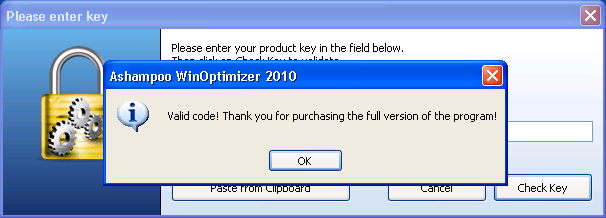
Today has been a busy day for the freebies part of dotTech. Lets round the day off with what may be the best freebie of the day – Ashampoo WinOptimizer 2010! Now Ashampoo WinOptimizer should sound familiar to dotTechies because I have posted about how to get Ashampoo WinOptimizer 5 for free in the past; WinOptimizer 2010 is a newer than WinOptimizer 5. In terms of features WinOptimizer 2010 sits in between WinOptimizer 5 and WinOptimizer 6; it has more than WinOptimizer 5 but less than WinOptimizer 6.
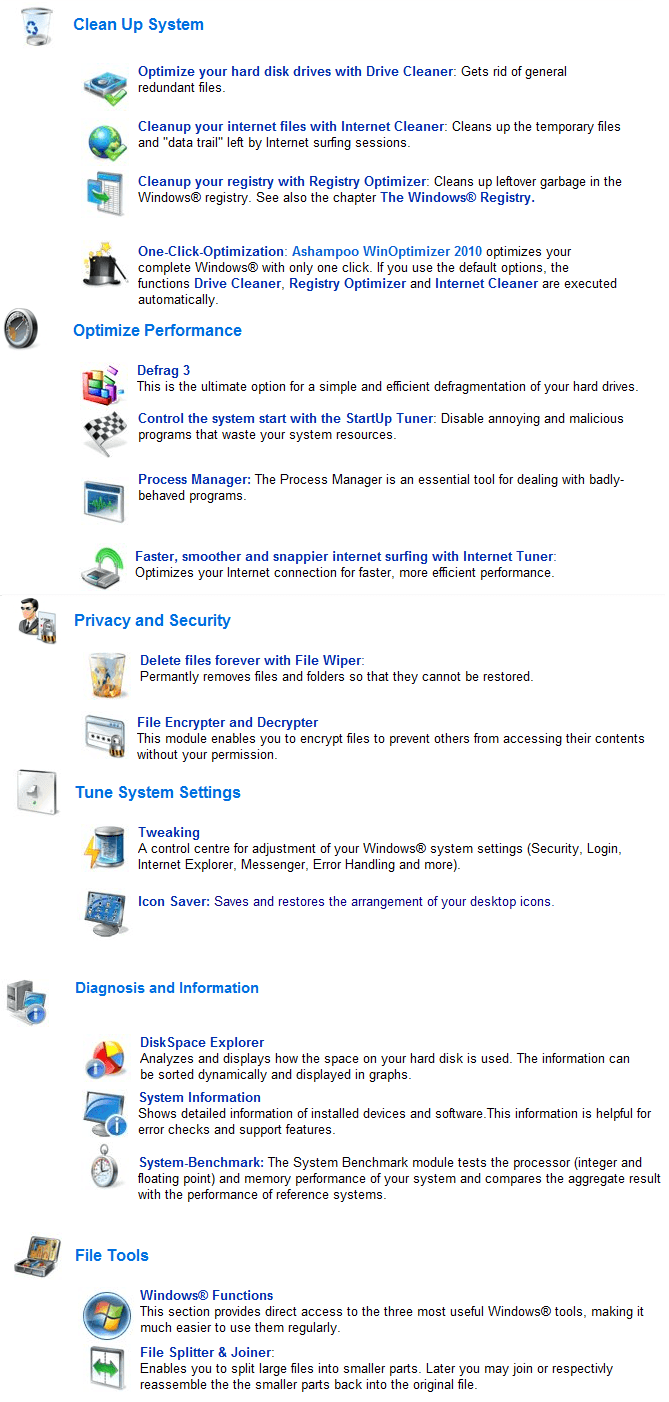
So what exactly can Ashampoo WinOptimizer 2010 do? I am glad you asked:
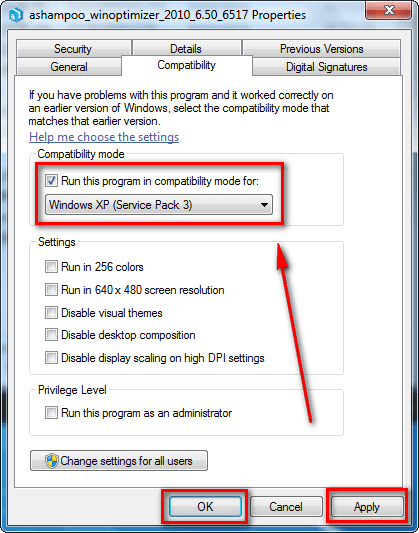
The only problem with WinOptimizer 2010 is it does not seem to want to work on Windows 7. Anyone that runs to run the WinOptimizer 2010 installer on Windows 7 will get an error and will be unable to install it. I have sent my friend in Ashampoo an e-mail asking for some help on the matter – to see if we can get the issue resolved. However, as a temporary fix, if you are on Windows 7 and really want WinOptimizer 2010, right click on the WinOptimizer 2010 installer, go to “Properties” -> “Compatibility”, check “Run this program in compatibility mode for:”, hit “Apply”, and hit “OK”:
After you have done that, you will be able to install WinOptimizer 2010 on Windows 7. However, as a word of caution, it is generally recommended to not force-install a program on a Windows it does not want to install on. That does not mean the program, WinOptimizer 2010 in this case, won’t work; rather it means don’t be surprised if it causes problems on your computer.
Update: I have received a reply from my friend in Ashampoo and he tells me there is a WinOptimizer 2010 Advanced version out that works on Windows 7. However that version has not been released as a freebie for the general public yet – it is only available as a magazine specific freebie currently.
That being said, how to get WinOptimizer 2010 for free? Well, WinOptimizer 2010 is part of the 5 Ashampoo software Softonic is giving away for free as part of their 5 year anniversary:
As you can see, you can get Ashampoo Magical Security, Ashampoo Burning Studio 2010, Ashampoo Photo Commander 6.5, and Ashampoo Uninstaller 2010 also. However, the reason I am not featuring the other 4 freebies in a post is:
- Ashampoo Magical Security is almost 2 years old; I don’t believe it is smart to advertise a 2 year old encryption program if you get what I mean.
- I have already posted about how to get Ashampoo Burning Studio 2010 for free.
- I have already posted about how to get Ashampoo Photo Commander 6.5 for free.
- I have already posted about how to get Ashampoo UnInstaller 3 for free; the one offered by Softonic is Ashampoo UnInstaller 1. Update: The one offered by Softonic is actually based on Ashampoo UnInstaller 4; however it still has less features than Ashampoo UnInstaller 3.
So, to get Ashampoo WinOptimizer 2010 for free, follow these simple steps:
Version being given out for free: v6.50.6517
Note: Don’t be fooled into thinking WinOptimizer 2010 is the same thing as WinOptimizer 6 because WinOptimizer 2010 is v6.50.6517. WinOptimizer 6 has three features which are not in WinOptimizer 2010: “AntiSpy”, “Context Menu Manager”, and “Undeleter”. Furthermore, WinOptimizer 6 works on Windows 7.
Supported OS: Windows XP/Vista
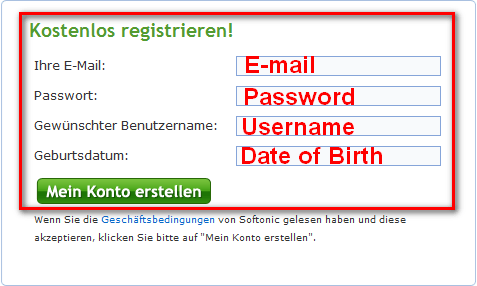
- Register on Softonic.de:

- Check your e-mail’s inbox for an e-mail from “Softonic <push@push.softonic.com>” with the subject of “Anmeldung bei Softonic.de bestätigen”. In the e-mail there will be a URL you have to visit to confirm your Softonic account:

Visit the URL. You can close the page that loads – you don’t need it.
- Visit the Softonic anniversary giveaway promotion page and click on “Download” for WinOptimizer 2010:

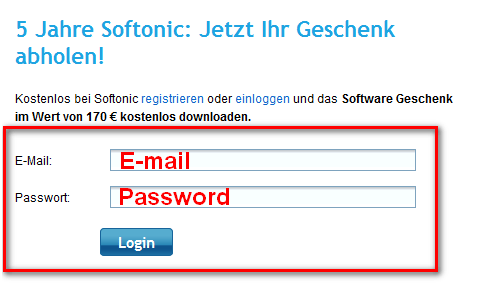
You will be asked to login:
Login. Your download will begin after you login.
- After WinOptimizer 2010 has finished downloading, install it. Take note during installation there will be an option to put a The-Page.net icon on your desktop. Uncheck the option if you don’t want it (you don’t need it – WinOptimizer 2010 will function without it just fine).
- After installation WinOptimizer 2010′s registration page will open in your browser window:
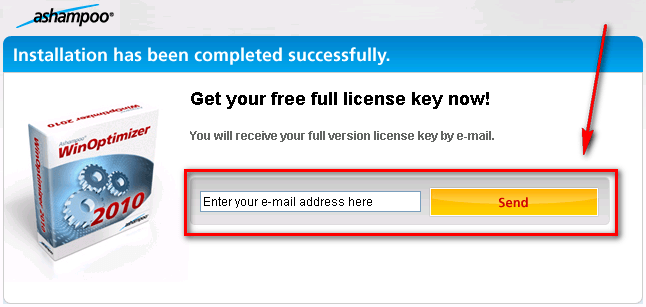
Enter your e-mail address in the box and hit “Send”; if you already have an Ashampoo account you will be asked to login. If you don’t have an Ashampoo account, you will have to confirm your new account before you can get the free key. So go to your e-mail’s inbox, look for an e-mail from “Ashampoo <MrReg@ashampoo.com>” with the subject of “Registration (Step 1) … follow the link in this email to go on.” In the e-mail there will be a URL you have to visit to confirm your new Ashampoo account (visit it):
Take note when you register with Ashampoo, you are automatically signed up for Ashampoo’s regular e-mail newsletters. If you don’t want the newsletters, you can manually unsubscribe from these newsletters after you registered by logging in via MyAshampoo, going to “Subscribe service letters”, and unchecking the ones you don’t want.
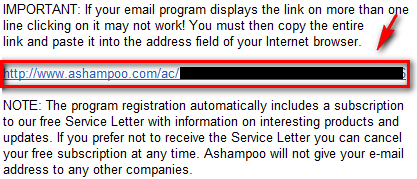
- Check the inbox of the e-mail you entered for the free license key. There should be an e-mail from “Ashampoo <MrReg@ashampoo.com>” with the subject of “Your registration – Ashampoo® WinOptimizer 2010 (F_sft) (English)”. In the e-mail you will find your registration code for WinOptimizer 2010:
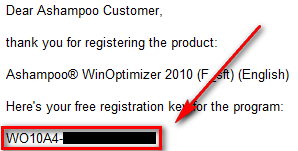
Copy the registration code.
- Go back to WinOptimizer 2010 or run it if you don’t have it running. You should be asked to register the software. Register it with the key you got in your e-mail:
- Enjoy!
If you have any trouble getting Ashampoo WinOptimizer 2010 for free, post below – I will try to help.
Thanks my_immortalize!


Email article


Ermm..
A few months back, I responded to one of Ashampoo’s frequent discount offers for WinOptimizer. In this case, it was for version 5 not long before the release of version 6. (V.5 is still available for sale on the website, btw.) I set a Restore point and backed up the registry before installing. After working with the software for a while, I decided it had no advantages over other commercial and free programs I was already using. Ashampoo was kind enough to honor my request for a refund, possibly because it came within hours of purchase.
Perhaps WinOptimizer 2010 is an improved software, perhaps not. I won’t be trying it for the reasons already stated, but others may have success with it. As always, YMMV.
Two weeks back, ForFree ON Internet had already said about this promotion, and I’ve already grabbed it, but I’m still glad you posted this for your readers!
Hi Ashraf,
Boy here’s a good one, it didn’t like my birth date. I tried month/day/year and I also tried, day/month/year and it rejected both.
What the heck?
Ok,
It finally let me in with date/month/year.
Thanks Ashraf.
Thanks for clarifying the relationships between Ashampoo Uninstaller version 3 and version 2010. I really thought version 2010 would be something like version 4 lite.
Thanks for your great work as ever, Ashraf.
Unfortunately, where Ashampoo is concerned, I’ve grown weary of its constant re-invention of new product names and the well-nigh permanent confusion over just what is an original product and what is a specially created, stripped-down freebie.
This latest offering may (or may not) be cosmetically appealing, but I actually think you’ve already out-voted it — in a way — by being kind enough to provide info and links to jv16 Power Tools.
Thanks to you, I now have that installed on all three of my computers as a replacement for my abandoned IObit software.
And unless whatever-it-is that Ashampoo is now offering is an exponential improvement on jv16 — which I very much doubt — then no, I’ll stick with jv16.
In my humble opinion, it’s one of the absolute best software products ever to have been recommended on this illustrious dot.tech blog!
@corno: Actually Ashampoo UnInstaller 2010 is Uninstaller 4 lite and not version 1. ;)
Im not sure whats going on but Vista keeps telling me that I need to find a program online to open this type of file extension. Does anyone have any suggestions on this? I would love to have the program. :)
I did the download and install. everything worked out great.it does a pretty good job at cleaning things up. though i have to admit I haven’t played with all the features it does look like a pretty dam good utility to have on board.
I tried 3 times to register and it says “for this query you need java script and cookies enabled and they are enabled.
I, like MikeR, also wondered at the lack of reference to jv16 Power Tools, which Ashraf just recently gave such high praise, and I wondered why there was no mention of the relative merits between the two? Or, at least an honorable mention, especially when there is a possible problem with Windows 7…
@Kerry: I have the same issue and don’t know what to try next.
@dixievelcro:
Same problem here, happens in Firefox and Internet Explorer, if anyone has a solution, please let me know.
@Kerry: I also have the same problem. Hope someone can find the answer.
winoptimizer 2010 advanced also is given for free ashraf. check this link
[Removed by Ashraf. Reason: I appreciate you trying to help out but as per my sources, WinOptimizer 2010 Advanced is a magazine specific freebie right now; it is not for the general public (yet). As far as I know, the link you provided is for ComputerActive subscribers only so I had to remove it. My apologies.]
@Ron: Well, I am glad to hear it all worked out for you in the end.
@Adrian: The difference between my post and theirs is when they posted about it, it wasn’t a general public freebie; it was a freebie for magazine readers only – they posted it from an ComputerActive promotion. My article is a Softonic promotion that is available to the general public. What they posted is unethical at best, illegal at worse. What I posted is not.
To some people there may be no difference between the two situations but there is a huge difference for me and the guys at Ashampoo (trust me when I say they appreciate me respecting everyone’s rights and licensing).
@justnakenny: Cool.
@Sandeep: You are welcome.
@corno: You are welcome.
@MikeR: I do agree jv16 PowerTools is terrific; however I have not sat down and objectively compared both so I can’t really agree or disagree with you on which one is * better*.
@Tim: The version number says “…1.03″.
@wendi: Add a “.EXE” to the end of the file name.
@Jabtano: Glad to hear you like it.
@Kerry: Try clearing your browse cache and try again.
@awisdom01: I have not sat down and objectively compared both so I can’t really make a claim either way.
@dixievelcro: Try clearing browser cache.
@Jeremy: Try clearning browser cache.
@Richard: Try clearing browser cache… lol.
@ MikeR: your reference to IObit reminded me of the IObit vs Malwarebytes claims and counter claims. Anyone with info on the latest developments??
Thanks, Ashraf for the information on the program, and srinivasan, for the link for getting the key for the Win 7 version, WinOptimizer 2010 Advanced. Here is a link for the download of the program itself: http://www.ashampoo-20.com/ashampoo_winoptimizer_2010_advanced_6.501.exe.
@Ashraf: I even tried a new copy of the Opera browser with no cache and everything enabled. Still just get the error message from Softonic about having cookies and javascript enabled. Others must be doing something right to get thru.
I tried trusted Firefox 3 times, Opera and IE7, and even updated to IE8 and specifically clear cache, it just make the registration darn hard. over hour on this is not worth the trouble.
Can’t register here as well. :(
ever heard of curtis mayfields “pusherman” YOU the Meng,ashraf…its like your pimpi’n me three high class ladies here…for FREE!!!! got me all excited AND confused :P
ashampoo winoptimizer,jv16 and your old but very relevant tuneup uts 2008…if i was alone in an island ill go with…???? what you think?
You can clear all the cache you want, play with birthdate format, change browsers, blah, blah, blah! Still gives cookies error. Not worth anyone’s time if you value it.
@ Mordaunt:
Nope, I haven’t heard of any new / latest developments re IObit and its software. I guess once the decision had been made to abandon its products, that was it.
I’m still annoyed at myself over being a mite too naive where IObit was concerned, because the way its ownership, address and provenance is deliberately shrouded should’ve dawned on me long ago.
Far better to have software from a developer whose background is known and whose address is apparent to all — though asnoted: my own fault, for being stupid.
@ wech:
If the Ashampoo offering was the only game in town, then the hassle you and others appear to have been encountering would seem a small price to pay.
But the Ashampoo product isn’t.
As our beloved ol’ guru Ashraf has said in this very comments thread, jv16 Power Tools is “terrific”.
And yes. It is.
When there’s something out there described on this blog as “terrific”, trying but failing repeatedly to download / install a competing product probably isn’t the best way of using one’s time.