Looking for a free movie editor besides Windows Movie Maker, VirtualDub, and Avidemux? You have come to the right place. Today I am going to tell dotTechies how everyone have get MAGIX Movie Edit Pro 15 Silver for free!
What exactly does MAGIX Movie Edit Pro 15 Silver do? Here is a short infomercial from the developer:
What is MAGIX Movie Edit Pro 15?
MAGIX Movie Edit Pro 15 is a complete movie studio for your PC. MAGIX Movie Edit Pro 15 lets you easily transmit your recordings to your computer and then, once you have improved and enriched them, onto DVD and Blu-ray Disc. It’s great for theater-quality presentations on TV, screen, or monitor.MAGIX Movie Edit Pro 15 is a production studio for the PC for editing videos, movies, photos, and audio from a wide range of sources. Long movies can be automatically separated into different chapters or scenes, or do the opposite by automatically incorporating short takes into a single movie.
Add audio, theater-quality transitions, text, and selected effects to your own movies with a mouse click. The easy-to-use interface, advanced technology and handy assistants guarantee perfect results at lightning speed!
Once your movie is finished, you can use it again in a number of ways: Transfer it back onto tape or to your camcorder, burn it onto DVD or Blu-ray DiscTM and enjoy it on TV, or put it online for your friends and family in your personal MAGIX Online Album.
The only thing to note is the freebie of MAGIX Movie Edit Pro 15 Silver has the burning features disabled – everything else works as far as I can tell.
So, how to get MAGIX Movie Edit Pro 15 Silver? Just follow these simple directions:
Version being given away for free: v8.6.017
Free updates available: Unspecified
Supported OS: Windows XP/Vista – it also seems to work fine on Win7
- Visit the promotion page and download MAGIX Movie Edit Pro 15 Silver.
- The download size is 115 MB and the download speed is really, really, really slow – be patient. It took me about 2 hours to download it and I am on a high-speed connection.
- After it has finished downloading, install it.
- After installation, run it and you should be asked to register the software:
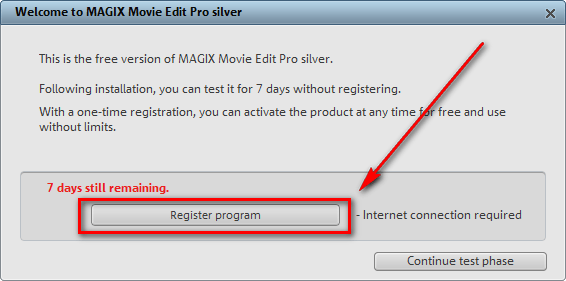
Click on “Register program” and the registration page will open in your browser window:
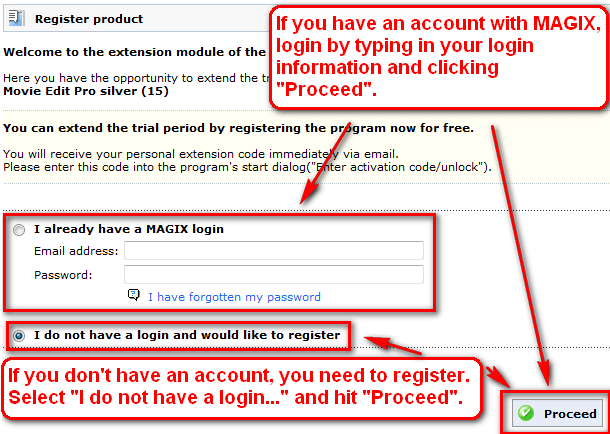
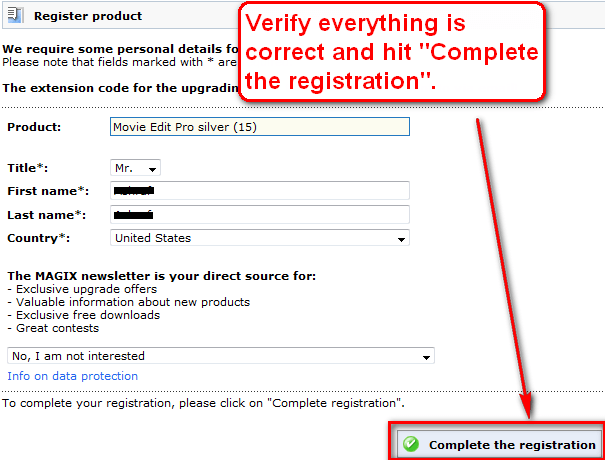
- If you already have an account with MAGIX, login. Your registration information will already be filled out; you will just need to “complete the registration”:
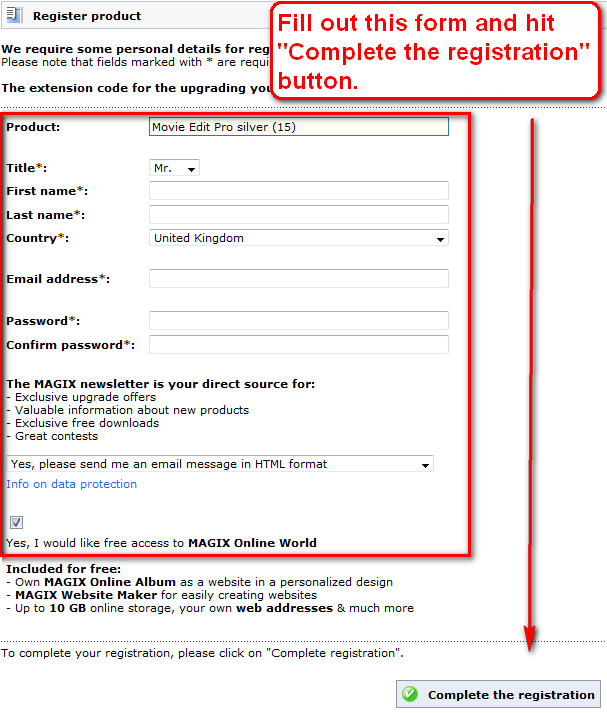
If you don’t have an account with MAGIX, you will need to register:
- After you finished registering, either with an old account or a new account, check the inbox of the e-mail you registered with. There should be an e-mail from “MAGIX <register@magix.net>” with the subject of “MAGIX <register@magix.net>”. In the e-mail you will find your registration code:
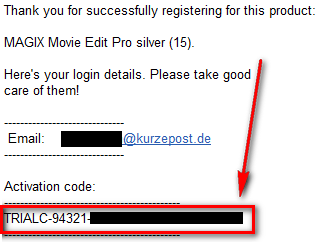
Copy the registration code.
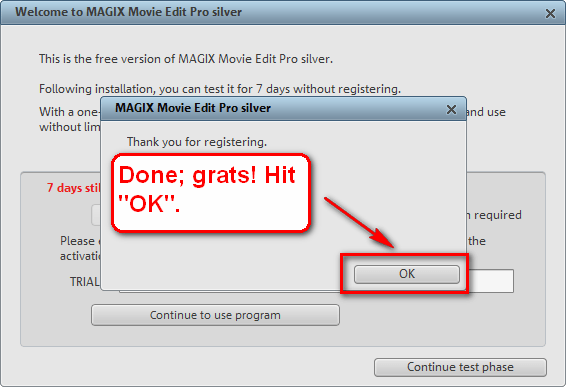
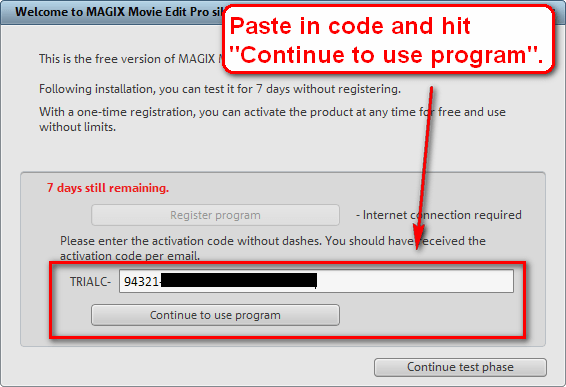
- Go back to MAGIX Movie Edit Pro 15 Silver program window and paste in your registration code to register the software:
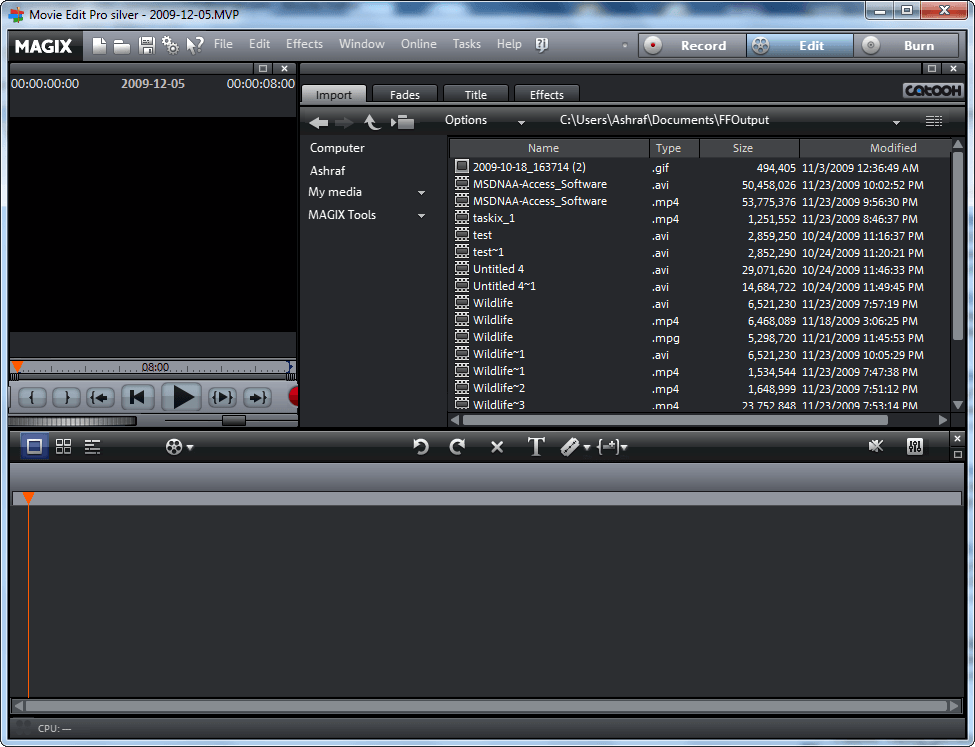
- Enjoy your new, fully registered, and free MAGIX Movie Edit Pro 15 Silver:
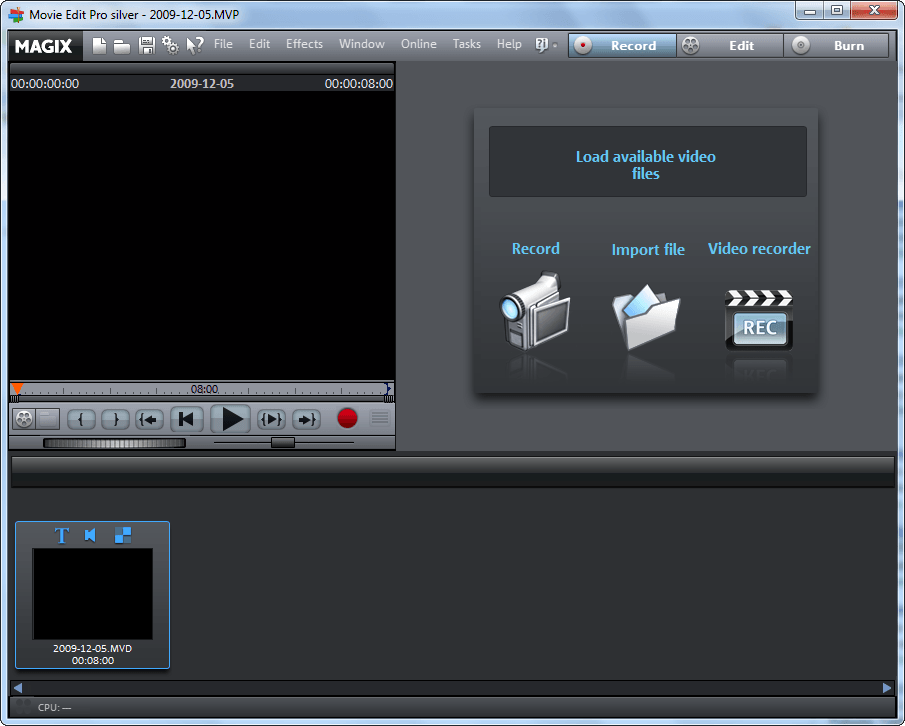
If you have any trouble getting MAGIX Movie Edit Pro 15 Silver post below – I will try to help.
Thanks Jean²!


Email article


Some quick thoughts:
1) Dear Ashraf . . . wot about using GigaGet as your downloader. . .? I know I keep banging on about this freeware but, well: it works! I’m so far from our telephone exchange I might as well be on another planet, so downloading anything always takes an age because of the line length. Using Gigaget to speed up any of my DLing has made a huge difference.
2) Magix Movie Edit Pro: Installed and activated without a problem — but Magix registration instructions are a bit bonkers: it says to fill in the registration field “without dashes”. But it doesn’t mean that. What it actually means is, only paste in the serial number you’ve received in your email from Magix; don’t paste in the ‘trialC” bit at the start of the code.
3) Installation has taken place on a worn-out Pentium 4 PC running XP Home with 12Gb left out of a 60Gb HDD and 1Gb of RAM.
4) Program performs smoothly — perhaps helped by the fact that on that PC, Process Lassoo is running as well as the superb CleanMem. If people are having difficulties with the Magix product, then running at least CleanMem in the background would help. (Actually, as Ashraf has often said, CleanMem helps any computer with any task so there’s no reason not to have it installed by default on any desktop or laptop.)
5) Video editing is ALWAYS going to be a resource hog. That said, I don’t see any “junk” in the Magix product; the company has a long-established reputation for specialist, quality development — it was the first, for instance, to work with the original ‘inventors’ of mp3. . .
6) . . . which is why, if you’re interested in video editing, Magix’ sound editing software is the perfect partner. So. . .
7) Pop back to the Magix site, if you’re interested, and download the Magix Music Manager 2007 version (which hasn’t changed that much in successive revisions, certainly not enough to compromise the fundamental usefulness.) Music Manager was a paid-for. . . now, it’s free, possibly something to do with some kind of Magix Christmas season celebration.
Finally. . .
Well done again, Ashraf. You really are a star!
Was happily downloading program till I came to Jolie’s comment. Stopped the download. I can do without such headaches.
Thanks for the heads-up Jolie.
Hello, Ashraf.
I downloaded. The filename is “download”. It isn’t application file and I can’t to install it. ?
It is direct videoeditor for:gif,avi and vmw.For gif is the best,next for avi and next for vmw.You can use :mpeg ,mov,etc format for videoediting but must to save in one of this 3 formats.Is good,in special for gif,but you can say that is too big.Movie maker i think that is better for vmw.Iwisoft Free Video Converter(and videoeditor) and Moyea Video4Web Converter(and videoeditor)are more better and smaller than this and also more fast than this.
Downloaded & installed, I got my registration code and activated just fine.
Thanks Ashraf.
Registration link above is not working. Registration link is different every computer. You must click ‘Register program’ in Magix welcome dialog.
Great! MEP11 wasn’t working in Win7 64! MEP15 arrived at the perfect time!
Thanks!!!
downloaded on dialup (all that is available here) took all night and installed but stopsw loading at video initilization and then closes.
Kerry
SIR
A NEW PROBLEM NOW.IT IS AKING ME TO CHOOSE PROGM TO OPEN IT.PL.SUGGEST.
THANK YOU
rachana
GOT IT!! Connected to a friends computer through VNC, downloaded in minutes! Download from him through VNC, all set!
Brilliant software Ashraf!!!! hats off to you once again.
Registered successfully
Thanks Ashraf
Thanks.
Thanks, registration still works, after downloading the program.
It’s asking to provide password when I click the “download MAGIX Movie Edit Pro 15 Silver.” link. What is the password?
Thanks!
Is this still available?
@Hasu:hey ,did you ever figure out how to download this
Free MAGIX Movie Edit Pro 15 Silver!?
let me know how i can down it ” Please ”
you can even email me at acidramfxu@yahoo.com
thx. ERICKj.CARDEN
Never mind figured it out ,to download this program you have to look at the tab in your browser there is a code there on the tab ,type it in then wait for a bit ,it took me about 30-45 min. for the white page to open with the rest of the download details in a new window ; i hope that i have helped out who ever looks at this program for download,make shure you have an account with Magix,this is a slow download for some but worth it .
thx.and enjoy:
ERICKj.CARDEN aKa @c?dR??F?U
94321-86347-82426-53157-87219
http://www.mydigitallife.info/2009/08/12/magix-movie-edit-pro-15-silver-free-download-with-unlock-activation-code/
@AcidRamFXU: Are you crazy posting your email in a public place? You want spam in your inbox? Or worse, you want your email getting backscattered?
I have clicked the link that says ” download Magix Movie Edit Pro 15 Silver” it leads me to “https://extern.magix.net/pdl/download?id=k0czzzwsumxkjrxbyxr5gaold&Password=5zciYlE0″ then says “password” then you hit download. Okay so I never seen a password. Maybe you can help me out here, I have been trying to get this program for a long time! Thanks :)
Yeah same here it says PASSWORD! What the heck is the password there?