dotTech Exclusive: Free 1 year license of Returnil Virtual System 2010 Home Lux!
December 9, 2009 93
Email article | Print article
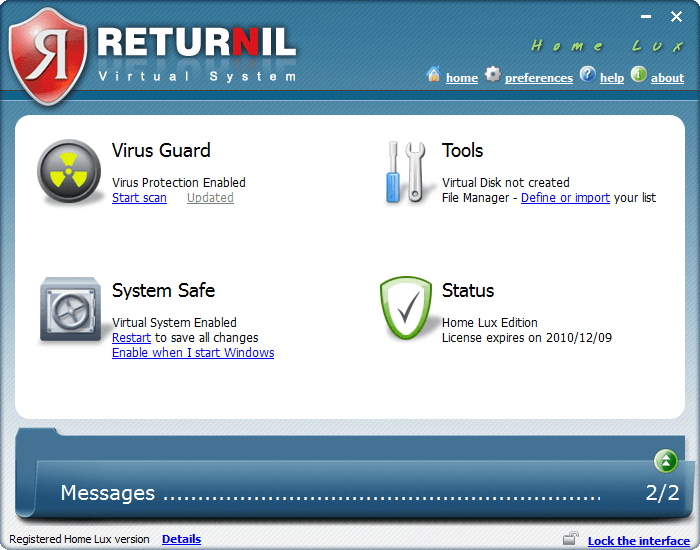
As promised earlier this week, we have a real treat for everyone this weekend: Everyone can get a 1 year license of Returnil Virtual System 2010 Home Lux for free! Before I delve into how to get the 1 year license, let me give a quick overview of what RVS 2010 is for those that don’t know.
Returnil Virtual System 2010 is a unique security software that protects your computer in an unorthodox manner. RVS 2010 uses a powerful combination of anti-virus, anti-malware, and a virtual system to protect your computer from all types of viruses and unwanted system changes. The traditional security software like Avira, Kaspersky, Norton, AVG, NOD32, etc. actively, and on demand, detect and remove infected files. RVS 2010, on the other hand, has a two pronged attack to the malware problem:
- Virtual System – RVS creates a “virtual copy” of your main system partition (the partition which you have Windows installed) and whatever changes are made to your computer are dumped when you restart your computer (there are opinions to tweak how it does that, but generally speaking, that is how it works).
- Anti-Virus/Anti-Malware – RVS also includes the traditional anti-virus/anti-malware live protection and on-demand scanning features.
Because of this two pronged approach which incorporates traditional and innovative protection capabilities, if used properly, a user can keep his/her computer 100% clean with RVS 2010. If you desire more detailed information on RVS, please read dotTech’s full review on Returnil Virtual System 2010 Home Lux. As indicated in the full review, RVS 2010 is one of dotTech’s favorite programs.
Now, RVS 2010 comes in four different flavors:
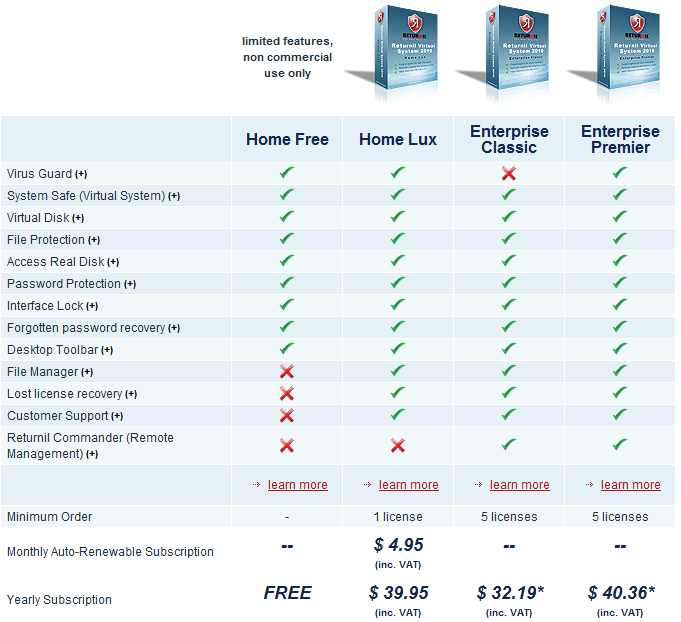
The free license you get via dotTech is of Home Lux – a $39.95 value.
That all being said, how to get the free 1 year license of Returnil Virtual System 2010 Home Lux? Just follow these simple directions:
Supported OS: Windows XP/2003 Server/Vista/2008 Server/Win7 (32-bit and 64-bit)
- Enter your e-mail address in the following form and hit “Submit”:
- Check the inbox of the e-mail you entered. You should have an e-mail from “returnil-noreply [noreply@returnil.com]” with the subject of “dotTech.org RVS giveaway registration”. In the e-mail there is a URL you have to visit to confirm your e-mail address:
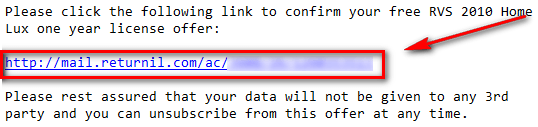
Visit the URL by clicking on the link or copy + pasting it in your browser.
- After you have confirmed your e-mail address, check the inbox again of the e-mail you entered. You should have another e-mail from “returnil-noreply [noreply@returnil.com]” with the subject of “Your dotTech.org RVS registration was successful!” In the e-mail you will find your license code:

Copy the license code.
- Download RVS 2010 and install it. You may need to reboot your computer after installation has finished.
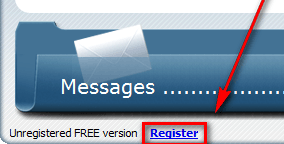
- Run RVS 2010. Click on “Register” (located at the bottom left of the program window):
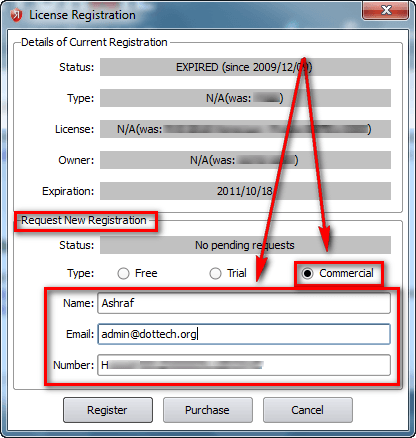
- At the window that pops up, go to the bottom half under “Request New Registration”. Click on “Commercial”. Type in anything you want in “Name” and enter the e-mail you submitted earlier in “E-mail”; paste in the license code you got via e-mail in the “Number” box:
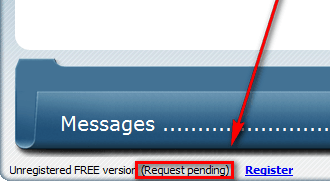
Click “Register” when you have entered everything. You should now see “Request Pending” written at the bottom left of main program window:
- Wait a few minutes while your registration is processed. When the registration has been processed, you will be told via a popup dialog box at the bottom right of your computer screen:

It took 5-10 minutes to process my registration so be patient.
- Enjoy!
The license will last you one year. After the year is over, you can revert to RVS 2010 Home Free (non-commercial use only) or purchase another year’s license of RVS 2010 Home Lux for $39.95. You can even sweeten the deal by getting 25% off.
————————–
Frequently Asked Questions
Q: How long are the licenses we are getting?
A: They are 1 year licenses (12 months).
Q: How long will this promotion last?
A: This promotion will end at 12 AM (Pacific Standard Time) on Monday December 14, 2009. At that time, new licenses will no longer be given out.
Q: If I already have a subscription of RVS 2010 Home Lux, can I still use your license?
A: Yes! However, the license you get via dotTech will “replace” your license so only use it if you have less than 12 months left on your subscription.
Q: Is there a shelf life to the license?
A: Sort of. You can only get the license for free until this promotion lasts. However, after you get the license, you can activate it anytime from now and 12 months from now. The catch is the clock starts to tick once you get the license so if you, for example, activate it 6 months from now you will only have 6 months left on it.
Q: Can I share the license with my friends and family?
A: This freebie is for everyone, including your friends and family. If you would like your friends, family, and others to be able to take advantage of this great offer, please send them to this page so they can get a license for themselves!
93 Comments »
Leave A Response »


Thank you for the early Christmas gift.
Nice product!
@Ashraf: IF anyone else has Returnil of any version other than this exact one already installed, you probably need to get it all out of registry & files before installing this one! I had it installed, (Not this version) but I got it from GOTD site, & when I installed this version, it registered with all the old info, & would not let me register with new license number & my own name. Got it out of my PC system with Reg Seeker, both in regs & in files, & reinstalled.
Ashraf, the way you have it on this page for downloading & getting license went very smooth, easy, and fast! Congrats! :) And huge Thank you’s to Ashraf & to Returnil! :)
Thanks Ashraf for starting this promotion earlier. Is this heavier on resources ????
Anyways will give it a try.
Thanks once again.
Thanks !! :)
Hi Ashraf sorry to bother you again but there is a comment on the download cnet page where a user describes a problem in uninstalling this software. Do you know anything about this?????
Thanks.
Despite my earlier reservations I did try a second install – disabled anti-virus/spyware/firewall/smart defrag etc. Cannot activate despite following all instructions to the letter! In addition computer slows to a crawl.
Actually, it’s not quite exclusive to dotTech, since the Christmas giveaway @ TechPP also has the same giveaway for today only to all readers. But I’d rather signup through here.
Thanks Ashraf
thank!
Thanks Ashraf!
BTW, can I install this at a later date and still get a full year of subscription, or does the subscription start the moment I find the key?
Ashraf,
I’m currently using Outpost Firewall, Avira Antivirus, and a-squared anti-malware. Do I still need this programme? If I do, should I uninstall all other antivirus programmes in my PC?
Cheers
Thanks!
@Roland: You are welcome =).
@Ozzie: You are welcome =).
@OldElmerFudd: RVS does have an anti-malware/anti-virus component. However if you already have NOD32 and Malwarebytes you can simply disable the live protection anti-malware/anti-virus component and still use RVS as a virtual system.
It really just depends on how you want to use RVS; there are multiple ways to put it to good use.
User 1 may decide to keep the virtual system and live protection anti-malware/anti-virus on at all times and not have any other security software.
User 2 may decide to keep the virtual system on at all times but disable the live protection anti-malware/anti-virus because they have a different live protection security software.
User 3 may decide to only use virtual system and anti-malware/anti-virus protection as on-demand because they have other security software that protect them and RVS is only called in when things get really hairy.
User 4 may use it some other way.
RVS is versatile enough that it can be used in many ways and still provide excellent protection.
Personally, I would be a User 3; I have the live protection disabled and use RVS’s virtual system as on-demand whenever I have doubts about a program I am about to install.
@smokexx: You are welcome. Honestly, I have not had that much experience with Deep Freeze (only minimal exposure on the job) so I can’t say.
@Skye-hook: You are welcome. Thank you for the informative comment =).
@vsm: You are welcome. However, I am confused by what you are asking. This installs normally just like any other program – why are you being asked to install QuickTime?
@jelson: You are welcome =).
@drtank: You are welcome =).
@mickay: Off the top of my head? 2010 added in a whole new amount of features and really made RVS more user friendly and usable vs the older version. I really like how in 2010 you can easily dump or keep your changes when using the virtual system; the older version made it a little bit annoying (in my humble opinion of course). For more info please refer to the link Libor provided, or see the following screenshot: http://dottech.org/rups/rvs2010/2009-12-10_090651.png.
@Andrew: I do agree. I did also find lots of false positives in the anti-virus/anti-malware. As I mentioned above, I have the anti-virus/anti-malware live protection disabled and I use the virtual system as on-demand; you may want to consider to do the same as long as you have other live protection security software protecting you.
@kentkitty: You are welcome =).
@Mordaunt: Installed fine on my computer. I suggest you send support a e-mail with your computer specifications so they can help you out.
@Murphy: You are welcome =).
@sangs: There shouldn’t be a conflict. Online Armor is a firewall/HIPs protection while RVS has anti-virus/anti-malware components and virtual system features. In fact, I do suggest you install RVS because it will compliment Online Armor since they provide two different methods of protection.
@libor: Thank you for providing support.
@Jabtano: Get used to it =P… we are here to stay inshAllah=).
@denzel: Cool. Glad to see it worked for you.
@chris: I don’t celebrate Christmas (not Christian) so not exactly a Christmas present, per se, but a present nonetheless. Maybe next year dotTech will run “Eid Giveaways” instead of the “Christmas Giveaways” other blogs are running. Not only will it give everyone a chance to get more freebies, but it will introduce everyone to a culture they may not have known about otherwise.
@Skye-hook: Thanks for the info! I also had RVS registered from GOTD but I registered with dotTech’s new license just fine. However, my license was expired so that be of been why.
@Sandeep: Heavier on resources than what?
@Shi: You are welcome =).
@Sandeep: I know nothing about any problems with uninstalling. I have in the past uninstalled RVS and it uninstalls just fine for me.
@Mordaunt: I am sorry but I can’t help there. I suggest you give Returnil’s support an e-mail and see if they can help you.
@Darthyoda: They only have it for 24 hours. We have it longer =). Plus we are cooler =P. Thanks for the support.
@Mohammed Sarhan: You are welcome =).
@Tran Quang Ha: You are welcome =).
@Refpeuk: It starts the moment you get the key.
@Albi: It depends on your habits. As I mentioned earlier in this comment, there are many different ways to use RVS. You sound like you are very well protected with other security software (in fact very similar to how I protect my computer). No you don’t have to uninstall the other programs; you can use RVS like I do: I have the live protection disabled and use RVS’s virtual system as on-demand whenever I have doubts about a program I am about to install.
@Howard: You are welcome!
HI Ashraf. Thank you very much for your very hard work. It’s a very nice gift. All the best.
Thanks Ashraf.
Yet another great product. Your site is always the first site I visit everyday. Even before my breakfast.
Cheers!
Thanks! I NEVER was able to access my computer when this was on GOTD and I never thought there might be a free version. SO THANKS FOR BOTH! (I know, quiet down, I tend to shout when I get exited…)
Thank you very much. I just updated the free version to your gracious offer. A wonderful gift. Thanks again for all your hard work for us.
Thanks Ashraf for a nice freebie. I have the same protection just like Albi and was wondering how this freebie would fit in. Nice to see the timely comments you provided and in addressing each individual personally.
Gracias!
Howdy,
I have 2 desktops and 5 laptops that I use at various times, am I able to use my single license on all my computers or do I need a license per system?
Also a thank you to Ashraf for bringing this it to us, I greatly appreciate it.
Thanks for this promo. It is my favorite software.
Thank you very much Ashraf, not only for today but also for all the previous outstanding dotTech jobs you have been doing. The way u present your comprehensive reviews is so simplified in a way that even the non techs (like me of coarse) understand what u are talking about. dotTech for life!
Many Thanks dear Ashraf
I check the site everyday.
Oh and BTW
I love you
(just saying)
Thanks so much
@Ashraf: Heavier on resourses than Bullguard. I installed Bullguard internet security during their promotion period and it made my laptop so slow, svchost.exe was taking around 170 MB of memory. Also the internet connection starts droping often. So i uninstalled it from both Win7 as well as XP and my laptops came back to life again.
I am a user of Malwarebytes Anti-Malware. Unlike other software including Kaspersky, it did not upset me. Is this software as good as Malwarebytes or am I wasting my time?