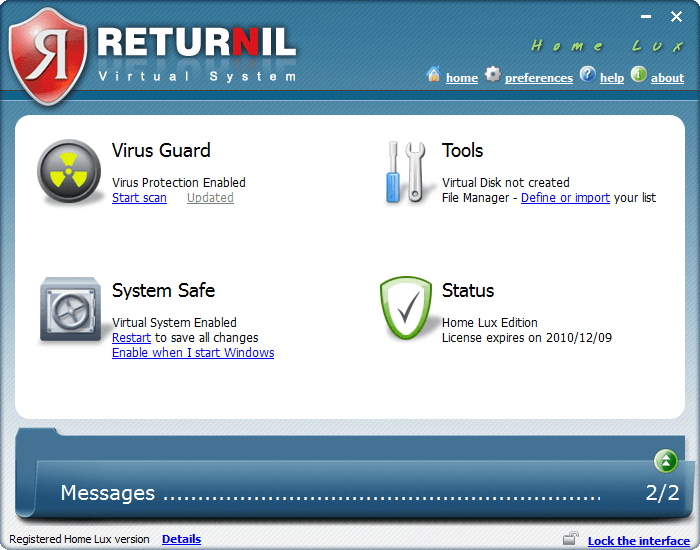
dotTech Exclusive: Free 1 year license of Returnil Virtual System 2010 Home Lux!

December 9, 2009 93 Email article | Print article

2009-12-09_213558As promised earlier this week, we have a real treat for everyone this weekend: Everyone can get a 1 year license of Returnil Virtual System 2010 Home Lux for free! Before I delve into how to get the 1 year license, let me give a quick overview of what RVS 2010 is for those that don’t know.

Returnil Virtual System 2010 is a unique security software that protects your computer in an unorthodox manner. RVS 2010 uses a powerful combination of anti-virus, anti-malware, and a virtual system to protect your computer from all types of viruses and unwanted system changes. The traditional security software like Avira, Kaspersky, Norton, AVG, NOD32, etc. actively, and on demand, detect and remove infected files. RVS 2010, on the other hand, has a two pronged attack to the malware problem:

  • Virtual System – RVS creates a “virtual copy” of your main system partition (the partition which you have Windows installed) and whatever changes are made to your computer are dumped when you restart your computer (there are opinions to tweak how it does that, but generally speaking, that is how it works).
  • Anti-Virus/Anti-Malware – RVS also includes the traditional anti-virus/anti-malware live protection and on-demand scanning features.

Because of this two pronged approach which incorporates traditional and innovative protection capabilities, if used properly, a user can keep his/her computer 100% clean with RVS 2010. If you desire more detailed information on RVS, please read dotTech’s full review on Returnil Virtual System 2010 Home Lux. As indicated in the full review, RVS 2010 is one of dotTech’s favorite programs.

Now, RVS 2010 comes in four different flavors:
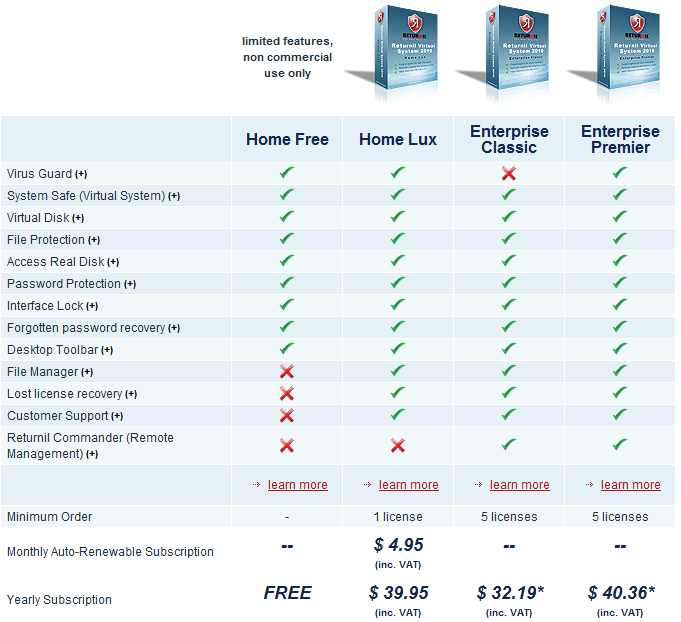
2009-12-09_205807

The free license you get via dotTech is of Home Lux – a $39.95 value.

That all being said, how to get the free 1 year license of Returnil Virtual System 2010 Home Lux? Just follow these simple directions:

Supported OS: Windows XP/2003 Server/Vista/2008 Server/Win7 (32-bit and 64-bit)

  • Enter your e-mail address in the following form and hit “Submit”:
  • Check the inbox of the e-mail you entered. You should have an e-mail from “returnil-noreply [noreply@returnil.com]” with the subject of “dotTech.org RVS giveaway registration”. In the e-mail there is a URL you have to visit to confirm your e-mail address:
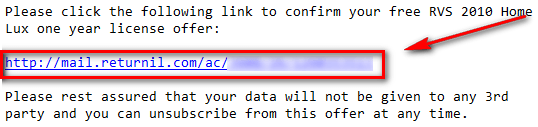
2009-12-09_211209

Visit the URL by clicking on the link or copy + pasting it in your browser.

  • After you have confirmed your e-mail address, check the inbox again of the e-mail you entered. You should have another e-mail from “returnil-noreply [noreply@returnil.com]” with the subject of “Your dotTech.org RVS registration was successful!” In the e-mail you will find your license code:

2009-12-09_211539

Copy the license code.

  • Download RVS 2010 and install it. You may need to reboot your computer after installation has finished.
  • Run RVS 2010. Click on “Register” (located at the bottom left of the program window):

2009-12-09_0317252

  • At the window that pops up, go to the bottom half under “Request New Registration”. Click on “Commercial”. Type in anything you want in “Name” and enter the e-mail you submitted earlier in “E-mail”; paste in the license code you got via e-mail in the “Number” box:
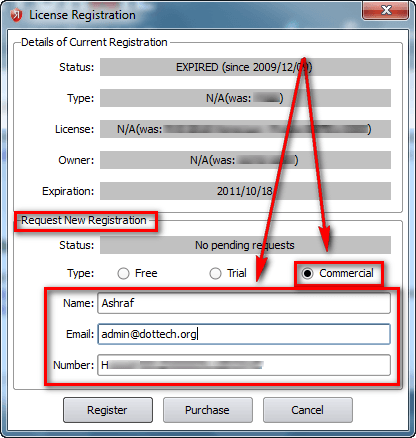
2009-12-09_0319282

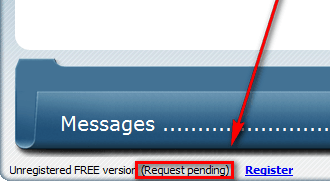
Click “Register” when you have entered everything. You should now see “Request Pending” written at the bottom left of main program window:
2009-12-09_0319502

  • Wait a few minutes while your registration is processed. When the registration has been processed, you will be told via a popup dialog box at the bottom right of your computer screen:

2009-12-09_032700

It took 5-10 minutes to process my registration so be patient.

  • Enjoy!

The license will last you one year. After the year is over, you can revert to RVS 2010 Home Free (non-commercial use only) or purchase another year’s license of RVS 2010 Home Lux for $39.95. You can even sweeten the deal by getting 25% off.

————————–

Frequently Asked Questions

Q: How long are the licenses we are getting?

A: They are 1 year licenses (12 months).

Q: How long will this promotion last?

A: This promotion will end at 12 AM (Pacific Standard Time) on Monday December 14, 2009. At that time, new licenses will no longer be given out.

Q: If I already have a subscription of RVS 2010 Home Lux, can I still use your license?

A: Yes! However, the license you get via dotTech will “replace” your license so only use it if you have less than 12 months left on your subscription.

Q: Is there a shelf life to the license?

A: Sort of. You can only get the license for free until this promotion lasts. However, after you get the license, you can activate it anytime from now and 12 months from now. The catch is the clock starts to tick once you get the license so if you, for example, activate it 6 months from now you will only have 6 months left on it.

Q: Can I share the license with my friends and family?

A: This freebie is for everyone, including your friends and family. If you would like your friends, family, and others to be able to take advantage of this great offer, please send them to this page so they can get a license for themselves!

93 Comments »

  1. Samuel December 10, 2009 at 4:45 PM (comment permalink) -

    @Someguy: As Ashraf and others have said, this program is different from your normal security programs in that it doesn’t look for problems and try to fix them instead it allows you to wipe your system of changes when you shutdown in case something bad happened. So it’s a good idea to keep normal security programs like Malwarebytes Anti-Malware to protect your system when you do save the changes before shutting down. Hope that helps.

    51
  2. siyam December 10, 2009 at 4:52 PM (comment permalink) -

    thanks,ashraf!…there goes my projects again,still playing with your new toy…nice!..Salam!

    52
  3. Nick (^c^) December 10, 2009 at 4:56 PM (comment permalink) -

    a-squared Antimalware is better than Malwarebytes and has a good proactive solution of protection.
    Myself useing it together with Comodo internet security which comes with firewall, Antivirus and Host intrusion prevention system.

    53
  4. Hugh Kent Touched This December 10, 2009 at 7:01 PM (comment permalink) -

    Would Returnil Home Lux have any conflict with the following software I have installed?

    Avast AV Free
    AVG Free
    ThreatFire
    SpyBot SD
    SpywareBlaster

    I was actually surprised that Avast and AVG had no conflict.

    Is it advisable if I were to add Returnil as an additional layer of protection?

    Thanks for the good work that you do at dotTech guys. Keep it up!

    54
  5. MichaelC December 10, 2009 at 7:27 PM (comment permalink) -

    Thanks for this! I had the Home version, so will upgrade to Luxe from this offer you have provided. Always enjoy visiting your site, and learning about new software. Keep up the good work!

    55
  6. Lutfi01 December 10, 2009 at 7:34 PM (comment permalink) -

    Ashraf, i want to ask is it safe to use this software with other antivirus and anti-malware software? i’m just worry if it will conflict with them. Thank you.

    56
  7. delenn13 December 10, 2009 at 7:47 PM (comment permalink) -

    Thank you very much. I use this program like you do…to test how a program works before I actually install it on my system. So many times my system would be fried if I hadn’t.

    57
  8. o(o.o)o December 10, 2009 at 8:26 PM (comment permalink) -

    I have trialed this software before and bumped into some problems with it. Have reverted to an older freebie version, RVS 2008 Personal, which works without a hitch on my computer. Hope other users will fair better than I did with Returnil 2010.

    For questions about the product, try posting at their support forum over at wilders:
    http://www.wilderssecurity.com/forumdisplay.php?f=100

    58
  9. Samuel December 10, 2009 at 8:50 PM (comment permalink) -

    @Hugh Kent Touched This and Lutfi01: Returnil will not conflict with other security programs if you turn it’s Anti-Malware off which is ok since the main reason to get Returnil is for the virtual system.

    59
  10. jSwann0 December 10, 2009 at 10:41 PM (comment permalink) -

    Thanks for this BSOD-only application…

    60
  11. Unlucky December 10, 2009 at 11:25 PM (comment permalink) -

    Thank you, this is truely awesome giveaway, sadly i can’t use it..

    Tried to install 9times and every time before installer finished BSOD….

    61
  12. Mordaunt December 11, 2009 at 12:18 AM (comment permalink) -

    @ Ashraf: Thank you for a really “must have” giveaway – pity that my computer obviously have other ideas!

    @ Unlucky: you are not alone! several attempts at installation and hours later I’ve decided it is a loosing battle. Everything goes smoothly up to the point of entering the “Key”. This is followed by total chaos and ultimately a non-responsive computer. Even restoring to a point just prior to installation does not work.

    62
  13. Emrys December 11, 2009 at 2:41 AM (comment permalink) -

    Again you come through for us even those such as I who are not worthy. :D

    63
  14. RoseD1st December 11, 2009 at 2:54 AM (comment permalink) -

    An error has occurred. Please use your browser’s “back” button and fill out all required fields.
    You might also be already subscribed. this is what I get when I go to enter email HeLP,I really want this,Ill give you extra strawberry shakes if you help me my email [Removed by Ashraf. Reason: Please don't post your e-mail address in a public form!]

    64
  15. Hugh Kent Touched This December 11, 2009 at 7:12 AM (comment permalink) -

    @Samuel: Thanks for the reply Samuel. It does worry me though that a number of people have warned against BSODs. I mean, Returnil is supposed to prevent that, not cause it, right? Does it do that on WinXP?

    65
  16. jumbi December 11, 2009 at 10:45 AM (comment permalink) -

    one question please:
    Following the procedure, I have received both emails just fine.
    May I install this at a later date (when I have more time to test it) or I have to install before Monday?

    66
  17. Samuel December 11, 2009 at 11:19 AM (comment permalink) -

    @Hugh Kent Touched This: It does seem that way, as to why I don’t know. My best guess would be something goes wrong during the installation or they have something that conflicts with Returnil. Just remember that for every person that gets BSODed there are people that don’t and it works for them. Being as it’s a well known program I think it’s more likly a problem on the installing computers than the program it’s self.

    @jumbi: you can install it when ever you want, just note that your license starts when you get the second email, so if you install it ini 6 months the license will only have about 6 months left on it.

    @Everyone Getting BSOD: One thing to remember about this program is that it works UNDER Windows so if any thing is wrong it will create problems for windows. Now I’m not blaming you, but as I said above I suspect that something was going on in your machines that is causing the problems, though I admit that I can’t say what. I would try asking Returnil them selves for help being as without knowing alot about your machine telling you what went wrong is very hard.

    67
  18. David December 11, 2009 at 4:10 PM (comment permalink) -

    Thanks for the excellent program. The link in your article led to version 3.0.6317.4958. The link on their website downloaded version 3.0.6317.4986. Probably not much of a difference. I went with the most recent version. Works great.

    68
  19. tejas December 11, 2009 at 10:38 PM (comment permalink) -

    Thank you very much Ashraf. Great program! You ~rock~!

    69
  20. future hacker December 12, 2009 at 2:02 AM (comment permalink) -

    Thank you so much! Il’ll try it right now. Is it the better than vitual pc 2007 and virtualbox?

    70
  21. Unlucky December 12, 2009 at 10:46 AM (comment permalink) -

    Anyone have solution to BSOD problem, i so much like to have this installed.
    @Hugh Kent Touched This: Yes, WinXP with latest updates and patches.

    71
  22. Skye-hook December 13, 2009 at 7:07 AM (comment permalink) -

    Returnil is NOT an anti-virus program! It’s much better! Please read the description by Ashraf carefully, & you’ll see. It uses your computers system, BUT it keeps everything you do while it’s turned to “On” in a separate environment kind of thing. Say you download a program or an update while it’s on, and OMG the download freezes your PC! Holy cow! IT’S OK! Returnil has kept it from being actually saved on your hard-drive! Yes, really! Just restart your computer, & WOW, it’s all back like it was before! It’s also NOT a Go-Back type thing. It’s a virtual PC. Try it out, or go see the Returnil website.

    72
  23. Skye-hook December 13, 2009 at 7:21 AM (comment permalink) -

    Anti-virus program conflicts? No.
    #38 From ASHRAF- (copy/pasted here for those above who obviously didn’t see it.)

    RVS does have an anti-malware/anti-virus component. However if you already have NOD32 and Malwarebytes you can simply disable the live protection anti-malware/anti-virus component and still use RVS as a virtual system.

    It really just depends on how you want to use RVS; there are multiple ways to put it to good use.

    User 1 may decide to keep the virtual system and live protection anti-malware/anti-virus on at all times and not have any other security software.

    User 2 may decide to keep the virtual system on at all times but disable the live protection anti-malware/anti-virus because they have a different live protection security software.

    User 3 may decide to only use virtual system and anti-malware/anti-virus protection as on-demand because they have other security software that protect them and RVS is only called in when things get really hairy.

    User 4 may use it some other way.

    RVS is versatile enough that it can be used in many ways and still provide excellent protection.

    Personally, I would be a User 3; I have the live protection disabled and use RVS’s virtual system as on-demand whenever I have doubts about a program I am about to install.

    73
  24. John December 13, 2009 at 10:15 AM (comment permalink) -

    • Statements first:
    - Have lost six hours of my night’s rest, and another three of my Sunday.
    - Not once — in my 25+ years of computer experience — have I faced a similar situation!

    • The strangest details:
    - Never saw a BSOD; never. Instead, each time during the installation, my PC would spontaneously restart. Again and again, and again. No error pop-ups, no alerts, no warnings. I thought I might have a corrupt file, so I downloaded the “rvs_2010.exe” for the second time (file size identical, to the bit).
    - Many failed attempts further on to install, I had the bright (!) idea to exit/disable the following, in desperate hope that the cause was due to some kind of code conflict: “Advanced SystemCare”, “Advanced System Protector”, a-squared AntiMalware”.
    - Alas no cure; all hope shattered!!!
    - OK, one more programme remaining to be disabled: My “avast AntiVirus”. Hey… The RVS seemed to finaly install…_ Oops! Computer restart. I got quite upset this time, little did I know at this point what other surprise awaited me.
    - With the new start-up, all anti-spy/malware and anti-virus were re-activated alright. Phew! Try again, then.
    - A Setup Wizard message pops up: “A prior uninstall of a Returnil product did not complete properly. Please complete the uninstall of this software and restart your computer before installing Returnil Virtual System 2010.”
    - Must click on OK, followed by “Finish” !!!
    “Returnil Virtual System 2010 Setup Wizard ended prematurely”

    - Revo Uninstall does not find Returnil. MS Control Panel / software know not of such a thing. Needless to say that I run all possible programmes to hunt for truncated leftovers. I also did a manual clean-up, editing the registry at a few places, and looking all over for any Returnil sub-directory. I also fail to check myself, cursing the whole darn thing, but just not kicking the machine…

    There I am now: Can’t install, not can I uninstall whatever is hidden somewhere.
    Once upon a time I remember that software were politely suggesting to “repair” their own stuff. What an old-fashion notion!
    ___

    AN APPEAL TO Ashraf, OR ANY OTHER KNOWLEDGEABLE “Technologian AND/OR THE TEAM BEHIND Returnil :

    How can I solve this huge problem?
    ___

    PS – @Samuel (#67)
    Please, do not repeat such argument as “Just remember that for every person that gets BSODed there are people that don’t and it works for them.”
    Though well meant (I accept it to be so), this offers no consolation, but rather frustrates even more.

    74
  25. Samuel December 13, 2009 at 10:39 AM (comment permalink) -

    @John: I agree that it doesn’t help in the best case and make it more frustrating in the worst. The reason I said it was for people who are scared to try it because of all the BSOD. I wanted them to know that it could work for them.

    On to your problem. As I said above since Returnil works under Windows tring to fix it can be very hard. But that very fact leads to what I think is happening on your system. I admit to being unsure why you had the problems, but from what I can tell the reason you can’t uninstall it fully is that because it runs under Windows Returnil modifies the BCD/Boot.ini or the MBR. Since the uninstall didn’t work correctly, can’t say why, my guess is that the modification is still there in the BCD/Boot.ini or MBR and that’s why you can’t reinstall it. As to fixing them I can’t really help to much, since most of my knowlege is for once the OS is running, but I hope you can use those ideas either to fix it your self if you know how or to find what you need.

    75

Leave A Response »