Free SoftMaker Office 2008! (Plus SoftMaker donates money to charity every time someone downloads.)

December 13, 2010 33 Email article | Print article

logo-softmaker-office-2008This article was originally written last year. However, SoftMaker is once again giving out SoftMaker Office 2008 for free this year – until December 31, 2010 – so I have brought this post to the front instead of writing a whole new post. People who didn’t get it last year can get it now. Enjoy! Thanks Amnesia for the tip!

In October I posted about how to get Ashampoo Office 2008 for free. SoftMaker Office 2008 is the exact same software as Ashampoo Office 2008 (Ashampoo Office is a rebrand of SoftMaker Office) with one difference: SoftMaker 2008 includes BasicMaker while Ashampoo Office did not. So for those that don’t have Microsoft Office and don’t want OpenOffice, yet did not get Ashampoo Office 2008, here is a chance to grab SoftMaker Office 2008 for free (promotion ends December 31, 2009). Even if you do have Ashampoo Office 2008, you may want to consider getting SoftMaker Office 2008 anyway because of the extra BasicMaker software. Plus there is a twist: for every download of SoftMaker Office 2008, SoftMaker will donate € 0.10 (about $.15) to BetterPlace.org, a charity organization (NOTE: The money will only be donated if you register with a valid e-mail address – you can’t just download the installer itself). Another advantage is everyone that downloads SoftMaker Office 2008 via this promotion gets free tech support and future SoftMaker Office upgrades at reduced prices.

The same features (+ BasicMaker)…

  • TextMaker 2008 (word processing; think Microsoft Word or OpenOffice Write)
  • SoftMaker Presentations 2008 (create powerpoint presentations; think Microsoft PowerPoint or OpenOffice Impress)
  • PlanMaker 2008 (work with spreadsheets; think Microsoft Excel or OpenOffice Calc)
  • BasicMaker 2008 (allows for users to create scripts in the SoftMaker Basic programming languages – similar to how VBA is for Microsoft Office)

…and advantages…

  • SoftMaker Office 2008 has a very small footprint, (taking up less than 80 MB on your hard drive after installation and uses 1/4 the RAM of Microsoft Office while running).
  • SoftMaker has native support to run SoftMaker Office 2008 from a USB/flash drive (to run SoftMaker Office 2008 from a USB/flash drive, run “usbstick.exe” found in the folder you installed SoftMaker Office into [by default it will be C:\Program Files\SoftMaker Office 2008]).
  • Importing and exporting Microsoft Office and OpenOffice format files in SoftMaker Office 2008 is a breeze.

…I mentioned for Ashampoo Office 2008 apply to SoftMaker Office 2008. At the same time, the shortcomings are the same also: SoftMaker Office 2008 does not support the new Microsoft Office 2007 generation .x formats (like .docx, .pptx, .xlsx, etc.).

As I said with Ashampoo Office 2008, SoftMaker Office 2008 will not be replacing Microsoft Office or OpenOffice any time soon, but it is definitely a worthy alternative to look into if you are lacking in the productivity suite genre.

That being said, to get SoftMaker Office 2008 for free (and help out a charity at the same time), follow these simple directions:

Version being given out for free: v2008 (rev 505)

Supported OS: Windows 2000 or higher and Linux

Download size: 58.9 MB

  • Visit the promotion page and click on 2009-12-16_185722.
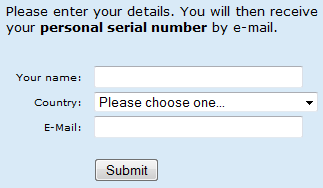
  • You will need to fill out a short form:
2009-12-16_182019

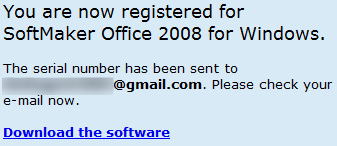
Fill out the form and click “Submit”. You will get a confirmation message:
2009-12-16_182234

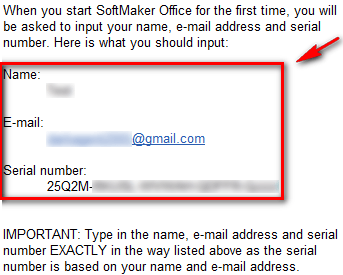
  • Check the inbox of the e-mail you registered with. There will be an e-mail from “SoftMaker Software GmbH <info@softmaker.de>” with the subject of “SoftMaker Office 2008 for Windows: Serial number and download”. In the e-mail you will find your registration information:
2009-12-16_183140

Copy the serial number and remember the name and e-mail address.

  • Download and install SoftMaker Office 2008.
  • During installation you will be prompted to enter your registration information:

2009-12-16_1832342

Enter your registration information and finish installing. Be sure to enter the registration information exactly as it appears in the e-mail you received or else it won’t work.

  • Enjoy!

If you have any problems, post below and I will try to help.

Thank you to the numerous many people who informed me about this freebie! I was not originally planning on publishing an article about this – because I already talked about Ashampoo Office 2008 – but the donation-of-money-to-charity changed my mind.

33 Comments »

  1. Sandeep December 16, 2009 at 8:04 PM (comment permalink) -

    Hi Ashraf,

    Greatly reviewed and i will be downloading it as this is for a good cause (even if i decided to use it or not). Would be better if with every download link you put, indicate the size of the download allowing the users to decide when to download (depending upon how big the size is).

    Is this offer for a limited time or it’s a freeware??

    And you said it supports Windows 2000 and higher, so it will be supporting Windows 7 as well, isn’t it.

    Thanks Ashraf.

    1
  2. smokexx December 16, 2009 at 8:05 PM (comment permalink) -

    Freebies! Freebies! Thanks for this again Ashraf! A free alternative (and at the same time helping a charity) is always welcome. Will download this when I get home.

    2
  3. smokexx December 16, 2009 at 8:14 PM (comment permalink) -

    @Sandeep

    Promo ends Dec. 31.

    @Ashraf

    I too agree with Sandeep about the download size indicator. Thanks again.

    3
  4. Shueygal December 16, 2009 at 8:19 PM (comment permalink) -

    Thanks Ashraf. I already have Ashampoo Office 2008, but I certainly will be downloading this one, and especially for the charity aspect. Thanks again.

    4
  5. Liam K December 16, 2009 at 8:25 PM (comment permalink) -

    Not worth it to drop Go-OO for 1 cent to charity :P

    5
  6. Ashraf December 16, 2009 at 8:46 PM (comment permalink) -
    Mr. Boss

    @Sandeep: Okay. I will try to remember to do that from now on.

    The promotion ends on Dec 31st but I also have another link for free SoftMaker 2008 but it isn’t linked to charity.

    Yes it works on Win7.

    @smokexx: You are welcome=).

    @smokexx: Done – I added download size.

    @Shueygal: You are welcome.

    @Liam K: Oops. That should say 15 cents.

    6
  7. Jon E December 16, 2009 at 8:47 PM (comment permalink) -

    Thanks Ashraf,

    This is a great cause and I am glad I am helping others out.

    Have a great evening and keep up the great reviews.

    7
  8. gurugyi December 16, 2009 at 9:30 PM (comment permalink) -

    Thanks Ashraf… It’s a good review.

    8
  9. calebstein December 16, 2009 at 9:53 PM (comment permalink) -

    Do I have to download it to have them donate? I registered but haven’t downloaded. Will they still donate?

    9
  10. Ashraf December 16, 2009 at 10:26 PM (comment permalink) -
    Mr. Boss

    @Jon E: You are welcome =).

    @gurugyi: You are welcome =).

    @calebstein: I am not particularly sure. In their FAQs it says “For every legitimate SoftMaker Office 2008 download (verified by the validity of your e-mail address), SoftMaker will donate € 0.10 to charity projects on betterplace.org.”

    10
  11. siyam December 17, 2009 at 12:30 AM (comment permalink) -

    Thanks meng!,was just thinking of installing abyword,i needed only a word processing software as the workstation is setup mostly for graphics works..ms office too expensive,open office too heavy..then you posted this,Nice! Salam again,meng.

    11
  12. rachana December 17, 2009 at 5:32 AM (comment permalink) -

    GOOD EVENING

    OFFICE 2007,2010,AND THIS CAN BE INSTALLED ON ONE SYSTEM.WILL IT CAUSE ANY PROBLEM?

    ANY HOW I DOWNLOAD THIS FOR A GOOD CAUSE

    THANKS FOR YOUR REVIEW.

    rachana

    12
  13. alalata December 17, 2009 at 6:08 AM (comment permalink) -
  14. Refpeuk December 17, 2009 at 8:10 AM (comment permalink) -

    What does basicmaker do?

    14
  15. Ryan December 17, 2009 at 8:32 AM (comment permalink) -

    Thanks Ashraf,

    Even though, I have 2007 and 2010, I will download it for a good cause.

    Cheers!

    15
  16. Rocky December 17, 2009 at 11:09 AM (comment permalink) -

    I already have Office but I downloaded this anyway. Good idea to have a back-up plus the donation.

    16
  17. normofthenorth December 17, 2009 at 11:36 AM (comment permalink) -

    I have MS Office 2007 (thanks to Ashraf!), but I usually use this (Ashampoo version) instead because it opens so much faster and doesn’t overload my laptop. Occasionally I have a special need — like opening a DOCX file — that drives me to open MS Word. (Or I sometimes just run docx2rtf.exe .)

    17
  18. DaveG December 19, 2009 at 3:20 PM (comment permalink) -

    Anyone having problems getting a promo code email? I’ve submitted 2 times now and still haven’t gotten a response. And yep- I whitelisted their domain.

    18
  19. Rocky December 21, 2009 at 9:08 AM (comment permalink) -

    @Rocky: Glad I downloaded this. Yesterday I downloaded a Word doc but I kept getting the “not responding” message. I was able to open it with Softmaker Text with no problem.

    19
  20. Roger December 23, 2009 at 4:55 PM (comment permalink) -

    Hi Ashraf,
    I downloaded and installed the Softmaker Office 2008 program and I really like it. Today was the first time I went to print something out using it and nothing happened. I had to fire up WORD to print out my letter. Any thoughts? Thanks for helping me and others get this software free. It doesn’t crap out like WORD does.

    20
  21. Roger December 24, 2009 at 12:06 AM (comment permalink) -

    Welcome back Ashrah,
    I’m not sure why, but the program prints out perfectly now. Thanks again for the heads up on it.

    21
  22. Leslie December 13, 2010 at 11:00 PM (comment permalink) -

    Hi Ashraf,

    You forgot to mention that there is a Linux version as well.

    22
  23. Ashraf December 13, 2010 at 11:02 PM (comment permalink) -
    Mr. Boss

    @Leslie: Thanks for the heads up but I beat you to the punch by updating the post already. Again. =P (I am just teasing.)

    It now reads:

    Supported OS: Windows 2000 or higher and Linux

    23
  24. Dru December 14, 2010 at 12:22 AM (comment permalink) -

    I’ll be installing a free alternative to MS Office on a new computer for my in-laws. It is their first computer. I’ve always used Wintel/MS Office machines and this will be my first foray elsewhere. I assumed I was going to install OpenOffice, then this post comes along :-) Any recommendations as to which free alternative to MS Office is best for my elderly family members and their first computer?

    24
  25. Clement December 14, 2010 at 3:05 AM (comment permalink) -

    Thanks for all Ashraf.
    Just a word to mention that this software can be made portable easily. See http://www.softmaker.com/english/tipsof_en.htm

    25

Leave A Response »