
Can’t access your favorite website but are not sure if the problem is at your end or theirs? Get a second opinion with DownForEveryoneOrJustMe.com
January 4, 2012 19
Email article | Print article
It is happened to the best of us: we load up the computer to visit our favorite website and instead of being greeted with the familiar homepage, we get a 404 or connection error message. Before the withdrawal symptoms set in, it is always nice to know if the reason you can’t access the website is because you have a connection problem and you can fix it or because your favorite website truly is down and it is out of your control. DownForEveryoneOrJustMe.com is a website that allows us to do just:

DownForEveryoneOrJustMe.com allows users to enter in a website URL (enter the website URL where it says “google.com” and hit “Enter” or click on “or just me?” after you have entered the website URL) and then it checks to see if it can access the website associated with the URL that was entered. If it can, it tells you so:
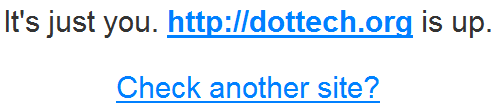
Depending on which result you get, you can figure out if the problem is at your end or at the website’s end.
One quick tip when using DownForEveryoneOrJustMe.com is if you want to quickly check if a website is up or not, you can simply do http://downforeveryoneorjustme.com/[INSERT WEBSITE URL] and go directly to checking the website instead of landing at the DownForEveryoneOrJustMe.com homepage. For example, I can go to http://downforeveryoneorjustme.com, type in dotTech.org, and get the result or I can go to http://downforeveryoneorjustme.com/dottech.org and get the result directly. Or, you can use a simple bookmarklet (created by Jermey):
javascript:window.open(“http://downforeveryoneorjustme.com/”+window.location.hostname);void%200
To use the bookmarklet, create a bookmark on the bookmark bar and enter the above code in the “location” or “URL” section. Then, whenever you visit a website that you think is down, click on the bookmarklet and it will automatically enter the website’s URL in DownForEveryoneOrJustMe.com and display the result for you.
DownForEveryoneOrJustMe.com is a very handy tool. I use it all the time when I have connection problems with dotTech. It allows me to find out if it is because my ISP sucks or if my website truly is down in which case I go yell at my webhost. I am sure everyone will find it very useful also.
19 Comments »
Leave A Response »


Wow, the bookmarklet is awesome.
Or you can use ping :)
This does come in handy though, I have to admit. I found it a while ago.
Thanks for the tip. Like to learn something new each day. Helps keep me young.
Or you could make a Firefox address bar keyword search. For instance, just type in the address bar dfeojm dottech.org and press enter, and it will tell you. To do that, go to the website and right click the search box. Add a keyword for that search, and add the “Name” as something like Down for Everyone or Just Me and the keyword, as in the example above, dfeojm.
@Locutus:
Sorry, I didn’t understand the explanation. I tried the dfeojm dottech.org>Enter in the FF address bar and got ‘couldn’t locate any documents’. Clearly, I’m doing something wrong.
Hey Ashraf, this reminds me. Have you written an article on YubNub? It saves me so much time.
For example, if I change keyword.URL in about:config to http://yubnub.org/parser/parse?command=, then I can type dojm google.com into the address bar to check Google. I can also do g test to do a Google search for test, etc.
I am aware of “DownForEveryoneOrJustMe.com” for about a year now as I had to find a solution for some friends who own sites and were calling me all the time to check if their site was working or not :-)
@Liam K: Hmmm. I forgot about that! However I think I will stick with the default Google search and the custom FF bookmarks w/ keyword search as I had just talked about above.
This site only works for a direct URL. I have a couple of sites which use redirection and this site says they are down when I can access them OK.
As you won’t know if an address needs redirection this site is not so useful as I’d hoped
If the “problem is at my end” how do I access the site referred to? Perhaps my logic is faulty, but I would expect “a problem at my end” to impact on all sites I wish to visit.
@Mordaunt
Let me help you:
1) Suppose u got a site which is not working for you (just this one all the others work)
2) Suppose you have a site and it seems fine to you (because of your browsers history/cache) but all your friends say that they see no site at all..
In this cases, this tool comes handy :-)
@ jumbi – thanks. I honestly never thought that the first scenario was possible. The second one, I presume, is more likely?
Super idea! But who do I ask when DownForEveryoneOrJustMe.com is down??? Har-har-har
Always wanted a tool like this. Thanks Ashraf!
@ Mordaunt
Yes indeed, the 2nd scenario is more often.
An example of the 1st scenario is when you get a new domain and your internet provider has not yet updated their DNS servers (officially it takes up to 2 days), so its not visible to you but its visible to other people. Rare example but its happennig.
@ Grant M
Haha…
(In that case, we should find out other similar tools)
check mine too : isthatsitedown.com , it has tool to check many sites in one click and the top ten sites list
ive tried this and found a site is down for “just me”…….so, ok how do I get it back up?
and what happens if I can´t access to DownForEveryoneOrJustMe.com?
then is it just me or also them
http://www.fottus.com/wp-content/uploads/2066%20-%20trollface/trollface%20(1).jpg
Ok this is quite helpful..but when it says its just me how can I be able to access the website again?? Desperately need to know..




