Free 1 year license of Advanced SystemCare Pro!

January 19, 2010 17 Email article | Print article

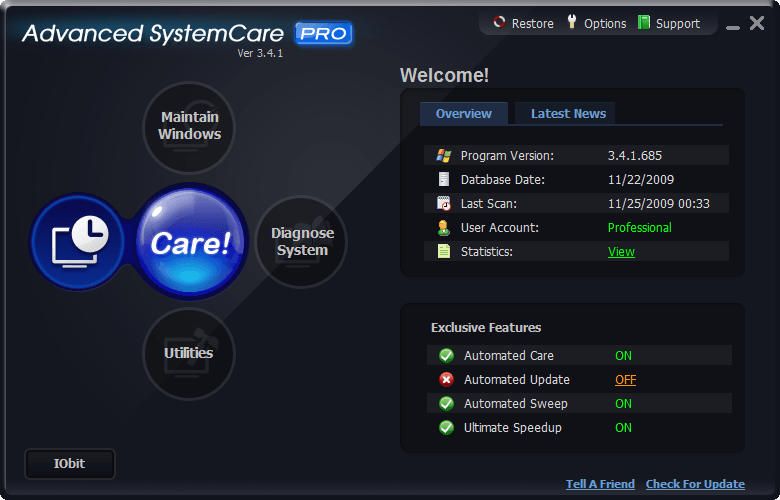
2009-11-25_004250As I am sure most of you know already, Advanced SystemCare Pro is a popular system optimization/management/cleaning/etc. tool from IObit. Regardless of IObit’s questionable tactics for their Internet Security 360 software, Advanced SystemCare Pro itself is fairly good software, although somewhat a RAM hog sitting in the background all the time (last time I checked it uses ~40 MB RAM while idle in the background). Of course IObit has run multiple Advanced SystemCare Pro promotions recently, so you may already have a free 1 year license. However, it doesn’t hurt to renew your license or to grab it now if you don’t have it yet.

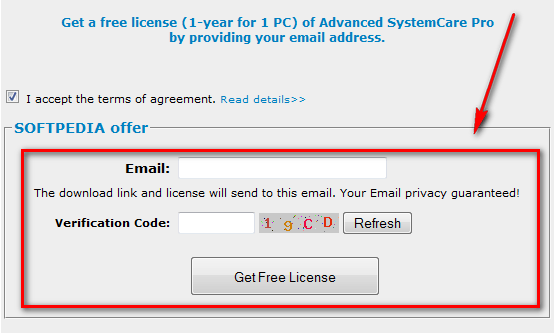
To get the free 1 year licenses of IObit Advanced SystemCare Pro follow these simple directions (this giveaway is sponsored by Softpedia – a quick “thank you” visit to them is appreciated):

  • After you have filled out the form, you will be given a download link and your registration information:
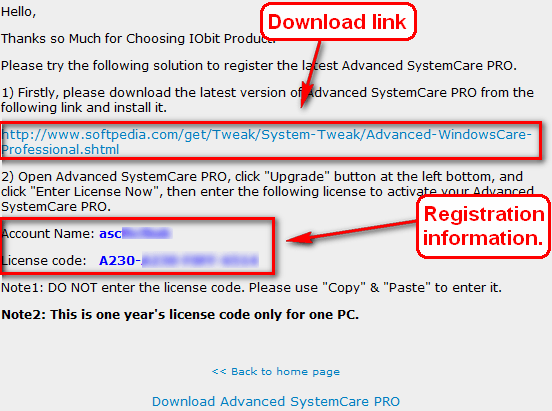
Keep this page open because you will need to copy + paste the account name and license code soon.

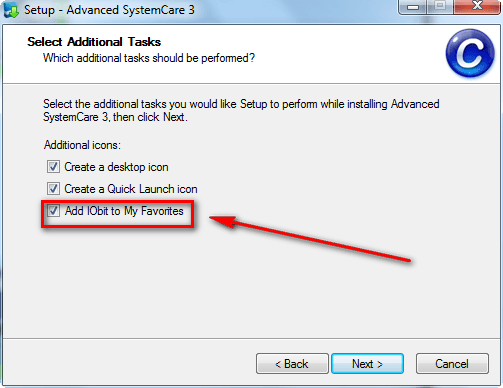
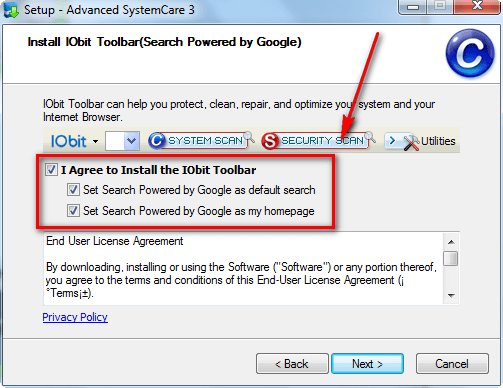
  • Download (click here) and install Advanced SystemCare Pro. Take note during installation options to add IObit to favorites and to install IObit’s toolbar are checked by default:
2009-11-25_003144

2009-11-25_003221

Uncheck them if you don’t want them (most people don’t want them or need them because they are junk – I don’t want or need them).

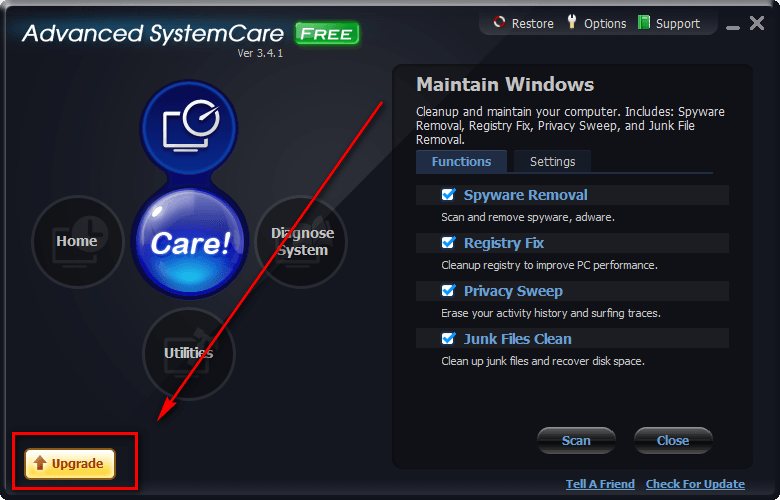
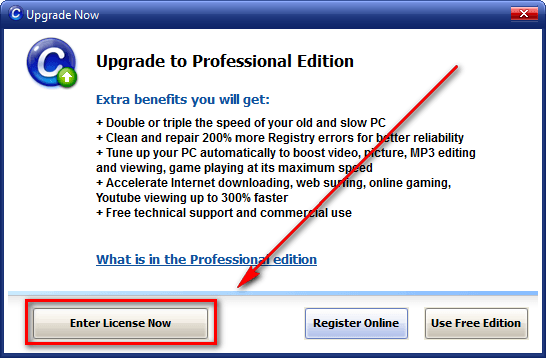
  • After installation, “upgrade” the Free version to Pro by entering the account name and license code you got earlier:
2009-11-25_003353

2009-11-25_003418

2009-11-25_003432

2009-11-25_004108

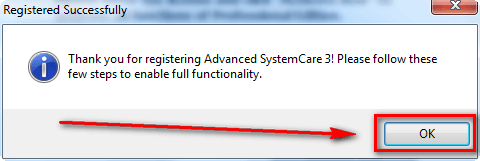
There will be a short four step wizard to follow after you click “OK” to setup the new features you unlocked by “upgrading” to Pro.

If you are having trouble successfully upgrading to the Pro version, try these two tricks:

  • Disconnect your network connection temporarily, and try to activate Pro again. After successful activation, you can enable your network connection again.
  • Disable your live protection anti-virus/anti-spyware/firewall, and try to activate Pro again. You may re-enable it after successful activation.
  • Enjoy!

If you have any trouble getting this, please post below and me – or other dotTechies – will try to help.

Thanks Ozzie!

17 Comments »

  1. Adrian January 19, 2010 at 7:59 PM (comment permalink) -

    Thanks Ashraf!

    My previous 1-year license was just nearly due…

    1
  2. Sandeep January 19, 2010 at 8:43 PM (comment permalink) -

    Thanks Ashraf.

    I already had one year license from the previous promotion and it still has around 10 months left.

    Thanks Anyways.

    2
  3. Ashraf January 19, 2010 at 8:46 PM (comment permalink) -
    Mr. Boss

    @Adrian: You are welcome =).

    @Sandeep: 12 months > 10 months – I would renew it with this new promotion.

    3
  4. Sandeep January 19, 2010 at 9:59 PM (comment permalink) -

    Yeah sure. Alright will do then.

    Thanks Ashraf.

    4
  5. John G. January 19, 2010 at 10:28 PM (comment permalink) -

    So, what do you do? Download the new one and install it over the old one.

    5
  6. Ashraf January 19, 2010 at 10:30 PM (comment permalink) -
    Mr. Boss

    @John G.: Not 100% sure since I am not using Advanced SystemCare Pro. However, I bet you can just re-activate it with the new serial key and not have to download it again.

    6
  7. Shueygal January 19, 2010 at 11:20 PM (comment permalink) -

    Thanks Ashraf,
    Never have too many good programs. Going to renew my previous one. Thanks

    7
  8. Graham January 20, 2010 at 12:07 AM (comment permalink) -

    Thanks Ashraf – I’d lost this.
    Would you recommend the deep reg scan setting? (Vista Ult 64 bit)

    8
  9. Sandeep January 20, 2010 at 6:18 AM (comment permalink) -

    You can get as many licenses as you want. Just put in any e-mail address (write/wrong doesn’t matter) and you will be getting license after you click “Get Free License”. In their earlier promotion the key was e-mailed but this time it’s shown straight up on clicking get license.

    9
  10. Alan January 20, 2010 at 7:07 AM (comment permalink) -

    Great. Got the renewal info but have nowhere to put it. All it says in the lower left hand corner is IObit and tries to take me to their page. Can’t find renewal option on any other menu.

    10
  11. ruudster101 January 20, 2010 at 8:28 AM (comment permalink) -

    @10 Alan.

    Go search in the main window for overview>>>user account-professional>>>install new license…copy and paste your new info….thats it… Enjoy

    11
  12. Jaap January 20, 2010 at 9:17 AM (comment permalink) -

    Thanks Ashraf for this article en thanks ruudster101 for your explanation how to install the new license.
    I had the Pro version of Advanced SystemCare on one of my pc’s and I took a look at the installed license:
    “expiring date: 2010-03-17; 339 days to go”. Very strange. I would expect 56 days until March 17?!
    But after installing the new license the expiring date is correct (2011-01-20) and I have 365 days to go…

    12
  13. tunde February 5, 2010 at 6:46 PM (comment permalink) -

    hi, please the offer has ended, kindly send me d user name and activation code. i need to reactivate my license

    13
  14. sahil May 5, 2010 at 4:29 AM (comment permalink) -

    hi, please the offer has ended, kindly send me d user name and activation code. i need to reactivate my license

    14
  15. RAMESH December 19, 2010 at 6:24 AM (comment permalink) -

    Hi Ashraf
    How does Advanced System Care compare with “jv16″ that you offered a few days ago (which I downloaded and installed)

    Ramesh

    15
  16. Identify theft prote March 6, 2011 at 10:57 AM (comment permalink) -

    WOW! Thanks its working. Great share! :)

    Identify theft protection

    16
  17. gjohnson March 6, 2011 at 5:54 PM (comment permalink) -

    That offer didn’t last long!
    Missed out. Rats!

    17

Leave A Response »