
How To: Find your mouse cursor after you have lost it on Windows
November 1, 2011 42
Email article | Print article
We move our mouse (or trackpad) but the cursor is no where to be found. Sometimes it camouflages with the background while other times our eyes just play tricks on us. Nonetheless, it has happened to the best of us. I just came across a simple trick to help out in situations like these and figured I should better human-kind by sharing it with all dotTechies.
The trick is very simple; it involves enabling an option in your mouse settings so every time you press the Ctrl key (left or right Ctrl) on your keyboard, your mouse cursor will be highlighted with circles so you can easily find it. In other words, every time you press the Ctrl key something like this will happen:
The round circles around the mouse pointer are what show up when you press the Ctrl key.
To enable this feature (it is built into Windows) follow these simple directions:
- Open “Start Menu”.
- Go to “Control Panel”.
- Find “Mouse” and click on it. “Mouse Properties” should open.
- Go to “Pointer Options” and check “Show location of pointer when I press the CTRL key”:
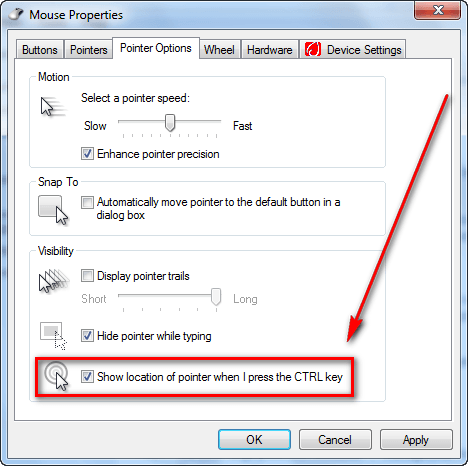
- Click “Apply” and “OK”.
Now whenever you press the Ctrl key (left or right) the round circles should surround your mouse pointer indicating where it is located.
Thanks Someguy!







I was already aware of this, but still, I’m sure it’s very helpful to others.
What is the registry hack for this?
That property does not show up on my property sheet.
(Win XP SP3, Logitech Mouseware driver)
I can’t believe this is a topic, as I can’t believe most of the responses of most places of the internet. If you’re anywhere in the 20th or 21st century, and, have been associated with computers for more than ten minutes, then how can it be possible to “loose” your mouse cursor? I can’t believe some of the responses from people to web sites and to topics, is it so hard to stay within the ballpark of technology? Win98, WinSE, operating with DOS, Wow – prehistoric. If you have more than a dollar fifty you can upgrade anything. Keeping up with the Jones’s isn’t what it’s all about. Asking to put a jet engine into a Model T is the most rediculous. Most of the responses everywhere could be eliminated if people would use the part of their body that seems to be depleating. Good God. It doesn’t take very much to operate or keep ones computer up to par. Most of the time it is user error.
@Mike:
You are so superior, or are you.
Why must you gratuitously make snide comments about people with vision defects that can give difficulty locating a cursor on a some backgrounds.
People who are otherwise more than competent,
people who had a good upbringing that taught them to be polite,
and taught them how to spell,
and the difference between “LOOSE the cursor” and “LOSE the cursor”.
This may help ! !
http://www.ericpinder.com/html/lose.html
Linux Mint or Ubuntu has a very similar method of locating the mouse with the Ctrl key in the preference menu. Not sure if the KDE version has it or not. I prefer Gnome.
@Someguy:
Thanks for the tip. I actually came here looking for other help about my mouse though. can you help?
After surfing the web for some time and having Mozilla open with a few tabs open inside one window, my mouse begins to operate erractically. The pointer starts to lag behind.
Also i wonder f yo have any idea as to why when I watch videos the video lags behind the audio a bit then catches up to it. This may happen quite often during a video. The video can be from Netflix or an online Webcast sermon from Harvest church or David Jeremiah.org I have a 2 yr old Systemax with a Dual Core processor 5050e, 2.60Ghz 3.25 GB of Ram, WinXP Pro with approx 65% of the C drive free and I have defragged scanned with anti virus and also disabled user switching. I also placed my pointer speed on fast hoping that would help.
Anything else you can think of? It would be greatly appreciated. I live on a low income budget of only $269.00 a month state disability and cannot afford a PC fixer guy. So all i get is what I can find online.
Thanks so much for your time,
Perhaps a browser Addon is hooking onto your mouse.
I suddenly lost control of right clicks – the context menu vibrated drastically.
I downloaded Autoruns
http://technet.microsoft.com/en-us/sysinternals/bb963902
Under the Explorer Tab I saw that the file sharing application DropBox had made TEN hooks to itself.
I unchecked the 10 boxes for these hooks to disable and my mouse worked properly again.
With those hooks disabled I could still share files and decided those hooks had no legitimate purpose.
I found dropbox application folder files with timestamps at the very same second as the System Events recorded power up.
I do not trust applications that try to start-up before the Firewall has started – what are they phoning home with ! ! !
DropBox may be legitimate but it totally lost my trust and I chose to restore a partition image and ensure there was no evil remnant.
Thank you; Great tip! Now all we need to do is find a way to extend the life of these little beasts.
Hello I need help I havn’t lost my cursor however when I open this program Sony vegas my cursor disappears and the pointer is never there when i click control it shows where my cursor is but the cursor isn’t there? I need HELP!
Thank you! I love this for presentations/demos!!
Really great!
@Mike: Well, Mike, I’ve been using Windows since it was MS-DOS :-) I just bought a new laptop with Windows 8 installed. I knew about the CTRL key option already, but it hasn’t helped with my current situation. The pointer is visible on the initial screen and the user selection screen, but once it opens the main page with all the tiles, it’s invisible. The ctrl key will show me where it is, but nothing I’ve tried allows me to see it. I changed it to inverse colors (i.e., black instead of white), but it still doesn’t appear. I can get around somewhat by using the keyboard, but of course there are limits to what you can do that way. If you or anyone else has any suggestions, I’m open. At this point, the machine isn’t much better than an expensive paperweight.
Dear all,
I recently bought a Sony Vaio with Windows 8 which was working just fine. However, yesterday I turned it on and the pointer had disappeared. So I’m kind of ‘locked’ in Windows 8′s initial screen. I can’t do anything and I don’t even know if it’s a Windows problem or a Sony problem. Can anyone help me??
@Lacerda:
Lacerda…have a similar problem with a brand new Toshiba Satellite C855 (non-touch screen) laptop pre-loaded with W8. A secondary identity has completely lost the onscreen pointer/cursor from the TouchPad. Have attempted to tweak the TouchPad settings but to no avail. The primary identity has the pointer/cursor…just not the other identity…
Why is it so bad to lose a pointer?
I found this thread trying to figure out where my pointer is when running Netflix on my Linux system.
Hardly makes me stupid.
[@alan]
Hopefully he found his pointer to click on the link :p
[@Mike]
Why is it so bad to lose a pointer?
I found this thread trying to figure out where my pointer is when running Netflix on my Linux system.
Hardly makes me stupid.