Youtubian: Improve YouTube with a simple bookmarklet

January 4, 2012 11 Email article | Print article

Have you ever looked at the YouTube interface and thought, “this could use a face lift”? Or perhaps you thought, “a download link and some fancy drop shadows would be nice”. Well, then, let me introduce you to Youtubian.

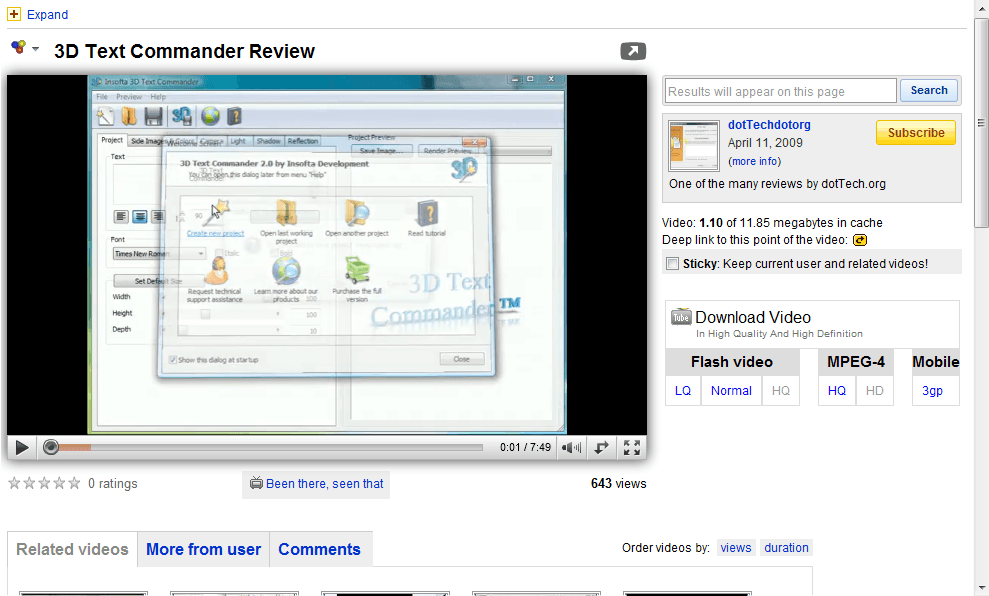
Youtubian is a simple bookmarklet that can improve YouTube by cleaning up the interface, and adding a few extra handy features. For example, you can turn this…
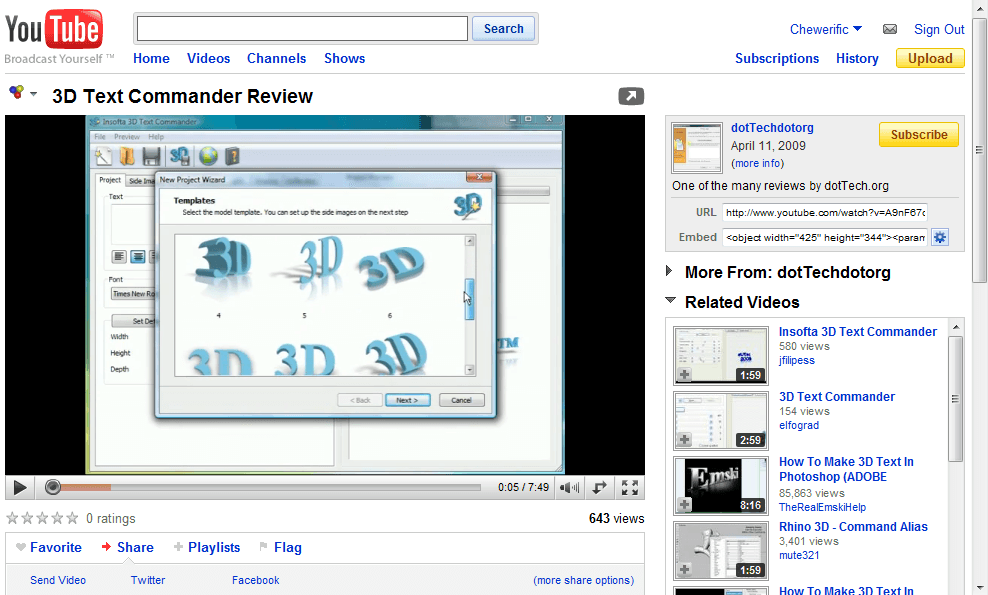
…into this:

The Youtubian interface removes a lot of clutter, including the entire top bar, and adds a new search box that loads inside the current page.  It also adds links to download the video and a nice drop shadow beneath the video.  It includes the original video description and a counter of how much of the video is cached.

If you ever want to access the top bar again, just click “Expand” in the upper right corner and the old bar will appear.  Do be warned, however, the top bar’s links open in the current tab.

Since it is a bookmarklet, Youtubian will work with most all browsers as long as you have JavaScript enabled. Being a bookmarklet also means you will have to use click on it every time you visit YouTube. It also restarts the video that is loaded.) However, once you have Youtubian enabled, using the search function allows you to keep Youtubian activated for all videos you watch. All in all Youtubian can be a very handy tool.

You can grab Youtubian from its homepage. (To install drag the red “Youtubian” box to your bookmarks toolbar.  To use it, click on it.)

11 Comments »

  1. Sandeep January 29, 2010 at 7:15 PM (comment permalink) -

    Thanks Ashraf.

    Will try that.

    1
  2. Locutus January 29, 2010 at 7:23 PM (comment permalink) -

    @Sandeep: Erm, it was me- Locutus. Just sayin’. :D

    2
  3. Yochanan January 29, 2010 at 8:49 PM (comment permalink) -

    Good idea, but you’d have to click the bookmarklet every time you visited YouTube. The author says there will be a Greasemonkey script soon, however. I recommend YouTube Enhancer which provides a “Download Link + Quality Selector + Rollover Preview + Media Controller + Media Resizer + More…”

    3
  4. Locutus January 29, 2010 at 9:45 PM (comment permalink) -

    @Yochanan: Ahh, but does YouTube work in all major browsers excluding jokes… I mean Internet Explorer?
    (Sorry to those who like IE)

    4
  5. OldElmerFudd January 30, 2010 at 12:13 AM (comment permalink) -

    Thanks, Locutus! i’ll give this one a try on the laptop. I love bookmarklets; zap colors, print what you like, and readability are my favs.

    5
  6. Farrukh January 30, 2010 at 2:47 PM (comment permalink) -

    Great :)

    I really like this way of customization of YouTube. However Download Video feature is not working. May be it will work of some other video.

    I tested in ChromePlus (Chromium) browser

    I wonder if we can customize this with our own choices.

    Thanks a lot Ashraf for bringing such useful thingy.

    6
  7. Locutus January 30, 2010 at 5:00 PM (comment permalink) -

    @Farrukh: Well it just grabs an external script so I’d say you can’t.
    (And ‘scuse me, it was me that wrote this. Maybe I should start signing my posts?)

    7
  8. Jyo January 30, 2010 at 6:09 PM (comment permalink) -

    Nice article “Locutus” ^_^

    8
  9. Locutus January 30, 2010 at 6:35 PM (comment permalink) -
  10. Ashraf January 4, 2012 at 11:45 AM (comment permalink) -
    Mr. Boss

    This still works with the new YouTube, by the way.

    10
  11. meldasue January 5, 2012 at 3:24 AM (comment permalink) -

    It just fixes random pages, not the new YouTube homepage, it appears? I’d almost be willing to install Firefox (which I hate) if it allowed me to customise the homepage again. (Again: Google has too much time on its hands. Don’t fix what ain’t broke.)

    11

Leave A Response »