
 Email article
Here on dotTech, without a doubt one of the most popular questions we are asked is “which anti-virus should I use for my computer — what is the best anti-virus for Windows”? Often times the person asking is looking for a free security solution as opposed to a paid one. To address this question, we have created this review of best free anti-virus program for Windows and are going to directly address the issue of: what is the best free anti-virus program for Windows?
There are quite a few free anti-virus/anti-malware software for Windows. However, we picked what we felt are the top six best free anti-virus programs for Windows, tested them, reviewed then, compared them, and present you with our findings. These six are almost the most popular and most commonly inquired about, hence why we picked them.
Also, to be clear, to be included in this review of best free anti-virus programs for Windows, a program must have live protection features. Many free versions of anti-virus or anti-malware programs only have on demand protection and don’t have live protection (e.g. Emsisoft Anti-Malware), hence they will never be included in this review.
That said, when evaluating best free anti-virus programs and trying to decide which one you want to use, there are two main areas which you should look at: features and performance. So, lets get started.
This review is part of our Best Free Windows Software section. Check out more articles on the best free Windows programs from here.
Table of Contents
Here at dotTech we’ve been reviewing and comparing the best free anti-virus programs for Windows for over four years. During this time, we’ve updated this review of best free anti-virus program for Windows multiple times; this review of best free anti-virus program for Windows is currently on its 4th Edition (fourth update).
This Summary of Update section provides you with a quick look at the changes we made to this review of review of best free anti-virus program for Windows in our updates.
4th Edition [Most Current Edition]
In the 4th edition of dotTech’s review of best free anti-virus program for Windows, the following changes have been made:
- We’ve added Panda Cloud Antivirus Free and Bitdefender AntiVirus Free to our review of best free anti-virus program for Windows.
Note: We’ve had requests from people to include Comodo Internet Security, a free security suite that includes anti-virus, in our review of best free anti-virus program for Windows. However, we have not yet added Comodo Internet Security to our review of best free anti-virus program for Windows because we have not been able to find a reliable source that tests the performance of Comodo Internet Security. Comodo Internet Security is neither tested by VirusBulletin nor AV-Comparatives, two of the most trusted anti-virus testing organizations.
Comodo Internet Security is tested by AV-Test, but we don’t trust the results provided by AV-Test. Why? Because we’ve noticed AV-Test’s results have way too much variance in results for anti-virus programs despite doing very frequent and regular tests. In other words, one month you may see Antivirus XYZ perform well and the next month it gives average performance, despite there being no major updates to Antivirus XYZ between the two tests.
We feel either AV-Test has flawed testing methodology or they provide biased results, which is why we are not using their test results for this review of best free anti-virus program for Windows. If anyone can convince us AV-Test results are trustworthy, please do let us know and we will be happy to include Comodo Internet Security into our review of best free anti-virus program for Windows.
- We’ve added a new Real-World Protection section.
- We’ve updated all the sections from 3rd edition to reflect changes made in newer versions of each free anti-virus program and newer test results.
3rd Edition
In the 3rd edition of dotTech’s review on Best Free Windows Anti-Virus/Anti-Malware the following changes have been made:
- Features Comparison section has been updated to reflect new features added to Avira Free, avast! Free, AVG Free, and Microsoft Security Essentials since the 2nd edition of this article was written. All four made tweaks and modifications to their existing features; the major new features are:
- Avira Free – “WebGuard”
- avast! Free – Behavior blocker, “Auto Sandbox”, “Script Shield”, “WebRep”
- AVG Free – Largely unchanged
- Microsoft Security Essentials – Behavior blocker, “Network Inspection System”
- Performance Comparison section has been updated to reflect new on-demand and retrospective detection rates for Avira Free, avast! Free, and Microsoft Security Essentials. AVG Free did not participate in the latest retrospective tests so AVG Free’s detection rates have been updated only for on-demand tests.
- Performance Comparison’s sub-section Speed and Computer Usage has been rewritten with a new source and renamed to Computer Impact.
- Performance Comparison now includes a new sub-section, Malware Removal Effectiveness.
2nd Edition
In the 2nd edition of dotTech’s review of best free anti-virus program for Windows, the following changes have been made:
- We’ve added Microsoft Security Essentials to our review of best free anti-virus program for Windows.
- We’ve updated all the sections from 1st edition to reflect changes made in newer versions of each free anti-virus program and newer test results.
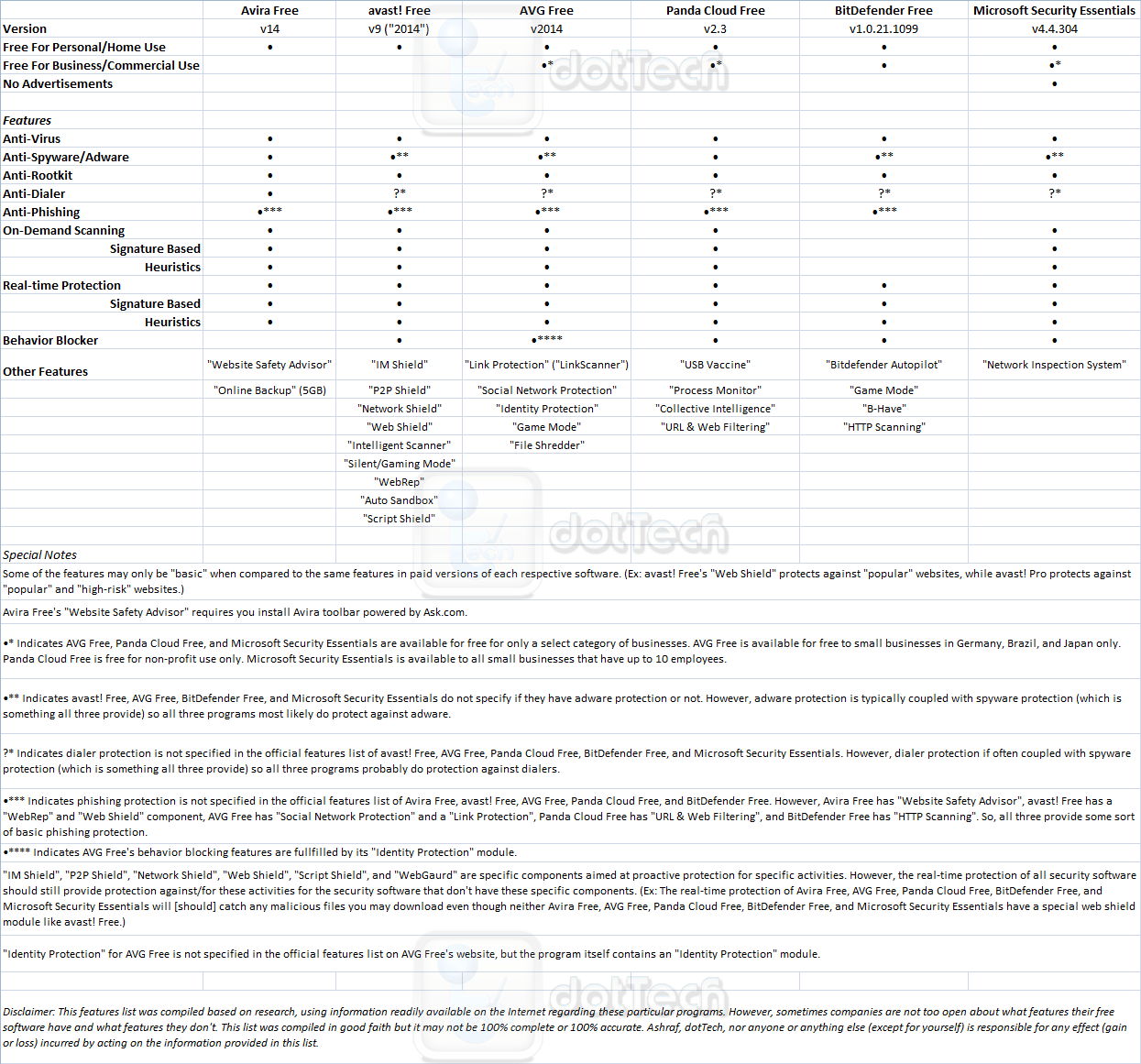
(Click on the chart to view it in full size.)
In terms of features, as you can see in the chart above, all six of the best free anti-virus programs for Windows provide the necessary fundamental protection. However, it is worth noting that neither of the programs provide full/advanced phishing protection; you will have to cough up money for paid versions to get full/advanced phishing protection. Or, you could just be careful about what links you click… and double-check to make sure the website you are at is who it claims to be since phishing success heavily depends on social engineering and user ambivalence.
Furthermore, while all six best free anti-virus programs for Windows provide the fundamentals, avast! is the most notable one for going “above and beyond” the basics and providing a little extra bang for the buck (or lack thereof). In other words, avast! provides more “extra” features than the other five best free anti-virus programs for Windows, although AVG Free also has some nice extras. It also should be noted Avira Free’s “Website Safety Advisor” requires users to install Avira Toolbar, which is powered by Ask.com; avast Free and AVG Free install add-ons/extensions in your browser for their “WebGuard” and “Link Protection” features but those are add-ons/extensions and not toolbars. The difference, of course, is more in appearance than functionality (i.e. avast Free and AVG Free’s add-ons and extensions don’t put a literal toolbar in your browser while AVG Free’s toolbar does) but nonetheless a difference to note.
On the subject of toolbars, aside from its browser add-on/extension for “Link Protection”, AVG Free comes bundled with AVG Secure Search Security Toolbar. AVG Secure Search Security Toolbar is essentially bloatware and is very hard to uninstall once you get it on your computer; in fact, in my experience, the toolbar behaves like malware. If you end up opting to get AVG Free, I highly recommend keeping your eyes open while installing AVG Free and to uncheck and not install AVG Secure Search security Toolbar.
That being said, let me point out a fundamental difference between these best free anti-virus programs for Windows. Avira Free, avast Free, AVG Free, and Microsoft Security Essentials are traditional anti-virus programs; they operate offline, doing all the scanning on your computer and regularly downloading signature database updates. On the other hand, Panda Cloud Free and Bitdefender Free are cloud-based anti-virus programs. Although they both also operate when you don’t have an active internet connection, their main strength is that they leverage the power of the cloud to protect you: most of the hard work and processing is down via the cloud and not your own computer, and you never download any signature databases because it is all hosted in the cloud.
The primary advantage of using cloud-based anti-virus programs is they lessen the load — and slow down your computer less — than traditional anti-virus programs. However, the flip side is, you don’t get as good protection if you don’t have an active internet connection. Enough about that, though — we will talk more details about computer load and protection in the performance section below in this review of best free anti-virus programs for Windows.
Lastly, even though Microsoft Security Essentials is the only one to not prompt users with advertisements, it must be noted that the ads in avast! Free and Bitdefender Free are comparatively non-intrusive and less frequent than the other best free anti-virus programs – they are not as annoying as what Avira Free and AVG Free do.
Before we go on to the next section, I want to point out two unique things about Bitdefender Free as compared to the others.
Firstly, you will notice we did not list Bitdefender Free as having on-demand scanning capabilities. This is because, Bitdefender Free does not have the ability to initiate an on-demand scan of your whole computer — it only has the ability to initiate and on-demand scan of individual folders/files, which we feel is incredibly stupid.
Secondly, Bitdefender Free is an arrogant son of a gun: it does not give you the choice of what to do when an infected file pr website is found. As stated in our full review of Bitdefender Free:
When Bitdefender Antivirus Free Edition detects what it feels is a malicious website or malicious file, it automatically blocks the file/website — you are given no ability to override the block. I can understand why Bitdefender behaves like this; they don’t want users to be infected because they wrongly overrode Bitdefender and allowed a malicious file to be executed or a malicious website to be loaded. So is a good thing for the average Joe who has no idea what button to press when prompted with a scary “malware has been detected message”. However, all anti-virus programs, including Bitdefender, are prone to have some false positives. Not giving users the ability to override Bitdefender actions or not giving users the ability to select what they want to do with a suspected malicious file means you simply have to live with any false positives Bitdefender detects, which is very poor form on the part of Bitdefender.
By behaving like this, basically Bitdefender is saying: We are always right and you are too stupid to make your own decisions. So bend over and take it. I don’t know about you but I ain’t bending over, and it has nothing to do with my wife getting jealous.
So while Bitdefender Free may have good features, you are handing over a lot of control to the program.
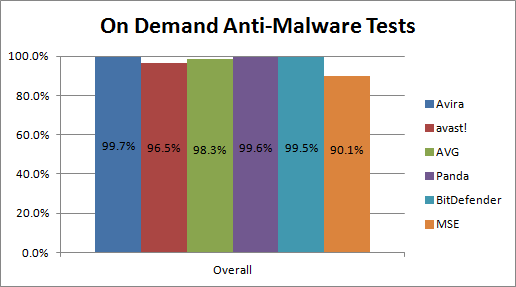
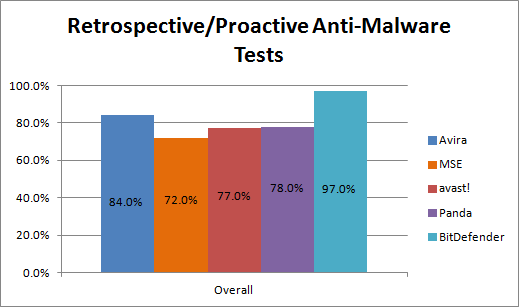
When viewing the above test results, keep a few things in mind:
- The On-Demand Anti-Malware Tests were done to see how many malicious files already on the system were detected by these anti-virus programs. With Avira, avast, Panda Cloud, Bitdefender, and MSE with their highest settings and all their features enabled (with all settings set to the highest possible); for AVG, the settings were left at default, which did not include the highest settings. All six programs had an active internet connection during this test, so the anti-virus programs that are heavily cloud-based (e.g. Panda Cloud) may not perform as well while offline.
- The Retrospective/Proactive Anti-Malware Tests are tests done specifically on the security softwares’ heuristics capabilities; their capabilities to protect against unknown/new malware that have no signatures (aka zero-day attacks). It needs to be mentioned that heuristics is not the only feature that security software use against unknown/new malware. Other feature, such as behavior blocking, also help detect unknown/new malware; however only the heuristics feature (and no other features, such as behavior blocking) was tested in the Retrospective/Proactive Anti-Malware Tests. It is also very important to note that this particular test was done while offline — no active internet connection was available, which is a potential determent to cloud-based AVs. Finally, please note AVG opted out of being tested in the Retrospective/Proactive Anti-Malware Tests because AVG felt their product is heavily based on the cloud and without an active internet connection, it wouldn’t perform well in this test. I personally say this is bullshit because Panda wasn’t afraid to test Panda Cloud Free in this test and Panda Cloud Free is more dependent on the cloud than AVG. But, hey, let’s assume they aren’t trying to hide AVG’s traditionally low performance in heuristics that we’ve seen in past test results.
- For the On-Demand Anti-Malware Tests
- Microsoft Security Essentials had “very few” false positives; avast and Bitdefender had “few” false positives; Panda, AVG, and Avira had “many” false positives
- The On-Demand Anti-Malware Tests test and the Retrospective/Proactive Anti-Malware Tests test are a few months old at the time of this writing. In other words, all six best free anti-virus programs for Windows may have improved (or degraded) their performance since these tests were conducted. Unfortunately, because of the intense work that goes into these tests, the tests are done once or twice every year and these are the latest results we have at our disposal at the time of this writing.
- Both of the above tests were done with the free versions of avast, Panda Cloud, and MSE: avast Antivirus Free, Panda Cloud Antivirus Free, and Microsoft Security Essentials (which is always free). For Avira, AVG, and Bitdefender, the tests were done with their paid versions: Avira Antivirus Premium, AVG Anti-Virus (Pro), and Bitdefender Anti-Virus+. Please note the free versions of Avira, AVG, and Bitdefender have less features than their paid counterparts, so their performance will be a bit less than the above results show — especially Bitdefender Free, which is more dependent on the cloud than Bitdefender Anti-Virus+ and thus will likely not perform as well when offline, aka would not perform as well in Retrospective/Proactive Anti-Malware Tests. Nonetheless, the results are still important — for the purposes of a simple comparison — as indicators of how the six best free anti-virus programs for Windows perform and are the best and most unbiased test results we have at our disposal at this time. The chart below shows exact version numbers that were tested:

That all being said, the two above mentioned test results tell us one story: the results are a clear indication of Avira’s detection superiority. True, aside from Microsoft Security Essentials which has a significantly low rate of 90.1% and avast which has a not-too-low-still-provides-good-protection-but-is-surprising rate of 96.5% in on demand tests, all of the free anti-virus programs for Window provide excellent protection when doing on demand scans. However, when you factor in the ability to block zero-day attacks (Retrospective/Proactive Anti-Malware Tests), Avira shines above the lot with a commanding 84% block rate of new/unknown malware.
It is important to note that Avira’s high protection comes at a cost: Avira has “very many” false positives. Having very many false positives means Avira will block safe files more often than other anti-virus programs. So while it has the best protection rates, be prepared to use your assessment skills to determine if a file Avira thinks is malicious is actually malicious or not.
If the issue of false positives is important to you, then Microsoft Security Essentials is the best of the lot — but there is a trade-off, you get less false positives and you also get less protection. (Yep, nothing in life is without trade-offs.)
At this point you may be thinking: hang on a second Ashraf, doesn’t Bitdefender have tip-top protection in both on demand and zero-day protection tests? This is true; Bitdefender does show excellent protection rates — in fact, Bitdefender’s protection against new/unknown malware is better than Avira’s as per these tests. But keep in mind, the tests were done using Bitdefender Anti-Virus+ not Bitdefender Antivirus Free (aka Bitdefender Free).
Typically, as I’ve said above, the difference between paid and free versions of each anti-virus program is not important for the purposes of our simple analysis to try to determine which free anti-virus program is the best. We are, after all, using the best data results we have at hand. In this particular case, however, it is important to differentiate between Bitdefender Anti-Virus+ and Bitdefender Free for the Retrospective/Proactive Anti-Malware Tests. Why? Because there was no active internet connection while Retrospective/Proactive Anti-Malware Tests were conducted and Bitdefender Free is a cloud-based anti-virus whereas Bitdefender Anti-Virus+ is not as cloud-based.
As already mentioned, cloud-based anti-virus still work offline but, more often than not, they don’t perform as well. For example, Panda Cloud Free performs as well as Avira in On-Demand Anti-Malware Tests when internet connection was active but does not perform as well as Avira in Retrospective/Proactive Anti-Malware Tests when there was no access to the internet. This means, more likely than not, if Bitdefender Free was tested in Retrospective/Proactive Anti-Malware Tests then it would probably not perform as well as the 97% of Bitdefender Anti-Virus+. We don’t really know how well Bitdefender Free would perform but I venture to say it would perform in the late 70s%, maybe early 80s%, similar to Panda Cloud Free.
So, then, let’s cut past all the crap and get down to it: which is *the best* when it comes to detection rates? Frankly, there is no “best” — they are all good, with the exception of MSE. But, if I were to rank the best free anti-virus programs based only on detection rates, my top three would be Avira Free, Panda Cloud Free, and Bitdefender Free. After that, fourth is avast Free, following by AVG Free and MSE.
With that said, however, keep two things in mind:
- The rankings I just gave are based on detection rates only; keep reading to learn how all of these programs perform when considering factors other than detection rates.
- The detection rate tests were conducted in a lab setting for benchmark purposes. In other words, they don’t exactly reflect “real life”. In real-life usage the protection between all five program (not including MSE, which even Microsoft admits is not designed to perform as well as others) will be similar because most user activity will fall within areas covered by all five. I may be a bit bold when I say this but the differences between all five software will typically only be felt when conducting benchmarks or tests.
Now let’s get to the next category of evaluation, shall we?
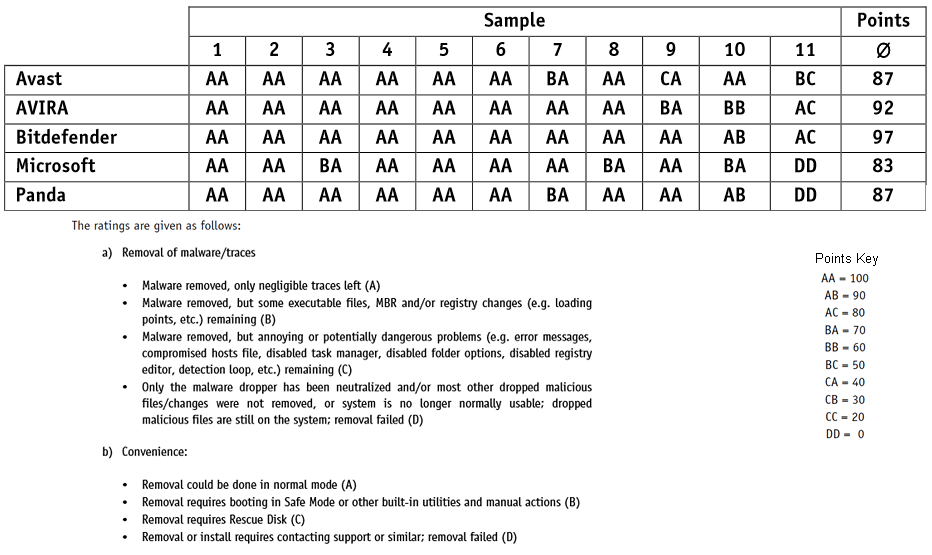
(Click on the chart to view it in full size.)
Being able to detect malware has value in and of itself; simply knowing you are infected is worthwhile. However, an anti-virus/anti-malware program that cannot remove malware is probably one you don’t want to have. Hence we look at the results of a malware removal effectiveness test.
Before we discuss the results it must be noted this malware removal effectiveness test had limited scope — it only used eleven samples. It is hard, and frankly not fair or logical, to draw authoritative conclusions based on a test that only used eleven samples. However, for the purposes of a non-authoritative indicator, this test will do just fine… as long as you keep in mind the limited scope.
Also remember, this test was conducted on the free versions of avast, Panda Cloud, and MSE but on the paid versions of Avira and Bitdefender. So it is goes without saying Bitdefender and Avira has a leg up on the others for this test because paid versions always have more features than free versions. Nonetheless, this is an interesting test to evaluate.
Oh and AVG apparently didn’t want to be included in this test either. Not really sure why.
That said, Avira and Bitdefender show they superior skills once again. Avast and Panda come in a seconds with MSE a relatively distant last. As I said, this test used only eleven samples so we can’t say only Avira and Bitdefender are good while the others are incompetent at removing malware. The results very well could have been different if different eleven malware samples were picked. (That is why having a large, randomized sample size is important in any test. The sample for this test was randomized but the size is a bit small.) However, the results are still interesting because they show one fact: no one single anti-virus program can remove all malware. Most anti-virus remove most malware but none remove all — at least not without external help, which comes in the form of a boot disc in this case.
(Click on the chart to view it in full size.)

(Click on the chart to view it in full size.)
Note: Just like previous tests, for this test free versions of avast, Panda Cloud, and MSE were used and paid versions of Avira, AVG, and Bitdefender were used.
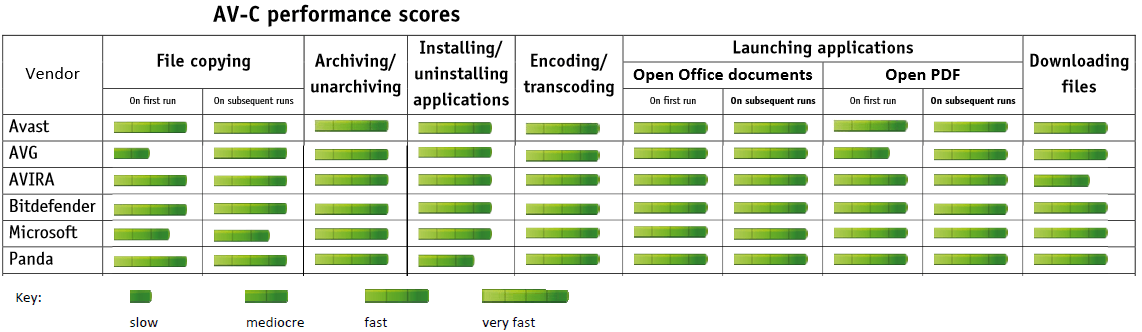
Generally speaking, the computer impact of all six best free anti-virus programs is about the same. True, avast does come out on top but only by a small margin — and this small margin will likely only noticed when benchmarking, not in real-life usage. Really if you take a look at the first graph, the six best free anti-virus programs perform similarly across the vast majority of tests. Indeed the Computer Impact test ended up with results that are too close to draw lines between.
What is interesting, however, is how Panda Cloud Free not only fails to top the rankings but it is at the bottom of the pack. Sure, as I just said, the differences between the results for each product is not very significant. However, one of the major selling points of using a cloud-based anti-virus is that it has less of an impact on your computer and does not slow your computer down as much as traditional AVs. That is the trade-off you are supposed to get for accepting under-performance of cloud-based AVs when not connected to the internet. These test results, however, seemingly contradict claims of cloud-based AVs — Panda Cloud Free, in this case — being more “lightweight” than traditional AVs. That is not to say cloud-based AVs, such as Panda Cloud Free, are more “heavy” than traditional AVs; however, these test results suggest they aren’t more “light” either.
That being said, keep in mind these test results are benchmarks and performance in real-life usage can vary. For example, despite avast topping performance tests, I’ve had a poor experience with avast Free causing slowdowns on my computer whereas Avira Free does no such thing. So while these results are important, you should always use them for what they are — benchmarking — and not let them hold sway over your real-life experience. Regardless of what benchmarks say, if you are using any of the six best free anti-virus programs and you notice your computer slowing down, don’t be afraid to switch to a different one of the best free anti-virus programs to see if it does not offer you better performance.
(For those that don’t know, PC Mark is a professional, industry-recognized benchmarking tool. The higher PC Mark score, the better. However, when it comes to PC Mark, few points here and there have no significant meaning. If PC Mark scores were drastically different, such as 5 or more, then it would be worth looking at.)
In our previous Detection Rates section, we discussed the ability of our six best free anti-virus programs for Windows to block known malware and unknown/known malware (zero-day) in a lab setting — a way to benchmark their detection rates. In this section we are doing something similar. However, we are testing the protection provided by the six best free anti-virus programs for Windows by trying to emulate a “real-life” setting instead of a lab.
The obvious advantage of testing the six best free anti-virus programs for Windows in a “real-life” setting over a lab setting is real-life protection rates are more relevant to end users than protection rates. A not-so-obvious advantage is, the “real-life” test results are a few months more current than the tests done in the lab setting; they are still a few months old at the time of this writing, but they are more current than the other tests. A disadvantage is the sample size of the “real-life” test is a lot smaller than the lab setting test; however, the “real-life” sample size is still statistically sound and larger than 1,000 for each product.
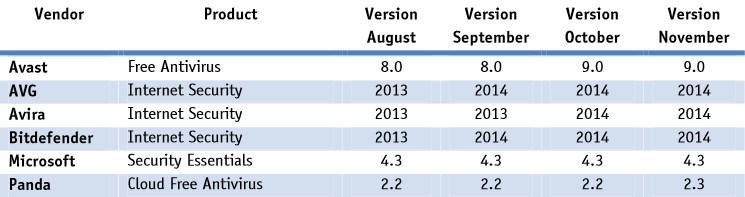
For the purposes of this “real-life” test, the ability of the six best free anti-virus programs for Windows to block known and unknown malware (files and URLs) was analyzed. Each program was left at default settings, had an active internet connection during these tests and the test was conducted over a span of four months, using the following versions of each program:
(Click on the chart to view it in full size.)
And without further ado, here are the results of the Real-Life Protection Rates test:
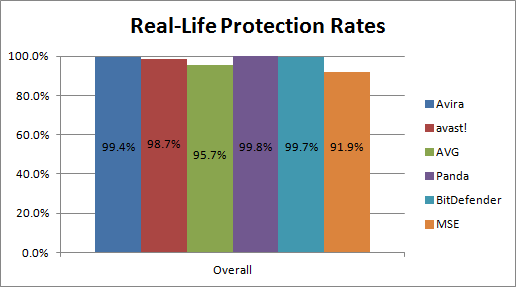
As you can see, the Real-Life Protection Rates test results are largely similar to the results shown previously: Avira, avast, Panda Cloud, and Bitdefender all provide excellent protection and MSE still falls way below the pack. The exception to this is AVG, which has seen its performance from lab setting test drop by a large amount.
Whereas in our previous Detection Rates test (the lab setting) AVG was running with the pack near the front, AVG is now near the bottom in the Real-Life Protection Rates test results. And while a rate of 95.7% would be acceptable in a lab setting, to miss almost 5% of malware in a “real-life” setting really makes me question AVG’s usefulness as an anti-virus program. Sure, blocking 95.7% of malware in a “real-life” setting is nothing to sneeze at. But it is also nothing to write home about, either. To make matters worse, the paid version of AVG was tested… so the free version is bound to have even lower protection rates.
Note: All tests referenced in all Performance Comparison sub-sections of this article were not conducted by dotTech. They (the tests) were conducted by AV-Comparatives.org, an authority on security software testing. I attained permission to re-publish AV-Comparatives’ results on dotTech when I originally wrote this article.
And here is the section you’ve all been waiting for: the final verdict. After considering all aspects of the six best free anti-virus programs for Windows, which ones stand out above the crowd? Which one is the best of the lot? Which ones should be avoided? Let’s talk, shall we.
While there are some noteworthy aspects — such as Avira’s excellent protection and removal performance — there is no one “winner” between Avira Free vs avast Free vs AVG Free vs Panda Cloud Free vs Bitdefender Free vs Microsoft Security Essentials. To try to determine which one is the “best” is like trying to split hairs; it is hard to do and it hurts. Still, that doesn’t mean we can’t try now does it? :-)
After considering all the results — from our Features Comparison and Performance Comparison [Detection Rates, Malware Removal Effectiveness, Computer Impact, Real-Life Protection Rates] sections — I rank Avira Free, avast Free, and Panda Cloud Free the top three best free anti-virus programs for Windows (in no particular order):
- Avira Free for its excellent detection and malware removal
- Panda Cloud Free for its excellent detection, good removal, and the fact that it is cloud-based — an offering that allows people a viable alternative to traditional AVs
- avast Free for its combination of excellent features with good detection and removal while having lower false positives than Avira Free and Panda Cloud Free
Bitdefender Free is also very good but I personally don’t like the arrogance of the program, i.e. not letting me pick what to do with detected malicious files/URLs and not having ability to scan whole computer on demand. Microsoft Security Essentials comes dead last and it should not be a surprise why: it provides poor performance when compared to the rest, even thought it has the least amount of false positives. AVG Free ranks before Microsoft Security Essentials but after Bitdefender Free; AVG Free is a decent overall package but has no notable aspects — it doesn’t shine in any categories and I personally question why AVG would not want to participate in some of tests we talked about in this review of best free anti-virus programs for Windows.
With that said, what program you should use comes down to your specific needs and desires. Want the most features? avast! Free is the way to go. Are you looking for the best protection and don’t care about anything else like features or false positives? Avira Free is for you. Hate ads? avast Free, Bitdefender Free, and MSE win out in that category. (Note: I don’t recommend MSE no matter how much you hate ads, but the choice is yours.) Are you a social network addict? Go with AVG Free for it has “Social Network Protection”. Hate false positives? Avoid AVG Free, Avira Free, and Panda Cloud Free and consider avast Free or Bitdefender Free. Download lots of software? avast Free’s “Auto Sandbox” may be your next best friend. Are you tech-unsavvy, don’t know what to click when your anti-virus flags a file or URL, and would prefer to allow your anti-virus make the decision of which file or URL to block? Bitdefender Free is your best pick.
As you can see, there are too many moving parts for us to tell you what is the best free anti-virus program for you. We have provided you with the facts; now the choice of Avira Free vs avast Free vs AVG Free vs Panda Cloud Free vs Bitdefender Free vs Microsoft Security Essentials is in your hands. So roll up your sleeves and pick one; if your first pick doesn’t work out, don’t be afraid to experiment and try out one or two more before deciding on your final one. Whichever one you pick, rest assured all of the best free anti-virus programs for Windows mentioned in this program are good (except for Microsoft Security Essentials :-).
Avira Free Antivirus
Supported OS: Windows 2000+ (32-bit and 64-bit)
avast! Free Antivirus
Supported OS: Windows XP+ (32-bit and 64-bit)
avast! Free Antivirus homepage
AVG AntiVirus Free
Supported OS: Windows 2000+ (32-bit and 64-bit)
Microsoft Security Essentials
Supported OS: Windows XP and higher (32-bit and 64-bit)
Microsoft Security Essentials homepage
Panda Cloud Antivirus Free
Supported OS: Windows XP and higher (32-bit and 64-bit)
Panda Cloud Antivirus Free homepage
Bitdefender Antivirus Free Edition
Supported OS: Windows XP and higher (32-bit and 64-bit)
Bitdefender Antivirus Free Edition homepage
Originally written on February 14, 2010. 2nd edition posted on December 3, 2010. 3rd edition posted on December 18, 2011. 4th edition posted on February 22, 2014.




