How To: Change Firefox 3.6′s new, annoying habit of opening new tabs next to the active one

October 17, 2010 38 Email article | Print article

Yesterday when I realized that I was running Firefox 3.5.7 even though Firefox 3.6 was out, I updated my Firefox – as fast as my fingers could click – to v3.6. After the update I went about my business surfing the web, doing some of this, doing a little of that. However, something was just… off about the whole experience.

You see one of the best I like about having a mouse with a scroll wheel is that I can use the scroll wheel to open links in new windows (i.e. click on a link with the middle scroll wheel and a new tab will open with the website in it). In fact, I use the scroll wheel button so often, I honestly feel lost when using a mouse without a scroll wheel. So, of course, after updating to Firefox 3.6, I used the scroll wheel button multiple times.

At first I did not notice it directly, but as I said, something just felt off. Then it hit me that before I updated to Firefox 3.6, the new tab would always be placed (when I used the middle scroll wheel button) at the end of the tab bar, but now it was being placed next to the active tab. Now I don’t know if it is a new change in Firefox 3.6, or just coincidental with my update of Firefox, but once I realized this, it drove me crazy; it was so annoying to not have my tabs in the proper order. So I went about looking for a solution, and a solution I found.

For anyone that finds the new tab behavior annoying, follow these simple steps to make it so new tabs are placed at the end of the tab bar instead of after the active tab:

  • Run Firefox.
  • Type in about:config in the address bar…
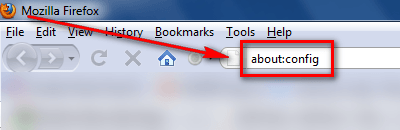
…and press the Enter key on your keyboard.

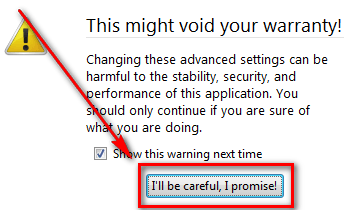
  • After you press the Enter key, you should see a warning; click I’ll be careful, I promise! to bypass the warning message:
  • After you have bypassed the warning message, you will see a list of Firefox’s “under the hood” settings:
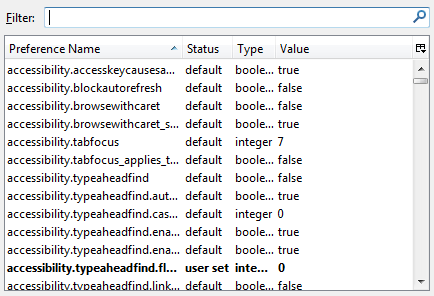
Although Firefox’s about:config is not quite as dangerous as Window’s registry, you still want to be careful, so be careful what you change.

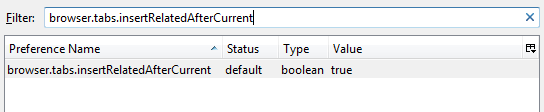
  • In the “Filter” box, type in browser.tabs.insertRelatedAfterCurrent

…and you should see this:

  • Double click on true (or right click -> Toggle) so that it changes to false:
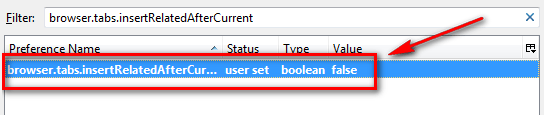
  • Once the “Value” is set to false, you are good to go. Simply close the about:config tab and go about your web surfing.

While I am sure many people will have no use for this trick, many others will also appreciate it if they – like me – are creatures of habit.


38 Comments »

  1. jumbi January 31, 2010 at 5:55 PM (comment permalink) -

    havent updated also due to some add-ons I want, so will be waiting for some time.
    But I had run into this tab attitude on IE and I hate it!
    So this tip (and the readers tips) are great for near future!
    Thanksssssss

    26
  2. craig avery January 31, 2010 at 6:22 PM (comment permalink) -

    I like the way the tabs open now. It keeps similar sites together.
    CA

    27
  3. MerryMarjie January 31, 2010 at 7:18 PM (comment permalink) -

    FAN-tastic! I love being able to go through my “regular” tabs and then reading the recently opened tabs at the end, and this trick worked, naturally. To each his own, but this about:config hint was most appreciated by me.

    28
  4. Maddog February 1, 2010 at 2:12 AM (comment permalink) -

    Nice one Ashraf really was a useful tip.New habit of opening a new tab right alongside was really beginning to annoy me.Many thanks my friend

    29
  5. Jon February 1, 2010 at 2:59 PM (comment permalink) -

    I had a problem with a few of my addons not being compatible with v3.6 also but there is a way to edit them to make many of them work just fine until their creator does it officially. It deals with the addons’ rdf file. Ashraf let me know if this is something that you could be interested in releasing in an article and if you don’t already know how to do it I’d be happy to do a quick write up on it. All you need to do it is one small, free program. Results do vary, some work fine, some don’t work at all, some partially work. All 20 of my addons are now working. :) Not to mention you could always try using the Nightly Tester Tools addon to make them compatible, but there are a few that I’ve had issues make work that way.

    30
  6. AlanR February 3, 2010 at 10:48 PM (comment permalink) -

    To each their own.! For me, I like the new “next door” TAB functionality.

    What annoys’ me, however, is the incompatible Add-on issue. My “must-Have” is ZOTERO (a research notes utility) that has now been disabled. So it looks like I will have to revert to FF 3.5.7 until official compatibility is restored – unless of course that Jon @30 can come up with a “fix”.

    31
  7. RobCr February 4, 2010 at 12:07 AM (comment permalink) -

    @AlanR:

    I Googled out of curiosity.
    Their web site -
    http://www.zotero.org/
    says -
    Changes in 2.0rc3 (February 4, 2010)

    Wouldn’t that be ok for the current FF ?

    32
  8. AlanR February 4, 2010 at 1:49 AM (comment permalink) -

    @RobCr

    Thanks for pointer to the new version of ZOTERO.
    My ZOTERO vr. 1.0.10 was disabled by the FF 3.6 upgrade and flagged as “Not compatible” and informing that FF would let me know when a new one was available.

    I had become (not GOTTEN [Ugh!]) used to FF automatically finding and offering new versions of installed Add-ons that it never dawned on me to check the origin site. Will do so forthwith (and a few others sitting “dead” in my Add-ons pop-up list) and let you know if it works.

    Thanks again… :)

    33
  9. AlanR February 4, 2010 at 10:55 PM (comment permalink) -

    @RobCr:
    Update on ZOTERO “Add-on”;
    I now recall when the vr. 2.0 Beta was first offered. It required many changes and re-syncing configurations to several computers that I use in different locations – hence why it was not implemented at that time (and reason why it got forgotten:¬( ).
    Now, due to FF 3.6 necessity, I have taken the plunge and begun the major upgrde (now out of Beta) following detailed instructions found on the Zotero site.
    So far, so good. All my old files etc. seem to be O.K. Much to my relief.

    Many thanks again for giving my memory a jerk.!

    Now… how to Fix that “Work Offline” add-on.????

    34
  10. Plume February 10, 2010 at 10:01 AM (comment permalink) -

    Thanks for the tip, very useful.

    35
  11. Ray February 12, 2010 at 10:58 PM (comment permalink) -

    Thanks much, this was driving me crazy as well.

    36
  12. Sid December 28, 2010 at 4:56 AM (comment permalink) -

    Thank God… it’s about time. ;)

    A tab opening at the end of all the tabs is one of the most annoying things a browser can do.

    For years people have struggled with this and having to resort to TabMixPlus etc to remedy this insanity using Firefox.

    On the other hand Opera has had the ability to open a new tab or a clicked tab beside the active one since I’ve used it since around 1990. This is acheived simply by ticking one box in Opera’s prefs; not having to resort to voodoo or horribly bloated addons to get your browser to do what you want it to. ;)

    Now if the Firefox developers could only grasp the simple concept of “Paste and Go.”

    37
  13. David Prakash Kumar April 10, 2011 at 10:01 AM (comment permalink) -

    Data Recovery is one of the most important things that need to be done if your computer crashes. There are a lot of things that you need to know about data recovery and you can get the relevant information at http://www.everydayhomeincome.com/data-recovery

    38

Leave A Response »