
How To: Change Firefox 3.6′s new, annoying habit of opening new tabs next to the active one
October 17, 2010 38
Email article | Print article
Yesterday when I realized that I was running Firefox 3.5.7 even though Firefox 3.6 was out, I updated my Firefox – as fast as my fingers could click – to v3.6. After the update I went about my business surfing the web, doing some of this, doing a little of that. However, something was just… off about the whole experience.
You see one of the best I like about having a mouse with a scroll wheel is that I can use the scroll wheel to open links in new windows (i.e. click on a link with the middle scroll wheel and a new tab will open with the website in it). In fact, I use the scroll wheel button so often, I honestly feel lost when using a mouse without a scroll wheel. So, of course, after updating to Firefox 3.6, I used the scroll wheel button multiple times.
At first I did not notice it directly, but as I said, something just felt off. Then it hit me that before I updated to Firefox 3.6, the new tab would always be placed (when I used the middle scroll wheel button) at the end of the tab bar, but now it was being placed next to the active tab. Now I don’t know if it is a new change in Firefox 3.6, or just coincidental with my update of Firefox, but once I realized this, it drove me crazy; it was so annoying to not have my tabs in the proper order. So I went about looking for a solution, and a solution I found.
For anyone that finds the new tab behavior annoying, follow these simple steps to make it so new tabs are placed at the end of the tab bar instead of after the active tab:
- Run Firefox.
- Type in about:config in the address bar…
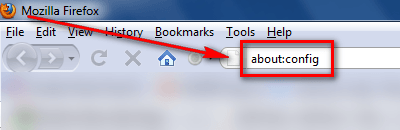
…and press the Enter key on your keyboard.
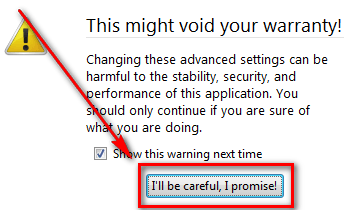
- After you press the Enter key, you should see a warning; click I’ll be careful, I promise! to bypass the warning message:
- After you have bypassed the warning message, you will see a list of Firefox’s “under the hood” settings:
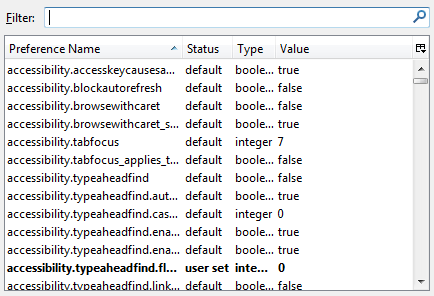
Although Firefox’s about:config is not quite as dangerous as Window’s registry, you still want to be careful, so be careful what you change.
- In the “Filter” box, type in browser.tabs.insertRelatedAfterCurrent…
…and you should see this:
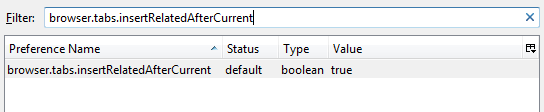
- Double click on true (or right click -> Toggle) so that it changes to false:
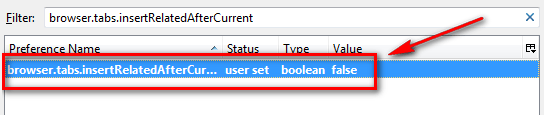
- Once the “Value” is set to false, you are good to go. Simply close the about:config tab and go about your web surfing.
While I am sure many people will have no use for this trick, many others will also appreciate it if they – like me – are creatures of habit.







![More Firefox love [Wallpaper]](http://cdn.dottech.org/media/2013/05/firefox_wallpaper_2560_1440-134x90.jpg)

![Firefox vs Chrome vs Internet Explorer [Wallpaper]](http://cdn.dottech.org/media/2013/05/chrome_vs_firefox_internetexplorer_wallpaper-134x90.jpg)
![This is for Firefox fans [Wallpaper]](http://cdn.dottech.org/media/2013/04/firefox_eye_wallpaper-134x90.jpg)
“I come to praise FireFox, not to bury him”
Actually I love that annoying habit.
Some of my browsers, on some of my PC’s (partitions), don’t open up next to it, and THEY are annoying.
One of the reasons I like Tabs opening up ‘next door’ are -
Say you have Googled to research some topic, and you click on three sites of interest. They may be forums discussing the topic.
I then go back to those tabs, and glance through them. Whilst doing that there may be some links from within one of those sites.
If I center wheel click (which I do all the time), I want those sub pages ‘next door’.
Especially if I am doing similar things in the other two sites that I got to from Google.
FF have come up with a cleaner solution.
Bless them.
Worked! Thanks….I thought this was happening because one of my add-ons, Customize Google, is not supported by 3.6. I installed Optimize Google and noticed the behavior. I attributed it to OG. Very nice.
@Ashraf:
You’re doing your mind reading thing again!
Honestly, just a few minutes ago I was thinking about how the new tabs open next to the active tab since I updated to 3.6.
I finished up what I was doing and checked my email one last time before going to bed. And there was the email notice about this article.
So I’m off to try this out. Sure hope I don’t mess it up! :-)
Thank you!
@RobCr: I can see where opening new tabs next to active ones can be useful. But, as I said, I am a creature of habit and I found it really annoying.
Oh, also, I do believe other browsers had this feature before FF. I know for sure Chrome did.
@Ron: Glad I am not the only one! You are welcome =).
@Wheezer: Glad it helped you too! You are welcome =).
This could not have been timelier, Ashraf! Here I am doing research and opening multiple tabs and wondering why the heck they aren’t opening where they used to open – and your article appears. Brilliant!
Huh. When I first noticed this feature, I thought to myself, “Yes!” But whatever floats your boat :D
It worked! Yea Ashraf!
Go buy yourself an ice-cream cone, coffee, pop, whatever it is that makes you smile. And then pretend I bought it for you.
I’d just do the donate thing so I could buy it, but as usual, I’m broke.
But I still appreciate your work!
Well I seem to be in the minority.
I believe some of you will adapt to this behavior in the future.
I can make it very easy for you to toggle between ‘next door’ or ‘on the end’
I am using Tab Mix Plus Add-on
It has lots of features, and THE OPTIONS CAN BE SET FROM A GUI DIALOG.
I just experimented, and with a couple of mouse clicks, I went form ‘next door’ to ‘on the end’ and then back to ‘next door’
You get to the option by -
Click Tools menu, and click Tab Mix Plus Options.
Choose Events (2nd choice along the top).
There is a sub Tab called ‘Tab Opening’, and it has a checkbox called ‘Open other Tabs next to the current one’.
Just ticking or unticking toggles between ‘next door’ and ‘on the end’
@RobCr: Interesting.
Now I’ve got yet another new thing to learn and “play” with.
Thank you.
lol, I always install “Tab Mix Plus” exactly to achieve the open next to active behavior (amongst other modifications). My browsing habits, I don’t even use the tab bar, in fact I have Tab Mix Plus hide it to save room. What I do, is I scroll through tabs, ctrl-page up and ctrl-page down. I have those programmed as key assignments for the left and right scroll wheel actions on my Logitech mx 1100 mouse for firefox. So, in that usage, opening tabs next to the current tab is handy for all the reasons already said by others, and logical too. I understand browsing habits of course, I loathe having to use anyone else’s computer but my own for any extended period of time…. I do highly recommend Tab Mix Plus, it lets you customize anything and all things pertaining to tabs, including a advanced session manager and crash recovery function. Worth a look.
hi ashraf i don’t think this feature is annoying. i was waiting for this feature to come and has finally arrived
this did not happen to me at all. my firefox 3.6 open tabs at the end of last tab , as usual.
Didn’t like the new tab behavior either. More to the point, didn’t like the change without an obvious way to revert. Shades of Microsoft.
Thanks again, Ashraf!
Why couldn’t you have posted this 24 hours ago? I had to search everywhere on the web to find this out!
Thanks, Ashraf! That feature was so bloody annoying it was driving me crazy. You are a wonderful source of useful information for me time and time again.
Greatly appreciated. :)
Thank you!
As ALWAYS,… you did an… EXCELLENT JOB! ! !
:)
@Ashraf: IE got that in IE8 with the tab grouping.
Hey Ashraf!!
I have FIREFOX 3.5.7 running on my PC right now but for the time being I dedided not to update to v. 3.6 as many extensions still don’t work properly in the new version and anyway it doesn’t seem to me that it’s a huge update worth downloading.
What about your extensions??
Actually there is a pretty cool FF extension that can bypass this problem pretty well….LOL!!
https://addons.mozilla.org/en-US/firefox/addon/15003?src=external-fxbetarelnote
Were you aware of it??
Finally what do you make of Google Chrome?? Have you ever used it along with Firefox??
According to many geeks out there Google Chrome is much faster than FIREFOX and requires much less resources (RAM) to work properly not to mention that Google Chrome extensions are starting to appear at an ever-increasing rate day by day.
I used it a couple of days ago but to be honest it didn’t impressed me at all.
How about you?
And IE 8 seems to be even stronger than FF 3.6 in some key areas (malware tests, antiphishing filters and so on): pretty shocking, isn’t it?
http://www.networkworld.com/news/2010/012210-firefox-36-is-good-but.html
Anyway, to improve Firefox Speed I suggest you take a look at these must-have tweaks (they work like a charm…LOL!):
http://www.groovypost.com/howto/firefox/improve-firefox-and-pc-performance-with-simple-tweaks/
Take care!!
I happen to like the new tab functionality, but here are a few more about:config tricks if you want to use them:
1) browser.ctrlTab.previews – change this to true and ctrl-tab will bring up a popup showing a preview of your open tabs
2) browser.allTabs.previews – change this to true (if you have Win7) and when you mouse-over FF in the taskbar you will see previews (or a list depending on how many tabs you have open) of your open tabs and you can go directly to the tab you want
thanks man!
this is what i have been looking for.
i was going to switch to safari or opera because of this behaviour
Hello Ashraf,
Until recently I’ve been using Firefox 3.0.17. Then I switched to Firefox 3.6 I don’t know, maybe it’s my impression, but I think that v3.0.17 worked faster than 3.6 for me. Another issue that I noticed in v3.6 is the fact that it disables 230 protected items in Spywareblaster. Any idea? I’m probably going to switch back to version 3.0.17 again.
Cheers
Well I too have to agree with RobCr & Scaredwitless about Tab Mix Plus, it’s been a must have extension/addon for me for years. The number of options & customizations of the tabs is amazing & straight forward through its gui. For those of you who haven’t tried it yet, do it! LOL
https://addons.mozilla.org/en-US/firefox/addon/1122
This is too funny……… one of the annoying things I find with most browsers is opening new tabs at the end of the tab bar. I hate that. When I’m checking out browsers, there are many reasons I always go back to Opera, but this tab behavior is a big one.
So what you’re telling me is, Firefox 3.6 is not quite as annoying as it’s predecessors.
:)
Thanks like you I like things the way they always have been especially since I’m legally blind and get used to things being the way they are (I can’t even use chrome all the time because you can’t turn off site colors & the addon that does blinds you everytime the screen refreashes). Have a good week =)
Well I see that I don’t be alone to dislike Firefox 3.6.
I don’t know why but all the habits I saved in FF 3.5.7 have dissapeared with the FF 3.6 update.
Most of my add-ons are not supported.
FF 3.6 is unstable and shut down itself regularly.
Since a while all the FF updates do FF going slower.
I reinstall FF 3.5.7 and all come back.
But if in the future the FF situation don’t improve I believe I will go back to Maxthon.