
 Email article
{rw_text}Software reviewed in this article:
KRyLacks Software’s Ultimate Keylogger
Version reviewed:
v1.60.21
Supported OS:
Windows 95/98/98SE/ME/NT/2000/XP/2003/Vista/7
Price:
$29.95 (USD) but you can get it for free for a limited time at Giveawayoftheday.com!
Software description as per the developer:
Ultimate Keylogger is the popular all-round monitoring solution. It monitors all activities on computer systems including applications, keyboard, passwords, clipboard, chat, email, and visited websites. To avoid tampering of the software, it features a unique file protection. Ultimate Keylogger is completely undetectable. During monitoring sessions it will not be listed in the task manager. The software can be installed in less than five minutes and runs maintenance free. Ultimate Keylogger displays reports in web format or sends zip-compressed and encrypted activity reports invisibly via Email, FTP or network. Ultimate Keylogger has a password protected interface and hot-key combination for accessing the application. All recorded information is stored in an encrypted file. Ultimate Keylogger does not consume computer resources.
Ashraf’s note:
The developer’s website lists v1.50.18 as being the latest version. However, the program itself says it is v1.60.21. So I am going to assume I am reviewing v1.60.21 and not v1.50.18.
————————-{/rw_text} –>
{rw_good}
- Logs keystrokes, clipboard activity, and application usage.
- Can take screenshot automatically at regular, designated intervals.
- You can password protect the program.
- You can have the recorded activity logs + screenshots sent automatically to an e-mail address, FTP server, and/or to local/network folder.
- The logs + screenshots can be password protected and encrypted via AES 256 before they are sent out.
- You have the ability to warn people that their activity is being monitored.
- All logged activity is encrypted until you view it and gets re-encrypted automatically.
- You have the option to hide Ultimate Keylogger’s system tray icon, Windows Task Manager entry, and program files.
{/rw_good} –>
{rw_bad}
- Ultimate Keylogger opens an outbound connection to the developer’s website every time I view my logs or screenshots. For what possible non-malicious reasons would the developer need to do this?
- Only text activity in the clipboard is recorded.
- Activity logs and screenshots are re-encrypted automatically, but they are re-encrypted after you close the main program window. They stay decrypted between the time you stop viewing the logs/screenshots and you have the main program window open.
- Claims to be able to record URLs visited in Internet Explorer, but does not do this (at least not with IE8).
- Constantly tries to add itself to Windows’ start-up/boot programs list (no option to tell it to stop).
- Screenshots are not/cannot be compressed.
- No way to exit the program except Alt + Ctrl +Delete style.
{/rw_bad} –>
{rw_score}
{for=”Ease of Use” value=”6″}The program is fairly self explanatory and easy to use. However, the Help file is pretty much useless, and the developer needs to improve in that area. Furthermore, the program constantly tries to add itself to the start-up/boot programs lists without giving you an option to tell it “no” and there is no way to exit the program except using Windows Task Manager and forcing it closed. Lastly, screenshots are not compressed so you need to be careful how many you take, otherwise they will fill your hard driver rather quickly.
{/for}
{for=”Performance” value=”8″}In terms of recording activity and taking screenshots, Ultimate Keylogger works well with two exceptions: 1) It is supposed to be able to record visited URLs in Internet Explorer but I found this does not work (at least in IE8) and 2) Only text activity in the clipboard is recorded. Other than that, the only other problem is the activity logs and screenshots are re-encrypted a little later than I would like after you view them.
{/for}
{for=”Usefulness” value=”5″}I am sure everyone has somebody they would like to spy on but in terms of using a keylogger ethically, it is a hit or a miss in terms of usefulness.
{/for}
{for=”Price” value=”7″}$29.95 is not a bad price for a keylogger considering I have seen other keyloggers to go for more. However, if the developer wants to sell more copies, he may consider dropping the price $10.
{/for}
{for=”Arbitrary Equalizer” value=”5″}This category reflects an arbitrary number that does not specifically stand for anything. Rather this number is used to reflect dotTech’s overall rating/verdict of the program in which all the features and alternatives have been considered.
{/for}
{/rw_score} –>
{rw_verdict}[tdown]
{/rw_verdict} –>
Ultimate Keylogger is obviously a program that monitors your activity. More specially, UK (Ultimate Keylogger) monitors and record your keystrokes (it would be monitoring my keystrokes if I had not already removed it), your clipboard activity, what applications/programs you are running. It is also supposed to monitor what URLs you visit in Internet Explorer but as I stated in my “The Bad” list above, I found this feature does not work (at least not in IE8). In addition to all the logging already mentioned, UK has the ability to take screenshots at regular, designated intervals (every X minutes or seconds).
When you run UK for the first time, you are asked to set a few options:
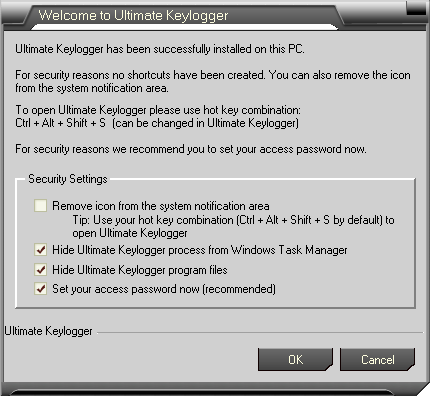
All of these “Security Settings” are changeable later, so no worries if you regret what you set them too. However, if you set a password do not forget it… or else.
After you get past the initial setup window, you get to the main program window of UK:

The program is pretty straightforward. Just be warned that as soon as you run the program it starts recording activity. You do, however, have the option to manually stop it/restart it whenever you want. In the top right you have the “Monitoring Options” from where you choose what you want to monitor:

For “Log Applications” the program records what is in the title of the program/app you have currently open as opposed to what the program actually is. For example, when visiting dotTech in Firefox, UK records “dotTech.org – Reviews, advice, tips, tricks, and freebies related to the digital world! – Mozilla Firefox” as opposed to just “FireFox”. This recording of the title program is a good and bad thing. It is a good thing in the sense that this helps you keep track of what websites are visited (because UK does not record URLs, or at least the feature that is supposed to record URLs in IE is not working as I already mentioned). It is a bad thing because sometimes the title of a program window does not properly describe what the program is.
When using the automatic screenshotting feature, keep one thing in mind: UK does not compress the screenshots so they can eat your hard drive space very quickly (depending on your resolution of monitor, the interval you set the screenshots to be taken at, .etc). The sad part is the screenshots are in JPG format so they can – and should – be easily compressed.
After “Monitoring Options” you will find “Security”:
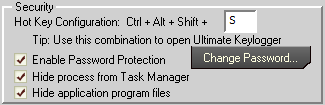
The “Password Protection” is for UK – whenever your try to maximize it from the system tray you will have to enter a password if you enable this feature.
If “Hide process from Task Manager” is enabled, UK’s Windows Task Manager entry will no longer show. If it is disabled, you should see something like this in Windows Task Manager:

“Hide application program files” hides the main essential files of UK in its folder. It doesn’t hide them all though and the folder itself is still there. Just for reference, UK does not install under Program Files folder. UK installs in C:/ProgramData/uklpr.
After “Security”, you will find “Banner”. “Banner” has an interesting feature (“Show message every…”). It allows you to display a custom message every X seconds/minutes that warns the user that his/her activity is being monitored:

The banner is a simple ballon pop-up from the system tray icon (if you have it enabled), like so:

After “Banner” there are some housekeeping things in “Advanced”:
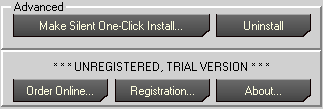
(I was running the 5 day trial to conduct this review; if you register the software you won’t get the same “UNREGISTERED” etc. message.)
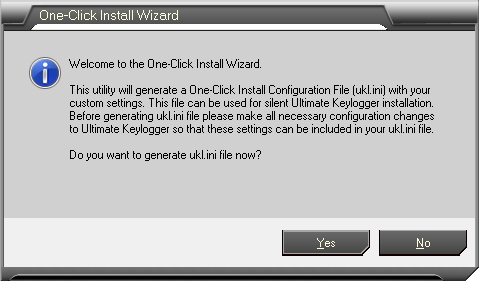
“Make Silent One-Click Install…” is basically a feature which creates a .INI file that allows you to install UK on another computer “silently”:
In regard to the “Uninstall” button, if you go to uninstall UK, you will not find it under Add/Remove Programs. Heck even RevoUninstaller is unable to uninstall UK. To uninstall UK you either hit that “Uninstall” button or you can go to C:/ProgramData/uklpr and run unukl.exe to uninstall.
Going back up to the top of the program window, there is the “Monitoring Status” section where you can enable/disable logging at your will:

Under “Monitoring Status” you will find “Logs”:
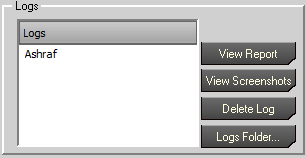
There can only be one log for your Windows account at a time (i.e. only one “Ashraf” log can exist). The information that is recorded is constantly added to that log. If you want to start over just delete that log and a new one will be created automatically. You don’t have any control over the logs besides deleting them. If you click on “Logs folder…” you will be brought to a folder where you will see your current log as a folder (the logs are stored in C:/ProgramData/ukl). For example, if I clicked on “Logs Folder…” I would see an “Ashraf” folder. You can manually create a new folder in the logs folder. UK will even recognize it and list that new folder under “Logs”. However, if you try to record to that log, nothing will record (‘least I had no success).
It is worth noting here that until you actually click on “View Report” or “View Screenshots” the information that has been recorded so far is in encrypted form so no one can stroll in an access it like it is no body’s business. Once you click on “View Report” and “View Screenshot” the data becomes decrypted. However take note of one possibly critical security hole. Your activity logs/screenshots are automatically re-encrypted; but they are re-encrypted after you close the main program window. So, essentially, your logs/screenshots sit unencrypted between the time you close them after viewing them and the time you close UK’s program window. As I said, possibly a huge security hole.
Lastly, there is the “Send Reports” feature:

Everything about “Send Reports” is pretty straightforward so there is no much explaining. Do note, though, if you plan on using the “Send by E-mail” feature, be sure to know your e-mail service provider’s SMTP server information because you need to enter it manually. The only exception for this is Gmail; UK has a built in feature that can automatically enter the relevant information for Gmail users – they just need to enter the username/password.
In terms of performance, UK has improved vastly since the last time I reviewed it. While before UK had sketchy recording accuracy, now it records everything it claims to record (aside from the URLs in IE). To view a sample log of what UK records, check this out.
While the performance of UK is fairly good, let me comment on some annoying and suspicious behavior it has that really make it look more like spyware than a legit keylogger:
- By far the biggest problem I have with Ultimate Keylogger is that it opens an outbound connection to the developer’s website every time I view my activity logs and/or screenshots. How do I know this? Outpost Firewall tells me:
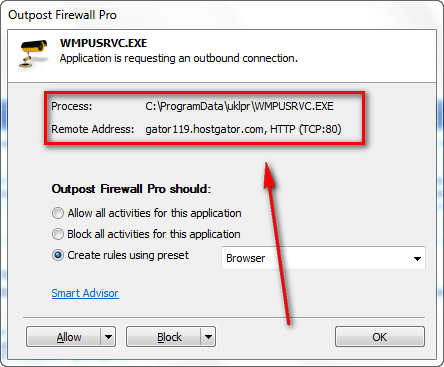
Now the developer’s website clearly is not “gator119.hostgator.com” so initially I was confused as to where UK is opening a connection to. However, after doing a bit more digging (I ran a whois on the developer’s website and learned it was hosted by HostGator, and when accessing the developer’s website via the Help file I got the same outbound connection warning), and running a traceroute, I know for sure UK is opening a connection to the developer’s website.
What I don’t know is why UK is opening a connection and what it is doing with that connection. For the life of me I cannot think of a single, non-malicious reason why the developer has made it so UK opens a connection to his/her website whenever a user views the recorded activity logs/screenshots. I can, however, give a thousand scumbag reasons why a developer would want to do this. I won’t, however, make any accusations since I don’t know what is going on, but just felt I should warn everyone.
Update: The developer of Ultimate Keylogger has contacted me and informed me that this outside connection is being made because “[they] have implemented additional protection to [their] licensing system and Ultimate Keylogger connects to [their] website to update the blacklist of stolen serial numbers. The only thing that happens is that it downloads http://www.ultimatekeylogger.com/dev3/465832/5684.txt [which] contains hashes of the stolen keys.” (As per the developer, this system is not being used yet but rather only being tested.) The developer also promised to figure out how to “improve” this in future versions of UK.
Assuming what the developer says is true (I am told Softpedia gave UK a “100% clean” rating), my only question now is why in the world would this happen when a user viewing activity logs/screenshots? Why not occur when the program is launched or 10 minutes after launch since program launches at Windows boot automatically? I am still not impressed with this behavior, regardless of what Softpedia says.
- There is no way to close the program once you have it started outside of Alt + Ctrl + Delete. You can try hitting “X” on the program window but it will just be minimized to system tray. If you right click on the system tray icon you will just be prompted to maximize the program window. I understand the developer may made it like this as a “security feature” but I do honestly feel the developer should add in an option allowing the user to select if they want to enable/disable a “close Ultimate Keylogger” button because, frankly, not being able to close UK is not only annoying but psychologically daunting.
- This program adds it self to your start up program list, i.e. it will start on Windows boot. Did you notice any option that you could turn off to prevent this from happening? Ya me neither. It is very bad that the developer has this program add its self to start up list yet does not give the user a choice in the matter. Good thing there are free programs like WinPatrol that protect us:

In conclusion, all things considered, Ultimate Keylogger = big thumbs down. While yes it works well in terms of recording activity, I am not thrilled by the fact that it opens a connection to the developer’s website for no obvious reason.
This review was conducted on a laptop running Windows 7 Professional and Windows XP Professional 32-bit. The specs of the laptop are as follows: 3GB of RAM, a Radeon HD 2600 512MB graphics card, and an Intel T8300 2.4GHz Core 2 Duo processor.
{rw_freea}
Imagine you are writing an e-mail message. Then you click a wrong button or your e-mail client hangs and you have to write the same text from scratch. Sounds familiar? With KGB Free Keylogger, you will never lose any of your text, whether it was typed in an e-mail client, a text editor, an on-line form or anywhere else. This free program logs everything you type. Get your passwords, registration keys and other info safely logged.
-Download.com
{/rw_freea} –>
{rw_verdict2}Commercial, non-spyware keyloggers will always have an aura of distrust and suspicion surrounding them because of the nature of their program. To dispell the distrust and suspicion, a developer needs to be open and transparent about their program. Ultimate Keylogger acts too much like spyware for my taste; thumbs down.
{/rw_verdict2} –>
