
Check email address validity with Email Address Checker

February 14, 2010 47 Email article | Print article

Have you ever wondered if an email is valid?  Perhaps you want to see if the support email on a software developer’s website is real.  Now, there’s a tool for that.

Discover Email Address Checker, a webapp from Rolosoft:
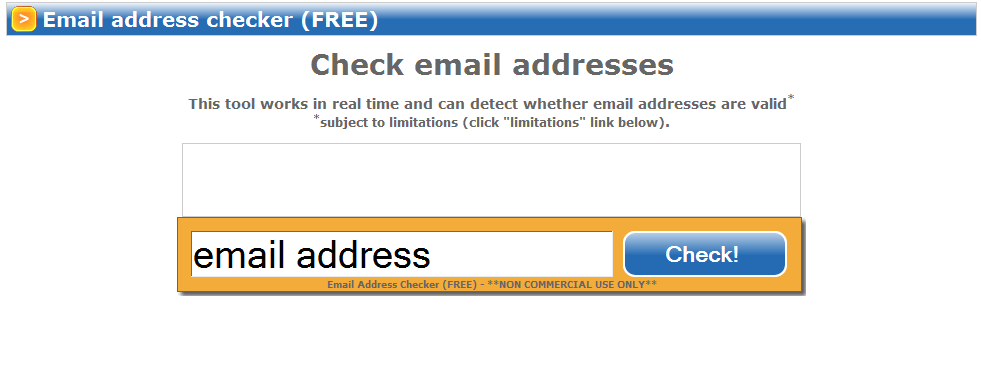
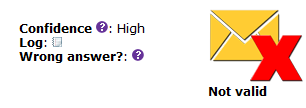
Just enter an email address into the box and click “Check!”.  If it is not valid, this shows up:
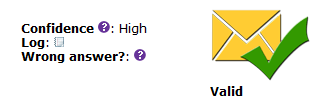
If it is valid, however, it shows this:
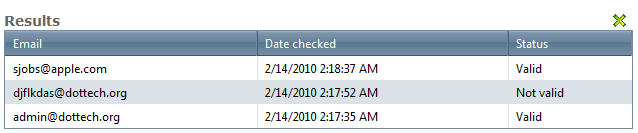
Email Address Checker can also show you the email addresses you’ve recently checked:
Note that:

  • There are limitations to Email Address Checker. For example, Yahoo and Altavista e-mail address cannot be validated. This is what I got when I tried a Yahoo address:
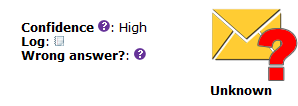
You can gain more detail on the limitations of Email Address Checker via the documentation.

  • Email Address Checker is for “non-commercial” use only.

In the end, despite its limitations, I think that this is a tool that can be useful.

[via WINDOWS 7 FREAK]

47 Comments »

  1. Ramesh Kumar February 14, 2010 at 12:34 PM (comment permalink) -

    Great. Thanks Ashraf, Locutus & Samuel I’ll “ungoodnight pronto” & instead click the “here” link again

    Ramesh

    26
  2. Ramesh Kumar February 14, 2010 at 12:40 PM (comment permalink) -

    Samuel
    Bullseye! Indeed it is “The 411 on Process Virtual Machines” Thanks, I’ll read & seek any clarification if required. Upon a fast read it looks “simply loveable” and also “loveably simple”. Wow!

    LOL

    Ramesh

    27
  3. Samuel February 14, 2010 at 12:40 PM (comment permalink) -
  4. Ramesh Kumar February 14, 2010 at 12:48 PM (comment permalink) -

    Locutus (reference your comment 21)

    Oh okay so there are no buttons as such for me to take. Therefore its not a computer problem at my end or yours. So I need to import smilies myself? How do I do that? Please guide me. Smilies are indeed great to use I agree with you 100%. They are there in my forum blog but not inside the main blog?!

    Ramesh

    29
  5. Adrian February 14, 2010 at 12:48 PM (comment permalink) -

    @Ramesh Kumar and Samuel: Has this comment thread turned into a mini-forum? :)

    30
  6. Samuel February 14, 2010 at 12:49 PM (comment permalink) -
  7. Ramesh Kumar February 14, 2010 at 1:05 PM (comment permalink) -

    Adrian
    yes dear friend LOL
    Ramesh

    32
  8. Locutus February 14, 2010 at 1:12 PM (comment permalink) -

    @Ramesh Kumar: Just type in : and ) to get :) or : and D to get :D

    33
  9. Locutus February 14, 2010 at 1:14 PM (comment permalink) -

    @Ashraf: When I click “Manage your subscriptions” at the bottom of this page, it says “You may not access this page without a valid key”. I want to unsubscribe because I’ve gotten 32 emails from this post.

    34
  10. Stockel1949 February 14, 2010 at 2:38 PM (comment permalink) -

    They cannot accept address in “.name” domain name like “something@john.doe.name”.
    This kind of domain existe since 2000 !!!

    35
  11. Locutus February 14, 2010 at 2:41 PM (comment permalink) -
  12. Ashraf February 14, 2010 at 2:49 PM (comment permalink) -
    Mr. Boss

    @Locutus: Go to the e-mail you get. There should be a link in there to unsubscribe. If not, let me know.

    37
  13. Locutus February 14, 2010 at 3:19 PM (comment permalink) -

    @Ashraf: Not one that I can see-the email I’m getting is the one for managing the new comments.
    http://i46.tinypic.com/2r70tq9.png

    38
  14. Adrian February 14, 2010 at 3:46 PM (comment permalink) -

    @Locutus: If I don’t remember wrongly, you can uncheck “receive email for new comment posted on your submission” or s/th similar inside the WordPress dashboard.

    Of course, if you use this method, you’ll have to check it again later if you post again.

    39
  15. Locutus February 14, 2010 at 3:57 PM (comment permalink) -

    @Adrian: But I just want to unsubscribe from this particular post :(

    40
  16. A. S. February 14, 2010 at 4:26 PM (comment permalink) -

    Hi,

    I’ve just tried this for a few addreses:

    - “…@hotmail.com”: Unknown
    - “…@hotmail.co.uk”: Unknown
    - “…@gmail.com”: Valid

    41
  17. Jon February 14, 2010 at 5:35 PM (comment permalink) -
  18. Locutus February 14, 2010 at 9:11 PM (comment permalink) -

    @Jon: Not all of us run PHP servers…

    43
  19. Ramesh Kumar February 14, 2010 at 9:35 PM (comment permalink) -

    Locutus (your comment no.33)

    Thanks for your guidance

    Ramesh:) :D

    44
  20. Locutus February 14, 2010 at 9:47 PM (comment permalink) -

    @Ramesh Kumar: To reply to a comment, click the reply button in the lower right corner of the box that comment is in. It will automatically link to that comment when you click on the final result.

    45
  21. Ramesh Kumar February 15, 2010 at 2:56 AM (comment permalink) -
  22. jim nelson January 15, 2011 at 12:45 PM (comment permalink) -

    test sending email

    47

Leave A Response »



