
CapsLock Warning: A failsafe for notorious Caps Lock-related mistakes

February 23, 2010 75 Email article | Print article

For those that have been following the discussion in the KeyExtender review, Rob – a loyal dotTechie – offered to make his CapsLock Warning program available to other dotTechies. Since then, me and Rob have been discussing the program behind the scenes and have finally come up with a final product ready for everyone to download (well, it was Rob doing all of the heavy lifting… I just tagged along to leech credit =P).

By the name of the program, I am sure most everyone can guess what the program is. However, I will still explain. CapsLock Warning is an simple but elegant program intended to help avert Caps Lock-related problems by displaying a “CAPS LOCK ON” message to users whenever Caps Lock is turned on:

Via the program options (right-click system tray icon -> “CapsLock OPTIONS”), users are given the ability to control where the “CAPS LOCK ON” message is displayed, and how it behaves:
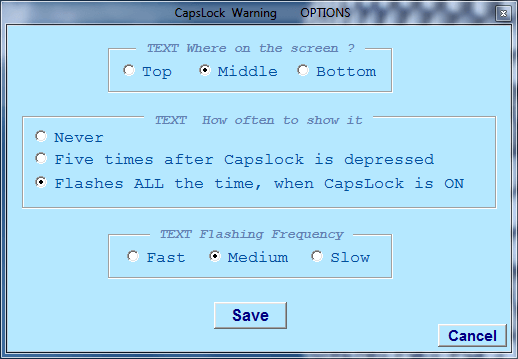
  • TEXT Where on the screen – this setting allows you to select which part of your screen the “CAPS LOCK ON” message will be displayed (top, middle, or bottom).
  • TEXT How often to show it – every time you turn on Caps Lock, CapsLock Warning will display the “CAPS LOCK ON” message once. After that initial display, you can control if you want the message to flash on the screen for you, and if so, for how long. “Never” makes it the message is not flashed again after the initial time. “Five times after…” makes it so the message is flashed five times after the initial display. “Flashes ALL the time…” makes it so the message continuously flashes until you turn off Caps Lock.
  • TEXT Flashing Frequency – this setting control how fast the flashes occur. Take note that this setting also controls how fast the initial flash is displayed so even if you have the previous setting set to “Never”, this setting is still relevant.

In  addition, to the “CAPSLOCK ON” message display, the system tray icon for CapsLock Warning continuously flashes while Caps Lock is on.

If/when you want to turn off CapsLock Warning, all you need to do is right-click the system tray icon, and select “UNLOAD THIS PROGRAM COMPLETELY”.

CapsLock Warning is a portable program, so after downloading it, just unzip it and run CapsLockWarning.exe to use it – there is no need to install. Since it is a portable program, you may place CapsLockWarning.exe in any folder on your computer except for your main directory (i.e. C:/) because it uses a Settings.ini file to save your settings.

After you download the program, please pay particular attention to the Readme because in it there are important instructions in there, such as how to make CapsLock Warning turn on automatically at Windows boot.

Now, as per Rob’s request, CapsLock Warning is available to dotTechies only. In other words, you must be a registered member on dotTech in order to download CapsLock Warning. If you are already a registered member, please login and come back to this post; if you are not a registered member, register, login, then come back here.

NOTE: Rob took his own time to create this very handy program for us. Please respect his wishes. Please do not host CapsLock Warning on any other website/server, and please do not directly link to the file on dotTech. If you want your friends and family to know about and get CapsLock Warning, simply provide them a permalink to this article.

To get CapsLock Warning, simply download it from the following link:

Version reviewed: v1.00

Supported OS: All Windows

Download size: 20 KB

CapsLock Warning download link

Thanks Rob!

P.S. Please provide feedback to Rob in the comments below. For example, if there are any bugs with CapsLock Warning, please say so or if there are any features you want added in CapsLock Warning please say so.


75 Comments »

  1. Elblando February 24, 2010 at 4:46 AM (comment permalink) -

    Many thanks Ashraf and Rob, CapsLock Warning is just what I’ve been looking for. Don’t know if it’s my clumsy fingers or my brain but always having uPPER cASE PROBLEMS!!

    26
  2. Janet February 24, 2010 at 4:55 AM (comment permalink) -

    @RobCr:

    That was sort of the idea but what you suggest may be a few too many steps….There is a program where by hitting one of the F-keys, highlighted Hebrew text gets direction-reversed (for times when your Hebrew has come up left-to-right instead of right-to-left). The same program will toggle between Heb characters and Latin characters for highlighted text by hitting a different F-key (useful because the computer sometimes unintentionally shifts alphabets). I would likewise like to have F-keys for upper-and-lower-case-reversal; change all to UPPERCASE; change all to LOWERCASE. With anything requiring more than highlight+one-key, it is usually faster just to retype….In the case of the Caps Lock issue, I usually correct immediately as a result of the beep notification, but Highlight+Fx would still be nice here…..

    27
  3. RobCr February 24, 2010 at 5:18 AM (comment permalink) -

    @Janet:
    That sounds a bit more elaborate and specialized, for the sort of things I was considering adding.
    We should see if we can get Ashraf to set up a suggestions forum or page.
    The trick would be to define/set your needs (or some of them) in such a way that there would be a similar demand from other members (a popular request). Then hopefully a member (probably with a similar interest), would volunteer to create a program for distributing to our members.
    If all that comes to pass, and there is a single(or two) need that is not met, perhaps I could ‘quietly’ build it in, like I have done with Emyrs’ Grey request.
    I define ‘quietly’ to mean – we know how to trigger it, but the other users don’t even know it is there.
    Regards,
    Rob

    28
  4. Alan February 24, 2010 at 5:25 AM (comment permalink) -

    Same problem as Bob Wingler, except there is nothing in the top right hand corner, or anywhere else. Just the message.

    29
  5. Fred February 24, 2010 at 1:19 PM (comment permalink) -

    I´d like to download. I regged yesterday but received no mail from here yet. :-(

    30
  6. IT3 February 24, 2010 at 2:21 PM (comment permalink) -

    Wow, this is great! Thanks Rob and Ashraf for sharing this great tool with us..

    31
  7. Samuel February 24, 2010 at 2:27 PM (comment permalink) -

    As one developer to another, what language did you write this in Rob?

    (I know I need to finish that program for you Ashraf, been having problems getting the right balance between things to monitor and the programs system load)

    32
  8. Ashraf February 24, 2010 at 6:09 PM (comment permalink) -
    Mr. Boss

    @Alan: The top right corner of this page. Also I provided links in the article to login/register. Here are they are again:

    http://dottech.org/wp-register.php
    http://dottech.org/wp-login.php/?redirect_to=http://dottech.org/freewaresr/14733

    @Fred: Check your junk box please. It may have been marked as junk. Otherwise, send me an e-mail at admin at dottech.org about it.

    @Samuel: He used VB6 I believe. Also, no problem on the app – we are all busy in this world, no worries.

    33
  9. Samuel February 24, 2010 at 9:04 PM (comment permalink) -

    @Ashraf: Gah, VB6???? that’s pre-.NET! Thanks!

    34
  10. jivadas February 24, 2010 at 9:15 PM (comment permalink) -

    @Ashraf:

    OK. So if I put it in a folder, it will work.
    But what if I want to get rid of it? If it’s installed, I can use the excellent Revo Uninstaller.
    But if Ido it your way, and it makes some problem, how do I remove it?

    xØx

    35
  11. Samuel February 24, 2010 at 9:34 PM (comment permalink) -

    @jivadas: “CapsLock Warning is a portable program, so after downloading it, just unzip it and run CapsLockWarning.exe to use it – there is no need to install” the app adds NOTHING to your system except that one settings file, so it can’t mess up your system.

    36
  12. RobCr February 24, 2010 at 10:17 PM (comment permalink) -

    @jivadas:
    Just create a folder say C:\capswarn and place the exe into there.
    When it runs it does not install anything, it just runs.
    Any files that it creates, are placed into that same folder (eg Settings.ini placed into c:\capswarn).
    If later on you wish to get rid of it, you just delete the whole folder.

    If you want the program to start when you turn the PC on, you can create a shortcut to the exe, and then place that shortcut into the Windows Start Menu Startup folder (As Ashraf described in the article above).

    Rob

    37
  13. AlanR February 24, 2010 at 11:41 PM (comment permalink) -

    Thanks guys for your efforts. However, at present, I can see no need for this utility – just more unnecessary screen clutter to me, even if it can be turned OFF (in which case, why bother in the first place..!!??)
    My laptop has lights which illuminate when CAPS and / or NumLock are active – same goes for my PC full keyboard (which also has other functions).

    Many programs (spreadsheets, word processors etc.) also have similar notifications somewhere on their screen window, command line or similar. It is therefore up to ME to take notice and care with what I am typing.

    Sure, I make mistakes – who doesn’t – but am not so lazy at proof reading and doing corrections. Even so, I am not infallible when there is no spell checker available (even these miss contextual errors!).

    Still, to those that have a perceived need, by all means go ahead and enjoy. For me, though, that day has yet to come. :=))

    38
  14. keef47 February 25, 2010 at 1:39 AM (comment permalink) -

    Similar error as goofus828 (Message 1)

    Winzip says “End-of-central-directory signature not found. Either this file is not a Zip file, or it constitutes one disk of a multi-part Zip file”.

    39
  15. RobCr February 25, 2010 at 2:29 AM (comment permalink) -

    @keef47:
    I purchased Winzip a few years back.
    I don’t use it anymore, even though it is registered.
    I use 7Zip as it can handle so much more.
    I just downloaded Ashraf’s zip, and it opened in 7Zip no problem.
    It is free, so give it a try.

    @Emrys:
    Did you want a copy of the Grey Text warning ?

    40
  16. Ed February 25, 2010 at 8:49 AM (comment permalink) -

    @RobCr: Hi Rob: this enhancement would make your application complete. If you type looking down at the keyboard, and you have made a mistake even while the warning is flashing, it might be easier to have a corrector within the application than to erase/retype the text in question. Just a thought; great tool, and Ashraf gets an A+ for tuning us in. Have a great day.

    41
  17. Alan February 25, 2010 at 11:02 AM (comment permalink) -

    I don’t give a about your ramblings. Why would I want to read the body of your text? Please disregard this comment if your reply was not meant as a slam at my intellect.

    42
  18. Ozzie February 25, 2010 at 7:49 PM (comment permalink) -

    @Alan: Hey, watch the language! I just read back on the comments and I can’t see where anyone has taken a swipe at your intellect. However, I think you need to work on the attitude.

    43
  19. Orchid February 25, 2010 at 8:41 PM (comment permalink) -

    Thanks RobCr. You’ve created a nice little app. I downloaded it and found it quite useful.

    While I have a small light that illuminates when my CapsLock is on, it’s not always noticeable. This saves me a lot of time and trouble.

    Anyone know if there’s a way to make the keyboard light for just that key flash as well by any chance….or a program that allows you to choose which keys flash?

    I personally keep my NumLock on all the time as I use the keypad regularly. To have a constant flashing of that key would get quite annoying after some time.

    Anyhow, Thanks again RobCr and Ashraf for providing us the opportunity to download a great app. Hope to see more available in the future. :)

    Warm Regards

    44
  20. Fred February 28, 2010 at 6:38 AM (comment permalink) -

    @Ashraf Now i wrote you a mail but you didn´t write back yet.

    45
  21. RobCr March 1, 2010 at 1:34 AM (comment permalink) -

    I am attempting to reply to one of the other threads, and they do not appear.
    Free O&O DriveLED 3
    (I did not post the link, as my other attempt has links, and they may trigger the problem ? ?)

    Anyone else having trouble ?

    46
  22. Samuel March 1, 2010 at 6:28 AM (comment permalink) -

    @RobCr: I had a problem like that on replying to the posts on my ‘EU’ thread. Ashraf figured out that it was that WordPress thought my my posts where spam for some reason. If that’s it Ashraf should be able to unspam them.

    47
  23. RobCr March 1, 2010 at 6:35 AM (comment permalink) -

    @Samuel:
    I managed to get my 5th attempt through, by avoiding inclusion of web links.
    thanks,
    Rob
    PS I wrote to Ashraf direct, and also mentioned a couple of posters were having trouble getting their ‘Join’ notifications back.
    I just noticed one of them received their reply, so I assume Ashraf is working on both problems.

    48
  24. Joji March 3, 2010 at 6:59 PM (comment permalink) -

    Nice… what did he use? Microsoft C++ to make it?

    ~Joji~

    49
  25. Samuel March 3, 2010 at 9:16 PM (comment permalink) -

    @Joji: “He used VB6 I believe.” – Ashraf

    50

Leave A Response »


