
 Email article
 Hard drives are the part of your computer most prone to crashing. Crashing of hardware, in of itself, is bad. However, the death of a hard drive is even worse because the hard drive holds all your precious data. So, in that regard, O&O DriveLED is an “early-warning system” that assists you by identifying potential hard drives problems so you can backup your data, or replace the hard drive, before the catastrophe occurs. Here are the features of O&O DriveLED as per the developer:
Features at a glance
- Display of read/write access for logical volumes
- Display of current storage capacity on logical drives
- Automatic monitoring of all S.M.A.R.T. properties
- Display of current temperatures on all hard disk drives (when supported by manufacturer)
- Prognosis of remaining operational life for all hard disk drives
- Self tests run directly in Windows without the creation of a boot disk
- Warning notification of possible operational errors on all hard disk drives
- Support of all Windows-compatible storage volumes
- Support of SCSI-disk drives
An early-warning for system crashes
Although O&O DriveLED won’t let you avoid a system crash entirely, it
can let you know early enough whenever there’s trouble on the horizon.
O&O DriveLED 3 is a reliable partner that accurately tells you when it
is time to backup your important data with O&O DiskImage, or even to
replace the hard disk.S.M.A.R.T. hardware monitoring
Quietly running in the background, the new O&O DriveLED 3 permanently
monitors the status of your hard disks With the help of S.M.A.R.T.
(Self Monitoring, Analysis, and Reporting Technology), O&O DriveLED 3
analyses the health state of your hard disks and warns you in the event
of potential malfunctions.Running self- tests
Immediately after installation O&O DriveLED 3 provides you with
the ability to make an intensive analysis of all of your hard disks. Every
hard disk that supports S.M.A.R.T. is able to run self tests. Using
O&O DriveLED 3 you can start a self-test of your hard disk with only one
click of your mouse. During the tests several parameters and functions
are systematically checked, including the interface, the surface and the
mechanics, including every read head. In addition, the error log will be
analyzed and the S.M.A.R.T. system itself will be tested. If there were
no failures found, the corresponding indicator will be lit up green. If
some failures occurred, O&O DriveLED 3 will notify you. In this case, it
is recommended to backup your data.Analyze the status of your drives
In the O&O DriveLED Control Center, each drive is symbolized by a
lamp. Each of these LEDs will show you the latest status of any particular
drive. Depending on the status, the LEDs will display a different color:
- Grey – no activity to report
- Green – reading access on the partition
- Red – data is being written on the partition
- Yellow – data is being simultaneously written and read on the partition
While O&O DriveLED 3 makes it possible for you to see your hard
drive‘s built-in LEDs on your computer screen, this is just the beginning.
In addition, you now have the possibility of monitoring all of your
virtual drives, such as network drives, being able to clearly distinguish
between read-access and write-access.
Usually O&O DriveLED would cost you $29.95 (USD) but now you can get O&O DriveLED for free! The cool thing is, the freebie is O&O DriveLED 3 – the latest version of the software.
To get O&O DriveLED 3 for free, follow these simple directions:
Version being given out for free: v3.1 Build 1983
Free updates: I don’t know
Supported OS: Windows 2000+
- Visit the registration page and register:
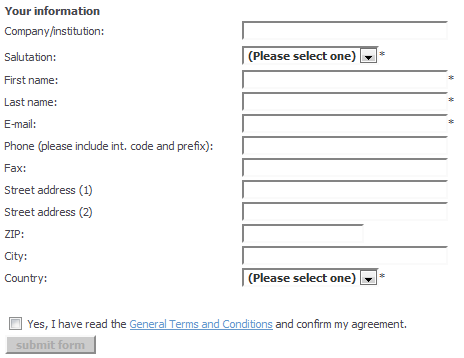
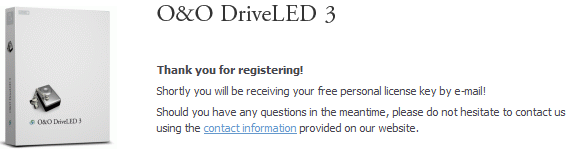
- Check the inbox of the e-mail you registered with. There should be an e-mail from “O&O Register (register@oo-software.com) ” with the subject of “Your license of O&O DriveLED 3?”. In the e-mail you will find your registration information:
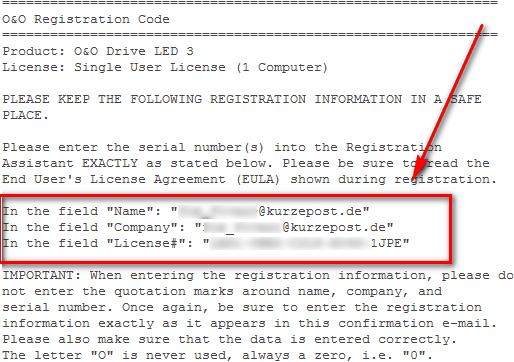
Keep this e-mail open because you will need that registration information soon.
- Download (32-bit download | 64-bit download) and install O&O DriveLED 3.
- After installation, run O&O DriveLED 3. You will be prompted to register the software. Enter the registration information you received in the e-mail, and register it:
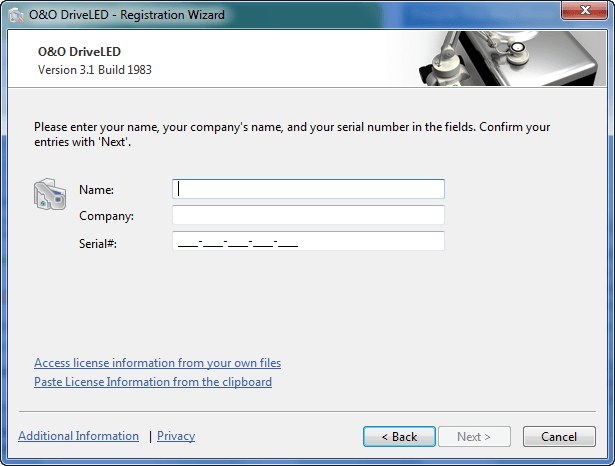
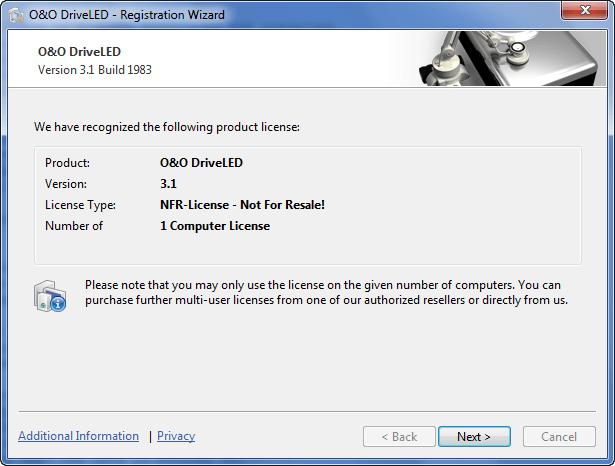
Take note that you will also be asked to enter your e-mail address after the registration has been complete. You do not have to enter your e-mail address at that point – it is optional. If you don’t want to enter it, just click “Next”.
- Enjoy!
If you have any trouble getting O&O DriveLED 3 for free, please post below and I will try to help.
