dotTech Exclusive: 15 free licenses of Auslogics Registry Defrag!

February 26, 2010 72 Email article | Print article

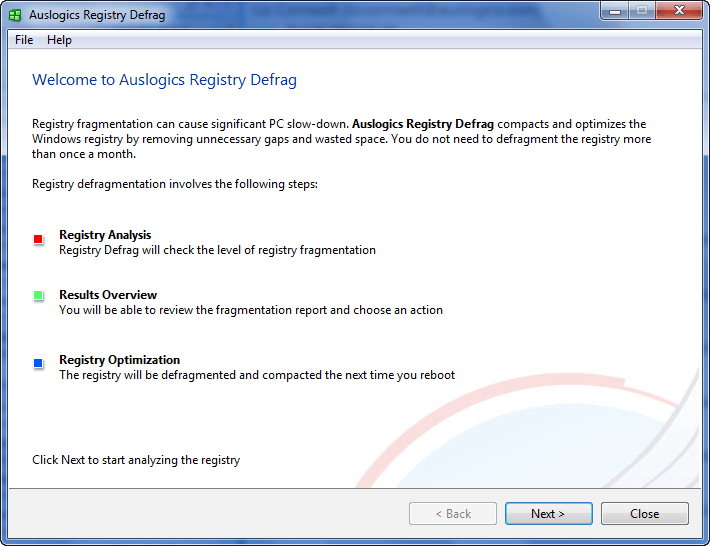
Auslogics is a popular name for their freeware Disk Defrag program. In addition to Disk Defrag, Auslogics also has a long offering of other software that can perform a variety of tasks for you with the same quality that we have come to know and love in Disk Defrag. Auslogics Registry Defrag is one such software.

Auslogics Registry Defrag, as the name implies, does to the registry what Disk Defrag does to your hard drive: defragmentation. Of course, to be completely fair, a Registry Defrag is not going have as big of an impact on your computer performance as Disk Defrag. Why? Because, lets be honest, a registry is not as large as a whole hard drive, so defragmentation is not as big of a deal. Nonetheless, though, if you use the right tool, defragging your registry can never hurt you.

These are all the benefits of Auslogics Registry Defrag as per the developer:

  • Eliminates structural defects in the Registry
  • Reduces the Registry size and the amount of RAM the registry takes up
  • Improves applications response time
  • Makes Windows running more stable
  • Improves overall computer performance

What is not mentioned in the list is something I can attest to with first hand experience: Auslogics Registry Defrag is, literally, point and click – extremely easy to use.

That all being said, 15 lucky dotTechies will have the chance to own a copy of Auslogics Registry Defrag for free! All winners will receive free updates. Here are the rules for this promotion:

Version being given out for free: 5.5.20.525

Free updates: Yes

Supported OS: Windows XP/2003/2008/Vista/Win7

Download size: 2.27 MB

  • If you want a chance to win Auslogics Registry Defrag, you must post a comment below answering all of these questions:
  1. Have you ever defragged your registry in the past? If so, with what software?
  2. What is your favorite aspect of Auslogics Registry Defrag?
  3. Is there anything Auslogics can improve in Registry Defrag (bug fixes, more features, portability, etc.)? If so, please specify.
  4. If you were in the market to purchase a registry defragger, would you be willing to pay $19.95 for Auslogics Registry Defrag? If not, then please name the price that you prefer.

Anyone that does not answer all four of these questions will be disqualified.

  • 5 licenses are reserved for dotTech donors, authors, and artists. If you fall in this 5 license reserve category, please specifically state so in your comment (i.e. say “I am a donor” if you are a donor, etc.), otherwise I may not know. Also if you are a donor, please be sure to use the e-mail you donated with in your comment (do not post your e-mail in public, just use the e-mail in the “e-mail” form when posting a comment) so I can confirm.
  • The other 10 licenses can be won by anyone.
  • I reserve the right to award specific people licenses if I feel they have helped foster the dotTech family by being very active (the people who fall into this category is at my sole discretion).
  • You may only enter the drawing once. If you try to enter more than once, you will be disqualified.

When posting a comment, please make sure you enter an e-mail that is 100% valid and an e-mail you will check because the licenses will be distributed via e-mail by me. If you win and don’t have a valid e-mail or an e-mail you don’t check, your license will go to waste. However, please don’t post your e-mail in your comment! You should never post your e-mail on a public form. Just enter the e-mail you want to be contacted at in the “E-mail” field when writing your comment – I will be able to get your e-mail from there. Or if you are a registered dotTechie, just post a comment normally and I will be able to find your e-mail.

The winners of this giveaway will be announced after the giveaway has ended in 48 hours, or on Sunday Feb 28, 2010.

Good luck to everyone!

Anyone that misses out on a free license of Auslogics Registry Defrag can always purchase Auslogics Registry Defrag from the homepage for $19.95 (USD). Or, better yet, if you want more “bang for the buck” consider Auslogics BoostSpeed, which includes Registry Defrag, for $29.95.

72 Comments »

  1. Locutus February 26, 2010 at 9:02 PM (comment permalink) -

    I’m not really interested in this offer, but what exactly would the RAM usage difference be on a few-month old installation?

    1
  2. Rocky February 26, 2010 at 9:16 PM (comment permalink) -

    1. Have you ever defragged your registry in the past? If so, with what software?

    No, I haven’t

    2. What is your favorite aspect of Auslogics Registry Defrag?

    Improves overall computer performance

    3. Is there anything Auslogics can improve in Registry Defrag (bug fixes, more features, portability, etc.)? If so, please specify.

    Option of setting up a scheduled scan.

    4. If you were in the market to purchase a registry defragger, would you be willing to pay $19.95 for Auslogics Registry Defrag?

    This price seems reasonable to me.

    2
  3. Frank February 26, 2010 at 9:26 PM (comment permalink) -

    Ashraf,
    don’t be the [Bleep] of such bleeding companies!
    You prostitute your site for 15 licenses? You are so poor (mentally)!

    Frank

    Edit by Ashraf: I have never had a policy to censor comments I don’t like (I prefer free speech) and I don’t plan on starting now; but at least keep it civil.

    3
  4. megaman February 26, 2010 at 9:30 PM (comment permalink) -

    I’ll give kudos to Auslogics. I love their Disk Defrag. I do understand the concept of defragging the registry, as well, but I still prefer the Tune-Up Utilities, at best.

    4
  5. trk February 26, 2010 at 9:42 PM (comment permalink) -

    Have you ever defragged your registry in the past? If so, with what software?
    * yes, Spinright 6.0 & legacy MS utility
    What is your favorite aspect of Auslogics Registry Defrag?
    * This is interesting. == Reduces the Registry size and the amount of RAM the registry takes up==
    Is there anything Auslogics can improve in Registry Defrag (bug fixes, more features, portability, etc.)? If so, please specify.
    * have not tested this software yet ???
    If you were in the market to purchase a registry defragger, would you be willing to pay $19.95 for Auslogics Registry Defrag? If not, then please name the price that you prefer.
    * $4.99 , I see this as a simple utility

    5
  6. Rita February 26, 2010 at 9:52 PM (comment permalink) -

    I love Auslogics Registry defrag. I use the free trial version, and when that runs out, I will be sad. I would love to have a license so I can use it for a long time. I love how quick it is and does not tie up your system with a several-hours-long defrag.

    6
  7. amozai February 26, 2010 at 9:55 PM (comment permalink) -

    1. Yes, with RegistryBooster.
    2. light on resources and easy to use
    3. scheduling and optimization
    4. this is a life saving tool, $19.95 is a fair price.

    7
  8. win7guru February 26, 2010 at 10:04 PM (comment permalink) -

    Hey Ashraf,

    I would love to try out this program and I am glad that I am one of the first 15 to comment. Talk to you later.

    8
  9. WECH February 26, 2010 at 10:05 PM (comment permalink) -

    1. RegCompact
    2. reduce size
    3. not sure, would be nice if it can fix W2K problem.
    4. fix that reg oversize problem, yes, will consider.

    9
  10. Friend February 26, 2010 at 10:09 PM (comment permalink) -

    AOA Ashraf,

    I hope you are fine. I also want to participate in giveaway. I have heard positive reviews about Auslogics Registry Defrag. Hope I will have one license out of 10.

    1. I do registry defragmentation. I use TweakNow PowerPack 2009.
    2. Registry structural improvements + reduced size
    3. Portability + more features
    4. I would prefer to buy it in $0.0000001

    10
  11. Grr February 26, 2010 at 10:12 PM (comment permalink) -

    1. Have you ever defragged your registry in the past? If so, with what software?

    No.

    2. What is your favorite aspect of Auslogics Registry Defrag?

    Reduces the Registry size and the amount of RAM the registry takes up. I don;t know but some or the other process would be eating my RAM. Just after boot, RAM usage will be 600Mb.

    3. Is there anything Auslogics can improve in Registry Defrag (bug fixes, more features, portability, etc.)? If so, please specify.

    A portable version would be great. Caz it will help bypass use it where access to registry is disabled, example-office.

    4. If you were in the market to purchase a registry defragger, would you be willing to pay $19.95 for Auslogics Registry Defrag? If not, then please name the price that you prefer.

    No. It believe it should be around $10.95 – $12.95; reason –there would be additional tax of $2-4..crossing the total price as $20 & more..

    Thanks,
    Grr

    11
  12. Mike Brazil February 26, 2010 at 10:20 PM (comment permalink) -

    Please include me in the drawing for Auslogics Registry Defrag:

    1. No.

    2. Defragging the registry should reduce boot time to some degree.

    3. I can’t really tell until I start using it.

    4. I think $19.95 is rather high for this type of utility. I’d be willing to pay $9.95.

    12
  13. OldElmerFudd February 26, 2010 at 10:41 PM (comment permalink) -

    @Locutus:

    Locutus, you hit on the same question I had! Ashraf, I don’t feel like I need this one, but thanks for the offer to your readers.

    13
  14. vhick February 26, 2010 at 11:49 PM (comment permalink) -

    1. Yes. I’m always used registry defragmenter than registry cleaner. I used NTREGOPT for this task.

    2. Improve the application response time and eliminate structural defects of the registry.

    3. Portability. Most especially the clean or “stealth” of its portability. No registry or folder that left behind. All in application folder. Perfect for usb use.

    4. Maybe its reasonable. But if its possible to make it lower than $10 or $5-$7 available in most 3rd world country, that will be great!

    14
  15. Adrian February 27, 2010 at 12:54 AM (comment permalink) -

    1. Have you ever defragged your registry in the past? If so, with what software?

    Yes. With a full System Utilities suite. I forgot which. Seems to be Ashampoo WinOptimizer.

    2. What is your favorite aspect of Auslogics Registry Defrag?

    It would reduce boot time (although not too much)

    3. Is there anything Auslogics can improve in Registry Defrag (bug fixes, more features, portability, etc.)? If so, please specify.

    No. There are enough great features in this program.

    4. If you were in the market to purchase a registry defragger, would you be willing to pay $19.95 for Auslogics Registry Defrag? If not, then please name the price that you prefer.

    19.95 is a fair price, considering that it performs in a specific category, meaning that it would certainly perform better than system utilities suites. However, a price range around $15 would be better.

    Am I still considered an ex-author? If yes then I think I can get a special license.

    15
  16. Bela February 27, 2010 at 1:30 AM (comment permalink) -

    1.
    Yes, in the past Auslogics Registry Defrag, now TuneUp Registry Defrag.

    2.
    Speed.Precision.Performance.

    3.
    Probably yes, but as a ordinary user I can say that Auslogics is perfect.

    4.
    I think the price is fair, but for me $19.95 it’s too much, I’m a freeware maniac :)

    16
  17. Ozzie February 27, 2010 at 1:51 AM (comment permalink) -

    In relation to the negative poster, what can I say but there’s one born every minute, isn’t there?

    Thanks for the offer Ashraf! I’ll pass as I got a hold of the Auslogics BoostSpeed giveaway a little while back, in which the registry defrag is included. But it’s a great product and is highly recommended (IM-Humble-O). Good luck everyone!

    17
  18. paf February 27, 2010 at 2:02 AM (comment permalink) -

    Hi Ashraf, thanks for the opportunity. Please count me in. Here are my answers:
    1.No.
    2.I’ve never used it, but from what I can see I would say: safety and improvement of boot time.
    3.I can not tell, as I’ve never used it.
    4.I think it’s a little to much. I would say something around 6-9 euros.

    Cheers.

    18
  19. jenny February 27, 2010 at 2:23 AM (comment permalink) -

    I would like to enter the contest. Thanks!

    1.Have you ever defragged your registry in the past? If so, with what software? Yes, Winrescue
    2.What is your favorite aspect of Auslogics Registry Defrag? Eliminate errors,Stable windows performance
    3.Is there anything Auslogics can improve in Registry Defrag (bug fixes, more features, portability, etc.)? If so, please specify. Portability
    4.If you were in the market to purchase a registry defragger, would you be willing to pay $19.95 for Auslogics Registry Defrag? If not, then please name the price that you prefer. No. $10 -$12

    19
  20. Mayank February 27, 2010 at 2:24 AM (comment permalink) -

    1) Yes, With 2 – i) Tweak Now Power Pack 2009
    ii) Tune Up Utilities 2010

    2) Improves Overall Computer Performance

    3) A Schedule Scan

    4) Well Too High Just For A Registry Defragger
    My Price – $10.99

    20
  21. Jabtano February 27, 2010 at 2:47 AM (comment permalink) -

    I would give this a shot for sure.I really don’t place a price on programs. People still have to take the time to write the code and put it all together.$20.00 dollars isn’t really a large sum of money when one thinks about it really.

    21
  22. aviator365 February 27, 2010 at 3:40 AM (comment permalink) -

    1. Have you ever defragged your registry in the past? If so, with what software?
    Ans: Yes, Puran Defrag.
    2. What is your favorite aspect of Auslogics Registry Defrag?
    Ans: Speed & simplicity
    3. Is there anything Auslogics can improve in Registry Defrag (bug fixes, more features, portability, etc.)? If so, please specify.
    Ans: Better GUI, maybe?
    4. If you were in the market to purchase a registry defragger, would you be willing to pay $19.95 for Auslogics Registry Defrag? If not, then please name the price that you prefer.
    Ans: NO way, $4.99 MAX

    Thanks.

    22
  23. Karl February 27, 2010 at 4:29 AM (comment permalink) -

    1) NTREGOPT along with ERUNT before and Page Defrag (sysinternals) after.

    2) I haven’t used it yet but I’m hoping easy of use.

    3) If it doesn’t have a built in backup (just in case) then that and a similar function to Page Defrag (on reboot) so it’s one stop covers everything.

    4) At the moment $0. If it could do the same as ERUNT, NTREGOPT and Page Defrag in one go. $4.95 because I don’t believe it can actually do better so it’s just a convenience fee.

    If I win I hope the product will open my eyes as to why it’s worth $19.95. Usually commercial s/w offers something over freeware but NTREGOPT and Page Defrag are a very hard pair to top in this department.

    23
  24. bb February 27, 2010 at 4:36 AM (comment permalink) -

    1. no
    2. never used it, thus have no ‘favorite’
    3. never used it, thus can’t advise
    4. It’s a fair price, however I tend not to buy such utilities.

    24
  25. Inger Anne-Sofi February 27, 2010 at 4:45 AM (comment permalink) -

    1. No.
    2. Eliminates structural defects.
    3. optimization and scheduling.
    4. it´s a fair price if the app´s that good.

    25

Leave A Response »