dotTech Exclusive: 15 free licenses of Auslogics Registry Defrag!
February 26, 2010 72
Email article | Print article
Auslogics is a popular name for their freeware Disk Defrag program. In addition to Disk Defrag, Auslogics also has a long offering of other software that can perform a variety of tasks for you with the same quality that we have come to know and love in Disk Defrag. Auslogics Registry Defrag is one such software.
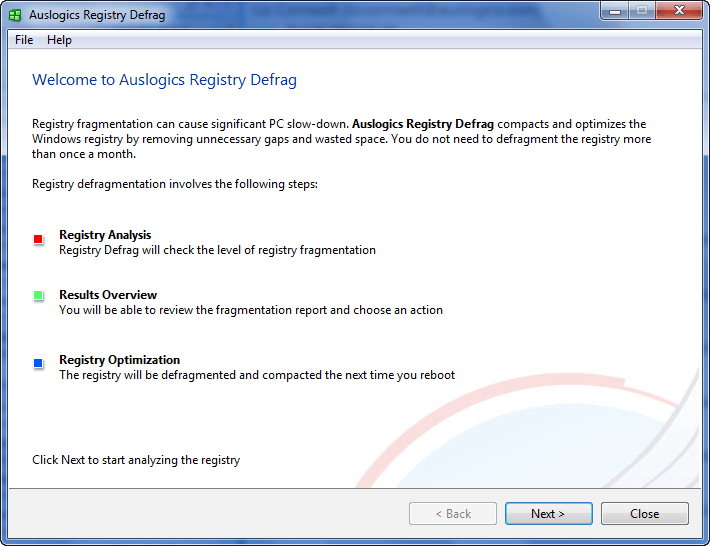
Auslogics Registry Defrag, as the name implies, does to the registry what Disk Defrag does to your hard drive: defragmentation. Of course, to be completely fair, a Registry Defrag is not going have as big of an impact on your computer performance as Disk Defrag. Why? Because, lets be honest, a registry is not as large as a whole hard drive, so defragmentation is not as big of a deal. Nonetheless, though, if you use the right tool, defragging your registry can never hurt you.
These are all the benefits of Auslogics Registry Defrag as per the developer:
- Eliminates structural defects in the Registry
- Reduces the Registry size and the amount of RAM the registry takes up
- Improves applications response time
- Makes Windows running more stable
- Improves overall computer performance
What is not mentioned in the list is something I can attest to with first hand experience: Auslogics Registry Defrag is, literally, point and click – extremely easy to use.
That all being said, 15 lucky dotTechies will have the chance to own a copy of Auslogics Registry Defrag for free! All winners will receive free updates. Here are the rules for this promotion:
Version being given out for free: 5.5.20.525
Free updates: Yes
Supported OS: Windows XP/2003/2008/Vista/Win7
Download size: 2.27 MB
- If you want a chance to win Auslogics Registry Defrag, you must post a comment below answering all of these questions:
- Have you ever defragged your registry in the past? If so, with what software?
- What is your favorite aspect of Auslogics Registry Defrag?
- Is there anything Auslogics can improve in Registry Defrag (bug fixes, more features, portability, etc.)? If so, please specify.
- If you were in the market to purchase a registry defragger, would you be willing to pay $19.95 for Auslogics Registry Defrag? If not, then please name the price that you prefer.
Anyone that does not answer all four of these questions will be disqualified.
- 5 licenses are reserved for dotTech donors, authors, and artists. If you fall in this 5 license reserve category, please specifically state so in your comment (i.e. say “I am a donor” if you are a donor, etc.), otherwise I may not know. Also if you are a donor, please be sure to use the e-mail you donated with in your comment (do not post your e-mail in public, just use the e-mail in the “e-mail” form when posting a comment) so I can confirm.
- The other 10 licenses can be won by anyone.
- I reserve the right to award specific people licenses if I feel they have helped foster the dotTech family by being very active (the people who fall into this category is at my sole discretion).
- You may only enter the drawing once. If you try to enter more than once, you will be disqualified.
When posting a comment, please make sure you enter an e-mail that is 100% valid and an e-mail you will check because the licenses will be distributed via e-mail by me. If you win and don’t have a valid e-mail or an e-mail you don’t check, your license will go to waste. However, please don’t post your e-mail in your comment! You should never post your e-mail on a public form. Just enter the e-mail you want to be contacted at in the “E-mail” field when writing your comment – I will be able to get your e-mail from there. Or if you are a registered dotTechie, just post a comment normally and I will be able to find your e-mail.
The winners of this giveaway will be announced after the giveaway has ended in 48 hours, or on Sunday Feb 28, 2010.
Good luck to everyone!
Anyone that misses out on a free license of Auslogics Registry Defrag can always purchase Auslogics Registry Defrag from the homepage for $19.95 (USD). Or, better yet, if you want more “bang for the buck” consider Auslogics BoostSpeed, which includes Registry Defrag, for $29.95.
72 Comments »
Leave A Response »


HI
1. NO
2.I THINK IT SHOULD BE Improved applications response time
3. MAY BE THEY CAN IMPROVE THE APPEARANCE/INTERFACE
4. 5$ IS OKAY FOR ME
* Have you ever defragged your registry in the past? If so, with what software?
Glary Utilities
* What is your favorite aspect of Auslogics Registry Defrag?
It’s pretty fast :)
Is there anything Auslogics can improve in Registry Defrag (bug fixes, more features, portability, etc.)? If so, please specify.
A good portable version would be nice..
* If you were in the market to purchase a registry defragger, would you be willing to pay $19.95 for Auslogics Registry Defrag? If not, then please name the price that you prefer.
If was gonna pay some money to buy i would buy it. It’s not that expensive. But still many companies offer free licenses of their software so why pay??
1) No, I have Not.
2) The Detailed Analysis of Registry Fragmentation: The -Before- and -After- Effect explanation.
3) Portable version perhaps.
4) Auslogics Registry Defrag is a fine Tool at the Right Price! I would be definitively willing to purchase it.
Going by the high “trust quotient” I place in you I am sure this app must be very good.
I admire your innovative new “questions-based-approach”. It reflects a new genre of freebies – aka “limited freebies with knowledge-based-winnership” Wow! That’s a new genre! :)
It rocks as much & as well as your reviews. The former because of “innovation” & the latter because of “pure undiluted sense”.
That said, I must confess I do not know the answers to these wonderful questions. However I am reading these posts to learn those answers.
Ramesh :)
1) Yes, I first used NTREGOPT in combination with PageDefrag.
2 & 3) Don’t know, never use it ! A portable version maybe…
4) The price is reasonable but, for a particular, there are enough freebies to do the job.
Thanks for the offer !
A great offer Ashraf. I also have Auslogic Boost Speed, so will pass on this offer.
Keep up the great work.
1. Have you ever defragged your registry in the past? If so, with what software?
Yes, I have!! I did it using TUNE UP UTILITIES, REGISTRY MECHANIC 7 and a little freeware tool called “Quicksys RegDefrag”
2. What is your favorite aspect of Auslogics Registry Defrag?
Improves the overall computer performance effectively by compacting the registry
3. Is there anything Auslogics can improve in Registry Defrag (bug fixes, more features, portability, etc.)? If so, please specify.
The (free of course) version I used a few weeks ago (see link below….LOL!!) automatically added itself in startup without warning you in any way; this is not good because in the end it consumes a great deal of computer resources for nothing. Another improvement could be to release a portable version.
http://www.321download.com/LastFreeware/page38.html#Auslogics%20Registry%20Defrag
4. If you were in the market to purchase a registry defragger, would you be willing to pay $19.95 for Auslogics Registry Defrag?
Taking into account the free alternatives mentioned above, the price seems to me a little bit high for my tastes and…for my (poor) wallet…LOL!
Have you ever defragged your registry in the past? If so, with what software?
I used Tuneup Utilities 2008. Also a small free software that I can’t remember the name of.
What is your favorite aspect of Auslogics Registry Defrag?
Well, for one it’s made by a well known company. I also like it’s simple and easy to understand interface-it looks pretty similar to basically every hard drive defrag I’ve used
Is there anything Auslogics can improve in Registry Defrag (bug fixes, more features, portability, etc.)? If so, please specify.
Yes, I believe that this program should be a defragger for both the registry and the hard drive.
If you were in the market to purchase a registry defragger, would you be willing to pay $19.95 for Auslogics Registry Defrag? If not, then please name the price that you prefer.
I’d be willing to pay it if they included a good hard drive defrag with it. Otherwise I’d probably pay only $10.
So yeah, hopefully I can win this to see why they think such a simple program is worth $20 while other people give it away for free.
1. No, just cleaned it quite a number of times.
2. “Makes Windows running more stable” is my choice, with “Improves application response time” in second.
3. Portability would be most desirable, so I can help others’ computers without having to install on them.
4. If I really, really needed it I would pay for it, but it should not be more than half the price of the BoostSpeed, which should not exceed $19.95 US, IMHO.
1. I use the windows defrag as most I have tried make no difference
2. Optimizes registry and actually cleans out the junk, tried cc cleaner and it crashed my pc.
3. Remove all dead links without missing anything, correct inaccurate links, and definitely be portable
4. If it works and improvement is noticed yes 20.00 is a good price with free lifetime upgrades.
Apparently I fail to qualify simply because I have never defragged my registry, have never even heard of Auslogics outside of this site, and cannot compare it to any experiences I have had with any other product. I also am not able to afford any donation to your site, though I certainly will be doing so in the future once my financial status improves. How to contribute to this site in any other way is not readily apparent by any of the materials I have read here, but I am an English scholar and would be happy to contribute my skills should you find a place where I might fit in. Thanx for this offer, as it does seem a valuable tool for those who actually know what it does. Have a great day.
Thanks for including me in the draw………
1) No
2) Speed up computer
3) Portable would be nice
4) Price fair, $14.99 even better
Hi Ashraf,
I would like to participate in the drawing for Auslogics Registry Defrag.
Here are my answers:
1. Yes, I have. With Registry Mechanic.
2. Improves applications response time.
3. Portability.
4. No. It should be around $12.
Hello all. hope you are doing well. Here are my answers….
1) I have defragged my registry using the free version of Auslogics Registry Defrag.
2)Before and after info
3)I don’t like that I need to reboot my computer. I know it’s needed but I hate any process that requires a reboot.
4)$19.95 seems like a fair price. Plus Auslogics does make some quality products. Maybe they could offer a combo with their disk defrag to make the offer more attractive.
1. no
2. never used it, thus have no ‘favorite’
3. never used it, thus can’t advise
4. It’s a fair price, however I tend not to buy such utilities.
I am in Ashraf.. hope to be lucky this time…
1. Yes. Registry Mechanic, Glary Utilities
2. Reduces the Registry size and the memory that the registry takes up.
3. Speed, and figuring some way to reset without a reboot.
4. No. It should be around $9.95; reason –the product doesn’t do enough to merit the price. Now if it did disk de-frags as well as registry de-frags, or some other purpose, I could see it.
Regards!
Gentlemen:
Thank you for this opportunity.
1. Have you ever defragged your registry in the past? If so, with what software?
No I haven’t, I do use the free version of your registry cleaner and value it highly.
2. What is your favorite aspect of Auslogics Registry Defrag?
That is the main reason I am here. I don’t defrag my registry; in fact, this is the first I have heard of the concept. If this is up to your free standards in other software, it should be effective, quick and very easy to use.
3. Is there anything Auslogics can improve in Registry Defrag (bug fixes, more features, portability, etc.)? If so, please specify.
Not having used the software, anything I say would only be a guess. I would be more than happy to, as I have done countless times before, register comments with a software developer, in this case, you.
4. If you were in the market to purchase a registry defragger, would you be willing to pay $19.95 for Auslogics Registry Defrag? If not, then please name the price that you prefer.
I can’t see myself considering any other developer’s registry defragging software at any price. That said, Auslogic is not “Any other developer”. I use free versions of your Registry Cleaner and Disk Defrag. They are both splendid pieces of software. They are perhaps too good, as I can find no reason to look for anything better even with Auslogics. One thing is certain; if I feel a need for any software you handle yours will be my first stop. Money is far less important to me than trust and value. You have a long track record of not trashing my machine. That is a very good thing and $20 for you software is quite reasonable.
Thanks again for this opportunity and for the freeware you distribute. Please keep up the good work.
Ed
I am so happy from their defragler (and I have tried too many) that I want this too!
Pls, count me in.
(I am donor)
1) Yes (tune up, etc)
2) Reliability of Auslogics
3) Don’t know yet!
4) I suppose around 5$, not because its not worthing more probably but because of competition, especially sets of util which include a registry defrag tool.
1. Have you ever defragged your registry in the past? If so, with what software?
Yes, Windows own soft.
2. What is your favorite aspect of Auslogics Registry Defrag?
Improves computer performance with good speed.
3. Is there anything Auslogics can improve in Registry Defrag (bug fixes, more features, portability, etc.)? If so, please specify.
Option of schedulling scan.
4. If you were in the market to purchase a registry defragger, would you be willing to pay $19.95 for Auslogics Registry Defrag?
Possibly.
I would like to join the contest too.
1) Yes, I have used Glary Utilities.
2 & 3) Don’t know, never used it ! A portable version maybe…
4) The price maybe reasonable for its quality, but should be ~10$, because there are many freebies to do the job.
I don’t like registry defragmenters because they really don’t show a great speed increase, and they have a large chance of breaking the system or software.
I would like to join
1.No
2.improvement of boot time.
3. I’ve never used it.
4.10 $
# Have you ever defragged your registry in the past? If so, with what software? Smart Defrag
# What is your favorite aspect of Auslogics Registry Defrag? It can defrag my Returnil partition and flash drives
# Is there anything Auslogics can improve in Registry Defrag (bug fixes, more features, portability, etc.)? If so, please specify. Speed it up; defrag the registry also
# If you were in the market to purchase a registry defragger, would you be willing to pay $19.95 for Auslogics Registry Defrag? If not, then please name the price that you prefer. I would not pat for a defrag program
Hi, count me in please.
I have used TuneUp utilities 2007 to defrag my registry in the past.
My favorite aspect of Auslogics Registry
Defrag : reliability.
Improvements : none seen yet
If I had to pay, I wouldn’t go over $10