
Free O&O Defrag 11 Professional Edition!

February 27, 2010 39 Email article | Print article

Defragging your hard drive regularly has it’s benefits. The time it takes to load files, save files, etc. reduces; your computer performance increases (to an extent). There are many freeware defrag programs available out there (many of them top-notch quality such as Auslogics Disk Defrag), but here is a free promotion of a commercial defragger, O&O Defrag 11 Professional Edition.

As per the developer, these are the features of O&O Defrag 11 Professional Edition:

O&O Defrag 11 includes an array of functions that a really good defragmentation software should offer, ranging from a fully automated defragmentation function to an expert settings option.

  • Zone filing for optimal organization of files
  • Three additional defragmentation methods (eight methods in all)
  • Improved: even better at eliminating high levels of fragmentation
  • Background monitoring: your system is constantly kept at its peak
  • Screen Saver Mode: optimizes your PC whenever it’s not being used
  • O&O OneClickDefrag for fully automatic configuration
  • Job Assistant for scheduling defragmentation

The latest version of O&O Defrag Professional Edition is v12 which usually costs $49.95 (USD), but you can get version v11 for free! However, I suggest you take a quick glance at a review written on it before getting it. I have not personally used O&O Defrag 11 Professional Edition so I can’t vouch for how good/bad it is but the review is very negative, fyi.

That being said, to get O&O Defrag 11 Professional Edition for free, follow these simple directions:

Version being given out for free: v11.6.4199

Free updates: No

Supported OS: Windows 2000-Windows Vista

  • Visit the registration page and register. The fields “Email”, “Name”, “Salutation”, and “Country” must be filled in. O&O sends regular newsletters regarding their products, so you may consider using a spam email address.
  • Check the inbox of the e-mail you registered with. There should be an e-mail from “O&O Register (register@oo-software.com) ” with the subject of “Your license of O&O Defrag 11 Professional Edition”:

In the e-mail you will find your registration information.
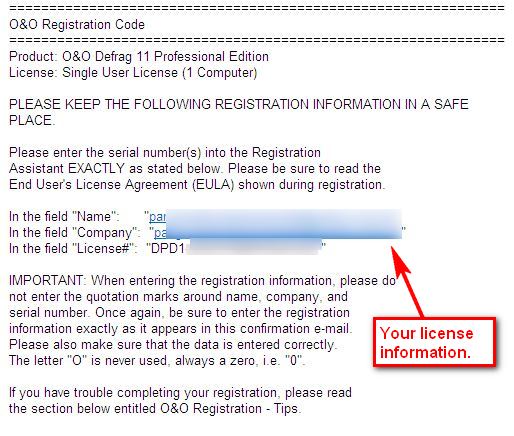
Keep this e-mail open because you will need that registration information soon.

  • Download (32-bit download | 64-bit download) and install O&O Defrag 11 Professional Edition.
  • After installation, run O&O Defrag 11 Professional Edition. You will be prompted to register the software. Enter the registration information you received in the e-mail, and register it.

Enjoy your free copy of O&O Defrag 11!

[via For-Free-On-Internet]

39 Comments »

  1. Happy Person (Inas) March 1, 2010 at 8:40 AM (comment permalink) -

    Hi all – here’s my update.

    I applied for (and received) my defrag pro 11 license code today. The company’s response time is very quick. It was slower over the weekend because (apparently) they are off on the weekends, which is very understandable. The company also provides very clear, detailed, helpful information on what to enter in the registration fields.

    One very important note: For users who have Win-7 systems, you’ll need to run the “installer” in Win2000 compatibility mode to get past an error message (during installation) that the program will not install on the win-7 version of windows (or something to that effect). I’m simply paraphrasing.

    After installation, however, you won’t need to worry about running the program using any compatibility mode. Just run it regularly.

    Cheers,
    Inas

    26
  2. Doru March 1, 2010 at 10:04 AM (comment permalink) -

    Defragmentation is good but very very slow.I put at complect acces.Uniblue is more more faster.So i will remain at uniblue.

    27
  3. giovanni March 1, 2010 at 12:20 PM (comment permalink) -

    And to defrag your REGISTRY system:

    REGISTRY MECHANIC 8 (1 year FREE license code ==> worth 30 $)

    http://www.mydigitallife.info/2010/01/14/pc-tools-registry-mechanic-8-free-download-with-1-year-license-code/

    Enjoy!

    28
  4. harris March 1, 2010 at 3:37 PM (comment permalink) -

    @adrian…a reply to your rather laconic response to my remarks about o&o defrag v.11 not being win 7 compatible. it is not necessary to buy v.12 as v.10, an earlier version runs quite wonderful under win 7. i do find it a bit peculiar that an earlier version supports a newer OS and a later version doesn’t…

    29
  5. Pwnana March 2, 2010 at 7:44 PM (comment permalink) -

    Am I the only one who likes O&O? Im using v12 which I got from a different promotion and it has gone above and beyond. But there are some huge improvements from 11 to 12, like zone filing, so I cant really speak for this. It keeps my hard drive below 1% fragged for months at a time without actually having to defrag the whole system, and I like getting results without the work =D.

    30
  6. Ramesh Kumar March 3, 2010 at 5:30 AM (comment permalink) -

    @MikeR – that is as comprehensive & as constructive a comment I’ve ever seen.

    A beautiful 3 pronged mantra of pure sense i.e. A) Not to get “blindly swayed” by going for an app written by a large faceless corporation B)Consider peer options offered by open source; but being alive to open source coding getting snitched by opportunistic coders c)Consider choosing an app coded by a civic minded coder (& donate to such guys) rather than blindly choosing apps written by one who is “only” commercial minded. Every one of the examples & developers cited rang true.
    Awesome.
    Ramesh

    31
  7. Ramesh Kumar March 3, 2010 at 5:35 AM (comment permalink) -

    @kingpin:

    Bullseye! To be honest I still do not know what to choose. And this genre is an extremely sensitive one – hard disk defrag. Hence following this thread closely
    Ramesh

    32
  8. Ramesh Kumar March 3, 2010 at 6:09 AM (comment permalink) -

    @megaman – I share with you the same regret wrt IObit Smart Defrag i.e. why it still shows a small residual percentage – undefragged – e.g. 5% or whatever. That’s one rant I share with you :(

    @harris – Entirely agree on your comment no.10. I wish version numbering is accompanied with a changelog which explains that if a version has jumped up by a “quantum” number what is the “quantum” new functionality it provides. It should have an elaborate changelog. Otherwise it looks like a sales gimmick :)

    @Toast (no.12) & Happy Person (no.26) –
    I quote Toast – “Should I try compatibility mode with this installer? Or would doing that to a defragmenting tool not meant for the newer OS possibly cause damage to my system?”. I am as concerned as you are. Shrewd query. :) I share your puzzlement along with you. After all, one of the most important tasks of an OS is “file management.” Messing that up could mean messing up big time……real big time. :D

    @Happy Person – I quote – “After installation, however, you won’t need to worry about running the program using any compatibility mode. Just run it regularly”.

    I’ve never run an app on compatibility mode as I remember reading somewhere (I unfortunately do not recollect) :( that running an app on compatibility mode while it is offered as an option should never ever be selected as an option.

    I wonder in any case if “compatibility option” is at least to be avoided in certain “genres of apps”. Meaning e.g. its okay for editing an image file provided the image is not important one but it might be risky for a genre as crucial as disk defragging. YMMV. :) If at all “compatibility mode” is used, perhaps its safer to use it for a lower os rather than a higher os version…….even though it allows you to do both. Even this if only both OS versions fall into the same runtime genre e.g. win7 to vista but not vista to Xp

    If a file is lost, just a file is lost, but if an entire drive is lost every file in it is lost. :( So is one supposed to do disk backup before every disk defrag just to be safe. Somehow that idea does not appeal to me. :) YMMV

    Consequently I am still hemmed in for the immediate present with Smart Defrag & its residual unfragged defragmentation of 5% or so :(
    Ramesh :)

    33
  9. Joji March 3, 2010 at 6:55 PM (comment permalink) -

    I use “Puran Defrag”. It’s a really good program, simple in design, but defrags and packs everything very well in less than 20 – 10 minutes!

    The best part is that it’s a freeware!

    Link: http://www.puransoftware.com/Puran-Defrag-Download.html

    ~Joji~

    34
  10. John Cain March 6, 2010 at 7:15 AM (comment permalink) -

    Thanks for the great guide!

    I use O&O Defrag myself but unfortunatly I paid for it to review it! It is very good software indeed one of the best features is the screen saver idle mode were it defrags when you are idle!

    There are many freeware applications but none compare to O&O Defrag that I’ve found its simply great software.

    I’m going to try to get the software for free on my brothers computer, thanks for your great tutorial!

    Cheers,
    John

    35
  11. Francis March 6, 2010 at 11:16 PM (comment permalink) -

    Has anyone tried out O&O Defrag by just using its context menus? I can’t make it work. Whenever i click any of the options O&O defrag just loads up but doesn’t do anything.

    36
  12. Johnny March 16, 2010 at 2:55 PM (comment permalink) -

    Why is it that version 10 installs and runs on Win7 with not a problem, but version 11 even under compatibility mode says it will not install under the same OS?

    37
  13. internetexplorer February 12, 2011 at 3:25 AM (comment permalink) -

    “offer has expired” (I’m not surprised, considering that it was published here about a year or so ago!). :(

    38
  14. Maverick Cortinas February 27, 2012 at 7:33 PM (comment permalink) -

    The round of applause for your weblog.Really thanks! Fantastic.

    39

Leave A Response »