
IObit’s “Advanced Uninstaller” tries to satisfy your clean uninstalling desires

May 22, 2011 44 Email article | Print article

Recently IObit, a software publishing firm famous for their Advanced SystemCare software package and their Internet Security 360 scandal, released a freeware product – Advanced Uninstaller – that aims to serve all your uninstalling needs:
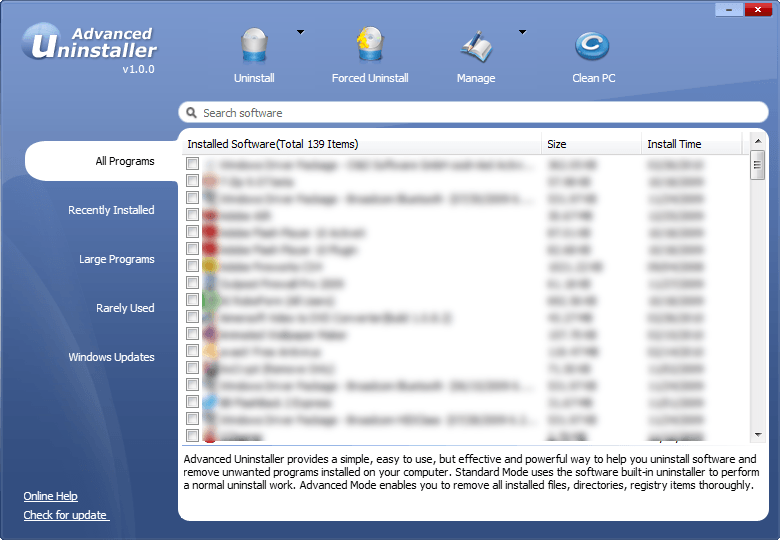
While the focus of Advanced Uninstaller is on performing clean uninstalls (i.e. performing a regular uninstall then scanning your computer for left over files and registry entries), it comes with a couple of other attractive features also:

  • The ability to perform “force” uninstalls (uninstalling programs that have no uninstaller)
  • The ability to uninstall programs in batch (uninstall multiple programs at once; take note that the “clean uninstalling” will happen in batch but you will be prompted to run the uninstaller of each individual program one at a time).

Other potentially useful aspects of Advanced Uninstaller include:

  • The option for you to view your installed programs by “All Programs”, “Recently Installed [Programs]“, “Large Programs”, “Rarely Used [Programs]“, and “Windows Updates”.
  • The ability to select between “Advanced” uninstalls or “Standard” uninstalls. (By default Advanced Uninstaller is set to do “Advanced” uninstalls, which are clean uninstalls; however one can also opt to do “Standard” uninstalls, which are the same thing as running the uninstaller from Add/Remove Programs.)
  • The ability to automatically create Windows Restore points because an uninstall takes place.
  • The logging of all actions taken by Advanced Uninstaller.
  • The ability to export the programs list into a text file.
  • Portability – no installation is necessary.

Of course Advanced Uninstaller looks good on paper, but in reality it is only worth how well it works. Seeing as the focus of the software is performing clean uninstalls, I did a (basic) test of Advanced Uninstaller vs RevoUninstaller to see which program did better clean uninstalls. I was disappointed to find that Advanced Uninstaller is yet still an infant – it doesn’t do very good clean uninstall; RevoUninstaller found files and registry entries leftover for programs while Advanced Uninstaller didn’t find much at all. Of course as I mentioned it was a basic test – nothing rigorous enough to be published into Computer Science Today – but the tests are good enough for me to put all my eggs in RevoUninstaller’s basket. I did, however, find Advanced Uninstaller’s ability to do batch uninstalls to be very, very useful; I wish RevoUninstaller had this feature.

You may download Advanced Uninstaller from the following links:

Version reviewed: v1.0.0

Supported OS: Windows 2000/XP/Vista/Win7

Download size: 687.4 KB

IObit Advanced Uninstaller homepage [download page]

44 Comments »

  1. phoenix_rising March 22, 2010 at 9:16 PM (comment permalink) -

    Thanks for the heads-up on this one, Ashraf. I guess Revo still reigns and still has a home on my comp. But I, too, would love to see a batch uninstall feature built into it. One day, maybe …

    1
  2. Locutus March 22, 2010 at 9:23 PM (comment permalink) -

    Hmmmm. It’s been suggested that I do a review of various uninstallers. I might do this one.

    2
  3. Ashraf March 22, 2010 at 9:26 PM (comment permalink) -
    Mr. Boss

    @Locutus: I am going to post about another uninstaller that just created a free version soon, so look for it.

    3
  4. annie March 22, 2010 at 9:42 PM (comment permalink) -

    Thanks for the excellent review, Ashraf.

    Awesome website, BTW

    4
  5. John G. March 22, 2010 at 9:49 PM (comment permalink) -

    Thanks Ashraf. Based on your findings, I will continue with my trusted Revo.

    5
  6. Locutus March 22, 2010 at 9:51 PM (comment permalink) -

    @Ashraf: Great, will do. Also, why is the permalink structure /%category%/%post_id%/%postname% ? Shouldn’t it be either %post_id% OR %postname%?

    6
  7. Ashraf March 22, 2010 at 10:33 PM (comment permalink) -
    Mr. Boss

    @annie: You are welcome =). And thanks =).

    @John G.: You are welcome =).

    @Locutus: It does not have to be an either or. Personally I prefer /%category%/%post_id%/ because it keeps the URL nice and clean. However, today I realized that having %postname% in the URL helps make dotTech more search engine friendly. I kept %post_id% in after I added %postname% because I want to avoid potential future conflicts such as posts with the same name and legacy links.

    7
  8. OldElmerFudd March 22, 2010 at 11:11 PM (comment permalink) -

    IObit software has been a little inconsistent, imho, and sometimes feels like users are made into beta testers without their knowledge. Still, thanks for keeping us advised about their efforts; I wouldn’t have known of it otherwise.

    Since Revo appeared on my personal radar many months ago, I haven’t found any reason to change or go back to “snapshot” installer/uninstallers like Total Uninstall. It never occurred to me that a “batch” process was a desirable feature, perhaps because I never found the need. Ymmv.

    8
  9. Ashraf March 22, 2010 at 11:25 PM (comment permalink) -
    Mr. Boss

    @OldElmerFudd: When you have over 100 programs installed, more than half of which are junk, and are too lazy to go back and uninstall one at a time, you will find the need =P. (I speak from experience.)

    9
  10. phoenix_rising March 22, 2010 at 11:58 PM (comment permalink) -

    @Ashraf: Agreed, Ashraf. The other day I wanted to remove a few programs that I had tried out to see which was best for my needs, and each time had to go through the whole uninstall process … so yes, a batch feature would be quite handy.

    10
  11. Ashraf March 23, 2010 at 12:09 AM (comment permalink) -
    Mr. Boss

    @phoenix_rising: The only problem is that if the developers of RevoUninstaller do add batch uninstall feature, they will probably add it to Pro and not Free so one will have to pay for it to get the feature. Personally, however, I don’t mind paying for RevoUninstaller (I use it so much…) but the extra features in Pro need to be worth the price tag. Right now, in my opinion, they aren’t worth it. Hopefully they will be worth the $$$ in the future.

    11
  12. vhick March 23, 2010 at 12:16 AM (comment permalink) -

    Just like revouninstaller. Its is good and also portable (and free)

    I thought it is like total uninstall or zsoft uninstaller.

    Thanks for this alternative sir Ashraf…

    12
  13. Nebulus March 23, 2010 at 12:57 AM (comment permalink) -

    Given the history of the company (the aforementioned scandal) I won’t try any of their products anytime soon, even if they are free…

    13
  14. Adrian March 23, 2010 at 1:11 AM (comment permalink) -

    @Nebulus: That’s not too big a problem, considering the “scandal” (which was never proven to be true, although I believe in Malwarebytes and was the person who notified Ashraf about it) was intellectual property stealing and nothing dealing with malicious files/programs, which would mean that it wouldn’t harm you at all.

    Anyway, this is a portable app everyone! You can still download and try it out if you think Revo Uninstaller is better.

    14
  15. phoenix_rising March 23, 2010 at 2:09 AM (comment permalink) -

    @Ashraf: True, I didn’t think of that. And yes, if they did include it in their Pro version, it might be worth the money …

    15
  16. Yochanan March 23, 2010 at 2:20 AM (comment permalink) -

    Thanks for the review but I’ll stick with Revo Uninstaller. Sounds like you’ll be doing the same.

    I do not trust anything from IObit and probably never will. The only reason I’ve heard of them is because of the antivirus scandal. Great publicity guys.

    16
  17. MikeR March 23, 2010 at 2:53 AM (comment permalink) -

    @ Adrian, post 14:

    Astonishing to see a regular poster / contributor to dot tech asserting that intellectual property theft is of lesser consequence to an individual computer user than malware / spyware.

    The one is fraud. The other is vandalism. Every computer user is the poorer for either.

    iObit is a company whose provenance is deliberately obscured and whose promotional campaigns have been proven to be fraudulent.

    Its vigorous assertion of innocence in the Malwarebytes affair was consistent with such corporate duplicity: if MBM’s allegation of database theft had been groundless, then iObit had no reason at all to strip its 360 Security app of so much code.

    Quite the opposite, in fact. If iObit had been telling the truth.

    I appreciate, we live in a world where the standards of openness and integrity to which Ashraf aspires – the reason why I support dot.tech – are ideals as notable for their absence as their reality.

    Nevertheless, the defence of those ideals is something incumbent on every computer user — not out of some weird moral imperative, but self-interest, and self-protection.

    The contention, which you appear to be making, that intellectual property theft is in some way a victimless crime — “it doesn’t harm you at all” — is no different from the contention that insurance fraud is a victimless crime.

    Wrong.

    Everyone ultimately pays when deceit and deception are allowed to hold sway.

    And everyone is a victim.

    As with Nebulus and Yochanan, so too with me: iObit and its products merit no home on any computers I have, nor are they recommended to any of my friends or family.

    17
  18. phoenix_rising March 23, 2010 at 3:38 AM (comment permalink) -
  19. Janetb March 23, 2010 at 3:46 AM (comment permalink) -

    Well, I was going to download it just for the ability to export the programs list into a text file–until I read MikeR’s post…..:-)….

    19
  20. Sputnik March 23, 2010 at 7:20 AM (comment permalink) -

    There is also another free uninstaller with the exact same name but from a different maker : Innovative Solutions.

    It is, I think, the only free uninstaller which is monitoring the installation of a software in order to better uninstall it eventually.

    I must admit I didn’t used this software as I am currently working with Ashampoo Uninstaller and Total Uninstall, so I cannot say anything about it.

    The website of this software is this one :

    http://www.innovative-sol.com/uninstaller-free/index.htm

    20
  21. Sputnik March 23, 2010 at 8:40 AM (comment permalink) -

    @Janetb:

    I use “Suppress Plus” from Perrysoft to export the programs list into a text file. In fact I use this software only for this function.

    There is also “MyUninstaller” from Nirsoft which is able to do the same, but I prefer “Suppress Plus” for this option.

    I like to use “MyUninstaller” for its ability to lead from the program’s name to its location in the register where I like to regularize the names of the softwares and the version numbers.

    Why don’t you install these two and compare ?

    From another point of view, I know Revo, but I don’t use it because I own Total Uninstall which is able to do the same and more and I like it very much.

    21
  22. OldElmerFudd March 23, 2010 at 1:07 PM (comment permalink) -

    @Ashraf:

    Hah Ha! I seem to have the habit of uninstalling those after a day or two. Besides, I scour installed programs on all my machines every few months to see what I never really use – out they go!

    @MikeR:

    My sentiments as well. Even before I was aware of what they stood for, i always found the products over-hyped and disappointing. Not for me, either. It still surprises me they get so much support from freeware users. Go figure.

    22
  23. Ashraf March 23, 2010 at 2:01 PM (comment permalink) -
    Mr. Boss

    @Sputnik: I know – someone emailed me about that. That is the “next article” I referred to earlier in my response to Locutus.

    23
  24. Sputnik March 23, 2010 at 2:50 PM (comment permalink) -

    @Ashraf:

    I know, because I am the one who emailed to you the news about this new free uninstaller which is able to monitor the installation of a software.

    I also send a comment here about this today but it doesn’t appear : I also send another comment here about Suppress Plus and this one appears as comment #21.

    24
  25. Ashraf March 23, 2010 at 3:15 PM (comment permalink) -
    Mr. Boss

    @Sputnik: Your earlier comment was marked as spam so I had to manually clear it. I will check to see if there are more comments of yours in the spam folder.

    25

Leave A Response »



