
IObit’s “Advanced Uninstaller” tries to satisfy your clean uninstalling desires

May 22, 2011 44 Email article | Print article

Recently IObit, a software publishing firm famous for their Advanced SystemCare software package and their Internet Security 360 scandal, released a freeware product – Advanced Uninstaller – that aims to serve all your uninstalling needs:
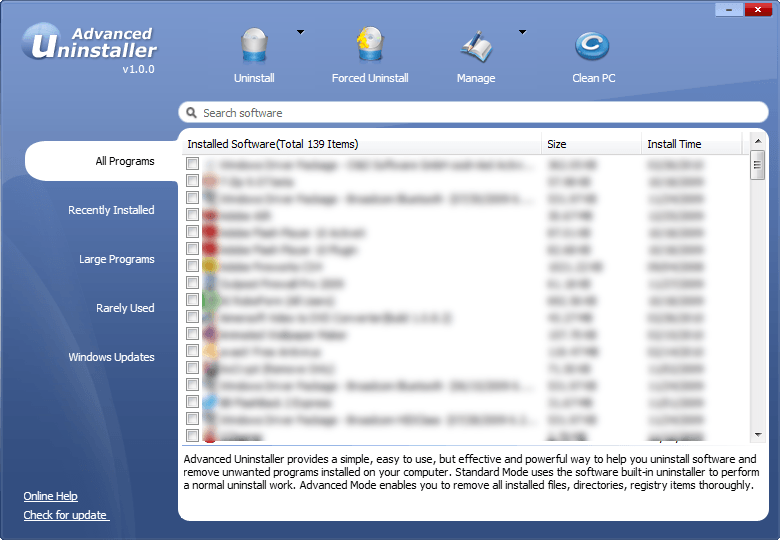
While the focus of Advanced Uninstaller is on performing clean uninstalls (i.e. performing a regular uninstall then scanning your computer for left over files and registry entries), it comes with a couple of other attractive features also:

  • The ability to perform “force” uninstalls (uninstalling programs that have no uninstaller)
  • The ability to uninstall programs in batch (uninstall multiple programs at once; take note that the “clean uninstalling” will happen in batch but you will be prompted to run the uninstaller of each individual program one at a time).

Other potentially useful aspects of Advanced Uninstaller include:

  • The option for you to view your installed programs by “All Programs”, “Recently Installed [Programs]“, “Large Programs”, “Rarely Used [Programs]“, and “Windows Updates”.
  • The ability to select between “Advanced” uninstalls or “Standard” uninstalls. (By default Advanced Uninstaller is set to do “Advanced” uninstalls, which are clean uninstalls; however one can also opt to do “Standard” uninstalls, which are the same thing as running the uninstaller from Add/Remove Programs.)
  • The ability to automatically create Windows Restore points because an uninstall takes place.
  • The logging of all actions taken by Advanced Uninstaller.
  • The ability to export the programs list into a text file.
  • Portability – no installation is necessary.

Of course Advanced Uninstaller looks good on paper, but in reality it is only worth how well it works. Seeing as the focus of the software is performing clean uninstalls, I did a (basic) test of Advanced Uninstaller vs RevoUninstaller to see which program did better clean uninstalls. I was disappointed to find that Advanced Uninstaller is yet still an infant – it doesn’t do very good clean uninstall; RevoUninstaller found files and registry entries leftover for programs while Advanced Uninstaller didn’t find much at all. Of course as I mentioned it was a basic test – nothing rigorous enough to be published into Computer Science Today – but the tests are good enough for me to put all my eggs in RevoUninstaller’s basket. I did, however, find Advanced Uninstaller’s ability to do batch uninstalls to be very, very useful; I wish RevoUninstaller had this feature.

You may download Advanced Uninstaller from the following links:

Version reviewed: v1.0.0

Supported OS: Windows 2000/XP/Vista/Win7

Download size: 687.4 KB

IObit Advanced Uninstaller homepage [download page]

44 Comments »

  1. MikeR March 23, 2010 at 3:43 PM (comment permalink) -

    Sputnik:

    Thanks for the heads-up about the existing app Advanced Uninstaller from Innovative Solutions.

    They’re a respected outfit so I’m certainly going to road test their uninstaller.

    Surprising though that iObit’s much vaunted facility with the Internet and all things computing has somehow failed it: launching a product of the same type and with exactly the same name as an existing product provided by someone else seems somewhat, um, inept.

    Perhaps iObit will have a re-think now and rename it.

    Nevo sounds about right.

    :wink:

    26
  2. Ashraf March 23, 2010 at 7:05 PM (comment permalink) -
    Mr. Boss

    @MikeR: Elegant as always. I agree with you on many grounds; however let me play devil’s advocate for a second. To what extent are you willing to boycott developers who show low morals and commit illegal activities? I ask because developers from all parts of world – ranging from powerhouses like Microsoft to small firms like IObit – have crossed the line at least once, often multiple times.

    Note: I am not defending IObit or low morals/illegal activities. I am simply playing devil’s advocate for discussion purposes.

    27
  3. Rita March 23, 2010 at 7:49 PM (comment permalink) -

    Once again, thank you for the very helpful review. Very helpful in making my decision. I appreciate all the hard work and time you put into testing the software and the screenshots you create to walk us through the installation process and familiarize us with the available options. I know this is very time-consuming, and I do appreciate your hard work.

    ~Rita

    28
  4. Dragonheart March 23, 2010 at 9:27 PM (comment permalink) -

    Thanx for the review.
    I’ve used Advanced Uninstaller for several times the past week and liked it a lot.
    The nice and clean interface and the many options where a big plus for me. And of course the fact that it’s portable.
    But I have to agree with you: Revo does the job better and cleans more leftovers from uninstalled apps. However, many people use disk- and registrycleaners, like “Wise”, “Auslogics” or “IObit”.
    These cleaners should get rid of the junkfiles Advanced Uninstaller leaves behind.
    *

    29
  5. Janetb March 24, 2010 at 1:38 AM (comment permalink) -

    @MikeR:

    The only Advanced Uninstaller from Innovative Solutions I find is “Pro” for $39….No free version?

    30
  6. Dragonheart March 24, 2010 at 10:48 AM (comment permalink) -

    @Janetb:
    Use the link Ashraf provided or check the website
    iobit.com

    31
  7. janet March 24, 2010 at 12:21 PM (comment permalink) -

    @Dragonheart:

    Reread my post—it is not about any program(s) from Iobit…:-)….

    32
  8. Dragonheart March 24, 2010 at 12:33 PM (comment permalink) -

    @janet:
    I’m sorry, you’re right. I didn’t read carefully enough.
    I’m from The Netherlands and english is not my native language. Mistakes happen. :-)

    33
  9. janet March 24, 2010 at 12:35 PM (comment permalink) -

    @Dragonheart:

    No problem—I realize you were just trying to help….:-)….

    34
  10. MikeR March 24, 2010 at 1:22 PM (comment permalink) -

    @ Janet:

    Sorry for belated reply!

    It is a bit confusing. . . but there is indeed a free version of this particular Advanced Uninstaller.

    Go here:

    http://www.versiontracker.com/dyn/moreinfo/win/75157230

    Versiontracker is a sub-site of CNET so no need to worry about integrity etc.

    The download will go through OK: it’s 5.8MB.

    Looks really, really good, too!

    Hope this helps.

    35
  11. Janet March 25, 2010 at 1:52 AM (comment permalink) -

    @MikeR:

    Thanks, Mike, but I guess by now you have seen Ashraf’s new article….:-)….

    36
  12. Blue May 23, 2011 at 12:12 AM (comment permalink) -

    Those who prefer Revo to Advanced Uninstaller Free 10.1 from Innovative Solutions

    http://www.softpedia.com/get/Tweak/Uninstallers/Advanced-Uninstaller-FREE.shtml

    have not *tried* Advanced Uninstaller Free. Why? The monitored install feature, for one. It’s sort of like the same feature offered in Revo Pro except it works much better; allowing you to not only uninstall *completely* but allowing you to *restore* as well. Such comes in handy for lots of things, including those websites that offer time-limited installs (like the one Ashraf used to comment for); you’ll never again be at their mercy.

    37
  13. Fish May 23, 2011 at 5:54 AM (comment permalink) -

    How does freeware COMODO Programs Manager compare with Revo Uninstaller Free?

    38
  14. David May 23, 2011 at 6:50 AM (comment permalink) -

    @Ashraf

    Thank you for your insight. I have one question though about Revo Uninstaller. I have Windows 7 64 bit. When I go to the web page they have which compares their free version with the pro version, there is no check mark for the free on the line that says: “Full 64-bit compatibility – Windows XP, Windows Vista and Windows 7.” Is this a problem? Thanks for your help.

    http://www.revouninstaller.com/revo_uninstaller_free_download.html

    39
  15. janet May 23, 2011 at 7:17 AM (comment permalink) -

    @David:
    These are replies I received when I asked Revo your very question:

    REPLY #1

    Hello,
    thank you for your feedback!
    Revo Uninstaller Freeware supports Windows 7 32-bit, it works on windows 7 64-bit, but it is not fully supported and there are few known issues.

    As Revo Uninstaller Pro, which is 30-day fully functional trial, supports both Windows 7 versions – 32-bit and 64-bit.

    If you have any further questions or suggestions, please do not hesitate to contact us!

    Thank you!

    Best Regards,
    Revo Uninstaller Support Team
    http://www.revouninstaller.com

    REPLY #2

    As you may know there is no problem to run 32bit application on 64bit Windows, because of the Windows-32-on-Windows-64 (WOW64) compatibility layer. Revo Uninstaller does not list the native 64bit applications installed, but only 32bit, therefore you can’t use Revo Uninstaller for all applications on 64bit OSs. So, Revo Uninstaller does not fully support 64bit operating systems but you still can use it on 64bit.

    Revo Uninstaller Pro does fully support 64-bit operating systems and is fully functional 30 days! You can use it 30 days for free – this is one of the best ways to know how it’s work and to understand it’s features!

    If you have any further questions or suggestions, please do not hesitate to contact us!

    Thank you!

    Best Regards,
    Revo Uninstaller Support Team
    http://www.revouninstaller.com

    40
  16. janet May 23, 2011 at 7:20 AM (comment permalink) -

    ASHRAF

    I tried to edit my post to remove the links, but the editor did not work–I just got a transparent gray over the screen…..

    41
  17. Fish May 23, 2011 at 9:19 AM (comment permalink) -

    I don’t like the name COMODO that much, but I have installed Programs Manager for later testing (when I have the time).

    Apparently CMP promises to deal with 64- as well as 32-bit programs, compared with Revo Uninstaller which you have to pay for the Pro version in order to work on both.

    On the other hand, CMP installs its own Windows service which runs in the background.

    That’s as far as I know for now.

    42
  18. David May 24, 2011 at 6:52 AM (comment permalink) -

    @Janet,

    Thank you for the replies from Revo. So I guess the answer is that the free version of Revo Uninstaller only works with 32 bit programs. Since Innovative Solutions’ Advanced Uninstaller is fully compatible with Windows 7 64 bit, I will give that one a try.

    43
  19. janet May 24, 2011 at 2:54 PM (comment permalink) -

    @David:

    Actually, I stuck with Revo–it’s not that it doesn’t work on 64 bit apps–rather, it may not work with them….I find that almost all the programs I have (and I download a lot because of GAOTD and dottech) give the x86 folder as the default installation location even tho I a have a 64 bit system. And some install to both. I have not yet had a problem with Revo not working…..Most apps are still 32 bit…..

    44

Leave A Response »



