Thanks for dotTech’s Free Advertising Initiative, dotTech has been able to bring dotTechies multiple commercial software for free. This post is about another such offering. This time we have teamed up SogSoft Inc. to bring you Sog DVD Ripper Platinum for free!
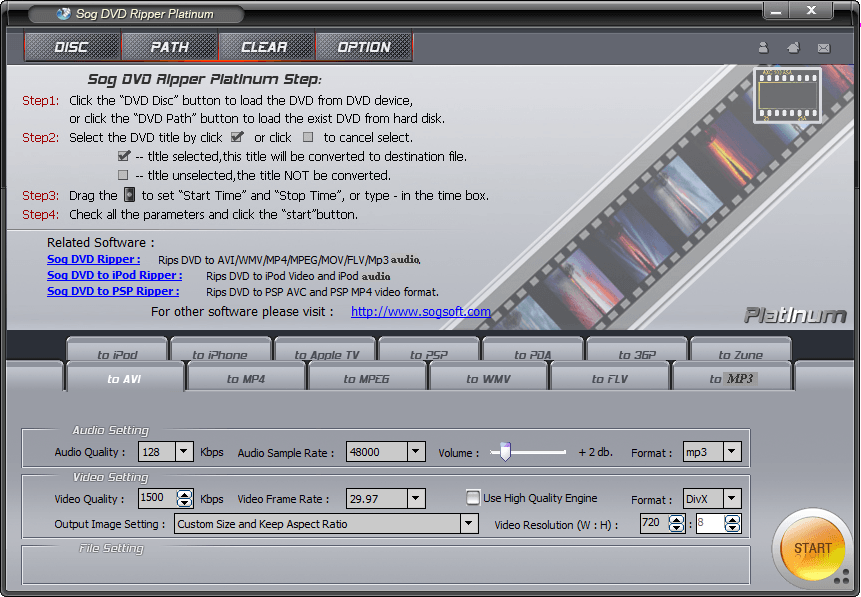
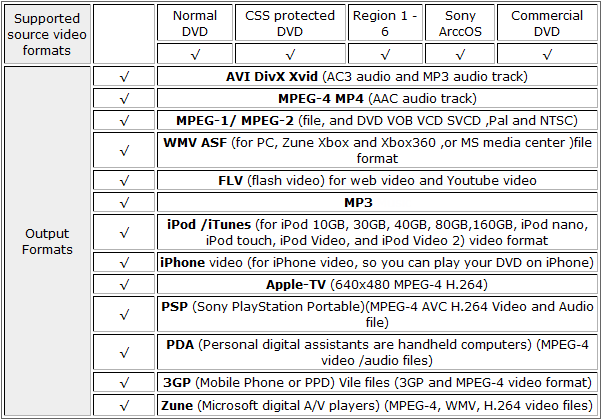
Sog DVD Ripper Platinum is a professional DVD ripper that allows users to rip DVDs to multiple different video formats. However, the highlight of Sog DVD Ripper Platinum is not that it can do DVD -> other format conversions, but rather that it can bypass DRM protection while doing it. (Public service reminder: Please only use DVD rippers – such as Sog DVD Ripper Platinum – for activities that are legal.) Here is a chart that sums up the jist of what Sog DVD Ripper Platinum supports:
Now at this point I am sure most dotTechies are thinking “Okay, but who is this SogSoft – I have never heard of them before?” Sure some dotTechies may not have heard of SogSoft in the past, but I am sure many dotTechies have heard of WinX DVD Ripper Platinum. A little bit of digging and research reveals that Sog DVD Ripper Platinum and WinX DVD Ripper Platinum are one in the same; both are sourced from Freetime Software Inc. which is the former name of Digiarty Software Inc. the developer of WinX DVD Ripper Platinum. To add icing to the cake, this promotion includes free updates and free technical support from SogSoft.
So, to get Sog DVD Ripper Platinum for free, follow these simple directions:
Version being given away for free: v5.0 Build 20080627
Free updates: Yes
Supported OS: Windows 98/NT/2000/XP/Windows 2003/Vista/Win7
- Download Sog DVD Ripper Platinum.
Update: Kaspersky and a-squared are picking up Sog DVD Ripper Platinum as a trojan. As far as I know, Sog DVD Ripper Platinum is safe and these are false positive readings (see VirusTotal scan results and SiteAdvisor rating). If someone has any information that says otherwise, please do say.
- Install Sog DVD Ripper Platinum.
- After installation, register Sog DVD Ripper Platinum with the following registration information:
regname name: dotTech User
regcode: Sog-3150-5151-7795Note: This promotion is available to everyone – everyone may get it for free. However, this is a dotTech.org promotion. Please do not copy, paste, or reprint this registration information anywhere else including private or public forums, blogs, file hosting services, etc. If you want to spread information about this offer, you may link to this article by providing a permalink (alternative link) to your audience.
- Enjoy!
If you have trouble taking advantage of this offer, please post below and I will try to help. Remember you can also contact SogSoft technical support for assistance.


Email article

Thanks Ashraf and friends here for your feedback, i am happy with your comments. I think them will help me out for taking your advice and make the new updates better. BTW, any question or advice , please feel free to contact me : contact@sogsoft.com
Thanks again,
Ashraf’s note: I moved this comment to the top since it is a comment by the developer.
Just loaded. When I put in the info, it froze. Reboot, all is working. Thanks
Very nice, Ashraf. I don’t usually work with a stand-alone ripper, but this strikes me as a good addition to the toolbox. Good work!
nice Ashraf,thank you!
thank you
Ashraf, this looks like a good program! Thanks for the find, but on VirusTotal, three hits say it is a Trojan. Can anyone confirm or deny it? I realize VirusTotal is not always correct, but I would like to be certain I am downloading a legit program, especially from a company I haven’t heard of before today.
http://www.virustotal.com/analisis/c06e990ce95bcfec6812ec98468f3a4e44f8d86c2d29eee756a8c3936a889458-1269561263
Thanks Ashraf,
Sounds good, and I will certainly give it a try.
One thing that this does seem to be missing (that is in the WinX DVD Ripper Platinum) is a “Copy” tab.
I’ve been using this copy feature to make a backup of all my DVDs without having to keep all of the .VOBs around. The copy feature does create a MPEG2 file but you don’t have any parameter choices as I imagine that it keeps the parameters as close to the original as possible. I’ve tried using the MPEG tab instead and using the DVD NTSC profile but this actually produces a slightly smaller file than the copy. Does anyone know what the differences would be?
And thanks for the giveaway. Even though it is probably the same company as Digiarty, I’ll be trying this software out on a few problematic DVDs that WinX chokes on (part of the reason I’m copying all of them is that they have scratches and fingerprints on them from the kids).
Thanks Ashraf
this looks great will give it a try
Double-clicking the installer “sog_dvd_ripper_platinum.exe” triggers a-squared to give the following alert “Trojan-Downloader.Win32.Hilldoor!IK”. Any clues Ashraf?
Does this have to be downloaded into the temp folder?
I’m having difficulty getting it to install.
Error message:
Unable to execute file in the temporary directory.
Setup aborted.
Error 5: Access is denied.
trojan detected in set-up.
Detected: Trojan-Downloader.Win32.Hilldoor.br
Welllll THAT was strange.
Tried over and over and then saw something written about Comodo Firewall.
I then noticed it wasn’t running ….yikes…
After I started it up I was able to install program.
Hmmmmmm
Thanks Ashraf,
it looks great, i use it to convert DVDs , fast and easy to use, very nice job
@Roland: You are welcome =).
@OldElmerFudd: Thanks =).
@raven: You are welcome =).
@miou25: You are welcome =).
@Toast: Ikarus and a-squared are the same, so technically two detections. However, I am pretty sure they are false positives by a-squared/Kaspersky considering majority of other ones don’t detect anything and SiteAdvisor gives SogSoft.com a green rating (SiteAdvisor explicitly tested the software and found nothing wrong with it).
@Shueygal: You are welcome =).
@karen: It seems like Sog DVD Ripper Platinum has not been updated in a while but WinX has; so that copy feature may come in later versions. I have e-mailed the developer of Sog asking when he plans on updating Sog DVD Ripper Platinum and am waiting on a reply.
@David: You are welcome =).
@Shenley: I do believe its a false positive. Please see my answer to Toast above for more information.
@Robert: Hmmm. It could be that you need admin privileges?
@Grr: You are probably using Kaspersky, right? It is a false positive I think. Please see my answer to Toast above for more information.
@Robert: Ah. Cool.
@Andy: You are welcome =).
Thanks Ashraf for this giveaway, it helps me a lot, very easy to put DVD movies into my iPod touch will recommend it to all my friends,
@Ashraf: Okay the developer just e-mailed me back and confirms new updates will be released later. He appreciates any feedback given on this software.
@Jacky: You are welcome =).
@Ashraf:
Good Morning Ashraf.
Yes–I’m using KIS-2010…
@Grr: Yeah false positive I am pretty sure.
@Everyone: The developer knows about the trojan readings and has assured me he is working on getting the problem fixed.
It looks a good program, my friend tell me that, and i will give it a try, thanks a lot for Ashraf and developer.
@Ashraf: @SogSoft: Cool, thanks SogSoft, it runs perfectly will recommend it to all my family menbers, but i have a question, that is when will the new updatas relesae?
Thanks, Ashraf. Apparently a good program, kudos for the freebie, but can anyone tell me why the developer forces Internet Explorer to open a webpage after installation? Most of your fans do not use IE (any version) and it is annoying, to say the least. Cheers.
Thanks Ashraf and Sogsoft for this fine giveaway. I will be giving it a run in a few days though. It should work great. Avira does not have a problem with it.
Thanks Ashraf. I logged in and saw the add, and immediately went sweet, new stuff!
@SogSoft: does the DRM bypass also bypass the protection on new DVD’s like Star Gate 2009 and Transformers 2?
@SogSoft: Yep,
this program runs good and its great for supporting input DVDs and output .FLV/MP4/WMV/AVI/MOV/MPEG with high quality, it runs the fastest i tried, easy to use and it is free, thank you guys!