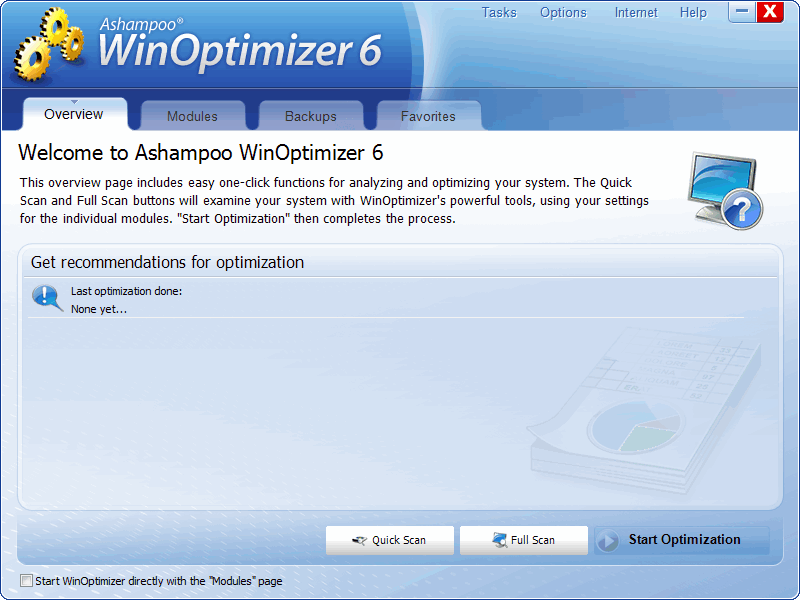
Free Ashampoo WinOptimizer 6!

July 19, 2010 16 Email article | Print article

In the past I have posted about how to get Ashampoo WinOptimizer 2010 and 2010 Advanced for free. Today I am going to tell you about how to get Ashampoo WinOptimizer 6 for free! (Ashampoo WinOptimizer 6 has a few extra features that Ashampoo WinOptimizer 2010/2010 Advanced do not have.)

Here is a crash course in what WinOptimizer 6 can do, as per the developer:

(Click on the image to view the list in full view.)

To get Ashampoo WinOptimizer 6 for free, follow these simple steps:

Version being given out for free: v6.60

Free updates: Probably not

Supported OS: Windows XP/Vista/Win7

Download size: 13.6 MB

  • Visit the ComputerBild.de promotion page and click on to download Ashampoo WinOptimizer 6.
  • After you have finished downloading, install it. Take note during installation that Ashampoo tries to install Ashampoo toolbar:

Be sure to uncheck all that if you don’t want it (most of us won’t want it nor do you need it to use Ashampoo WinOptimizer 6).

  • After installation, the registration page should open automatically. If it doesn’t you can visit it by clicking here. When the registration page loads, enter your e-mail address in the box shown and click “Senden”:
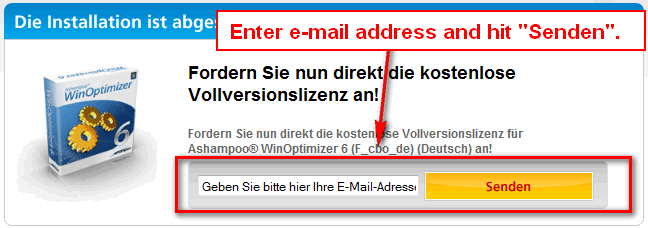
Take note that in addition to registering for the free cdkey, you are opting in to receive Ashampoo “service letters”. (You can opt-out of letters after you register via MyAshampoo.)

  • If you have registered with Ashampoo in the past with the same e-mail address you just used, you will be asked to login to the Ashampoo account:

Login. (If you don’t remember your password, go back and register with a new e-mail address.)

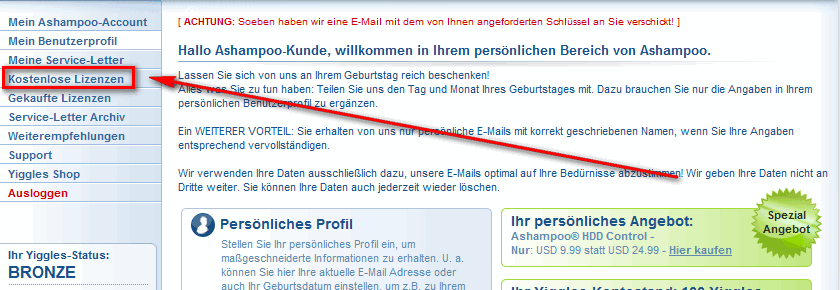
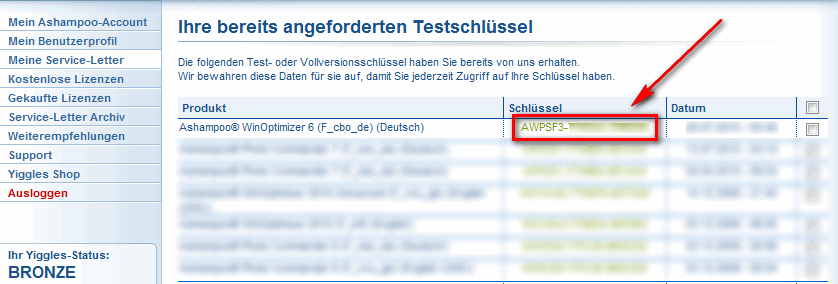
After you login, click on “Kostenlose Lizenzen” and you will be shown the registration code for Ashampoo WinOptimizer 6:
Copy the registration code – you will need it to register the software.
  • If you used an e-mail address new to Ashampoo, you will need to confirm your e-mail address. So, check the inbox of the e-mail you entered. Look for an e-mail from “Ashampoo (MrReg@ashampoo.com)” with subject of “Registrierung (Schritt 1) … folgen Sie dem Link in dieser E-Mail”. In the e-mail you will find a link that you need to follow:

Follow the link.

Once the page loads, you will be asked to fill out a registration form:

Click on “OK, senden” when finished.

Check the inbox of the e-mail again that you registered with. You should have another e-mail from “Ashampoo (MrReg@ashampoo.com)” with the subject of “Ihre Registrierung – Ashampoo® WinOptimizer 6 (F_cbo_de) (Deutsch)”. In the e-mail there will be your registration code:
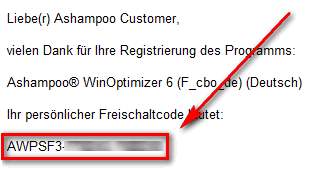
Copy the registration code – you will need to register the software.

  • Run Ashampoo WinOptimizer 6; you will be asked to register the software. Register it with the license code you received:
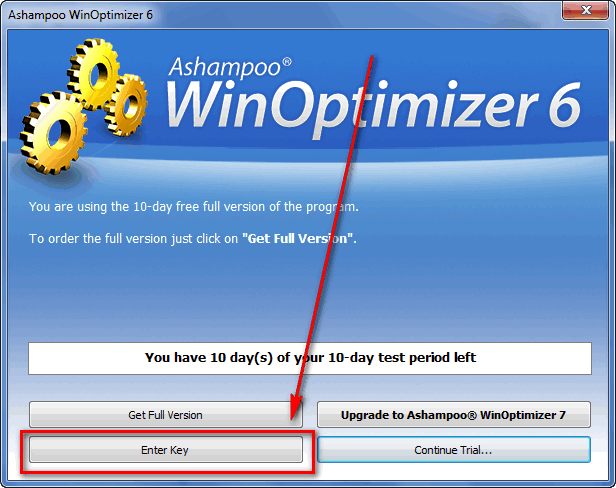
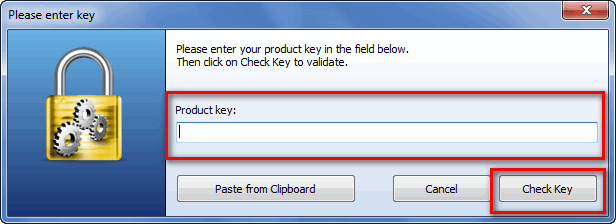
  • Enjoy! Take note you may be asked to upgrade to WinOptimizer 7. Click “Do not upgrade” unless you want to purchase Ashampoo WinOptimizer 7:
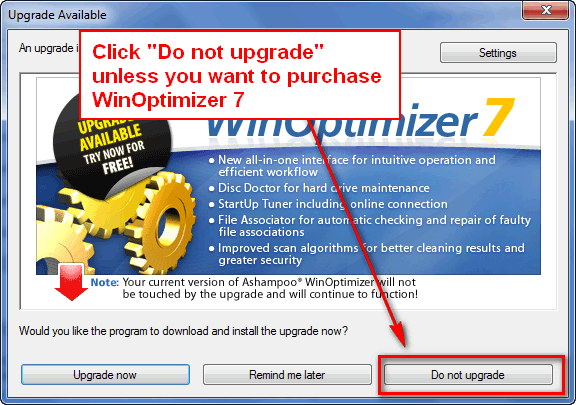
If you have any trouble getting Ashampoo WinOptimizer 6 for free, post below and I will try to help.

16 Comments »

  1. Jamster Mc July 19, 2010 at 10:32 PM (comment permalink) -

    Hi Ashraf, Do you think that their is any point of getting this software if i already have WinUtilities installed ???
    Great work =)
    Thanks, Jamster Mc


    1
  2. Ashraf July 19, 2010 at 10:55 PM (comment permalink) -
    Mr. Boss
  3. mgoj July 20, 2010 at 3:20 AM (comment permalink) -

    What happens if I want to get the key now and install the software later?
    Is there a time limit for installing the software?
     
    Thank you,
    mgoj
     

    3
  4. anemailname July 20, 2010 at 4:59 AM (comment permalink) -

    Is this one better than Advanced System Care 3?
    It seems to have a little more to it but would rather have your opinion.
    Thanks!

    4
  5. Bruce Fraser July 20, 2010 at 5:08 AM (comment permalink) -

    Ashraf,
    I tremendously value your reviews of software. You are thorough and to the point. You are respectful (you’ve never called someone’s product “garbage”), but also forthright in your conclusions.

    This is what I miss when you post freebies, like this one or ones which are direct from the programmer (like the many Paragon promotions). I’m a sucker for something free; but it’s also important to know whether the freebie is worth anything, or should I go with an alternative.

    Thanks for ALL you do!

    5
  6. Dragonheart July 20, 2010 at 5:34 AM (comment permalink) -

    To All.
    Ashampoo software is very good and so is this one.
    I use several programs made by Ashampoo and I’am very satisfied.
    If you already have a cleaner an optimizer, this one seems to be unneccessary but it,s got features others don’t.
    The serialkey you’ll get is (as far as I know) valid forever, but only for this version. So you don’t have to install it today.
    It also seems to be that the licensekey is for everyone the same.

    6
  7. ted baxter July 20, 2010 at 6:34 AM (comment permalink) -
  8. ftv00es July 20, 2010 at 6:58 AM (comment permalink) -
  9. janet July 20, 2010 at 7:32 AM (comment permalink) -

    How can I tell if it is, in fact, registered? Can’t see it in About.

    9
  10. Dragonheart July 20, 2010 at 8:22 AM (comment permalink) -

    @janet:
    After installation you had to fill in the serial-key to register.
    That’s all. Indeed you can’t see in the about-section but if you didn’t register the software asks for a serial every time you start it.

    10
  11. janet July 20, 2010 at 8:56 AM (comment permalink) -

    @Dragonheart:

    Interesting. I installed 7 over 6 and lost my registration. Then when I removed 7 (RevoUninstaller), it took out everything. So I reinstalled 6, and, according to what you say, it was automatically registered….:-)….

    11
  12. Dragonheart July 20, 2010 at 9:19 AM (comment permalink) -

    @janet:
    Even Revo doesn’t remove everything. In some cases, and perhaps this is one of them, some registrykeys  remain in the registry.
    If I scan my registry with “License Crawler” it often finds some serialkeys of software that was removed by Revo. ;-)

    12
  13. jivadas July 20, 2010 at 1:12 PM (comment permalink) -

    WARNING! re Single-Click Cleanup

    Users of googleDesktop and similar devices should be warned that the Ashampoo single-click process automatically wipes your search history and disables the gDesktop.

    Fortunately this is not a disaster, since there is a log, and you can easily undo the operation. But it made my aging heart skip a beat when I got a popup saying “google Desktop is not working”! As a scholar, I find this (free) utility absolutely indispensable.

    So yes, Ashraf, I agree with your “hmmm”: I already have winUtilities, and no complaints about it.

    +++

    And all prosperous (or even preposterous) dotTechies should send Ashraf a small donation. A good time for you to do so is on your birthday, when you’re buried in presents; but any day would do: even today.


    xØx
    jd

    13
  14. Lascannon July 20, 2010 at 2:12 PM (comment permalink) -

    Agreed, I uninstalled it since it’s not much of a useful program. WinUtilities have most of the things already, and I’m the type who wants my laptop to stay fresh and clean as possible. :D

    14
  15. janet July 21, 2010 at 12:51 AM (comment permalink) -

    @Dragonheart: Re: comment #12:

    Not to blame Revo! I deliberately did a low-level uninstall in hopes that it would leave v.6 files and reg….:-)….

    15
  16. jordon July 21, 2010 at 4:00 AM (comment permalink) -

    hi ashraf .i sometimes visit your forum .
    now may i ask u to review this freeware called “Fcleaner”which i tested and found safe.it is comparable to advanced system optimizer which is not a freeware.i came to this conclusion as i have both of these and have checked them against each other.though “aso” has extras being commercial software.also it is portable.cleaning is very fast.please review it and tell others.

    thanks……….

    16

Leave A Response »