
 Email article
{rw_text}Software reviewed in this article:
iSurfer Shield by Giant Matrix
Version reviewed:
v2.1.8
Supported OS:
Windows 98/Me/2000/XP/Vista/7 (32-bit)
Price:
$19.95 (USD) but you can get it for free for a limited time at Giveawayoftheday.com!
Software description as per the developer:
iSurfer Shield keeps you safe on the Internet by protecting your PC from malicious websites, hackers and pirates so they can’t harvest information and use it against you!
————————-{/rw_text} –>
{rw_good}
- Straightforward and easy to use.
- Gives users the ability to use “premium” (Giant Matrix run) proxies or “public” proxies.
- Has a handy disposable e-mail generator built-in.
- Support all majors browsers.
{/rw_good} –>
{rw_bad}
- Proxies are extremely slow (at least the USA premium one is).
- Only three premium proxies available – in USA, Canada, and Germany. Should have at least one, if not more, premium proxies for other continents also.
- Does not keep the selection of a proxy as default; you must manually select proxies every time you run the software.
- User needs an e-mail client in order to be able to check the disposable e-mail addresses.
- Has a few bugs.
{/rw_bad} –>
{rw_score}
{for=”Ease of Use” value=”9″}Very easy to use. There is only one problem: Giant Matrix does not provide any sort of web e-mail checking capabilities – all the disposable e-mail addresses created by iSurfer Shield must be used in an e-mail client.
{/for}
{for=”Performance” value=”5″}The proxies are slow – at least the US premium one is – and the program has a few bugs.
{/for}
{for=”Usefulness” value=”8″}I can see many people wanting to be “anonymous” while surfing the web.
{/for}
{for=”Price” value=”8″}$19.95 is a fairly fair price in my opinion.
{/for}
{for=”Arbitrary Equalizer” value=”5″}This category reflects an arbitrary number that does not specifically stand for anything. Rather this number is used to reflect dotTech’s overall rating/verdict of the program in which all the features and alternatives have been considered.
{/for}
{/rw_score} –>
{rw_badb}
On iSurfer Shield’s homepage, the developer lists a bunch of awards:
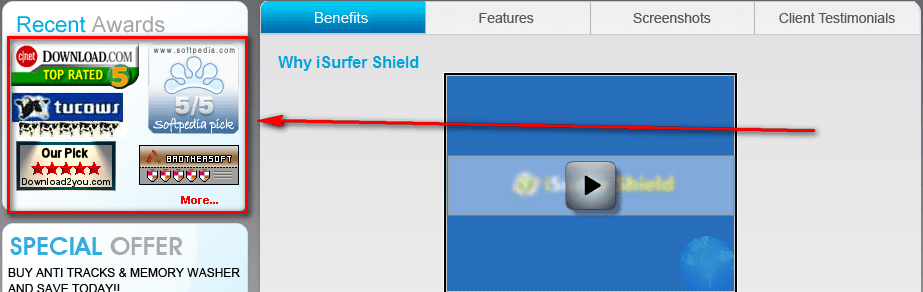
I cross referenced the major ones (Download.com, Softpedia.com, and Tucows.com) and did not find any for iSurfer Shield. On the other hand, Giant Matrix’s other software have received awards, such as Anti Tracks getting a 5/5 from Download.com so the developer may not necessarily mean these awards are for iSurfer Shield (it is worth noting that I could find no 5/5 rating from Softpedia for any of Giant Matrix’s software). However, the awards are linked to the top of iSurfer Shield’s homepage (when you try to click on them) and just listing the awards right there is very misleading.
{/rw_badb} –>
{rw_verdict}[tdown]
{/rw_verdict} –>
Privacy is a big issue for most everyone. The Internet, by design, is not a private place. Every time you visit a website, your computer gives that website information, such as what web browser you are using, your monitor’s screen resolution, your IP address, etc. So people are often trying to “protect their privacy”. One of the biggest cons (by “con” I mean “deceitful trick”) of the Internet that has cropped up to help people protect their privacy are “proxies”. I say proxies are a con because they dupe the user into thinking their privacy is protected. In fact, often times a user’s privacy is more exposed using a proxy than not using a proxy. You see proxies are basically servers that you reroute your Internet traffic through so the website you visit does not find out your IP address, but rather finds out the IP address of the proxy you are using. So, in essence, you really aren’t “hiding” your IP while surfing the Internet; you are just changing who gets to know your IP: instead of websites you visit getting to know your IP, the proxy server gets to know your IP. If you use a proxy run by a malicious person – who mines IP addresses – using a proxy puts you worst off than not using a proxy. That is not to say all proxies are bad; you just need to be weary about using just any proxy – use ones that you can “trust” (you should specifically look for proxies that explicitly mention they are not storing your data or something to that effect).
That said, iSurfer Shield is a program that allows you to easily hide your IP address by using proxies:
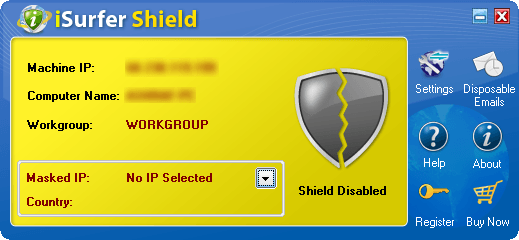
Using iSurfer Shield is very easy. You select a proxy to use (click the button with the black arrow) and iSurfer Shield reroutes your Internet traffic through that proxy. When selecting a proxy, you have the choice of using “premium” proxies (premium proxies are run by the developer of iSurfer Shield – there are three to select from, one in USA, one in Canada, and one in Germany), or using “public” proxies (public proxies are proxies run by third party sources; currently there are public proxies located in India, Indonesia, Russia, USA, and Brazil). After you select a proxy, click on the shield so “Shield Disabled” turns to “Shield Enabled” and start surfing the Internet – all your traffic will be routed through the proxy you selected. According to the developer, iSurfer Shield works with Internet Explorer, Firefox, Chrome, Opera, and Safari. I have been able to verify it works with Internet Explorer, Firefox, Chrome, and Opera – I don’t have Safari installed so I don’t know if that is supported or not.
As I mentioned in the start of this post, some proxy owners may be mining your data instead of protecting it. I don’t know, and therefore can’t verify, the “scumbagness” of the premium or public proxies available for use in iSurfer Shield. In other words, I don’t know if those proxies are mining your information or if they are truly there to serve as a way for you to protect your information. My educated guess is the premium proxies probably are not mining your information, but that is only a guess.
One “extra”, and potentially very useful, feature iSurfer Shield has is the ability to create disposable e-mail addresses:

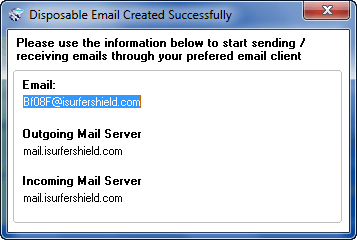
The e-mail addresses are temporary (you can select how long they last – from as little as 1 hour to as long as 30 days) so you can use them for any sort of registration need to do on the Internet and don’t want to give out your real e-mail address. Do take note that the developer provides no capability to check the e-mail addresses you generate via a website – you must use an e-mail client to check them (or you could use something like Gmail that allows you to import e-mail address from different servers).
Here is a very short video by the developer that shows iSurfer Shield in action:

To view the video click above. If you have JavaScript disabled you will not be able to view the video by clicking above so instead click here.
Now, when using a proxy, speed is a very critical aspect of the whole experience. By definition rerouting your Internet traffic (which is what happens when using proxies) will slow down your Internet surfing speed. However, the amount of “slowness” depends on the proxy. In other words, a proxy is only as good as its speed. As per my tests, iSurfer Shield proxies fail; epic fail in fact. I tested the USA premium proxy (the server for the proxy is located in Houston, Texas and I live in the USA) and it was very, very slow. Although I immediately felt the dramatic speed decrease after I turned on the proxy, I decided to gather some empirical data to show instead of tell: it took me 42 seconds to load Google.com with the proxy enabled! 42 seconds!!! (Google.com loads instantly for me without the proxy.) I understand that all proxies will cause some sort of speed decrease, but an increase of 42 seconds in load time? Geez. I was unable to test the other proxies – premium or public – because the trial version of iSurfer Shield only lets you use the USA premium proxy, but I don’t have high hopes for the other proxies considering the USA proxy is hosted by The Planet who are known for providing world-class web hosting services on premium bandwidth (therefore the fault is more likely the developer’s).
Other than that, there are also other cons to iSurfer Shield:
- iSurfer Shield has a few bugs:
- Recall how I mentioned earlier that you need to click on the shield on the main program window so “Shield Disabled” turns into “Shield Enabled” to use the proxy. That actually is not true. Apparently as soon as you select a proxy from the proxy list, iSurfer Shield kicks into gear even if it says “Shield Disabled”.
- On a similar note as what I just mentioned, when trying to disable the shield (i.e. it says “Shield Enabled” and I want to turn it off), iSurfer Shield freezes and crashes.
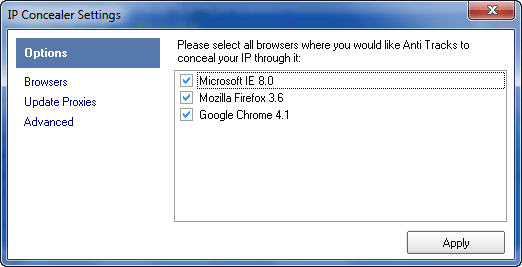
- iSurfer Shield allows you to turn off support for browsers. Although iSurfer Shield supports Opera, it only shows IE, Firefox, and Chrome under options so Opera users can’t “disable” Opera support:
- Every time you run iSurfer Shield, you need to manually select a proxy from the proxy list. There is no feature that allows you to “save” your selection so you need not have to select it every time you run iSurfer Shield – it would be selected for you. I find having to manually select the same proxy every time I run iSurfer Shield very annoying.
- There needs to be more premium proxies. Having premium proxies in USA, Canada, and Germany only shortchanges users from other parts of the world. There should be at least one premium proxy in all continents (minus Antarctica and maybe Africa depending on how many sales the developer plans on generating from Africa).
This review was conducted on a laptop running Windows 7 Professional 32-bit. The specs of the laptop are as follows: 3GB of RAM, a Radeon HD 2600 512MB graphics card, and an Intel T8300 2.4GHz Core 2 Duo processor.
{rw_freea}
Tor is free software and an open network that helps you defend against a form of network surveillance that threatens personal freedom and privacy, confidential business activities and relationships, and state security known as traffic analysis.
Tor protects you by bouncing your communications around a distributed network of relays run by volunteers all around the world: it prevents somebody watching your Internet connection from learning what sites you visit, and it prevents the sites you visit from learning your physical location. Tor works with many of your existing applications, including web browsers, instant messaging clients, remote login, and other applications based on the TCP protocol.
-Developer
Create a free disposable email address! It’s really easy to use:
Create a new email address on trashmail.net. All mails to this address will be forwarded to your real email address for a number of times you can set up on the following form. When the limit is reached, the Trashmail.net email address will be automatically deleted. All following mails (like spam, newsletter, etc) will be rejected at Trashmail.net.-Developer
NOTE: All TrashMail users are subject to German privacy laws. E-mails sent and received via TrashMail are not anonymous.
{/rw_freea} –>
{rw_verdict2}I like the idea of iSurfer Shield, but the implementation is horrible. Specifically, the developer needs to iron out the bugs and make their proxies a lot faster; thumbs down. Personally, my recommendation is to accept the fact that you will never have true “privacy” on the Internet. However, if you insist, you can give Tor a try and see if it works for you (be sure to read up on exactly how Tor works and what you are getting yourself into). On the other hand, I whole heartily recommend TrashMail; TrashMail is an excellent tool for creating and using temporary e-mail accounts for the purposes of avoiding spam.
{/rw_verdict2} –>
