
“UPS Delivery Problem”? Watch out for scam e-mails!

April 17, 2010 25 Email article | Print article

A few days ago I received an e-mail allegedly from UPS (UPS is a global delivery company for those that don’t know):

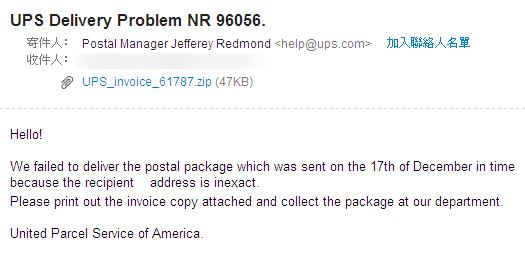
I immediately knew that this was a scam email so I turned on all my defensive methods and opened the email. You should not do this at home [or at work for that matter].

Then, just like something an innocent computer user may do, I tried to download the attachment that came with the e-mail. Again, you should not do this at home [or work].

There was immediately a warning from ESET NOD32, my active antivirus, saying that there was a threat in the download:
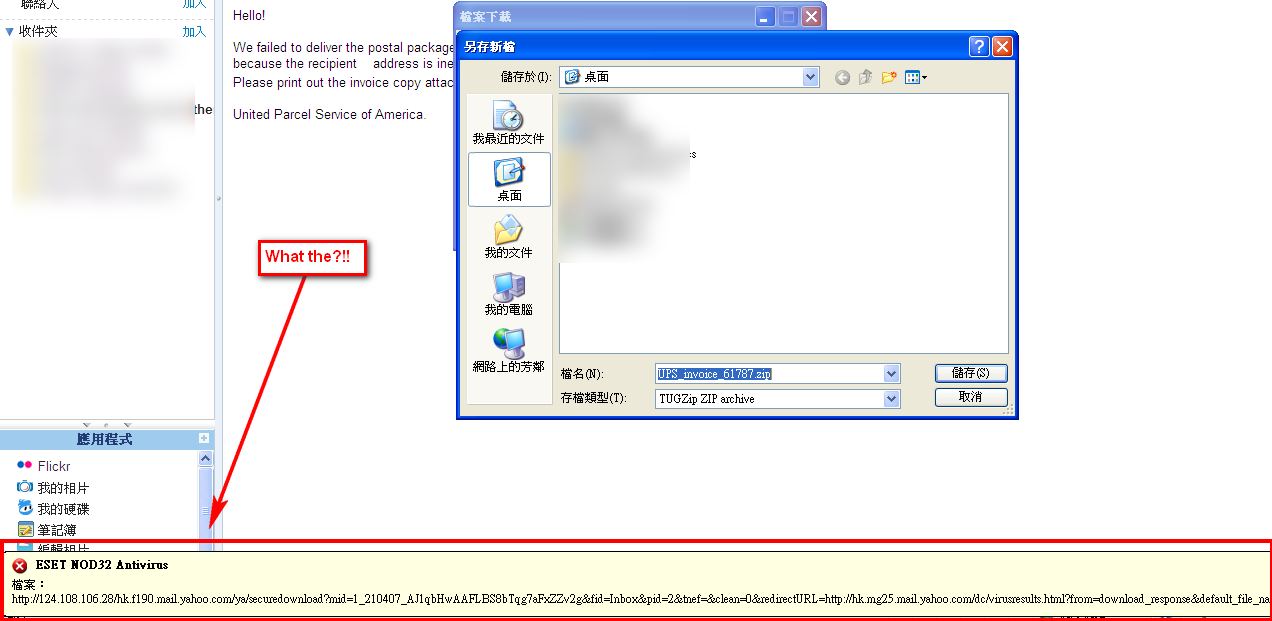
With all the cards laid out on the table, it is fairly clear that this was a hoax that was trying to take advantage of those not-so-technically-knowledgeable computer users who

  1. Open e-mails that they are not familiar with;
  2. Download the attachments that come with those e-mails and install a Trojan in their computer, allowing the cybercriminial who sent the email to control the victim’s computer.

Similar to the UPS hoax I just mentioned, there are many other such e-mail scams out in the wild; tt could be a “Facebook password reset”, a “Bank of America” or similar. Do not fall for this kind of thing.

So, how to protect oneself? Here are some tips to help you spot a scam e-mail:

  1. Were you expecting an e-mail from [insert company name here]? For example, did you expect a UPS package delivery? If no, then the e-mail is probably a scam.
  2. Have you, in the past, provided your e-mail address to [insert company name here]? If no, then the e-mail is probably a scam.
  3. Does the e-mail from [insert company name here] include your name? If no, then the e-mail is probably a scam.
  4. Is the e-mail asking you to reply with personal information (i.e. full name, address, bank account number, credit card number, etc.)? If yes, then the e-mail is probably a scam. (Sometimes legitimate companies do ask you for personal information, but they will never request it via e-mail – you will probably be asked to submit it via their website.)
  5. UPS, banks, or any other legitimate company/website will never send you emails requesting your password. If your bank really uses email to do so, you might seriously consider abandoning this bank. Instead, most companies will use telephone to inform you of account problems.
    1. In the case of UPS (or FedEx, DHL, etc.), they may send you e-mails informing you about delivery delays or problems, but those e-mails will never contain any sort of attachment for you to download.
  6. Sometimes e-mails – even legitimate e-mails – can contain links for you to follow. If the e-mail is from a scammer, often times the links will be “spoofed” (i.e. you think they are taking you somewhere but they take you elsewhere). When you see a link in an e-mail you should not visit it unless you are 110% sure the e-mail is from a legitimate source. Rather, you should right-click the link and “Copy Link Location”/”Copy Hyperlink” or something similar. Then, open Notepad and paste the URL. After pasting the URL, analyze the URL and verify that it is infact taking you to the proper website (look at the beginning of the URL to see which domain it is taking you to). Look especially for letters that can be easily substituted for each other, like L and I.
    1. Thanks to Twitter, URL shorteners are very popular nowadays. If an e-mail contains a URL that uses a URL shortener, unshorten the URL before analyzing it using a URL unshortening service.
  7. Sometimes there are “urgent” or similar words in the subject of a scam e-mail.
  8. Check the date of the e-mail (and any date mentioned within) for any unreasonable dates. For example, I was alleged to have sent a package via UPS last December. If there are any unreasonable dates in the e-mail, the e-mail is probably a scam.
  9. Often times a scammer will try to “spoof” the e-mail to make you think it is from a trusted source. Spoofing can be done primarily of two ways:
    1. Changing the “From” name to an e-mail address. For example, you may get an e-mail from help@ebay.com <scammer@example.com> or eBay Customer Service <scammer@example.com>. The “From” name says help@ebay.com/eBay Customer Service so you may think the e-mail is from eBay. However, the e-mail is actually from scammer@example.com. This type of spoofing is fairly easy to spot – just double check the “From” e-mail address instead of just looking at the “From” name.
    2. The actual “From” e-mail address may display the e-mail from a trusted source. For example, you may get an e-mail from accounts@yahoo.com <accounts@yahoo.com> or Yahoo Inc <accounts@yahoo.com>. In this case both the “From” name and e-mail address indicate that the e-mail is from Yahoo. In reality, however, the e-mail is not from Yahoo – it has been spoofed to make you think it is from Yahoo. This type of spoofing is harder to spot since the “From” name and e-mail address are both spoofed; when you come across this type of e-mail you need to use the other points mentioned in this list to protect yourself.
  10. Make sure you have security software installed on your computer. If you accidentally do fall into a scammer’s trap, security software can often save you. (See Ashraf’s best free security software list.)
  11. If it looks suspicious or too good to be true, it probably is – so stay away from the e-mail.

Good luck to everyone and stay safe!

If readers have any more suggestions to add to the tips mentioned above, please leave a comment below to share with us all.

25 Comments »

  1. chuck April 17, 2010 at 5:36 PM (comment permalink) -

    I started getting the UPS ones about two months ago.I recognized them as phishing attempts at the very least,and dispatched them to the trash without opening them.Too bad I don’t have the skills to send a nasty little virus back to them!

    1
  2. Ashraf April 17, 2010 at 5:39 PM (comment permalink) -
    Mr. Boss

    @chuck: Yeah, I have been spammed with the UPS e-mails also. That said, for future reference, retaliating to a scammer with a virus is just as illegal as being the scammer =P.

    2
  3. Locutus April 17, 2010 at 5:53 PM (comment permalink) -

    Ha!  You just got pwned scammed!

    3
  4. dbrookman April 17, 2010 at 7:16 PM (comment permalink) -

    I’ve had several PayPal scams by e-mail.
    I always go to Paypal direct using another computer which uses a different log in name. If  I still have a concern (I did in December 2009), I called Paypal direct. It was not a toll free number but the small cost was worth it.
    D

    4
  5. Sandy April 17, 2010 at 9:12 PM (comment permalink) -

    @dbrookman:   I’ve had the same problem with paypal, yahoo, facebook, credit cards, banks, and UPS!  I have Kapersky installed and use yahoo for email, but can’t believe I still get so many…and from so many different sources!  My privacy is set to mid-high – should I do anything else?  Funny thing is, other than phishing emails, I rarely get just run of the mill spam.

    5
  6. Ron April 17, 2010 at 9:15 PM (comment permalink) -

    I’ve found the UPS emails on the upswing, too. My favorites are the Facebook password resets – I don’t have a Facebook account (or any other social  networking)!!
    I’ve been advising a close friend about these all along; at least she’s remembered not to open unknown emails with attachments, so I’ve been successful there…

    6
  7. Ron April 17, 2010 at 9:34 PM (comment permalink) -

    @Sandy: Depends on your ISP, among other things. I use Earthlink and their spam filters are very good – they use Spamassassin – and Gmail addresses otherwise. I especially like the way they hold certain suspect/spam messages for you to look over. Some ISPs, like ATT and Comcast, just arbitrarily dump what they consider spam so you have no option to review anything.

    7
  8. Sandy April 17, 2010 at 9:54 PM (comment permalink) -

    Ron,

    Thank you – I didn’t realize it could come from the ISP.  I just recently switched from Surewest to Time Warner Cable, so maybe it will get better…?  I dropped the phone service (and went with Magic Jack) and cable (why bother when I don’t have time to watch anything and most things aren’t worth watching?!) and so TWC was the least expensive for “just” internet.  There is no way I could survive anymore (what was I thinking to live in a time where I had to write a thesis on a typewriter?  lol) without my ‘net and computer – I create, stay organized, communicate, etc… and so it was the only thing I couldn’t let go of!  lol  But, I think most people are looking for ways to be a bit more frugal these days.
    Thanks for responding so quickly.

    8
  9. Farrukh April 17, 2010 at 10:13 PM (comment permalink) -

    And I bought a UPS and take that home in my car and then I started receiving such mails (although I knew these are spam), but I just starting thinking, “How the heck they got some information about my UPS?? ” :) LOL… (just kidding).


    9
  10. roger April 18, 2010 at 1:40 AM (comment permalink) -

    I haven’t had the UPS emails, however my sexual inadequacy is apparently common knowledge on the net…

    10
  11. Justarookie April 18, 2010 at 3:30 AM (comment permalink) -

    I received several alerts by my Earthlink Virus Blocker, that UPS sent a virus infected email. In the 5 years of having Earthlink Email, I havn’t ever had a virus sent to me, so I wasn’t sure what to do. I was waiting for a package, so just in case, I went to the UPS.com and asked about the “delivery problem”, that the email had on subject line. UPS emailed back within 12 hours and asked me to foward the email to their provided link. UPS also let me know that it was fraudulent and to forward any questionable emails to them at fraud@ups.com.  I know that time is key for lots of people, but I didn’t have all the tips from Ashraf (Thank You, Kind Sir), to check the emails origin. 
    When in doubt, check it out;) 

    11
  12. meldasue April 18, 2010 at 4:34 AM (comment permalink) -

    The two biggest tip-offs to scam e-mails:  misspellings and bad English.  (In the e-mail above, ‘recipient address is inexact’ is the clue.)

    One more thing – if you see a scam, it’s not necessarily wise to be a good netizen and report it to the company being spoofed.  I did this with a fake PayPal e-mail a few years ago, and even though I made it clear that I had *not* been fooled, they told my credit card company that my account had been compromised.  My credit card company cancelled my card – of course, they reissued another, but it’s such a pain to have to change your information at all the sites with the card number.

    12
  13. Joji April 18, 2010 at 6:29 AM (comment permalink) -

    Hey Ashraf… why are the text on your computer Chinese? You can read chinese!? If so, I’m impressed. Hold on a minute… Ashraf is chinese!? O_O
     
    LoL
     
    ~Joji~

    13
  14. Mags April 18, 2010 at 6:48 AM (comment permalink) -

    I agree with everything the others have said about the phishing emails, however I noticed one thing was missing, and I’m surprised no one else has mentioned it.
     
    When you hover (do not click on it) your cursor over a link in the phishing email, look at the bottom left side of your browser.  It will show you the site it will take you to.  9 times out of 10 it will show a link that has nothing to do with the so called company that supposedly sent you the email.
    The rare time it shows a link that is supposedly from the site they say it is from it generally isn’t, but rather something similar.  When in doubt, contact the real company to see if they indeed sent that email.
     

    14
  15. Philippe April 18, 2010 at 6:50 AM (comment permalink) -

    Thanks for the information, it’s very helpful.  May I use it for some friends and customers?
    I just received a offer to transfer a big ammount of money from
    Sir. John Dickson From: The Accountant,
    Gulf Bank International,
    4 Enfield Road, Etham.
    London.

    with privat email at:mailto:sirjohndicksonn@feynet.cn

    I could be rich very soon……if…..let the dream be true.

    by the way Thunderbird shows the real link when you go over with the mouse.

    15
  16. FostWare April 18, 2010 at 7:48 AM (comment permalink) -

    We’re also seeing a lot of messages from “Microsoft Computer Security Department” regarding running a supplied “computer security scan” attachment.

    16
  17. Adrian April 18, 2010 at 10:51 AM (comment permalink) -

    @Sandy: The amount of spam you receive isn’t related to your local defense system. However, it is good to stay safe!

    17
  18. Adrian April 18, 2010 at 10:56 AM (comment permalink) -

    @Joji: I wrote most of this article, and I’m from China. Ashraf is American, and he probably can’t read Chinese.

    18
  19. Ashraf April 18, 2010 at 1:59 PM (comment permalink) -
    Mr. Boss

    @Joji: Thats not my computer. Adrian wrote the article.

    19
  20. Joji April 18, 2010 at 6:35 PM (comment permalink) -

    @Adrian: @Ashraf: Oh LoL… ok ok. :)

    Oh I see it now, “by Adrian”. XD

    ~Joji~

    20
  21. joji's a wank April 19, 2010 at 12:40 PM (comment permalink) -
  22. grow up April 20, 2010 at 4:48 AM (comment permalink) -
  23. kathleen November 29, 2010 at 1:48 PM (comment permalink) -

    If you’re ever in doubt about the legitimacy of a UPS email be sure to contact UPS by phone prior to opening it – UPS Phone Number

    23
  24. Adrian November 30, 2010 at 12:20 AM (comment permalink) -

    @ All

    I think the link from Kathleen is a scam … don’t click on it please =[

    24
  25. Dandre Latham May 30, 2012 at 3:35 AM (comment permalink) -

    I value the blog article. Keep writing.

    25

Leave A Response »