dotTech Exclusive: 30 free licenses of Linkman Pro!

April 17, 2010 111 Email article | Print article

Linkman Pro was one of the first software I reviewed way back when dotTech was first launched; yet, to this day I remember it because of how much I was impressed by it. So, with great pleasure I would like to announce a dotTech-Outer Technologies giveaway of 30 free licenses of Linkman Pro!

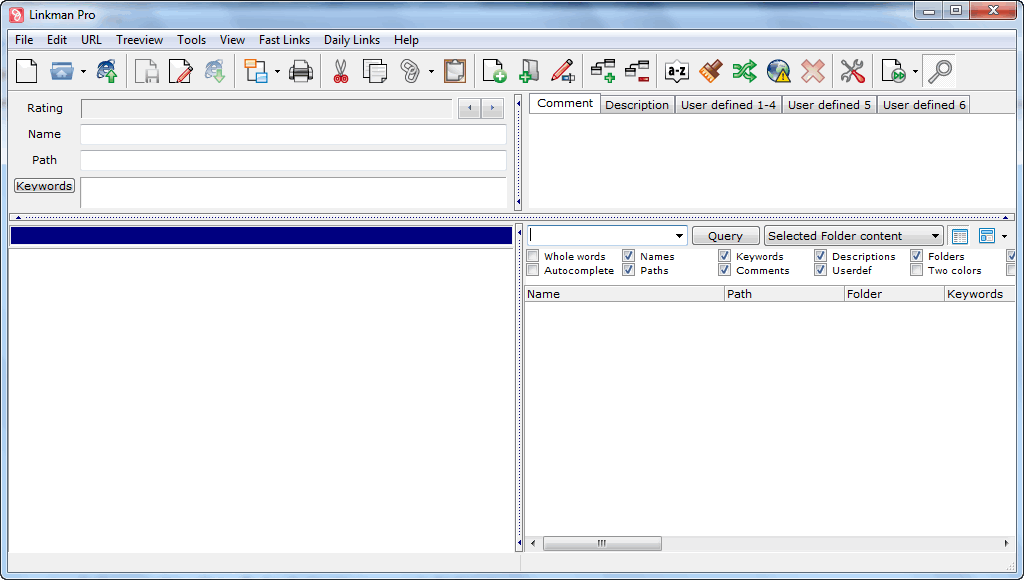
For those that don’t know, Linkman Pro – which also has a Linkman Lite version which is freeware – is a professional, feature filled bookmarks/favorites management tool. In other words, it helps you easily manage your bookmarks/favorites if you use multiple browsers, multiple computers, or would like to be able to create back ups for safe keeping. Here is an overview of the features that Linkman Pro has, as per the developer:

  • Compatibility with all major Windows browsers
    • Firefox 1.x-3.x, Internet Explorer 3.x-8.x, Google Chrome 2.x-5.x, K-Meleon 1.x, Maxthon, SeaMonkey 1.x, Opera 4.x-9.x, Avant Browser, Neoplanet, Netcaptor, SlimBrowser
  • Use the same link collection across different browsers (automated synchronization between Firefox, IE and other browsers)
  • Synchronization support to share links between multiple computers
  • Supports keywords, ratings, comments, descriptions, shortnames and user defined data
  • Ability to handle large databases (even millions of links) without performance or stability issues
  • Optional installation on removable drives like USB sticks
  • Internet Explorer integration
  • Firefox 3 integration
  • Optional Desktop Toolbar (supports all browsers including Chrome and Opera) for fastest browsing ever
  • Optional Internet Explorer Toolbar
  • Highly customizable user interface
  • Tray Icon
  • Detects duplicate links, even if they differ in subdomains, ports or login data
  • Query for URLs on the same domain or subdomain and display results in groups
  • User defined rating system
  • Synchronization
  • Extensive help file and PDF Tutorial
  • Ability to check URLs for dead links, intelligent (only major) content changes, and page movements
  • Retrieves keywords, descriptions and custom metatags from web pages
  • Password protection
  • Multiple import and export formats
    • Direct Internet Explorer Favorites support (including correct item order)
    • Firefox Bookmarks
    • Google Chrome
    • Powermarks
    • SeaMonkey
    • Opera Hotlist
    • Html
    • Separated Value files
    • Any data file containing links
    • Editable Export Templates (XML, TSV…) with UTF8 support
  • Fully customizable Html Link webpage generation
  • Search and Replace
  • Text and Status Query
  • Link Collector
  • Printing support
  • Sort feature with multiple sort orders and autosort
  • Drop Basket for faster browsing and URL addition
  • URL Path associated launch
  • URL Launch History
  • Fast Links for fast access to your favorite URLs
  • Daily Links feature to launch several bookmarks with one click
  • Full Drag and Drop support including link drops from browser to Linkman
  • Advanced Tray Icon (configurable click actions)
  • User defined browser support
  • Auto save
  • System-wide hotkeys for easy use, even when working with another application

If you want to learn more about Linkman Pro, you are welcome to read my review, or watch the tutorial video. Do take note, however, that both the review and the tutorial video are of old version of Linkman Pro – the latest versions have made many improvements. (A full changelog of improvements made to Linkman Pro with each new release can be found the bottom of this page.)

That all being said, 30 lucky dotTechies will have the chance to own a copy of Linkman Pro for free! All winners will receive free updates. Here are the rules for this promotion:

Version being given out for free: 7.9.0.30

Free updates: Yes

Supported OS: Windows 2000/XP/Vista/Win7

Download size: 7.7 MB

  • If you want a chance to win a license of Linkman Pro, you must post a comment below answering all of these questions:
  1. Have you ever used a bookmarks/favorites manager or synced bookmarks/favorites across multiple browsers or computers? If yes, please name the software/service you have used.
  2. What will be the main task you will use Linkman Pro for (sync bookmarks across browsers, sync bookmarks across computers, backup bookmarks, etc.)?
  3. Is there anything Outer Technologies can improve in Linkman Pro (bug fixes, more features, etc.)? If yes, please specify.
  4. Do you think $25 (for a single license) is a fair price for Linkman Pro? If no, please specify the price you think is fair.

Anyone that does not answer all four of these questions will be disqualified.

  • 10 licenses are reserved for dotTech donors, authors, and artists. If you fall in this 10 license reserve category, please specifically state so in your comment (i.e. say “I am a donor” if you are a donor, etc.), otherwise I may not know. Also if you are a donor, please be sure to use the e-mail you donated with in your comment (do not post your e-mail in public, just use the e-mail in the “e-mail” form when posting a comment) so I can confirm.
  • The other 20 licenses can be won by anyone.
  • I reserve the right to award specific people licenses if I feel they have helped foster the dotTech community by being very active (the people who fall into this category is at my sole discretion).
  • You may only enter the drawing once and may only win one license. If you try to enter more than once, you will be disqualified.

When posting a comment, please make sure you enter an e-mail that is 100% valid and an e-mail you will check because the licenses will be distributed via e-mail by me. If you win and don’t have a valid e-mail or an e-mail you don’t check, your license will go to waste. However, please don’t post your e-mail in your comment! You should never post your e-mail on a public form. Just enter the e-mail you want to be contacted at in the “E-mail” field when writing your comment – I will be able to get your e-mail from there. Or if you are a registered dotTechie  just post a comment while you are logged in and I will be able to find your e-mail.

The winners of this giveaway will be announced after the giveaway has ended in 72 hours, or on Tuesday April 20, 2010.

Good luck to everyone!

Anyone that misses out can always purchase Linkman Pro (scroll down to the bottom of the page to find Linkman Pro) for $25 (USD).

111 Comments »

  1. AKBAR SHAIKH April 18, 2010 at 2:35 AM (comment permalink) -

    Have you ever used a bookmarks/favorites manager or synced bookmarks/favorites across multiple browsers or computers?  If yes, please name the software/service you have used.
    * No, never. *
    What will be the main task you will use Linkman Pro for (sync bookmarks across browsers, sync bookmarks across computers, backup bookmarks, etc.)?

    *Mainly for sync bookmarks across computers and for backup.*
    Is there anything Outer Technologies can improve in Linkman Pro (bug fixes, more features, etc.)? If yes, please specify.
    * Never used the product so I cannot specify right now.*
    Do you think $25 (for a single license) is a fair price for Linkman Pro? If no, please specify the price you think is fair.
    * I think for the utility of the software the price is quite high.  Normally a user will not suffer much without having the software and pricing should be based on such factors as well.  Microsoft has changed their pricing methodology with Windows7.
    I think a price below $15 would be practical and also stop abuse of licence. *

    51
  2. designibelle April 18, 2010 at 3:09 AM (comment permalink) -

    1.
    The only program I use is AM-DeadLink. To synchronize bookmarks across browsers simply use the import/export function. I use Opera and Firefox and have to admit that I need a tool to manage bookmarks.
    2.
    Sync bookmarks across browsers and backup.
    3.
    Compatibility with Opera Link.
    4.
    If this program is as good as Ashraf said, that I think, I was willing to give 10$ – this is max amount I would give for this type of program.

    52
  3. popfly April 18, 2010 at 3:15 AM (comment permalink) -

    1. I don’t know if it counts, but I used to use Delicious.com service.
    2. I think I would use it mainly for syncing bookmarks between browsers: IE and Opera.
    3. I never used it, but I guess it’s a mature product. Of course there is always room for improvement.
    4. I don’t know pricing of rival software, but I suppose $25 is fair price.

    53
  4. Mayank April 18, 2010 at 3:19 AM (comment permalink) -

    1) I Can’t Properly Say That Iuse Any Thing Because I Use OPERA and it Has A Feature Called OPERA UNITE. By Which I Can Sync My Bookmarks And Other Things Across Computers.
    2) The Main Task I Would Use It For Would Be To Sync All My Bookmarks, Backup Them/Sync Bookmarks Across Browsers or Computers etc. Which Will Help Me A Lot To Have All My Fav. Bookmarked Sites Wid Me Without The Trouble Of Remembering It.
    3) Truly Saying, I Havn’t Tested This Software Once So Can’t Tell Anything. But Really Would Like To Have It To Have A Taste Of Your One Of Fav. Softwares.
    4) According To me It’s A Bit High Price For Such A Thing.It Is A Great Software But Should Be Withing A Range Of $15 – $20.

    Hope, I Win This Giveaway.

    54
  5. amozai April 18, 2010 at 3:29 AM (comment permalink) -

    Thanks Ashraf for sharing. The following are my answers for the four questions:-
    1. Yes, I used Xmarks and Weave.
    2. I’ll use Linkman to sync bookmarks across computers and to backup bookmarks.
    3. I can not guess since I’ve not used Linkman before, so my answer is NO at the moment.
    4. Yes, if you the importance of Linkman and how it’ll serve your life like me, then $25 is the right way to go. Even other programs which are less important than Linkman are being sold at this price.
    This is a great tool for me.
    Best regards,

    55
  6. nektar April 18, 2010 at 3:52 AM (comment permalink) -

    - I am a donor -:

    1) Yes I use Firefox Weave which works great to me, but only in Firefox
    2) All 3 mentioned! (sync bookmarks across browsers, sync bookmarks across computers, backup bookmarks)
    3) No, because I havent used it so far.
    4) Considering some free alternatives (even with less capabilities), I suppose around 10-15 would be competitive.

    56
  7. jumbi April 18, 2010 at 4:00 AM (comment permalink) -

    Yes, enter me for the draw. Here are my answers:
    1) I have used Xmarks but I kept losing bookmarks and many rearrangement of them, so stopped finally. Weave is my current firefox solution.

    2) sync bookmarks across computers

    3) Havent tried Linkman yet to have much experience. I had it once installed through gaotd but lost it after a reformat…

    4) The price is fine, but special offers should be given around the year to forums and software discount sites eg like iconico deals, where the discount is generous and not just 15-20%. By this way, all who want the software and dont want to spend 25$ will have a chance to buy it legally at a lower price. This will be mutually profitable to both developers and customers :-)

    Thanks dottech for this useful offer, I believe anyone who wins will get satisfied by Linkman Pro!

    57
  8. Numsekrummen.dk April 18, 2010 at 4:02 AM (comment permalink) -

    1: Yes I tryed BookmarkSync Ver. 2.3.3 and TidyFavorites Ver. 5 Both are ok, but a little messie in my opinion. Need somthing more simple, but yet with thumps to see what the site looks like.

    2: The main idea with the use of Linkman pro, is to control, backup and sorting my (2400 bookmarks aprx) I have.

    3: Hard to say anything about the program, when I havent used it. But I could get the “lite” version and try it out that way.

    4: Reagarding the price, I cant really tell if its cheap or expensive. But Id say around 15 $ or something would be nice.

    Once again, thnx for the wonderfull offer and a great site

    Cheers o/

    58
  9. Erik Tinnerwall April 18, 2010 at 5:22 AM (comment permalink) -

    I’m using Xmarks for the moment. It works well and is the best freeware I have found in my search so far.

    I will mainly use it yo sync bookmarks across browsers, sync bookmarks across computers, backup bookmarks. But there is allot of goodies in the features like duplicate finder and other stuff that I will use allot as well.

    I have not tried to program so I can”t tell.

    I don’t want to pay for a bookmarks sync. Xmarks works well and is free.

    59
  10. Cindy Paliotto April 18, 2010 at 5:57 AM (comment permalink) -

    1. I have never used a bookmarks manager, but I have synced IE bookmarks across computers and browsers using the export feature in IE.  It’s highly annoying that this method rearranges all the bookmarks and then I have to take the time to get them where I want them (most used at the top).
    2. I will use Linkman equally for syncing bookmarks across browsers (I have 3 that I use), sync bookmarks across computers (we have 5 in our house), and to backup bookmarks (I have hundreds and could never replace what I have).  I think the fact that Linkman can check to see if your bookmans are valid is a great feature.
    3.  I don’t know enough about this product to be able to offer a useful answer to this question, and I have never used this type of product before, or even knew they existed, but it would solve a huge problem for me.
    4.  Yes, if this does everything as stated in your review, then I would have to say that $25 is a very good price for this software.   I have paid much more for software that excellently meets my needs.

    60
  11. Joji April 18, 2010 at 6:26 AM (comment permalink) -

    @AKBAR SHAIKH: License key ABUSE!? WTH!? Wait… whatttttt. I don’t get this is, how is Ashraf abusing product keys? I’m confused…


    ~Joji~

    61
  12. lylia April 18, 2010 at 6:47 AM (comment permalink) -

    1 / no, I never use a bookmark manager before.
    2/I would like to use with internet explorer 8, synchronize favorites between IE8 and Firefox
    and organized and able to make backups on both at the same time.
    3 / I never used, can not hang you(I can not tell you if there are beugs)
    4 / I found 17 $ is a reasonable price .

    62
  13. Harry April 18, 2010 at 6:59 AM (comment permalink) -

    LinkMan sounds interesting.
    1. I’ve used LinkCollector & LinkStash. The main annoyance is when you lose icons!
    2. I’d be interested to compare LinkMan with these to organize and sync bookmarks across browsers and computers.
    3. I’ve not had a chance to evaluate LinkMan yet.
    4. Like other folk, I have tended to buy discounted software on Bits du Jour , where $25 would seem about right as a regular price and you would pick it up if it came round for about $12.

    63
  14. Roland April 18, 2010 at 7:02 AM (comment permalink) -

    1. I have not used a bookmark manager
    2. I would like to use her with Chrome and Firefox.
    3. I can not comment because I have never used the product or even a product like the giveaway.
    4. Seems alright as a cost if she works as stated. I would like it to be $15.00.

    64
  15. ha14 April 18, 2010 at 7:41 AM (comment permalink) -

    I tried TidyFavorites and also linkman both in their free versions.

    Ssupporting comments will make after easier to find urls by keywords, this is helpful when has hundreds links stored in the database. Editing and export feature will help to take a backup and also to share interesting urls by sending these via email.

    I would like to see a pop up  tiny window where you can save links, and images with a single click and return to them later or syncing to the database.

    Well those who can afford 25uSD then its reasonable but other will find it suitable for 20USD

    65
  16. dralokmisra April 18, 2010 at 7:58 AM (comment permalink) -

    1. Till date I have not used any dedicated software for synchronizing my bookmarks other than taking a backup of them and then importing them into another computer.
    2. I would be using this software with my Firefox and internet explorer 8 browsers in between my laptops and my desktop.
    3. I think I am not a suitable person to comment on any bugs or such stuff but certainly I would always want to avoid them!
    4. I can safely say that if the software does what it claims it does then price is justified at 25 USD.

    66
  17. gpc111 April 18, 2010 at 8:40 AM (comment permalink) -

    1) I have not used sync software before.
    2) I will use to sync bookmarks between my different browsers.
    3) Not sure as I have not used yet.
    4) The price seems a little steep.
    Thank you Ashraf for the great articles and reviews.

    67
  18. Number99 April 18, 2010 at 9:01 AM (comment permalink) -

    1) No, never.
    2) I will use it to sync bookmarks across computers.
    3) I don’t know yet, as I haven’t tried it yet.
    4) I think it’s very fair. And updates seems to be free so…

    68
  19. Grr April 18, 2010 at 10:07 AM (comment permalink) -

    Thanks Ashraf & Linkman for giving an opportunity to get our-self a genuine license.

    I’m currently using 3 different browsers – Mozilla, Opera & IE. All 3 have lots of bookmarks & all different.

    Please find below the answers:

    1. Have you ever used a bookmarks/favorites manager or synced bookmarks/favorites across multiple browsers or computers? If yes, please name the software/service you have used.

    >>I used to use once-it was a cracked version. Don’t remember the name though. But it spoiled everything. After reformat, my bookmarks were not recognized by browser.

    2. What will be the main task you will use Linkman Pro for (sync bookmarks across browsers, sync bookmarks across computers, backup bookmarks, etc.)?

    >>I will use for sync bookmarks across browsers, backup bookmarks, import my old Mozilla bookmarks, delete duplicate bookmarks, remove dead links

    3. Is there anything Outer Technologies can improve in Linkman Pro (bug fixes, more features, etc.)? If yes, please specify.

    >> I cannot say anything for now, as I have not tried it. If i’m lucky to win a license, I will post my detailed review.

    4. Do you think $25 (for a single license) is a fair price for Linkman Pro? If no, please specify the price you think is fair.

    >>I think a fair price would be $20, as taxes would make it to $25. I’m assuming this license fee is for free lifetime updates/upgrades.

    Thanks, Grr

    69
  20. Jon April 18, 2010 at 10:55 AM (comment permalink) -

    I’m an older techie that just doesn’t have the time to try a bunch of different stuff like I used to.  But when something comes along that sounds interesting I give it a go.  One such program was a bookmarks/favorite manager titled “Tidy Start Menu” (TSM).  I downloaded it as part of a free giveaway; believe I found that info on Gizmo’s site, but I don’t honestly remember.  It was Gizmo’s site that I learned about GAOTD, and through GAOTD that I learned about Ashraf.  Any ole’ way I downloaded and installed “TSM”.  I kind of liked the look and feel of “TSM”, but I could never get it configured the way I wanted.  I’m a crotchety old buzzard; I want things the way I want them, not the way someone else thinks they should be, since I already separate my bookmarks into my own categories, and so I eventually uninstalled “TSM”.  I also received “Tidy Favorites” (TF) free with “TSM”.  I still have “TF” installed; it integrates into Firefox just like an extension except that you have to have the “TF” program running on your system.  While I can see that it may be useful for some, I rarely use it.  I also use the Xmarks (formerly foxmarks) extension for Firefox to save my bookmarks.  While Xmarks is supposed to be able to synchronize bookmarks across IE, Firefox, Chrome (don’t and won’t use it), and Safari, I’ve never used it for that purpose; read too many horror stories concerning that.  I have, however, used Xmarks to restore my bookmarks in a new Firefox profile; it works well.  I have also used the Xmarks site info feature and found it very useful when looking for a specific type of program.  And I also use the FEBE and CLEO extensions for Firefox to save my Firefox bookmarks on my system also.  Well, FEBE is used to save bookmarks, extensions and a few other things while CLEO is used to package the FEBE extension so that it can be installed in a new profile without downloading it from the Firefox extension site or the FEBE site every time, but I love that I can find what other users are saying about a specific topic.  I may not always agree, but I get a diverse amount of different sites to looks at especially if I’m looking for a program.  I also, many years ago, used a bookmark sync program called “SyncIt” (SI); its main purpose was to save bookmarks, off ones system, and save them on their servers and then sync those bookmarks across IE and Firefox; they were working on other browsers when they went out of business.  It was originally titled “BookMarkSink” but later changed to “SI”.  “SI” did what it did very well, but one day they had a major server crash and just never went back in business.  I had paid for a lifetime license for “SI” so mildly put I wasn’t too happy.  Oh yeah; almost forgot; there was one other program I used titled Transmute which is supposed to be able to export, import bookmarks between the most popular browsers; it’s quite an extensive list, but I never found it all that reliable, but since it’s possible that was due to user error I may give it another try since the Portable, Standard, and Pro versions are very highly rated on FileForum; the Pro version is rated the highest; go figure.

    Since I use Firefox as my default browser and build my bookmarks in Firefox I typically synchronize (export/import) bookmarks with IE, Maxthon, and Opera using an HTML file generated by Firefox; time consuming.  I also have Safari and SRWare Iron installed, but rarely use them.  I use IE as little as possible and if I need to use IE for something that Firefox won’t handle then I use Maxthon, although I’ve been using Maxthon less and less ever since I installed the “IE Tab” and “IE View Lite” extensions in Firefox, which really work rather well.  While I do typically use Firefox more than any other browser I would welcome a way to keep my bookmarks synchronized across all browsers without having to go through the lengthy, time consuming process of exporting an HTML file from Firefox and importing into each individual browser; IE, Maxthon, and Opera and then dealing with the way each browser wants to handle those bookmarks.  For instance IE and Maxthon both have a bookmark toolbar, but each handles it differently.  So I’d love to see if Linkman can help perhaps save me some time.  Oh, and I’d love it if I were rich enough to be able to synchronize bookmarks across different computers, but alas I only have one.

    I always love it when I’m asked to tell a dev what they can do to improve a program I’ve never used; I don’t have a clue what can be done to improve this program, but I am interested enough in Linkman to download the free version to get a feel for it and then perhaps I will have an opinion in this area.

    Whether Linkman is worth the asking price, or not, is not a question I can definitively answer, at this time, but it seems that all the other programs of its type are similarly priced.  Whether a program is worth the asked price depends on how useful it is to the user.  If it does what it says it will do, does it well, and does it better than other program of its type then it’s worth every penny and more.  As for me I will take a chance and download and install the free version and see what there is to see.

    Y’all have a great day and good luck to everyone.

    70
  21. Harris April 18, 2010 at 11:02 AM (comment permalink) -

    thanks for the opportunity to obtain a license for what appears to be a very nice piece of software.  i have been trying out different browsers as my favourite for years – opera – is giving me problems with sites that have a huge number of elements – i keep having to reload. i suspect user error as when it gets to buffer overloads, maximum connections, etc. i become quite addled.
    as to the questions…
    i have never used any program for syncing bookmarks/favourites. i’ve only used the export/import functions within the browser.
    my primary use would to sync between the various browsers on my computer and especially to try and organize my bookmarks…what a mess!!
    i have not tried to program so cannot make any comments.
    as to pricing, i feel it should be on a sliding scale, depending on the number of computers being used…perhaps $15 for single computer, 
    $25  for 2-5 which would cover most homes with multiple computers and a seperate business licensing agreement.
    thanks…
     

    71
  22. Richard April 18, 2010 at 11:15 AM (comment permalink) -

    1. No, I have never tried a bookmark sync program.
    2. I would use this program for syncing bookmarks between various browsers.
    3. I dont’ have any improvement suggestions for this program.
    4. I think that $25 is a fair price for this useful program.

    72
  23. benhenry April 18, 2010 at 11:58 AM (comment permalink) -

    #1 Yes. Sort of… We have the Desktop computer as the ‘main’ computer for our little family. My son, daughter, and I have notebook computers. We have a wirelessN router that has a slot for a usb pen drive. We use the MS SyncToy with the contribute function to add all our favorites to the Favorites folder we keep on the pen drive. It sounds a lot more complicated than it is!

    #2 I’m still studying the functions of  Linkman Pro… but syncing the bookmarks on all the computers and backing them up would be the two most useful functions for us.
    #3 I couldn’t answer that without lots of study. Even then I doubt I’d find anything the developer hasn’t already worked on. I remember Outer Tech’s cacheman pro sure helped our win98 box back in the long ago.

    #4 I saw a Lot of free web based alternatives. $25 should cover at least three computers…

    I’m a donor and proud to be a member of dotTech. 

    73
  24. gordon55y April 18, 2010 at 12:29 PM (comment permalink) -

    Ashraf,
    Thanks for your reviews.  I always check for your thumbs up sign.
    1.  I have been using FF bookmarks, but found it too limiting, and
    have migrated somewhat to windows folders using html shortcuts.
    2.  I use FF only on my laptop.  I would use Linkman Pro to
    allow me to *FIND* stuff.   I have thousands of bookmarks.
    3.  I see that Linkman Pro does search.  I hope that it allows
    specificity.   Indexing and searching is a big deal for me.
    4.  I would suggest $10 for a single license.
    thanks
    gordon

    74
  25. Barbara April 18, 2010 at 1:21 PM (comment permalink) -

    My answers:
     
    1.No…I didn’t seem to be able to find a bookmark prog that people thought worked well enough. I’ve never used FFx Weave ..never heard of it (thanks for the tip in case I don’t get a freebie here)
    2. I’d TRY to get organized!  :)
    I’m a bookmark nut..and have diverse interests.
     
    3. I agree ..indexing and searching is very important.
    I haven’t tried the program but would certainly give feedback that I felt would be constructive.
    4. $25 is a little steep for me….I’d think $15 would fit my budget a little better.

    75

Leave A Response »