dotTech Showdown: Free online backup services – which one is the best?
September 29, 2011 105
Email article | Print article
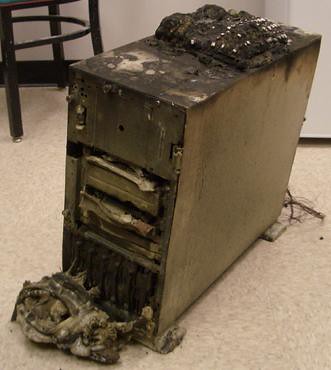
Sometimes hard drives croak. Maybe you’re writing an essay and your computer catches fire. Perhaps you deleted that file that you needed by accident and now you don’t have it. If you did not make external and/or offsite backups, you are SOL. Today we take a look at some of the top free online backups that could potentially save you when a disaster strikes.
In round one of the Free Online Backup Showdown, we take a look at the purported features, speeds, and prices of six popular online backup services. The contenders are Mozy, which advertises about automated online backup; ADrive.com, which boasts about its free 50GB of storage; Windows Live Skydrive, another popular tool from Microsoft; IDrive, claiming to protect your critical data; Dropbox, another popular storage site used for both sharing files and keeping backups of private files; and humyo.com, which wants to improve your efficiency.
When it comes to selecting an online backup service, something you need to ask yourself about an online backup is what do I want from an online backup?
What do I want from an online backup?
There’s a lot of things to find in an online backup tool. Do you want to share files with friends? Have your data backed up (and not waste bandwidth)? Do you want your financial documents the pictures of your dog secured so no one else can hack into them? Lots of free storage space? A fast connection? Are you OK with uploading through a web browser, or do you want a program to do it for you? The following chart answers those!
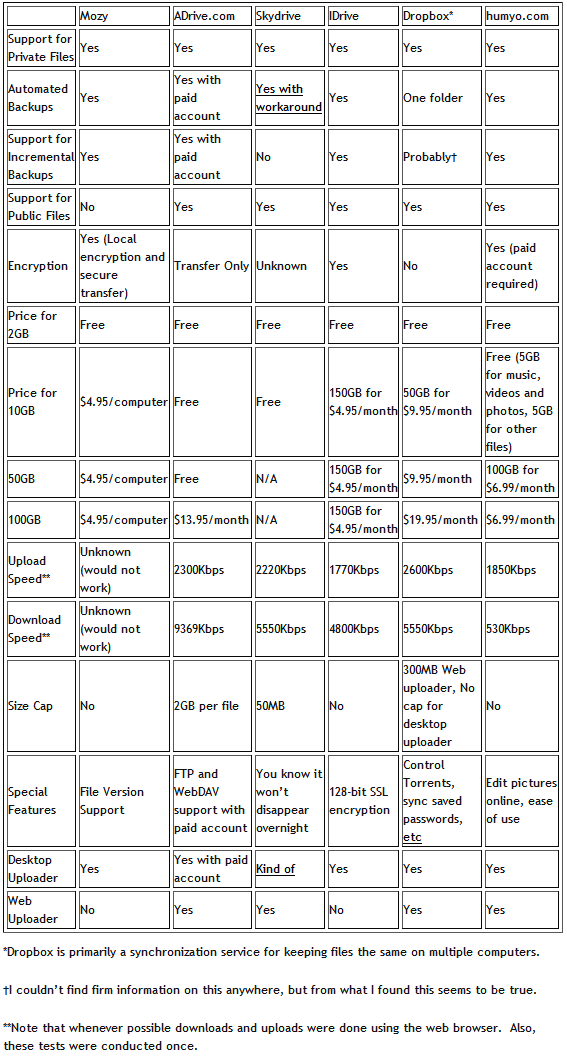
(Click on the chart to view it in full size.)
My Favorite
My favorite service was probably Dropbox. Its Windows Explorer integration is superb and has a tiny learning curve. Its public folders have simple right click options to copy the link to public files. That text file was just saved like any other file, right into the Dropbox folder. That’s how easy it is! It also has a Photo Gallery option:
Dropbox photo galleries allow you to share photos with anyone (even non-Dropbox users). These photos will be presented in a photo gallery that is viewable online.
Pretty cool, no? You can even get an extra 250MB by signing up at this link!
What I liked
From what I used of these online file backup sites, I liked what I saw from Skydrive, Dropbox, ADrive, IDrive, or Dropbox. They were all pleasant to use and fairly quick too. I’d recommend to a friend that wanted a desktop client Dropbox- one of the major things that makes Dropbox popular is its integration with Windows. For someone who didn’t care about that kind of thing but wanted lots of free space, I’d choose ADrive. Why? It has a lot of free space-50GB-for free.
What I didn’t like
One word: Mozy. It was slow on the old laptop I tested it on (what wasn’t?) and even refused to let me upload a custom file and at multiple times either froze or refused to log in. Given that uploading a single file was how I was testing these, I really don’t like that. Another thing I didn’t like was humyo for the sole reason of its extremely slow download speed. Perhaps it was other people on the network, but on this 20Mbps connection (~16Mbps, or 2MBps, if used at a fast site) I don’t want my 36MB files taking nine minutes to download.
Your thoughts
Tell us what you think. Do you use an online backup service? Will you ever use an online backup service? Which one is your favorite (your favorite does not have to be from the five that were reviewed in this article)? Are there any features you find that all backup services lack but you would like them to have? Feel free to share it all in the comments below.
Photo credit: alexmuse
This article was originally written by Locutus at his blog Cogizio on March 20th, 2010.







I have to say I have been extremely satisfied with Carbonite. I recently experienced (I am NOT kidding or exaggerating) my PCU hard drive crashing in the same week as my lap top crashed and two external drives crashed. I was able to recover everything from Carbonite – and that included all my tax info which I needed this past week. I had lost and it recovered over a quarter of a million files! I had no idea I had that much crap! I have needed to cntact them 3 times for help on something – and each time, I was able to get online to chat with them within a few minutes, they all solved my issues, and everyone of them wrote (chat) in English which any lay person could understand, as well gave me the opportunity to copy the comments and/or receive them via email. It’s extremely user friendly, priced fairly (and if any of you wan to mention me recommending it, I’ll save 3 mos. worth of renewal. lol But, srioiusly, it’s not why I mentioned it – I really do believe in their product and their customer service.
The only time I used online backup was to set up a convenient way for her to sync My Documents between her netbook and desktop. Dropbox was what I picked; so far it seems to work, even though I’m usually the one who does the syncing for her. (It’s interesting being a geek when your best friend is a confirmed Luddite)
My personal backup habits are so ingrained that online storage is hardly a consideration otherwise.
After a month of use, I have to say, Dropbox is pretty awesome.
Ashraf, you must be kidding me!
You should have written this article before I had spent so much time searching!
(unless you discovered Dropbox from any comment of mine during last month where I “advertise” all over the net).
I had search in the past and did not find any practical online backup.
After a year or so, just last month I discovered accidentally Dropbox.
Its amazingly practical! Its my second hand now and I can’t live without it!
I stopped copying files all around 3 usb sticks, emailing, using google docs, etc…
Even to-do lists or business files, are all automatically syncronised!
After Dropbox, I do need to try any other online backup systems.
During my recent research, I checked again to other services. Some of them from the past have stopped totally or stopped free services (I have a 30 day trial of Norton Online Backup but I am not going to try at all).
I had found also that adrive offers this huge 50gb space, so I kept it for big files that I want archived but which I do not need access often.
Notes for Dropbox:
- Encryption is not a problem with Dropbox, as you may use whatever tool you like for encrypting files or folders in the syncronised forlder from your desktop (eg with axcrypt or truecrypt vol files).
- Speed is automatically selected (and not full all the time) according to your free bandwidth. Very handy for background sync.
P.S.
Whoever subscribes to Dropbox through my link invitation below, gets an extra 250mb to the 2gb free space! (Through invitations, you may get up to 8gb max free).
Nothing to lose, just both gain and if you try it, you will not regret it:
https://www.dropbox.com/referrals/NTU2NzYzMjQ5
for large free space WINDOWS LIVE SKYDRIVE,
IDRIVE: It offers 2 gb free space. but after creating an account and simply referring idrive to your contacts you can get 10 gb extra free space
ADRIVE: does not provide desktop client in free account any more or this is what i think
@jumbi: I didn’t write it. Locutus did.
Great write-up, Locutus. Dropbox has become such a valuable tool for me. I use it daily. I totally agree with jumbi – I can’t live without it now.
@Locutus: Your article started me thinking (never an easy option!), so I went to the Acronis website to check up on Acronis Online. Looks like it interfaces nicely with TI Home 2010, so maybe….
It’s an interesting idea, anyway. I’ve had drives fail a couple of times and an external HD get corrupted. I’m going to investigate this a little more. Thanks.
Carbonite works very good and it costs me $54/year, unlimited storage space. I’ve recently used it to re-load a new laptop. Very easy to use, and it also notifies you if (for some reason) it is unable to upload your current files. Highly recommended, and you get a free trial.
Ted Browne
@jumbi: Actually, I wrote this article last March. March 20th to be exact. :D :(
# Ashraf:
Yes, I noticed afterwards that Locutus is the guilty criminal writer :-)
Correction to my fast enthusiastic post:
“After Dropbox, I do need to try any other online backup systems.”
is of course:
“After Dropbox, I do NOT need to try any other online backup systems.”
# phoenix_rising: I am glad you feel the same and I am not alone :-)
# Locutus: Congratulations for the super article!
Whoever reads this and tries Dropbox will thank you for ever!
Are you trying to drive donators to your account?!? :-) :-)
@Ron: I believe Ashraf wrote an article a while back on best home harddisk imaging software.
@ha14: Did I write that ADrive has a desktop client? GAH! I know it doesn’t…
@Sandy: @Ted: Well that wouldn’t work well for us cheapskates would it?
@jumbi: I know! I’ve been using Dropbox since I wrote this article last March and it is AMAZING!
Spent considerable effort last year testing and choosing various players listed above and settled on iDrive 150GB deal for $50/year.
Upload/download speeds are great, can choose own encryption so even their system can’t peak at my files. Maintains 30 versions of any file forever (not 30 days like some other companies do).
It does not have sync features but you can access your data from any computer (even while traveling from any hotel or café computers) using the web based interface, no client install required. One other drawback of iDrive, unlike Dropbox or Humyo, it can not share files or folders with anybody.
Deleted files are stored permanently on the cloud backup until manually deleted by you (using a sync feature) which has saved me many times when I deleted a file and didn’t remember it. Most sync services such as DropBox would delete such files permanently.
iDrive just announced a new product iDriveSync (unlimited capacity for $5 per month) which allows you to sync your data on upto 5 computers (similar to DropBox) and share any file/folder with upto 10 people using their email addersses. This is different from iDrive Backup service as deleted files are also deleted from sync’d computers so the combination of the two (iDrive Backup and iDrivesync) might be helpful but then its $50+50/year for the two services.
Humyo had a promo for 50% off on Jan 1st so I got 100GB sync service for $32 for a year and it has worked great. Humyo is sync service but also maintains older versions and keeps deleted files.
Also signed up for SpiderOak paying $75/yr promo but then it had problems, froze in 2 days, had automatic sign ins on a shared computer so anybody could see data backed by the admin etc so contacted the company and managed to get 50% refund even though I never used their service to begin with. Their reasoning – we give you 2GB free to test our services before you buy.
iDrive has been real fast for both upload/download so I am very happy with $50/yr of 150GB online backup using my own encryption key!
BEWARE: Many promo services that give you 2GB or 10GB free allow you to upload the data but retrieving is VERYYYYYYYYYYYYY slow forcing you to buy their paid service. Try retrieving your free upload data and you would notice what I am telling you with Humyo (10GB service) or Mozy.
@Ashok: I’d have listed all of those things in my review, but:
I’m too lazy. Nice detective work!
Notice how the table barely fits as it is? XD
I didn’t think of those things.
Good review!
I agree that Mozy sucks. Despite all the self-praise, Mozy is not good, as simple as that.
Dropbox is excellent, to say the least.
I have an account on aDrive and humyo, but I did not use them a lot. (I prefer to keep an external hard drive for backups) Dropbox… well, it’s not a backup system, but it’s a must for everyone working on more than one computer!
lol….no one told me dropbox application will act like spyware :) Online Armor almost block this behaviour :D
@Locutus: I remember. I’ve been using TI for years, upgrading from 7 through time to the current 2010 Home. Best investment I ever made in software of this type.
If I predict that someone may crack those sites, and access your files, would that make any of you nervous ?
I tried DropBox more than a year ago. One feature that made me decide to NOT use it was the fact that files to be sync’ed and backed up had to be stored in one particular folder only. It was not possible to select multiple folders for DropBox to watch and synchronise. Is that still the case in the last version?
# sunrise
you have a shared folder, thats all. No spyware unless shared is spyware for you. Just tell Online Armor to permit it (if you want the service).
#RobCr
For Dropbox, I mentioned above: You have the files in your desktop folder so you encrypt them as you like.
So the hacker, has to crack as well axcrypt or truecrypt… quite difficult.
Even so, its your choise what you upload or not. You dont have to upload financial data or you may write in a way that only you know. To give an example: I do have some sensitive data encrypted on dropbox with passwords and numbers but even if a hacker manages to cracks everything and reach my files, he will not understand what I mean cause I replace some characters with something I only know.
e.g. k…. is my typical password for a word starting with k and has 6 characters. I use it often, I always remember but no one can guess it.
4…5… is my typical number password which has 8 numbers/symbols and only 2 of them are visible.
Simple and safe tactic. There can be many personal variations.
# Eddy:
This is indeed how it works (with a shared folder) but I do not understand your problem. Into the synced folder you may have any others folders just like into your documents and they are all automatically syncronised.
@jumbi:yup…already give permission :) i believe if something come from dottech is free from spyware,etc :) unless ashraf himself write a spyware :) but this will make a big conspiracy between ashraf and other loyal member :D
@Jumbi: Thanks for confirming! Well, it is not a major problem, but it means that I have to re-organise my existing folder structures and move all of my working folders into the shared folder. Technically, there is no reason why DropBox would not be able to watch multiple folders.
At the time, I decided to go with Memopal. A commercial solution: 50 euro/year for 200 GB.
+ : – Memopal can watch any number of existing folders to backup.
– One subscription can be used on any number of pc’s.
– Lots of GB’s for your euro’s (or dollars)
- : – The GUI sucks …
I don’t know what the problem with Mozy was; I’ve been using Mozy for maybe six months now, and I have almost 150GB backed up with them. I have a friend who has been using them for over a year. Sorry to hear it didn’t work out for you. Did you call their tech support?
And I agree that Dropbox is great, if you don’t mind the size limitation (or are willing to pay their steep prices for additional storage).