dotTech Showdown: Free online backup services – which one is the best?
September 29, 2011 105
Email article | Print article
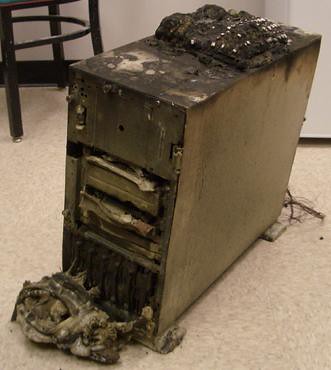
Sometimes hard drives croak. Maybe you’re writing an essay and your computer catches fire. Perhaps you deleted that file that you needed by accident and now you don’t have it. If you did not make external and/or offsite backups, you are SOL. Today we take a look at some of the top free online backups that could potentially save you when a disaster strikes.
In round one of the Free Online Backup Showdown, we take a look at the purported features, speeds, and prices of six popular online backup services. The contenders are Mozy, which advertises about automated online backup; ADrive.com, which boasts about its free 50GB of storage; Windows Live Skydrive, another popular tool from Microsoft; IDrive, claiming to protect your critical data; Dropbox, another popular storage site used for both sharing files and keeping backups of private files; and humyo.com, which wants to improve your efficiency.
When it comes to selecting an online backup service, something you need to ask yourself about an online backup is what do I want from an online backup?
What do I want from an online backup?
There’s a lot of things to find in an online backup tool. Do you want to share files with friends? Have your data backed up (and not waste bandwidth)? Do you want your financial documents the pictures of your dog secured so no one else can hack into them? Lots of free storage space? A fast connection? Are you OK with uploading through a web browser, or do you want a program to do it for you? The following chart answers those!
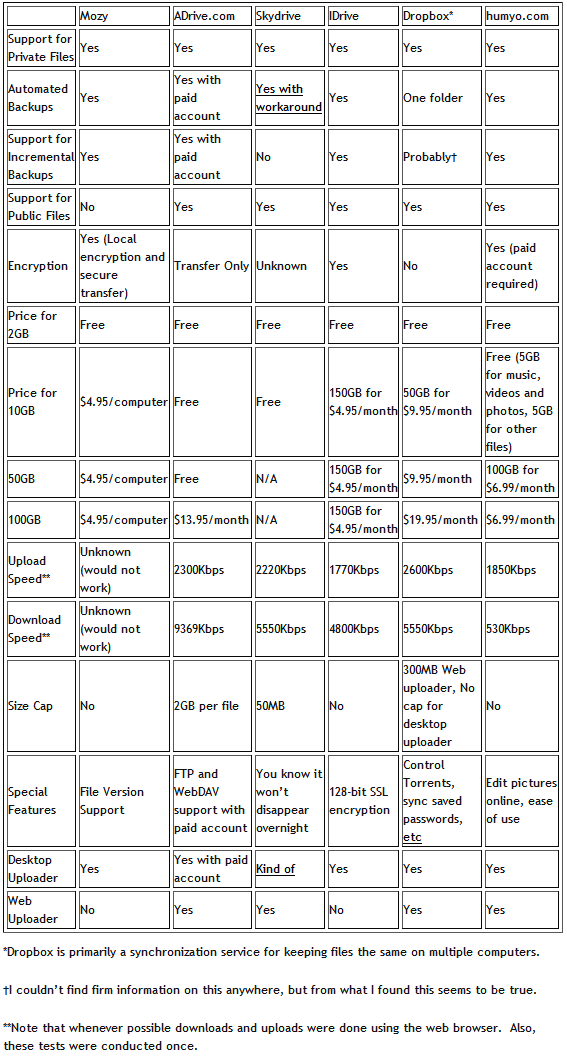
(Click on the chart to view it in full size.)
My Favorite
My favorite service was probably Dropbox. Its Windows Explorer integration is superb and has a tiny learning curve. Its public folders have simple right click options to copy the link to public files. That text file was just saved like any other file, right into the Dropbox folder. That’s how easy it is! It also has a Photo Gallery option:
Dropbox photo galleries allow you to share photos with anyone (even non-Dropbox users). These photos will be presented in a photo gallery that is viewable online.
Pretty cool, no? You can even get an extra 250MB by signing up at this link!
What I liked
From what I used of these online file backup sites, I liked what I saw from Skydrive, Dropbox, ADrive, IDrive, or Dropbox. They were all pleasant to use and fairly quick too. I’d recommend to a friend that wanted a desktop client Dropbox- one of the major things that makes Dropbox popular is its integration with Windows. For someone who didn’t care about that kind of thing but wanted lots of free space, I’d choose ADrive. Why? It has a lot of free space-50GB-for free.
What I didn’t like
One word: Mozy. It was slow on the old laptop I tested it on (what wasn’t?) and even refused to let me upload a custom file and at multiple times either froze or refused to log in. Given that uploading a single file was how I was testing these, I really don’t like that. Another thing I didn’t like was humyo for the sole reason of its extremely slow download speed. Perhaps it was other people on the network, but on this 20Mbps connection (~16Mbps, or 2MBps, if used at a fast site) I don’t want my 36MB files taking nine minutes to download.
Your thoughts
Tell us what you think. Do you use an online backup service? Will you ever use an online backup service? Which one is your favorite (your favorite does not have to be from the five that were reviewed in this article)? Are there any features you find that all backup services lack but you would like them to have? Feel free to share it all in the comments below.
Photo credit: alexmuse
This article was originally written by Locutus at his blog Cogizio on March 20th, 2010.
105 Comments »
Leave A Response »


Locutus,
Your chart shows “NO” for encryption under Dropbox but I’m confused by that because the Dropbox web page at http://www.dropbox.com/features says…
- All transmission of file data and metadata occurs over an encrypted channel (SSL).
- All files stored on Dropbox servers are encrypted (AES-256) and are inaccessible without your account password.
jumbi #41 – you are correct, I forgot – I got on to Jungle disk when it was free and just starting- now it costs me $1/month + Amazon S3 storage charges which for me are a few cents/month. If starting with it now I guess the fees are as you discovered. “old” as in forgetful!
Is there anywhere to upload jpg files so others can download them? I’ve uploaded 100mb to both humyo and dropbox, both require providing email addresses of those I want to let see them. A link to the files would be great without having to give addresses.
One vote plus from me to Dropbox as well ++
I just love this service :-)
Hope it doesn’t turn to paid over time…I would have to pay!
And here is my referral link:
https://www.dropbox.com/referrals/NTU2NzYzMjQ5
Thanksssssss
This article came just at the right time. I tried using Mozy a couple of weeks ago and ended up uninstalling it. I’ve been searching for a good alternative and most of what I need to know is right here. Thanks
Thanks for this.
I have previously backed up mainly photos with gmail and skydrive.
Gave Dropbox a whirl today, so easy to use and syncs very well.
Got an extra 250 mb thanks to the referall and an extra 250 by completing the getting started section.
Going to give a few referals now to family and friends to get a bit more space.
Thanks again :)
@Dave McGraw: Really? I missed that! Thanks for the notice.
@GaryKC: In Dropbox, put the files into the Public folder. Then right click on it, go to the Dropbox submenu, and click Copy Public Link.
I think I first heard about Dropbox here.
Besides backing-up my files (which you too should do as often as possible: I also use Carbonite for this purpose, having hired them long-ago when my PC burned a wire), Dropbox allows me a unique method of pre-publishing the 500 Chapters of a book on which I’m working. The 500 Dropbox Keys [URLs] will each open its Chapter. Collaborators, after an email invitation, can add their comments, which will appear within moments in the Dropbox.
Dropbox has numerous forums for its users.
And it’s easy to use.
A++
@redmaledeer:
“What about the stability of these companies?” Probably they’re as strong as General Motors. That’s why I use BOTH Dropbox and Carbonite.
xØx
jd
I use Mozy paid and haven’t had any difficulties with it on Vista 64. It backed up 72 GB in the background over 2 days and then does incremental updates daily.
My laptop (XP) has the free version and sometimes it gets slow and bulky. The laptop is old and slow anyway so that could be part of it.
I also use Carbonite for keeping things synched between computers. Love that feature. It’s a little expensive to use as a full backup, but it’s great to have my important files wherever I need them.
@GaryKC: Humyo allows you to create a direct link to any folder and share with your users. On the right part of the screen, you would see “Sharing” under which is an icon “kind of orange arrow” that creates a direct link which you then publish to any user.
I am a paid member of Humyo so I hope this sharing works for gratis members too :)
The online backup service I use and love is carbonite. Its very light on my systen resources and internet connection and I have a 4 year old laptop thinkpad T-43. I even forget its there except for a small icon in the tray. At $58.00 per year Im very pleased with this service. Everytime I change a file or folder its backed up. I have no idea yet what if any the limit is however as of this time Im over 150 gigs
@Locutus doesn’t want to log in again: Dropbox won’t allow sharing of shared folders is the message I get, also checked their forum others have the same problem. 3 weeks ago Humyo sent an email about a new way to share using a direct link, clicking on the icon does nothing. Someday, someone, somewhere with offer a way to share files, maybe.
I would check out CrashPlan– http://crashplan.com. I’m surprised it wasn’t in the initial list. Cheaper monthly unlimited online backup than Mozy or Carbonite (i.e. 100GB will cost $5/mo. for ALL your computers, not each computer) as well as the option of backing up to external hard drives or other computers onsite or offsite, anywhere in the world. And that part is Free. Works on any platform too. It was Macworld’s Editor’s Choice over all those other services. Honestly this is the only “all-in-one” backup solution out there. Just doing online backup isn’t really backup – you need multiple copies of your files. And no other program will let you manage all your backup destinations in a single interface like CrashPlan does.
Everyone should be trying this. If you choose not to use their online backup service (Crashplan Central), then it’s completely free, and you can backup to as many different locations as you want…for free…forever.
Don’t confuse this with file syncing, like dropbox, and likewise don’t confuse file syncing for true backup. I would use dropbox in conjunction with CrashPlan, but not just dropbox alone.
@GaryKC
Gary, why don’t you look at Opera - their latest version comes with Unite, a feature that let’s you share pictures or files with friends. The data remains on your pc which can act as a server. You specify what is shared and what remains private. Ther e is no need to upload or download anything.
Obviously this feature is for sharing stuff not for backups.
Hey peoples! If you sign up for Dropbox from this link then we both get an extra 250MB of free space!
(I need it!)
Here is another comprehensive review and comparison of various players in this field.
http://online-storage-service-review.toptenreviews.com/
Thank you all for signing through my link earlier.
I am very happy with my 4gb space on dropbox, so all new readers, interested for dropbox, please sign through Locutus link on post # 67.
I am certain he needs it!
And he will use the extra space for more great dottech articles :-)
# GaryKC
I think I read before a month that dropbox supports file sharing not folder sharing. If you want to share a folder there are other solutions or if you like dropbox, just zip whichever folder to one file (you may zip without compression depending on the contents) and share it, either public or by invitation.
@jivadas: Would you mind if I ask what program you’re using for your book? I’m working on one as well – and am using MS Word – and I also backup with Carbonite. However, I have heard of large files corrupting – and so I’ve been saving chapters separately to keep the volume of each file lower… . If you have any other ideas, I’d love to hear them. Because I don’t always go back and open each file I’ve finished, for a few months (sometimes), I’m mortified at the thought of opening one 5 months down the road and finding out I can’t! Or, worse (well, maybe) would be loosing a file that contains research.
Thanks!!
Another fine service (at least for me): https://www.opendrive.com/services/plans.php?lang=en
@Sandy: I’ve used Carbonite for several years, and never had a problem with corrupted files. Lost files (including, I think, prior drafts) are easily restored with a couple of clicks.
I use Dropbox mainly for collaboration, and have never tested their backup system. For a very small charge it backs up every version of a file separately.
I’d recommend sticking to Chapter files, if your book is large, simply for ease of downloading to another computer. (A very large file can take a long time both uploading and downloading.)
xØx
jd
@GaryKC: I just checked ZumoDrive and it appears to do what you want. Below is a link to one of my folders containing pics and a movie from a Trackmania racing course I made. See if you can access these files, and please let me know if you can see anything outside of this folder (you shouldn’t be able to, but I’d like to know that for sure!). You could also try deleting or changing one of the pics, you shouldn’t be able to do either one. You can also create a link to an individual file, it’s all very easy to do. And, there is a “share” option that gives others access to add and (I think) edit and maybe delete files in a folder.
Here’s the link:
http://www.zumodrive.com/share/3k7rOGFlNz
@Mr.Dave: Thank You, using multiple browsers, link opens, nothing there. I’ll check out the zumodrive site, can anyone see Mr.Dave’s pics?
A highly recommended cloud backup service (2 GB for free, secure file transfers, WebDAV, etc.): https://secure.storegate.com/user/Files/Index.aspx
Also, SugarSync: https://www.sugarsync.com/referral?rf=eysjtbxz6opik
and Syncplicity: https://my.syncplicity.com/Signup/UserSignup.aspx?plan=free&token=0FAS7ES1