dotTech Showdown: Free online backup services – which one is the best?

September 29, 2011 105 Email article | Print article

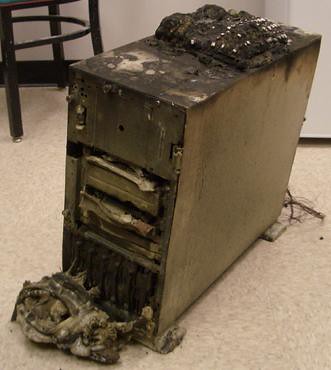
Off-site backup for Dallas companiesSometimes hard drives croak. Maybe you’re writing an essay and your computer catches fire. Perhaps you deleted that file that you needed by accident and now you don’t have it. If you did not make external and/or offsite backups, you are SOL. Today we take a look at some of the top free online backups that could potentially save you when a disaster strikes.

In round one of the Free Online Backup Showdown, we take a look at the purported features, speeds, and prices of six popular online backup services. The contenders are Mozy, which advertises about automated online backup; ADrive.com, which boasts about its free 50GB of storage; Windows Live Skydrive, another popular tool from Microsoft; IDrive, claiming to protect your critical data; Dropbox, another popular storage site used for both sharing files and keeping backups of private files; and humyo.com, which wants to improve your efficiency.

When it comes to selecting an online backup service, something you need to ask yourself about an online backup is what do I want from an online backup?

What do I want from an online backup?

There’s a lot of things to find in an online backup tool. Do you want to share files with friends? Have your data backed up (and not waste bandwidth)? Do you want your financial documents the pictures of your dog secured so no one else can hack into them? Lots of free storage space? A fast connection? Are you OK with uploading through a web browser, or do you want a program to do it for you? The following chart answers those!
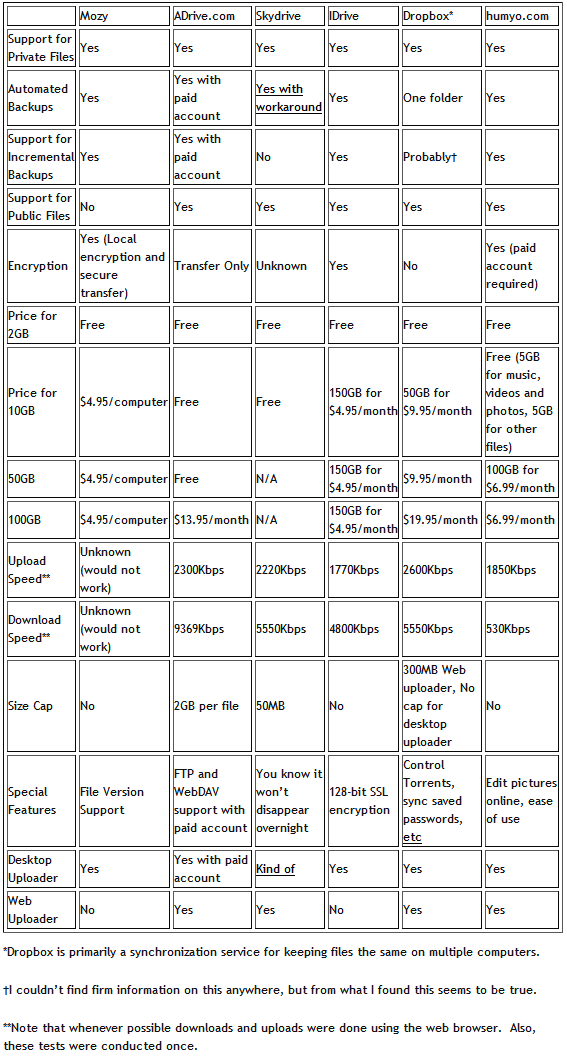
(Click on the chart to view it in full size.)

My Favorite

My favorite service was probably Dropbox. Its Windows Explorer integration is superb and has a tiny learning curve. Its public folders have simple right click options to copy the link to public files. That text file was just saved like any other file, right into the Dropbox folder. That’s how easy it is! It also has a Photo Gallery option:

Dropbox photo galleries allow you to share photos with anyone (even non-Dropbox users). These photos will be presented in a photo gallery that is viewable online.

Pretty cool, no?  You can even get an extra 250MB by signing up at this link!

What I liked

From what I used of these online file backup sites, I liked what I saw from Skydrive, Dropbox, ADrive, IDrive, or Dropbox. They were all pleasant to use and fairly quick too. I’d recommend to a friend that wanted a desktop client Dropbox- one of the major things that makes Dropbox popular is its integration with Windows. For someone who didn’t care about that kind of thing but wanted lots of free space, I’d choose ADrive. Why? It has a lot of free space-50GB-for free.

What I didn’t like

One word: Mozy. It was slow on the old laptop I tested it on (what wasn’t?) and even refused to let me upload a custom file and at multiple times either froze or refused to log in. Given that uploading a single file was how I was testing these, I really don’t like that. Another thing I didn’t like was humyo for the sole reason of its extremely slow download speed. Perhaps it was other people on the network, but on this 20Mbps connection (~16Mbps, or 2MBps, if used at a fast site) I don’t want my 36MB files taking nine minutes to download.

Your thoughts

Tell us what you think. Do you use an online backup service? Will you ever use an online backup service? Which one is your favorite (your favorite does not have to be from the five that were reviewed in this article)? Are there any features you find that all backup services lack but you would like them to have? Feel free to share it all in the comments below.

Photo credit: alexmuse

This article was originally written by Locutus at his blog Cogizio on March 20th, 2010.

105 Comments »

  1. Sandy April 21, 2010 at 9:27 PM (comment permalink) -

    @jivadas:   Thank you so much!  I feel much better – having someone who has done this before  – confirming the choices I made, since computers are not my area of expertise.  Best of luck on the success of your book!

    76
  2. Rip DVD April 22, 2010 at 1:13 AM (comment permalink) -

     
    oh, cool staff. Thanks for sharing.

    77
  3. Ashok April 22, 2010 at 3:22 AM (comment permalink) -

    @Mr.Dave: Nice HQ photos! Zumodrive seems to have good cloud functionality but the price is steep for 100GB or more specially when storing music, photos etc in the cloud..

    Reproducing Dave’s link here: http://www.zumodrive.com/share/3k7rOGFlNz

    78
  4. bem April 22, 2010 at 6:05 AM (comment permalink) -

    Call me a troglodyte but I put NOTHING online with anybody.  In a world where even defense computers are being hacked I have zip faith that someone somewhere can’t mine it for their own purposes.  Worse, the site owners themselves might use personal info for their own gain.  Even Microsoft has sunk to this level, though they didn’t have far to sink.

    I don’t tweet, twitter, face or blog and as a result receive near zero spam.  I certainly wouldn’t upload my personal files.  I can’t see a need for it, at least in my case.  I have way more than enough external storage to keep my backups at home where no one can get at them or hose them but me.

    Untrusting?  Paranoid?  Yes, but I haven’t been hacked, attacked, infected or seriously spammed since I was a noob running 98.  The simplest security starts with closed, locked doors.

    79
  5. Mr.Dave April 22, 2010 at 12:30 PM (comment permalink) -

    @GaryKC: Thanks for giving a try.  I noticed my link was replaced with dottech.org, but if I paste the text of the link, it takes me to a page where I see a list of files.  I’m using Firefox 3.6, also tried it in Chrome (4.1.249) and it works the same.
    The page says “ZumoDrive” at the top.  In the right-hand side of the screen there’s a button to download all of it as one big .zip file, or you can “Accept a Share” – this takes you to a sign-up page for ZumoDrive, and if you go through all that, you will have a live copy of my folder on your ZumoDrive.  If I add or change files, you’ll see the updates as well.  Not sure if you would be able to add or change things.
    You can also click a filename to see more details or download it.  If you double-click you see the picture full screen (almost).   Near the upper left are buttons that switch between list view and gallery view.
    And it still is asking me to sign in, so I don’t think I see all this just because I have an account.  I don’t know what might be blocking it on your system — I’m running a bunch of different security/monitor programs (Avira, Anvir, Adaware, Windows Defender, Online Armor).  I hope you can find something that works for you, there are so many helpful people on this site and many good suggestions!


    80
  6. Caleb April 22, 2010 at 7:24 PM (comment permalink) -

    I use dropbox.
    For my important files, I’ll make symbiotic link from the file on my dropbox to my hdd, so that when I use my desktop or laptop, I always have the latest version, and a copy is stored on my hdd as well as my dropbox, and not just dropbox.

    81
  7. GaryKC April 22, 2010 at 8:34 PM (comment permalink) -

    Only service I’ve been able to upload to and access with any degree of consistancy is storegate. Thanks to everyone for your suggestions. Regarding Mr.Dave’s link, here’s what I see. Something is blocking my ability to view what’s there, I’ve been running every anti-mal-virus-spam-utility in my arsenal, no luck…yet. [IMG]http://i566.photobucket.com/albums/ss107/garykc/zumoscrshot.jpg[/IMG]

    82
  8. captcha April 22, 2010 at 9:09 PM (comment permalink) -

    @GaryKC: if you put your image files into the ‘Public’ folder of Dropbox, you can get permalinks to your files (“Copy public link”) and can give/send these links to those you want to.

    83
  9. .mau. April 23, 2010 at 12:33 AM (comment permalink) -

    I tried to sign up to Storegate, but after putting my username and password I always end up in a (Swedish) page which says “you’re logged out”. I just contacted the people there to see what happens.

    84
  10. JohnD April 23, 2010 at 4:47 PM (comment permalink) -

    Carbonite is on special (Ends today 4-23) at Costco online, 2 years for $59 plus tax, free shipping.  I’m going to check it out, I have off computer backup, but if the house burned down I would have some major troubles.

    86
  11. .mau. April 24, 2010 at 9:00 AM (comment permalink) -

    @captcha: I think the problem lies in the firewall at my office. Here at home it works seamlessy.

    87
  12. Mr.Dave April 24, 2010 at 12:01 PM (comment permalink) -

    @Ashok: Thanks for the compliment!  Trackmania is one of my favorite “guilty pleasures”, and it’s FREE, great fun to race and I also like to build tracks.  I only built one so far, but as you can see from the photos & movie, it’s a monster.  My best time is 11:35 start to finish!
    Glad to see you were able to access the files.  After GaryKC’s comments I was beginning to wonder if ZumoDrive worked for others.  It would help to know what the difference is (between GaryKC’s setup and yours) in case I try to share files with someone else and hit the same snag….


    88
  13. Frank May 5, 2010 at 9:04 PM (comment permalink) -

    I signed up for iDrive account a few days ago.
    No matter what connection I have (upstream), I get no more than 200Kb upload speed. Sincerely I would not recomment iDrive right now.
     
    Frank

    89
  14. Daniel May 9, 2010 at 6:11 AM (comment permalink) -

    @Tony: I used the dot tech refer but no free storage. How did you do it? Thanks.

    90
  15. Wayne May 13, 2010 at 6:55 AM (comment permalink) -

    I followed you link to sign up for dropbox but did not receive the extra storage.  What shoud I do?

    Wayne

    91
  16. Jon May 14, 2010 at 1:42 PM (comment permalink) -

    ADrive is my absolute favorite, and I LOVE it’s space. But the maximum size is ONE gb per file, NOT 2.

    92
  17. jivadas June 18, 2010 at 12:42 PM (comment permalink) -

    @jumbi: I don’t understand what you’re saying.
    “Public” files are invitational. You have to send your friends the URL for any file you wish to share. Such files are read-only.
    But you can also invite a reader into a public file. Then your computers get synced, so that you can collaborate wiki-style.
    This is a great system, and easy to use.
    xØx
    jd

    93
  18. RobCr June 24, 2010 at 6:24 AM (comment permalink) -

    @Tom:
    I like the sound of Unite.
    I have the latest Opera.
    Does the person I wish to allow to ‘download’ from my Opera PC, have to have Opera as well ?
    Or do I just email them a link to my PC ?
     

    94
  19. Jacky August 5, 2010 at 10:20 PM (comment permalink) -

    The cloud has become a lot more powerful. Not only you can backup files to the cloud, you can also move your file server, FTP server, email server, web server and backup system to the cloud. You can create sub-users and sub-groups; you can set different user roles; share different folders to different users with different permissions. For a small business, Cloud-based storage, backup, sharing and Cloud IT Solution can save you a lot of cost, while offering better, more secure and reliable services that can be accessed from anywhere. DriveHQ.com is one of the first few companies offering such cloud based services. For more info, please visit:
    http://www.drivehq.com/
     

    95
  20. Diii August 12, 2010 at 3:36 AM (comment permalink) -

    I like safecopy backup and it is what i use for all my backups.It is so efficient and cost effecitive.

    96
  21. Jabtano December 6, 2010 at 1:35 PM (comment permalink) -

    I use both skydrive and dropbox I like them both. though one I use for work and the other I use for my home set up’s

    97
  22. Debra January 17, 2011 at 9:01 AM (comment permalink) -

    For those mentioning a “paid” cloud storage service, why would I want to use one of those when there are so many good FREE cloud storage sites? Makes no sense …. or CENTS !

    98
  23. PCbasics September 29, 2011 at 12:19 PM (comment permalink) -

    There are many more alternative now….maybe you should update this posts. There is a huge list here: http://en.wikipedia.org/wiki/Comparison_of_online_backup_services

    99
  24. Susan September 29, 2011 at 2:21 PM (comment permalink) -

    I’ve been using SpiderOak for backups of data & manuscripts & am more than happy. Free 2mb is plenty for me, prices above that are comparable to others. They have backup and sync options, automatic or on-demand, an onboard client. I’m stuck with s-l-o-w dialup (yes, we do still exist out here in the boonies!), but in spite of that, the upload & download process — while it can get tedious at times — has never failed me or given me any problems. Highly recommended.

    100

Leave A Response »