dotTech Exclusive: 30 free licenses of AnyBizSoft PDF to Word Converter 3.0.0!

April 21, 2010 72 Email article | Print article

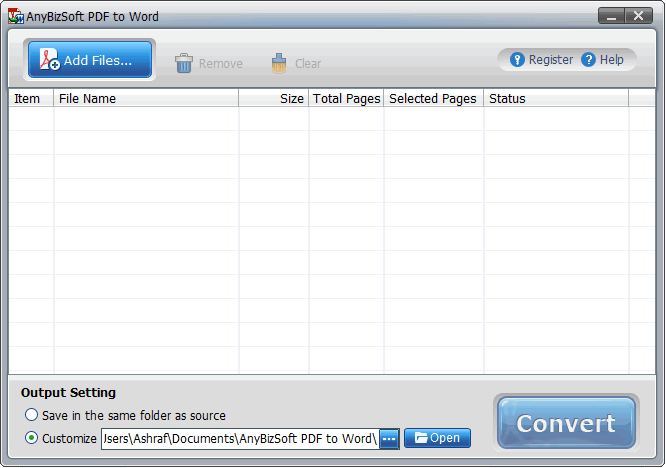
Last week I announced how AnyBizSoft PDF to Word Converter v2.5.3 is now freeware. Now dotTech and AnyBizSoft Studio have teamed up to allow you a chance to win AnyBizSoft PDF to Word Converter 3.0.0 for free! The major improvements made in AnyBizSoft PDF to Word Converter 3.0.0 are:

  • Users no longer need to have Microsoft Word installed to use AnyBizSoft PDF to Word Converter 3.0.0
  • AnyBizSoft PDF to Word Converter 3.0.0 better/properly converts tables
  • AnyBizSoft PDF to Word Converter 3.0.0 better/properly preserves image and text hyperlinks

If you want to learn more about AnyBizSoft PDF to Word Converter, feel free to read my review on v2.5.3 (but keep in mind the new changes in v3.0.0 I just mentioned).

That all being said, 30 lucky dotTechies will have the chance to own a copy of AnyBizSoft PDF to Word Converter 3.0.0 for free! All winners will receive free updates. The developer also would like everyone to know that all winners will be able to take advantage of AnyBizSoft Studio’s online technical support for free. Here are the rules for this giveaway:

Version being given out for free: 3.0.0

Free updates: Yes

Supported OS: Windows XP/Vista/Win7

Download size: 6.4 MB

  • If you want a chance to win a license of AnyBizSoft PDF to Word Converter 3.0.0, you must post a comment below answering all of these questions:
  1. What kind of PDF files do you convert? (Reports, papers, ebooks, contracts, applications, etc.)
  2. What is the composition of your files? In other words, please tell us what generally is included in the files (i.e. images, tables, text, hyperlinks, etc.).
  3. How well does AnyBizSoft PDF to Word Converter convert the files? (I.e. which features do you like, do not like, what can be improved, etc.)

Anyone that does not answer all three of these questions will be disqualified.

  • 10 licenses are reserved for dotTech donors, authors, and artists. If you fall in this 10 license reserve category, please specifically state so in your comment (i.e. say “I am a donor” if you are a donor, etc.), otherwise I may not know. Also if you are a donor, please be sure to use the e-mail you donated with in your comment (do not post your e-mail in public, just use the e-mail in the “e-mail” form when posting a comment) so I can confirm.
  • The other 20 licenses can be won by anyone.
  • I reserve the right to award specific people licenses if I feel they have helped foster the dotTech community by being very active (the people who fall into this category is at my sole discretion).
  • You may only enter the drawing once and may only win one license. If you try to enter more than once, you will be disqualified.

When posting a comment, please make sure you enter an e-mail that is 100% valid and an e-mail you will check because the licenses will be distributed via e-mail by me. If you win and don’t have a valid e-mail or an e-mail you don’t check, your license will go to waste. However, please don’t post your e-mail in your comment! You should never post your e-mail on a public form. Just enter the e-mail you want to be contacted at in the “E-mail” field when writing your comment – I will be able to get your e-mail from there. Or if you are a registered dotTechie  just post a comment while you are logged in and I will be able to find your e-mail.

The winners of this giveaway will be announced after the giveaway has ended in 72 hours, or on Saturday April 24, 2010.

Good luck to everyone!

As a friendly reminder, keep in mind that dotTechies can take advantage of large discounts (up to 50%) on AnyBizSoft Studio products such as the 5-in-1 PDF Converter, PDF to Word Converter, PDF to PowerPoint Converter, etc. Please visit the special discounts page for more details.

72 Comments »

  1. Larry Spielvogel, PE April 21, 2010 at 8:14 PM (comment permalink) -

    I convert ebooks, magazine articles, technical papers, and contracts.
     
    The pdf files include text and extensive tables.
     
    I am mostly satisfied with the AnyBizSoft conversions.

    1
  2. Helen Crow April 21, 2010 at 8:27 PM (comment permalink) -

    I convert knitting, crochet and quilting patterns for a local chapter of Project Linus.  We are volunteers who provide new, hand-made blankets for kids in need – primarily to hospitalized kids.  I rework difficult patterns to make them less difficult and more efficient.
    Our files include lots of images and text.
    Having done this for LOTS of years going back to cutting and pasting with scissors  and glue and having to hand-write or re-type the written instructions, even when lots of tidying up is required after conversion, I’m still WAY ahead.

    2
  3. Phuong April 21, 2010 at 8:32 PM (comment permalink) -

    Dear dottech,I’d really like to have this software. Can i get a licensed AnyBizSoft PDF to Word Converter. They are amazing! Thanks for the giveaway.Best Regards,Phuong

    3
  4. Praful Thakkar April 21, 2010 at 8:37 PM (comment permalink) -

    Mostly, I convert the real estate related documents and forms/contracts.About more than 50% of documents have images whereas contracts end up being text oriented.I have used online service to convert these documents in past, did purchase the AnyBizSoft PDF to WORD convertor few months ago – and barring some exceptions (mostly image loaded files), the conversion quality is great. Some fill-in PDF documents conversion had issues where I ended up cut-n-paste text part. Overall, happy and looking forward to 3.0.0

    4
  5. Al LIPSKY April 21, 2010 at 8:38 PM (comment permalink) -

    1- I use PD Converter to open information sent by my manufacturers
    2- The composition is Imiges, text and excell sheets
    3- This converter program works very good for my pourpeses I dont think any improvement is needed

    5
  6. chinaguy April 21, 2010 at 8:50 PM (comment permalink) -

    1.I will probably use it to convert contracts, maybe some papers or any other miscellaneous pdf files I need to convert.
    2.Most likely the files I will convert will be largely text with an occassional table and image or two.
    3. I have never used the software before so I cannot give an answer on how well it converts the files.
     

    6
  7. lreyes2 April 21, 2010 at 8:51 PM (comment permalink) -

    1  I do a lot of translating documents
    2  this software does a fantastic job for what I use it
    3  is small, does not take a much space and does what they says it does

    7
  8. Josh April 21, 2010 at 9:10 PM (comment permalink) -

    1. Technical papers, research papers. (To delete blank pages, trim unnecessary data before printing).
    2. Text, images, tables, hyperlinks.
    3. Would like option for .DOC (instead of .DOCX) when using Word 2007 (and 2010). Impressed with speed, user friendliness and how it converts PDF text to “normal” Word documents, instead of little text “frames” that must be edited one by one. Also impressed with ability to edit text inside converted images. Overall this is an excellent, very good value for money program. For everyday use, finding fault is like splitting hairs.

    8
  9. Bud Gallagher April 21, 2010 at 9:13 PM (comment permalink) -

    Reports and reviews of software
    Mostly text with some tables. once in a while an  image
    I have no experience with AnyBizSoft PDF to Word Converter but do with AnyBizSoft PDF to Powerpoint which works very well and although not used often it has never failed me.

    9
  10. Ron April 21, 2010 at 9:21 PM (comment permalink) -

    OK, I’m down for this one. As I posted before, I’ve been using the free version since an early February promotion. It works very well, but the 3.0 version will take care of some minor irks.
    I write articles and research papers in the fields of paleobotany and geology. Typically, I insert photographs and tables to illustrate locations, cladistics, etc. Hyperlinks are not a common feature, but citations are. I used to create the PDF documents for these reports in Acrobat, but I now use another PDF composer/editor.
    In the short time I’ve used the AnyBizSoft free product, I’ve found it useful for quick conversions. It’s light enough to work easily on my laptop and netbook, and I’ve installed it on two of my other machines to good effect.
    I’ve already recommended the freeware to friends; the 3.0 version is an appealing opportunity.

    10
  11. Friend April 21, 2010 at 9:24 PM (comment permalink) -

     
    AOA Ashraf,
    Thanks for AnyBizSoft PDF to Word Converter 3.0.0 giveaway. Here are my answers:
    1.  I am a student of M.Sc. (Hons.). I have to convert reports, thesis, and research papers from pdf to doc to study them better and use desired information.
    2. The pdf usually contains text, data tables, and images (i.e., correlation and regression).
    3. AnyBizSoft PDF to Word Converter does its job very well. Version 2.5.3 does not support Windows 7 x64.

    I hope I will win a license out of 20. This software will be very helpful for my study. Thanks in advance.

    11
  12. Ira April 21, 2010 at 10:09 PM (comment permalink) -

    What kind of PDF files do you convert? (Reports, papers, ebooks, contracts, applications, etc.)

    Downloaded files.

    What is the composition of your files? In other words, please tell us what generally is included in the files (i.e. images, tables, text, hyperlinks, etc.).

    Illustrations and text.

    How well does AnyBizSoft PDF to Word Converter convert the files? (I.e. which features do you like, do not like, what can be improved, etc.)

    For the price it is good.

    12
  13. kingpin April 21, 2010 at 10:37 PM (comment permalink) -

    Hello Ashraf,
    Thanks for the opportunity for providing us AnyBizSoft PDF to Word Converter converter 3.0.0.

    My answers to questions are simple and discreet I would say,

    1.E-books and primarily Project papers i.e. ieee format ones.

    2.Images mainly,text and hyperlinks also.

    3.The ability to copy almost the entire PDF file to Word format is quite impressive.The feature of extracting images as the way they are presented in PDF to Word format can be better.

    That’s all.

    Hope I can win one license too.

    13
  14. Lee April 21, 2010 at 11:00 PM (comment permalink) -


    What kind of PDF files do you convert? (Reports, papers, ebooks, contracts, applications, etc.). Answer: I convert legal contracts.
    What is the composition of your files? In other words, please tell us what generally is included in the files (i.e. images, tables, text, hyperlinks, etc.). Answer: Tables and text mainly – sometimes images.
    How well does AnyBizSoft PDF to Word Converter convert the files? (I.e. which features do you like, do not like, what can be improved, etc.) – Answer: it is the best that I have used to date and the conversion rate is good. I would prefer it if it kept columns in pdf in the right format when converted. It does not use text frames (which a competing but inferior product – pdf zilla does). So I like that aspect of it. I would like to see an option for .DOC as opposed to DOC.X when using Word 2007.


    14
  15. MADHUSUDHAN April 21, 2010 at 11:26 PM (comment permalink) -

    please consider me

    15
  16. perico April 21, 2010 at 11:48 PM (comment permalink) -

    1. Educational papers and info related to my hobbies.
    2. They contain text with hyperlinks and images.
    3. I like it because it is simple to use. I have to try it further to check it on textes including charts/graphs thought.

    16
  17. chnkk April 22, 2010 at 12:05 AM (comment permalink) -

    The documents are mostly catalogues, copies of invoices, delivery challans etc.
    They contain mostly tables and images other than text.
    I have tried free softwares but most of them failed at converting tables. I have not yet used this software as such.

    But the very improvement of proper conversion of tables along with Win7 support attracted me much.

    17
  18. bogdanic April 22, 2010 at 12:33 AM (comment permalink) -

    Most of the time I convert reports and different studies that contain text, large tables with data and charts.
    My interest is to re-chart data and make different comparison between different data sources.
    I’m not verry happy about the way AnyBizSoft PDF to Word Converter converts tables because I have to work a lot on them after conversion. A better way to convert tables will be a wonderfull improvement for me.
    off topic: Thnx for all good reviews an opinions. I’m always considering your opinion on installing software.

    18
  19. popfly April 22, 2010 at 12:46 AM (comment permalink) -

    1. Mostly publications about IT downloaded from the Web
    2. Text, tables, some images, an a few hyperlinks (they don’t matter)
    3. The conversion is mostly OK. I especially like the independece from Word

    19
  20. AKBAR SHAIKH April 22, 2010 at 12:47 AM (comment permalink) -

    I rarely convert any PDF files, except those I want to share some important comments/suggestions/hints out of the main document.  If the pdf files allows copying of the text, then I do not convert.

    Composition of my file is normally text or hyperlinks.  It is not easy to convet the tables as the formatting is usually lost unless you copy it as an image.

    I do not remember having used this software, but if it allows me to convert the tables in PDF file to either Word table or Excel table, then it would be very useful.

    20
  21. Ayase Ichi April 22, 2010 at 1:13 AM (comment permalink) -

    I’d got my free AnyBizSoft PDF to Word Converter 2.5.3.
    I’m surprised, it supported Japanese.
    Not many PDF converter support Japanese, almost of PDF converter
    softwares only support English.
    I wish to win one of free 3.0.0 to find more useful functions.
    Thank you. 

    21
  22. omar April 22, 2010 at 2:23 AM (comment permalink) -

    please  send me free license because i need it for my doc
    thanks(I am sorry for my english )

    22
  23. Robin April 22, 2010 at 3:09 AM (comment permalink) -

    What kind of PDF files do you convert? Ebooks and research documents, primarily for note-taking purposes or when including cited content in reports.

    What is the composition of your files? Text primarily, but some tables, and occasionally images.

    How well does AnyBizSoft PDF to Word Converter convert the files? Very well, with the occasional exception of a table or image.

    23
  24. harrrrrrr April 22, 2010 at 3:15 AM (comment permalink) -

    Hi Ashraf…
    I enjoy these free license offerings…
    1) I convert many different pdf documents, including: contracts, protocols, reports, manuals, letters.  Many of which include imbedded graphics, tables and data.
    2) Text, graphics, tables, data listings.  Occassionally a document may contain links or bookmarks.
    3) I haven’t used the program but would like to give it a try.

    Thanks for all you do and to the vendors making free licenses available.

    24
  25. Laurence April 22, 2010 at 3:21 AM (comment permalink) -

    You know,
    there is a very big trouble in doc to pdf,
    and this program can solve it!

    25

Leave A Response »