dotTech Exclusive: 30 free licenses of AnyBizSoft PDF to Word Converter 3.0.0!
April 21, 2010 72
Email article | Print article
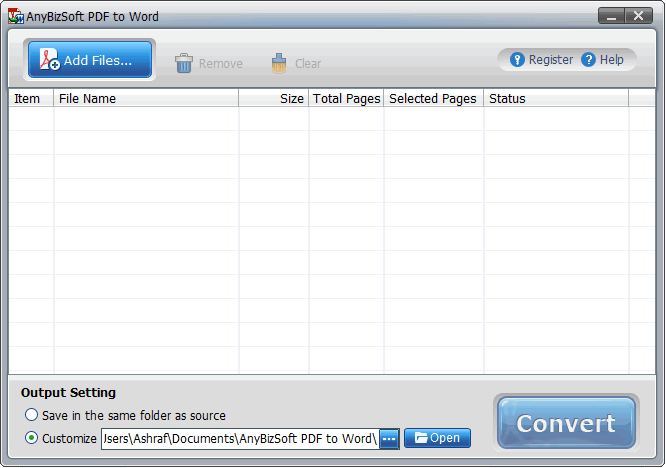
Last week I announced how AnyBizSoft PDF to Word Converter v2.5.3 is now freeware. Now dotTech and AnyBizSoft Studio have teamed up to allow you a chance to win AnyBizSoft PDF to Word Converter 3.0.0 for free! The major improvements made in AnyBizSoft PDF to Word Converter 3.0.0 are:
- Users no longer need to have Microsoft Word installed to use AnyBizSoft PDF to Word Converter 3.0.0
- AnyBizSoft PDF to Word Converter 3.0.0 better/properly converts tables
- AnyBizSoft PDF to Word Converter 3.0.0 better/properly preserves image and text hyperlinks
If you want to learn more about AnyBizSoft PDF to Word Converter, feel free to read my review on v2.5.3 (but keep in mind the new changes in v3.0.0 I just mentioned).
That all being said, 30 lucky dotTechies will have the chance to own a copy of AnyBizSoft PDF to Word Converter 3.0.0 for free! All winners will receive free updates. The developer also would like everyone to know that all winners will be able to take advantage of AnyBizSoft Studio’s online technical support for free. Here are the rules for this giveaway:
Version being given out for free: 3.0.0
Free updates: Yes
Supported OS: Windows XP/Vista/Win7
Download size: 6.4 MB
- If you want a chance to win a license of AnyBizSoft PDF to Word Converter 3.0.0, you must post a comment below answering all of these questions:
- What kind of PDF files do you convert? (Reports, papers, ebooks, contracts, applications, etc.)
- What is the composition of your files? In other words, please tell us what generally is included in the files (i.e. images, tables, text, hyperlinks, etc.).
- How well does AnyBizSoft PDF to Word Converter convert the files? (I.e. which features do you like, do not like, what can be improved, etc.)
Anyone that does not answer all three of these questions will be disqualified.
- 10 licenses are reserved for dotTech donors, authors, and artists. If you fall in this 10 license reserve category, please specifically state so in your comment (i.e. say “I am a donor” if you are a donor, etc.), otherwise I may not know. Also if you are a donor, please be sure to use the e-mail you donated with in your comment (do not post your e-mail in public, just use the e-mail in the “e-mail” form when posting a comment) so I can confirm.
- The other 20 licenses can be won by anyone.
- I reserve the right to award specific people licenses if I feel they have helped foster the dotTech community by being very active (the people who fall into this category is at my sole discretion).
- You may only enter the drawing once and may only win one license. If you try to enter more than once, you will be disqualified.
When posting a comment, please make sure you enter an e-mail that is 100% valid and an e-mail you will check because the licenses will be distributed via e-mail by me. If you win and don’t have a valid e-mail or an e-mail you don’t check, your license will go to waste. However, please don’t post your e-mail in your comment! You should never post your e-mail on a public form. Just enter the e-mail you want to be contacted at in the “E-mail” field when writing your comment – I will be able to get your e-mail from there. Or if you are a registered dotTechie just post a comment while you are logged in and I will be able to find your e-mail.
The winners of this giveaway will be announced after the giveaway has ended in 72 hours, or on Saturday April 24, 2010.
Good luck to everyone!
As a friendly reminder, keep in mind that dotTechies can take advantage of large discounts (up to 50%) on AnyBizSoft Studio products such as the 5-in-1 PDF Converter, PDF to Word Converter, PDF to PowerPoint Converter, etc. Please visit the special discounts page for more details.


1. datasheets, reports
2. text, images
3. conversion works fine maybe speed need to be improved
Thanks Ashraf. My answers:
1. What kind of PDF files do you convert? (Reports, papers, ebooks, contracts, applications, etc.)
>> Reports, Manuals, Ebooks, Patent PDFs, Comics
2. What is the composition of your files? In other words, please tell us what generally is included in the files (i.e. images, tables, text, hyperlinks, etc.).
>>It includes text+images+tables+hyperlinks+index. And this is color & B/W; both.
3. How well does AnyBizSoft PDF to Word Converter convert the files? (I.e. which features do you like, do not like, what can be improved, etc.)
If the pdf is having high resolution images, or if the no.of images is more (around 25) – it gets stuck/no response. Have to end task.
Thanks, Grr
I am a donor. Ashraf, thanks for your good reviews and freebies.
1. Reports, ebooks, flyers, brochures (mostly small size). 2. Text, images, tables, hyperlinks3. Conversion works fine and i was excited to see same look n feel of a brochure after conversion to word. I am running on win 7 64 bit ultimate and no issues so far.
Here are my answers Ashraf:
1. reports, ebooks, manuals, papers
2. images, text, tables, hyperlinks
3. it runs slow when there are a lot of pages with a lot of images and tables.
More power to this site!
Thanks in advance Ashraf
1 I convert e books, journal pages, case reports etc
2 My files include text images and lot of tables
3 Good conversion. But the GUI can be improved and it registers an Active X on the system (my winpatrol scotty tells me this).
One or me Please
Dr Nitin
Thanks
What kind of PDF files do you convert? (Reports, papers, ebooks, contracts, applications, etc.) Being in university I come across tons of lectures
and presentations in PDF format that I need to take electronic notes over
but am unable to.
What is the composition of your files? In other words, please tell us what generally is included in the files (i.e. images, tables, text, hyperlinks, etc.). Images, texts, and blank forms
How well does AnyBizSoft PDF to Word Converter convert the files? (I.e. which features do you like, do not like, what can be improved, etc.) I like it it works pretty well
1/
Mainly they are reports, and ebooks
2/
It includes text,images and tables.
3/
I see the old version couldn’t work perfectly with tables, but this has been eliminated in version 3.0.0
Thank you very much, please count me in
Hi Ashraf, thank you very much for this nice opportunity. Please count me in. Here you have my answers:
1. I usually convert reports and papers.
2. Most of the files I use have images, tables, text, hyperlinks, graphs.
3. I specially like the possibility of converting encrypted documents, as well as the fact that in general the results of the conversion are very good.
Thanks in advance. Cheers, Ashraf.
1) Reports and papers, just some e-book.
2) Text, images and few tables
3) It’s a little bit slower of the (short) time I desire for the conversion :-), but i think it’s a common issue in this sw category.
Nomiroba
What kind of PDF files do you convert? = papers, ebooks, applications
What is the composition of your files? = images, tables and text.
How well does AnyBizSoft PDF to Word Converter convert the files?= no issues
Thanks in advance !!!
1. Reports, textes.
2. Those pdf’s contain images and tables, as well as hyperlinks.
3. I found some slight conversion errors (for example: some text of tables put a bit on top of the cells borders; not conversion of vertical text; omission of lines of the type _ _ _ _ _ _ in forms, etc.)
What kind of PDF files do you convert? (Reports, papers, ebooks, contracts, applications, etc.) Ebooks (a lot), manuals, papers and brochures.
What is the composition of your files? In other words, please tell us what generally is included in the files (i.e. images, tables, text, hyperlinks, etc.). Many images about 30 pages text or more and a few links.
How well does AnyBizSoft PDF to Word Converter convert the files? (I.e. which features do you like, do not like, what can be improved, etc.) I really like it, it converts PDF to Word in about 30 seconds and I saved 2 hours of trying to copy to word.
Ashraf, thanks for your good reviews.
my answers are:
1. reports and manuals.
2. mainly text with some tables and images.
3. AnyBizSoft PDF to Word Converter is very good software but I think it’s handling of table should be improved.
Hi Ashraf, hope all is well with you and your family. I’m a donor and I’d like to enter this fun contest……
1. I convert academic/research/medical papers.
2. Paper & Documents contain tables and text – sometimes images.
3. Best feature of AnyBizSoft is text/word conversion – features which
need improvement are alignment and integrity of tables and
images upon conversion.
Thanks for this wonderful opportunity!
Hi Ashraf. I have previously posted for this draw to answer the three questions that need to be answered to be eligible to win a license! I am just posting again to let you know that since my previous post for this draw I donated to Dottech.org – so now I am a donor- which may put me into a different category for this draw i.e. the category for the 10 licenses that are reserved for dotTech donors, authors, and artists! Thanks for organising this promo and I look forward to the results of it!
1. Reports, White Papers, Tech Documents, Research Papers etc.
2. Mainly text with some tables and images
3. No Major issues, sometimes minor problems with images or tables.
This drawing is now closed. Winners will be announced shortly.
@Lee: FYI just to clarify my above post - please be aware that my initial post for this draw (prior to my above post) was post No. 14. Cheers.
+I tried the version 3 free trial (limited to 3 pages) and here’s my experience.
1. I need to convert pdfs that have equations, diagrams, pictures and text
I know the free gift is expired, but based on my experience, it doesn’t do what I need. I tried 2 documents, one mostly text with a few pictures. Anybizsoft converted did a great job. the doc produced was easily editable. Unfortunately document 2 was another story. this one was mostly text and equations. The result was a large number of text boxes for everything in the document which meant it was basically uneditable. My take is that for simple documents this program works fine, but for complicated ones it is useless. It works no better than PDF2Word.
@Ashraf: When will you announce the results?
@James Mackey: The drawing has been already closed.
And the winners are?