[Windows] Color code your folders or modify their icon with Folderico
November 26, 2011 20
Email article | Print article
The human eye has a tendency to better notice things if they stand out from their environment. For example, from your closet full of black shoes, you are more likely to notice a white shoe than a particular black shoe. So, then, I suppose the question is wouldn’t the same logic apply to folders on your computer? Wouldn’t it be useful to be able to change the color of those manila colored folders? With Folderico you can do just that.
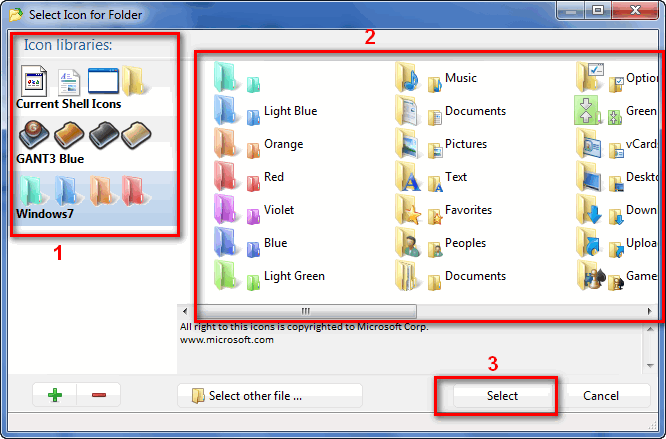
Folderico is a freeware program that allows you to easily change the color – or icon – of folders. Using Folderico is very easy. You can either change the color or icon of a folder via Folderico’s main program window…
…or via the right-click context menu for folders:
If you ever want to change a folder back to its original icon, you can make use of the Folderico’s “reset” function.
By default Folderico comes with handful of colors or icons that you can change your folders to (see the above screenshots). However, Folderico allows you to import custom icons/colors via icon files (.ICL files), and allows you to install extra icon themes. So, by default you will be limited in the selection of colors or icons that you can use for your folders, but you always have the flexibility to import and use more colors/icons.
The last thing to note is that the Windows you use will determine which version of Folderico you should download. If are a Windows 2000 or XP user, you need to download and use Folderico v3.7. If you are a Windows Vista or Win7 user, you need to download the latest v4. Take note that this latest v4 is still in the “release candidate” phase, so it has not been officially “released” yet; however RC2 – the version I tested for the purposes of this article – seems to be fairly stable and usable.
You may download Folderico from the following links:
Version reviewed: v4.0.0.4 RC2
Supported: Windows 2000/XP for v3.7 and Windows Vista/Win7 for v4
Download size: 1.3 MB for v3.7 and 4.3 MB for v4
License restriction: Freeware for “private use” only
20 Comments »
Leave A Response »


![[Windows] Backup and restore open windows, programs, files, tabs, and more across multiple computers with Cupcloud](http://cdn.dottech.org/media/2013/05/Cupcloud-Beta-empty-UI-134x90.png)
![[Android] RegawMod Rebooter allows you to easily reboot, power off, or go into recovery or bootloader by clicking a button on your Windows computer](http://cdn.dottech.org/media/2013/05/RegawMod-Rebooter-UI-134x90.png)
![The Leap Motion makes Windows 8 look… awesome [Video]](http://cdn.dottech.org/media/2013/05/leap-134x90.jpg)
![[Windows] Backup and restore WiFi and wired network settings with Network Profiles Utility](http://cdn.dottech.org/media/2013/05/Network-Profiles-Utility-main-UI-134x90.png)
FWIW, I used Folderico for a few years. It works great, but there are not enough colors to use. And if there were – say even 1000 colors – I would probably would want more. And then I would not remember what the colors meant.
Bottom line, it works great, but I got tired of all the colors and what they meant.
It’s just me. ;-(
I’ve been using v4.0 since I got my new Windows 7 computer in February. I’ve seen no issues at all from using it and it looks great, IMO.
@davidroper: Yeah, I agree with you – there is a small number of colors available by default. I hope someone creates a custom theme that allows for a lot of colors. I don’t it would be that hard, would it?
Hmmm.
http://dottech.org/gotdreviews/4259
Eh…if I need to change what my folders icon is I just change it from properties.
@Samuel: I think this is meant for people like me, who use the desktop as a base (with 70 or 80 icons displayed, I use the windows icon gallery in properties, using the more visible icons like the Tree to mark important files). But I’ll see what this thing can do shortly.
But this gives me an opportunity to say that I am sending Ashraf a CAD$10.00 bird-dog fee. He’s worth every CAPenny!….
xØx
jd
ps to Ashraf: The NOTIFY ME button shoud be checked by default, not blank. I often forget to check it when I post a query.
@jivadas: Interesting point. I try to keep my desktop as clean as i can.
Folderico is good but Rainbow Folders has more choice of colors.
http://www.rainbowfolders.aionel.net/
Hey, what is the RAM usage of this thing when it’s in the background?
Thanks.
Other notes:
Folder Marker (the one at GAOTD) Has some nice features, but I stopped using it because it’s extremely laborious to add homemade icons to the FM Custom Icons Tab.
Seems like there used to be one called “MyFolder” though I can’t seemed find it (????) Was really nice because you could basically open a folder-full of homemade icons in the program… There was only XP though, no Vista compatibility..
once again, useful article. thank you.
Sadly I don’t think I can use this software (I have 64 bit). But I have something making me afraid to try it out on my laptop… Can it hurt my laptop if I try using 32 bit only software on a 64 bit computer? Also, how would Rainbow Folder compare to this program? I’ll try Rainbow Folders out…
I tried it out and I like it okay, I think I’ll stick with it.
Uh, I just realized “colorcode” should be “color code”…
I found but have not used Colorize. It allows you to select a color and add it as once of you selection, however it does not mention anything about icons. Oh and it is a freebie.
Here is another free alternative:
“Folder Colorizer” from http://softorino.com/
It doesn’t have a GUI, so don’t try opening the exe after installing it. Just open Windows Explorer and right-click on any folder of your choice, click on Colorize and select a color. You can manage the palette by adding custom colors and giving it a name.
@ Steve
This one maybe ? : http://www.grafile.com/download/MyFolder.EXE
I’ve used a little free program for years to do this from Windows 98 through Windows 7.
It’s call Rainbow Folders. You can choose 3 styles of folders, Classical (9x), Typical ( XP) and Modern (Vista). Choose your colour, hit Colorize, and you have a nice coloured folder.
Still free from
http://rainbow-folders.en.softonic.com/?ab=3
@AF70:
“Rainbow Folders” >>> This is actually a good software, easy, simple… for users of XP.
(Dowload ok, but editor ???)
BYE et merci.
>>> Rainbow Folders 1.02
I recently learned how to use my pictures of anything for Folder Icons in WIN7. Not just colors.
I will be glad to write it up for DotTech if it’s okay?