
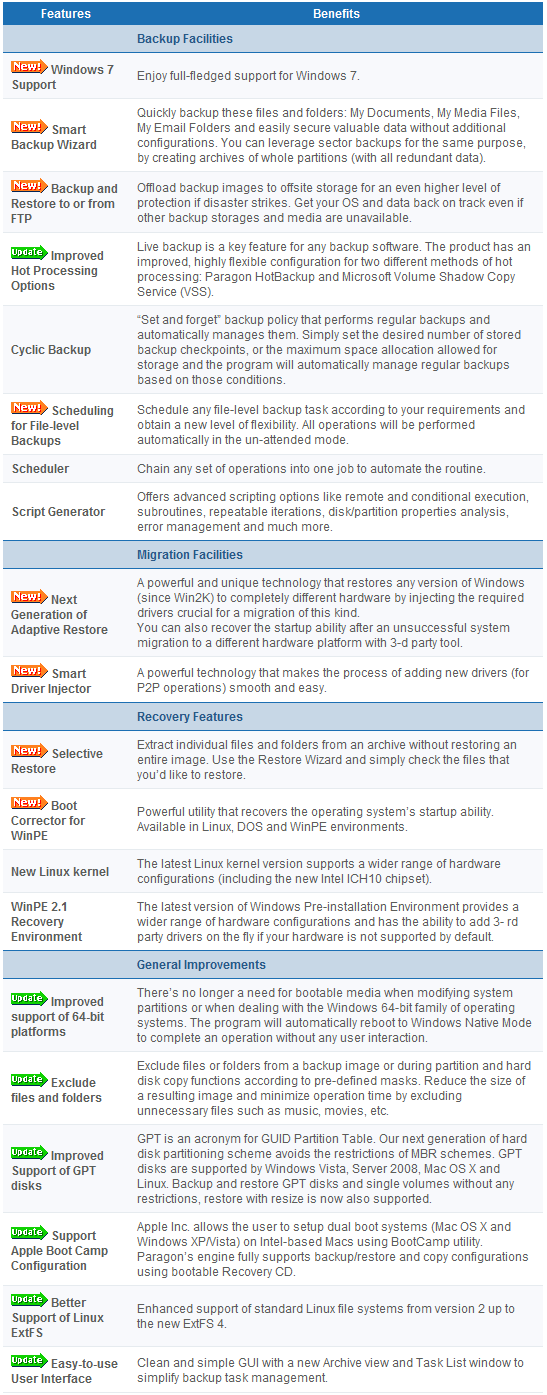
Paragon Drive Backup Professional is a commercial backup (image and file) software. These are the main features of Paragon Drive Backup 10 Professional per the developer:
For a limited time (from Friday, 9:00AM on 30th of April to 9:00AM on Tuesday, 4th of May EST) users can get Paragon Drive Backup 9.5 Professional for free:
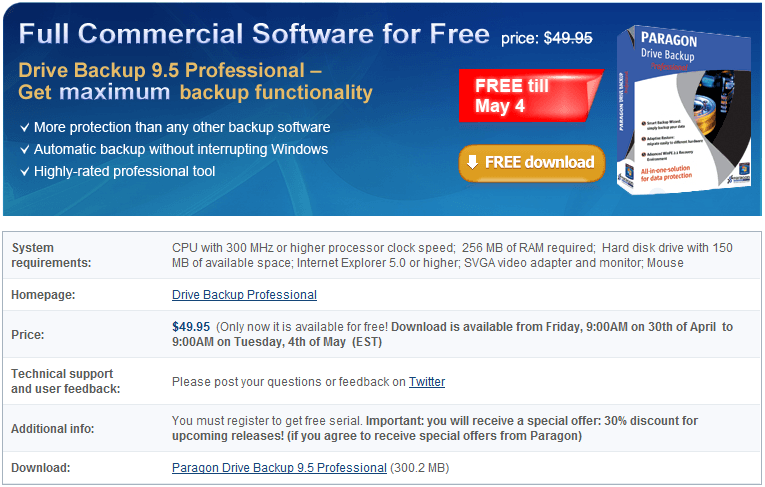
To get Paragon Drive Backup 9.5 Professional for free, download it from the following links (keep in mind you will have to register during installation, just like you have to register all Paragon products):
Version being given out for free: v9.5
Free updates: No
Supported OS: Windows 2000 and higher
Download size: 300.2 MB
Paragon Drive Backup 9.5 Professional promotion homepage [direct download]
Thanks zhrmrn!


Email article


can anybody tell me which the program for one to one back-up is? i don’t want OS and programs to be backed up, i simply want all of my files in an external drive to be backed up in another external drive in simplest form, for example, if i have two folders, say, videos and documents in the root of source drive, i want to see videos and documents folders in the root of destination drive (just like copy/paste of windows explorer). unfortunately, i find most back-up software don’t do this way.
If you have previously registered with Paragon for any other of their software keys, you only need to enter the same (legitimate) e-mail address used before to get the new key.
why not they highly compress the files
@SS:
If you have the program installed, open it and under settings change the compression settings to Best. You may want to go to the program’s layout.ini and change a setting there. Change Best Compression level (2-9) = 2 to Best Compression level (2-9) = 9. This will reduce the archive size although it may prolong the process of making one and will use a bit more resources.
The site for registration is http://www.paragon-software.com/registration/db95pro_eng.html
I currently have Paragon’s 9.0 Personal Backup installed on my Vista/64 bit (home) PC. Any thoughts on the benefits of upgrading to this 9.5 Professional edition? It appears to be 3 times the size so what ‘must-have’ features are offered in this pro version?
Thanks in advance for any and all replies!
Dan
Since there’s some debate about whether this is version 9.5 or version 10 (I think the latter) then you might be interested in this:
http://www.paragon-software.com/home/db-professional/comparison.html
Thanks, Ashraf and OldElmerFudd!
Based on #32′s link to compare versions, it doesn’t appear that a home user would benefit from the extra bloat in the pro compared to the freebie version. Thanks for the link, Gil!
Dan
@OldElmerFudd: Thank you :).
Seems to work fine in Windows 7. This appears to be a hybrid of v. 10 because it works on win7 and it offers FTP backup (which 9 doesn’t).
Vs. 10Free it offers file backup and incremental backup. The added weight of the install comes from the various flavors of it (x86, x64, PE) that are included. No “bloat” at all.
IMHO, this is well worth it. I *used* to be a big Acronis fan but Paragon does the same plus the PE version has some disk fixing ability that Acronis (TrueImage) doesn’t AND Paragon is a lot simpler to use. With Acronis I was never real sure of what I was overwriting and it was easy to make a mistake (though I never did). With Paragon, it is very clear what is being done
I’m starting to wonder…. is Ashraf really connected to Giveawayoftheday?! Cause I got Paragon Drive Backup Professional 9.5 here a few days earlier and now it is on Giveawayoftheday! Hmm….
Glad your direct download still works – missed the GOTD yesterday!