
Free Paragon Drive Backup 9.5 Professional!

April 30, 2010 38 Email article | Print article

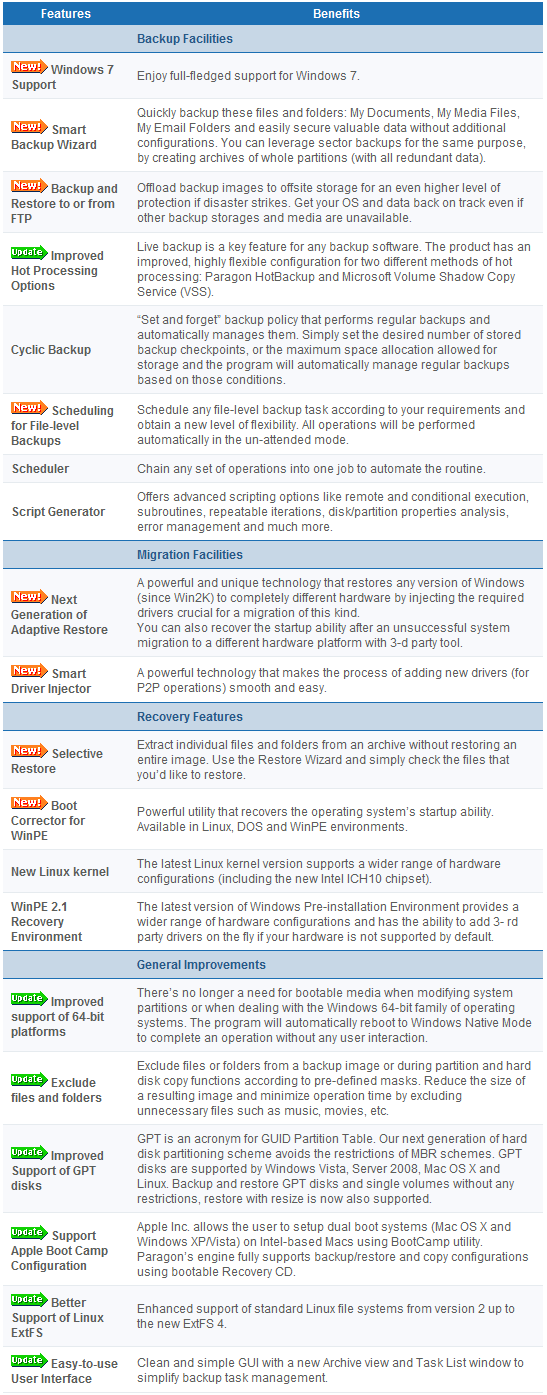
Paragon Drive Backup Professional is a commercial backup (image and file) software. These are the main features of Paragon Drive Backup 10 Professional per the developer:
For a limited time (from Friday, 9:00AM on 30th of April  to 9:00AM on Tuesday, 4th of May EST) users can get Paragon Drive Backup 9.5 Professional for free:
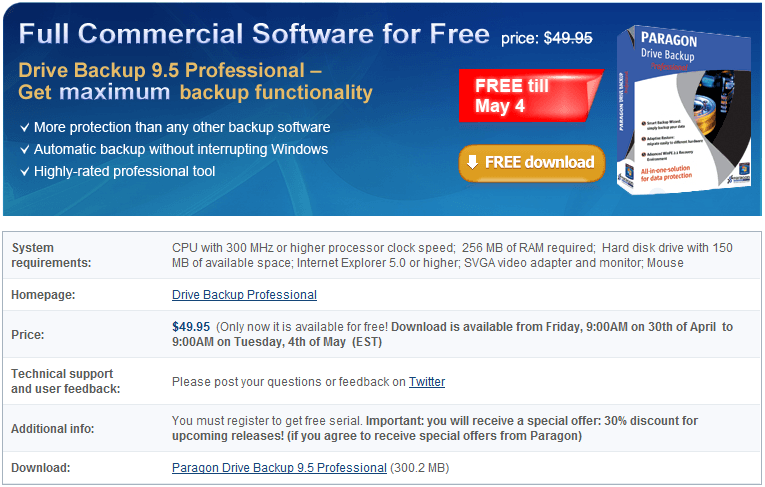
To get Paragon Drive Backup 9.5 Professional for free, download it from the following links (keep in mind you will have to register during installation, just like you have to register all Paragon products):

Version being given out for free: v9.5

Free updates: No

Supported OS: Windows 2000 and higher

Download size: 300.2 MB

Paragon Drive Backup 9.5 Professional promotion homepage [direct download]

Thanks zhrmrn!

38 Comments »

  1. KHamm April 30, 2010 at 11:54 AM (comment permalink) -

    I’ve had some problems with Paragon backup products, but this is worth a try at least.  What I need is a backup that will:
    1. Do a FULL backup copy of my C: drive, including page file, registry, etc.
    2. Do differential backups so only the files that have changed are added to the main backup.
    3. Allow me to test the backup without deleting or overwriting my C: drive. I should be able to boot from my backup drive if my main drive flakes.
    We’ll see if this has all of that.

    1
  2. Farrukh April 30, 2010 at 12:25 PM (comment permalink) -

    Aoa
    Great tool
    Thanks a lot :)
    its my birthday today (30 April) :)

    2
  3. Jane April 30, 2010 at 12:37 PM (comment permalink) -

    Hi Ashraf,

    Do you know if this offer includes the WinPE recovery disk?

    3
  4. Unicorn02 April 30, 2010 at 12:37 PM (comment permalink) -

    Hmm. No Windows 7 support…
    If you can live without file-based backup, go for the free 10.1 Edition instead. (Paragon Backup & Recovery Free Edition)

    4
  5. OldElmerFudd April 30, 2010 at 12:41 PM (comment permalink) -

    @Farrukh: Well, Happy Birthday and many happy returns!
     
    While I still use Acronis and Genie-Soft products, I’ve always enjoyed the easy way Paragon Products preform. I have HDM Manager Suite 2010 on a laptop, so I’ll keep this for a friend’s machine. Thanks for the head’s up!

    5
  6. Horst April 30, 2010 at 12:45 PM (comment permalink) -

    Anyone willing to share the registration-URL?

    6
  7. Gil April 30, 2010 at 12:50 PM (comment permalink) -

    I have Paragon Drive Backup Professional 9.0 from a GAOTD download. If this were coming from GAOTD, the install process would first uninstall version 9.0.

    Is that true with this “give-away”?
    I certainly don’t want two versions on my computer.

    Thanks

    btw — Happy Birthday “OldElmerFudd” – great user name!

    7
  8. OldElmerFudd April 30, 2010 at 1:22 PM (comment permalink) -

    @Horst: You call up the registration page during the installation process. After registering, Paragon sends you an email with the product key and serial number. Btw, on the registration page the “send me news, etc. is checked by dault. Uncheck if you don’t want anything like that
     
    @Gil: It’s Farrukkh’s birthday, not mine. My birthday is June 29th, about a thousand years ago…

    8
  9. OldElmerFudd April 30, 2010 at 1:23 PM (comment permalink) -

    @OldElmerFudd: That’s “send me news, etc.” is checked by default. Sheesh…

    9
  10. Horst April 30, 2010 at 1:28 PM (comment permalink) -

    I know how this works. But i don´t want to install it now. And my primary PC is NOT running windoze.
    Since paragon will deactivate the reg-page after the giveaway period there is no need to keep the stupid URL secret!

    Last time the reg-page even was disabled the first two days of the giveaway period. After a few thousand mails to the support the page was finally available on the third day of the giveaway.

    10
  11. Gil April 30, 2010 at 1:37 PM (comment permalink) -

    ooops!

    Sorry about that OEF – I think I’m about thirteen years older than you – 1013. You still have a great username.

    Farrukh – Happy Birthday.

    Anyone know if this version of Paragon will automatically uninstall the GAOTD version I currently have on my computer?

    11
  12. Continuity Expert April 30, 2010 at 1:45 PM (comment permalink) -

    The download is of version 9.5 Professional, yet when describing the feature set, you mention the features of v10 Professional…
    Now, I understand you probably did this because the feature sets are understandably similar. However, I think you should make clear anything you know or is documented to be different in the new version. Otherwise it could be considered misleading…

    12
  13. OldElmerFudd April 30, 2010 at 1:52 PM (comment permalink) -

    @Jane: It looks like the recovery disc will be Linux/Dos with this version. You can create a BartPE with the 2010 Suite, iirc.
     
    @Horst: If Ashraf is OK with it, I’ll post the product key and serial.

    13
  14. roi April 30, 2010 at 1:59 PM (comment permalink) -

    If the described features are from 10 Professional, does 9.5 work in Windows 7 ?

    Anyone may post the registration-URL ?

    Thank you very much

    14
  15. roi April 30, 2010 at 2:01 PM (comment permalink) -

    @OldElmerFudd

    IMO Horst is asking for the registration-URL, not for the product key and serial

    15
  16. OldElmerFudd April 30, 2010 at 2:10 PM (comment permalink) -

    @roi: Possibly, but you get one shot at that page when first registering. I’ll install it on another machine to see if I can get it for him.

    16
  17. Ashraf April 30, 2010 at 2:21 PM (comment permalink) -
    Mr. Boss

    @Farrukh: Happy birthday!

    @Continuity Expert: I posted v10 features (and I specifically mention they are v10 features) because there is no way of knowing v9.5 features (Paragon does not releases “feature lists” for special editions) and from past experience, I know that often times v9.5 = v10.

    @OldElmerFudd: Go ahead and post the registration URL, but not serial (serial is unique to each person anyway).

    @roi: This should work on Windows 7 AFAIK.

    17
  18. Horst April 30, 2010 at 3:01 PM (comment permalink) -

    Thank you so much! :-)

    19
  19. roi April 30, 2010 at 3:02 PM (comment permalink) -
  20. Steven April 30, 2010 at 3:49 PM (comment permalink) -

    Very nice – will boot and detect drives on new Acer Aspire 7740 notebook with IDE mode set in BIOS – earlier Paragon products would not.

    21
  21. Steven April 30, 2010 at 3:52 PM (comment permalink) -

    comes with v10 manual (pdf) and on Recovery boot CD in Help > About says: “Paragon Drive Backup 9.5, v10.0.10.10505 (Nov. 18, 2009)”

    …download includes 32 bit and 64 bit versions, says it will work with Windows 7, Recovery CD is Linux/DOS (not winPE)

    22
  22. o(o.o)o April 30, 2010 at 4:12 PM (comment permalink) -

    The download includes both the 32-bit and 64-bit installation files. I extracted the files from the 32-bit msi and compared them to files I extracted from Drive Backup Pro 10. All files from each extracted Data1.cab have the same md5 hashes except for hdm.dll.
     
    So in essence, this giveaway is Drive Backup Pro version 10.0.10.10505 which is fully compatible with windoze7, according to their product page that is.

    23
  23. Joji April 30, 2010 at 5:25 PM (comment permalink) -

    Someone please help me for this: http://dottech.org/forums/tech-support/can-not-change-avatar-pic-d
     
    Who ever gives the best answer wins free ice cream. :P
     
    ~Joji~

    24
  24. John April 30, 2010 at 7:01 PM (comment permalink) -

    FYI,
    the splash screen says “Paragon Drive Backup 10.0″ but the main screen says “Paragon Drive Backup 9.5 Professional Edition”.

    25

Leave A Response »