
 Email article
One of the advantages of Google Toolbar is the ability to quickly and easily translate websites using Google Translate. The only problem is most of us despise toolbars (including me) and refuse to install any – from Google or other sources – on our computers. Yet, with the Internet connecting people from all around the world, most of us have probably stumbled upon a non-English website and probably make use of Google Translate to get past that language barrier. So, what would you give me if I told you that you could enjoy the convenience of Google Toolbar’s integration with Google Translate without having to install or use Google Toolbar? (I have always wanted a pretty pink pony; just kidding.)
Translate is a bookmarklet that allows you to quickly and easily use Google Translate to translate websites:
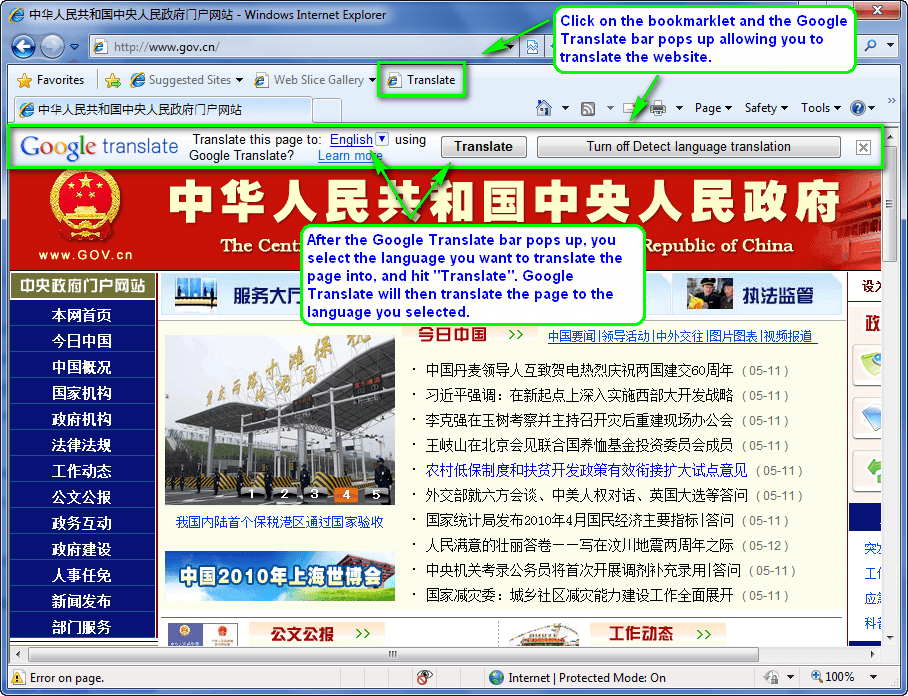

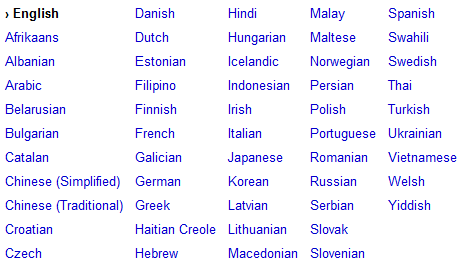
All languages supported by Google Translate are available for you to select to translate to:
Since Translate is a bookmarklet, you don’t have to install anything to use it (i.e. you are not forced to install Google Toolbar). To use Translate, all you have to do is add the bookmarklet to your bookmarks/favorites bar and click on it whenever you want to use it. If you ever want to get rid of Translate, simply delete the bookmarklet from your bookmarks/favorites bar and it is gone – no need to “uninstall” it because you never “installed” it in the first place. You must have JavaScript enabled to use a bookmarklet, though, so if you are one of the people that disables JavaScript you are out of luck. (Most people have JavaScript enabled, so unless you specifically disabled it, don’t worry about it.)
To get Translate, click + drag [Translate] to your bookmarks bar if you are using Firefox, Chrome, or Opera, or if you are using Internet Explorer, right click [Translate], select “Add to Favorites…”, select “Favorites Bar” for “Create in”, and click “Add”.




