dotTech Exclusive: Free Eltima SWF & FLV Toolbox! (Promotion open for 24 hours only so hurry!)

May 14, 2010 84 Email article | Print article

Update: This promotion has now ended.

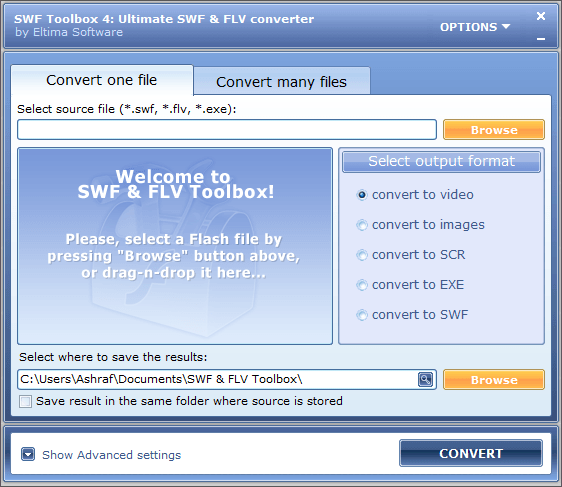
Second in the list of promised free software is Eltima SWF & FLV Toolbox. Hence, today dotTech is teaming up with Eltima Software to bring everyone Eltima SWF & FLV Toolbox ($55.95 value) for free!

For those that don’t know, Eltima SWF & FLV Toolbox is a software that specializes in converting Flash files (.SWF, .FLV, and .EXE) to other formats. Here is the full features list as per the developer:
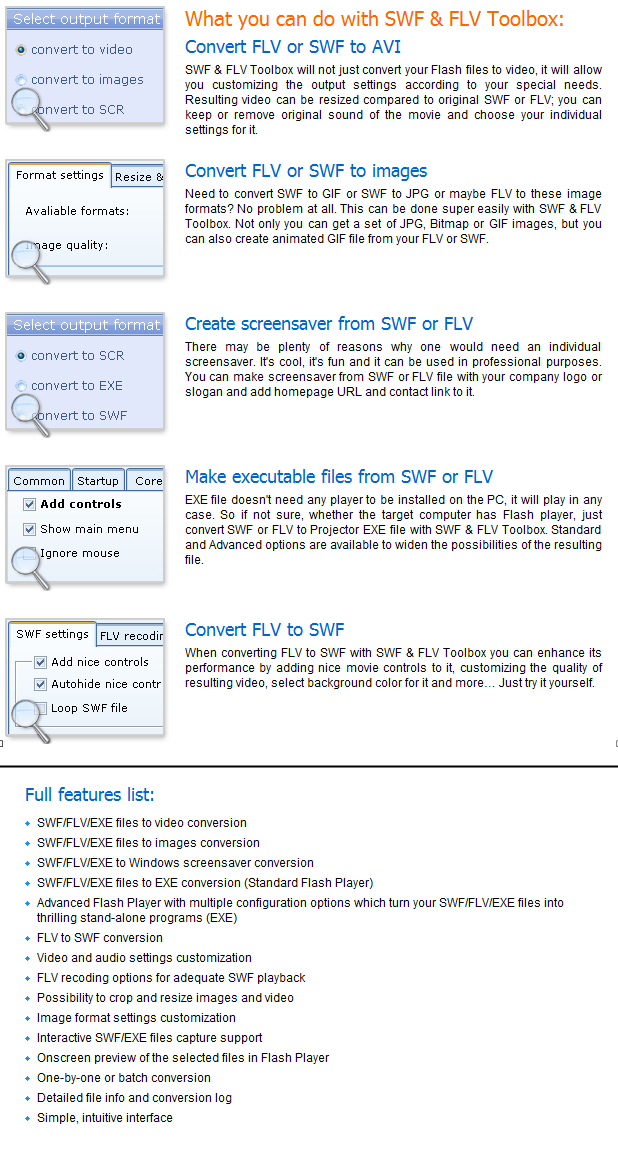
Now some of you may be thinking “but I already have a video converter, so why do I need this?” Well, the answer to that is simple: most video converters you have will do FLV -> other format conversions, but most video converters do not allow you to do SWF -> other format or EXE -> other format conversions. Conversion of SWF/EXE Flash files is a bit tricky and different than conversion of other video formats, so most video converters don’t bother to add in that capability; hence the need for a specialized converter.

That said, dotTechies have the chance to get Eltima SWF & FLV Toolbox for free! This promotion is open for 24 hours – from 00:00 May 14, 2010 to 24:00 May 14,2010 – and you must install and register the software within these 24 hours because you will not be able to take advantage of this freebie at a later date (even if you keep the installation file).

To get Eltima SWF & FLV Toolbox for free, follow these simple steps:

Version being given out for free: v4.0.0.440

Free updates: Yes

Supported OS: Windows XP and higher

Download size: 10.9 MB

  • [REMOVED - The promo is over.] and install Eltima SWF & FLV Toolbox.

Note: This promotion is available to everyone – everyone may get it for free. However, this is a dotTech.org promotion. Please do not upload the installer file to any other website, server, file hosting services, etc. and please do not directly link to the download. If you want to spread information about this offer, you may link to this article by providing a permalink (alternative link) to your audience.

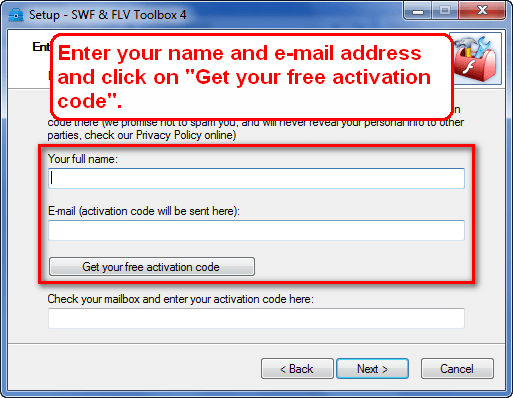
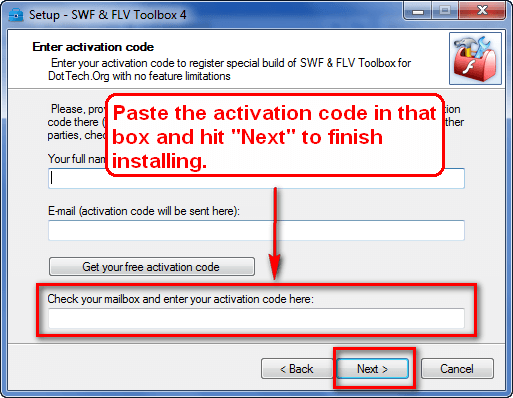
  • During installation, you will be prompted to grab your activation code and register the software. You need to enter your name and e-mail address so you can receive the activation code:
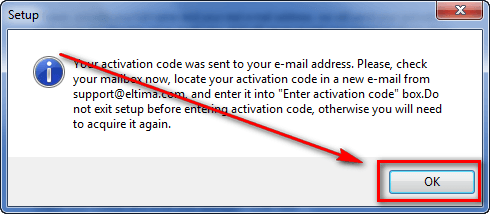
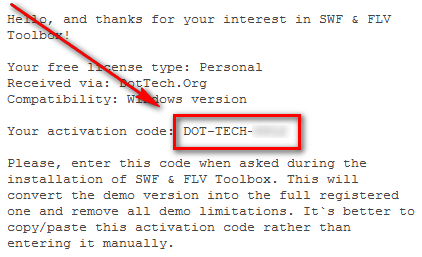
Check the inbox of the e-mail address you entered. There will be an e-mail from “Eltima Software (serveradmin@sync-mac.com)” with the subject of “Free SWF & FLV Toolbox license?”. In the e-mail you will find your activation code:

Copy the activation code and paste it in the activation code box located at the program installer window:

Update: Please note that you must grab the activation code and register/install the software at one time. If you grab the activation code, cancel installation, and go back to install the software with the activation code you got earlier, you will receive an “ERROR: cannot proceed without activation!” message. If this happens to you, enter your name and e-mail address again (you may use the same e-mail address) and grab another activation code; use that new activation code to register/install SWF & FLV Toolbox.
  • Finish installing.
  • Enjoy!

If you have trouble getting Eltima SWF & FLV Toolbox for free, post below and I will try to help.

84 Comments »

  1. Digish A D May 14, 2010 at 1:06 AM (comment permalink) -
  2. pallen May 14, 2010 at 1:09 AM (comment permalink) -

    Hey Ashraf, how are you today?Thanks for the program!And have a nice day.

    2
  3. Jeanjean May 14, 2010 at 1:12 AM (comment permalink) -

    Thank you very very much !

    3
  4. ha14 May 14, 2010 at 1:23 AM (comment permalink) -

    Hi Thanks for this giveaway, when I enter the received code I get
    error:cannot proceed without activation

    what to do

    4
  5. Ashraf May 14, 2010 at 1:24 AM (comment permalink) -
    Mr. Boss

    @ha14: Hmmm… Please make sure 1) The name and e-mail are still entered when entering the activation code and 2) You are entering the activation code properly.

    5
  6. genieautravail May 14, 2010 at 1:31 AM (comment permalink) -

    Same thing: cannot proceed without registration!

    Correction : it works if you click before on the “Get your free activation code” button.
    Do not resart the setup and enter directly the activation code (click before on the button).

    6
  7. Ashraf May 14, 2010 at 1:32 AM (comment permalink) -
    Mr. Boss

    I just downloaded it on another computer and it works fine =O.

    7
  8. Ashraf May 14, 2010 at 1:38 AM (comment permalink) -
    Mr. Boss

    @ha14 and @genieautravail: Okay I just encountered the same error. Did you guys grab the registration code, cancel installation, then went back to reinstall with the activation code you got earlier? You cannot do this. If you grab an activation code, you must finish installing and registering it. If you cancel installation/registration, you need to grab the activation code again.

    8
  9. njwood60 May 14, 2010 at 1:47 AM (comment permalink) -

    woohoo!! Thanks heaps Ashraf :-)

    9
  10. njwood60 May 14, 2010 at 2:30 AM (comment permalink) -

    got an error when I ran it that said pthreadGC2.dll was missing
    it seems this file needs to be in windows/system32 (for XP) and it’s not there on my system. Not sure if the software was supposed to install it
    After a bit of a search I found a place to download pthreadGC2.dll from (that I trusted!) and put it in the windows/system32 directory
    Now runs OK – no errors.
    For ref, I got the file from:
    http://sourceforge.net/projects/mingw-w64/files/
    the file called:
    pthreads-20100513.zip (you may need a different one for 64 bit system)
    In that zip file, the file I used was:
    pthreads-20100513.zip\pthreads-20100513\mingw32\pthreads-w32.zip\bin\pthreadGC2-w32.dll
    Then renamed it to pthreadGC2.dll after I extracted it.

    10
  11. Sam May 14, 2010 at 3:01 AM (comment permalink) -

    It works!
    Thanks for this present, Ashraf!
    Really useful thing.

    11
  12. john barrentine May 14, 2010 at 4:01 AM (comment permalink) -

    just tried to download twice and both times got message : The program can’t start because pthreadGC2.dll is missing from your computer. Try reinstalling the program to fiw this nproblem. Well I got the same message after the second try. I une installed first program before starting second download. NEED HELP PLEASE Thanls Jack B.

    12
  13. AF70 May 14, 2010 at 4:15 AM (comment permalink) -

    Have tried several attempts at install but upon clicking on ‘Get you free activation code’ I receive an error message – ‘ERROR – could not connect to our server to get your free activation code’. I am told to check my internet connection etc. I have disabled my firewall and antivirus and still get the error message. Any suggestions?

    13
  14. Alex Taylor May 14, 2010 at 4:41 AM (comment permalink) -

    Hi everyone, I’m Alex from Eltima Software and I’m here to answer all your questions:)

    @  AF70 -
    Please, send me your e-mail address and name (those, you’ve entered while registration) at alex.taylor@eltima.com and I will check if you are already in our database and will send you registration details.
     
    @ john barrentine -
    Yes, you need to install pthreadGC2.dll on your PC – just Google it and downlod from the website you trust.
     
    @ everyone -
    Thanks for your interest in our software! Any ideas or suggestions, please, feel free to send them at alex.taylor@eltima.com, our team will be happy to know your opinion!:)

    14
  15. Kali May 14, 2010 at 5:19 AM (comment permalink) -

    First time put error in email. Amended email. Got code, input code and program came up but in the about it said demo. So uninstalled, downloaded again and put right email. Input code and all activated correctly the about says reg to DOT TECH. Thanks for program.

    15
  16. Karl May 14, 2010 at 5:41 AM (comment permalink) -

    I tried downloading and setting up twice using different email and different download links and I get:
     
    “Error while unpacking program, code LP5. Please report to author.”
     
    It goes through the setup but when the program goes to launch it displays the above message.  what am I doing wrong?

    16
  17. Jeanjean May 14, 2010 at 5:53 AM (comment permalink) -

    @ AF70
    I had the same thing, but I still received the license to the address indicated.

    17
  18. Alex Taylor May 14, 2010 at 6:20 AM (comment permalink) -

    @ Karl -
    Please, download the build once again and disable your antivirus software while installing SWF & FLV Toolbox; install SWF & FLV Toolbox again.

    18
  19. garyg May 14, 2010 at 6:21 AM (comment permalink) -

    Tried installing, entered name and email address, clicked on get your free activation code, but  I never get an email with activation code.  Have started over and tried this 3 times and nothing. Any ideas? I am getting other emails and double checked to make sure I entered it correct.

    19
  20. Grr May 14, 2010 at 6:29 AM (comment permalink) -
  21. Alex Taylor (Eltima Software) May 14, 2010 at 6:32 AM (comment permalink) -

    @ garyg -
    Please, send me your e-mail address and name (those, you’ve entered while registration) at alex.taylor@eltima.com and I will check if you are already in our database and will send you registration details.

    21
  22. Alex Taylor (Eltima Software) May 14, 2010 at 6:36 AM (comment permalink) -

    @  AF70 –
    Please, send me your e-mail address and name (those, you’ve entered while registration) at alex.taylor@eltima.com and I will check if you are already in our database and will send you registration details.

    @ john barrentine –
    Yes, you need to install pthreadGC2.dll on your PC – just Google it and downlod from the website you trust.

    @ everyone –
    Thanks for your interest in our software! Any ideas or suggestions, please, feel free to send them at alex.taylor@eltima.com, our team will be happy to know your opinion!:)

    22
  23. Mohammed Sarhan May 14, 2010 at 6:42 AM (comment permalink) -

    Got
    Thanks Ashraf
     

    23
  24. William May 14, 2010 at 6:53 AM (comment permalink) -

    How different is this from version 3.5 that was given away on another site? I couldn’t find a changelog.

    24
  25. pcbasics May 14, 2010 at 6:53 AM (comment permalink) -

Leave A Response »