
dotTech Exclusive: Free Wondershare DVD Ripper Platinum! (Promotion open for 24 hours only so hurry!)

May 18, 2010 109 Email article | Print article

Update: This promo has now ended.

Wondershare DVD Ripper Platinum is a professional DVD ripping tool that allows users to rip their DVDs (including most, if not all, DRM protected DVDs) and convert them into various different video formats (including .VOB for lossless storage.) Here are key features of Wondershare DVD Ripper Platinum as per the developer:
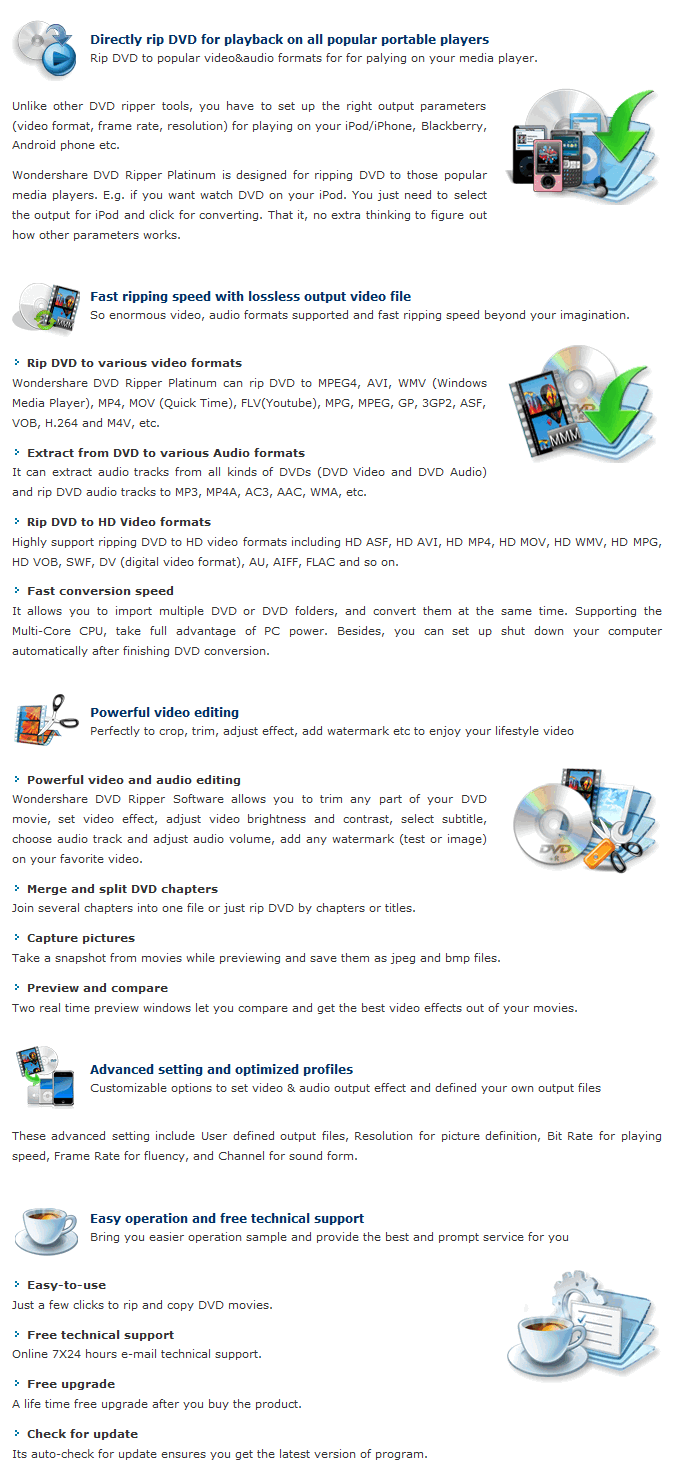
(Click on image to view key features in full size.)

In particular you may want to note the video editing capabilities included in Wondershare DVD Ripper Platinum… editing capabilities that most other DVD rippers do not have.

Here is a table that details all supported input and output formats/profiles (and specifies the specific electronic devices supported by Wondershare DVD Ripper Platinum):
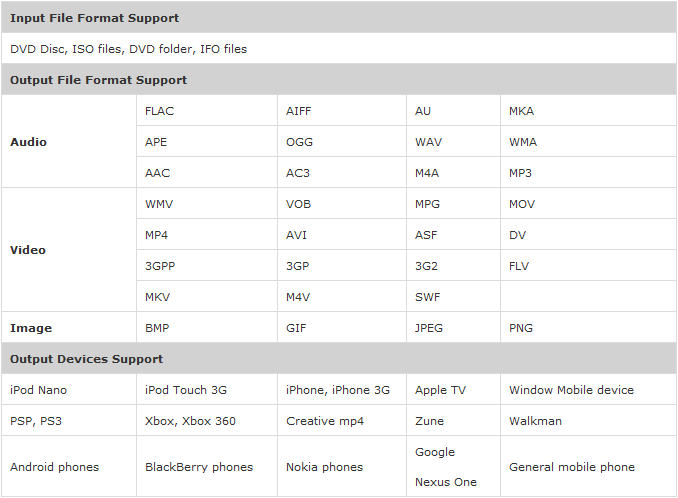
(Click on image to view table in full size.)

Take note that iPad support was just recently added to Wondershare DVD Ripper Platinum so the tables and key features list have not been updated yet to list iPad as being supported. However, the iPad is supported.

For a limited time - from 00:30 PST (Pacific Standard Time) May 18, 2010 to 00:30 PST (Pacific Standard Time) May 19, 2010 – dotTech is teaming up with Wondershare Software to bring dotTechies the chance to get Wondershare DVD Ripper Platinum ($39.95 value) for free! This promotion will only be live for 24 hours, so you must grab the registration information during this time, but you may install the program at any time afterward.

To get Wondershare DVD Ripper Platinum for free, follow these simple directions:

Version being given out for free: v4.4.2

Free updates: Yes, free lifetime updates

Supported OS: Windows NT4/2000/2003/XP/Vista/Win7

Extra note: Wondershare is generously offering free lifetime technical support to all participants of this promotion.

Note: This promotion is available to everyone – everyone may get it for free. However, this is a dotTech.org promotion. Please do not copy, paste, or reprint this registration page link anywhere else including private or public forums, blogs, file hosting services, etc. If you want to spread information about this offer, you may link to this article by providing a permalink (alternative permalink) to your audience. If you respect our wishes, we will be able to continue to bring you great freebies. If you don’t, we have no incentive to continue our promotions and they may stop.

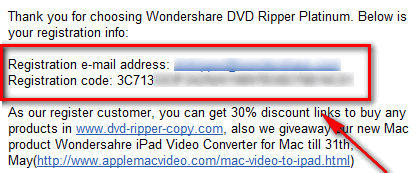
  • After you have filled out the form, check the inbox of the e-mail address you received. There should be an e-mail from “Wondershare (claire.lee [at] wondershare.com)” with the subject of “Thanks for choosing Wondershare DVD Ripper Platinum”. In the e-mail you will find your registration information:

Update: Many people are having trouble getting the registration code. I don’t know why but it seems like some e-mail addresses are not receiving the e-mail with the registration code. If you register with an e-mail address and don’t get the code instantly, please register with a different e-mail address – this promotion is working, there just seems to be a problem with some e-mail addresses. I know for sure that Hotmail, Gmail, and TrashMail e-mail addresses are receiving the codes (I tested it with those e-mail addresses myself). If you are still unable to get the registration code e-mail, please clear your browser’s cache and try again, or try using a different browser. I have contacted Wondershare about the issue and hopefully we can get it resolved. I apologize for any inconvenience this has caused.

Update2: Anyone that had problems getting the registration information can e-mail Claire at claire.lee [at] wondershare.com and request the registration information (mention that you tried to get it via dotTech’s recent promotion but you didn’t get the registration information).
Note: This promotion is available to everyone – everyone may get it for free. However, this is a dotTech.org promotion. Please do not copy, paste, or reprint the registration information you receive anywhere including private or public forums, blogs, file hosting services, etc. If you want to spread information about this offer, you may link to this article by providing a permalink (alternative permalink) to your audience. If you respect our wishes, we will be able to continue to bring you great freebies. If you don’t, we have no incentive to continue our promotions and they may stop.

  • Download and install Wondershare DVD Ripper Platinum.
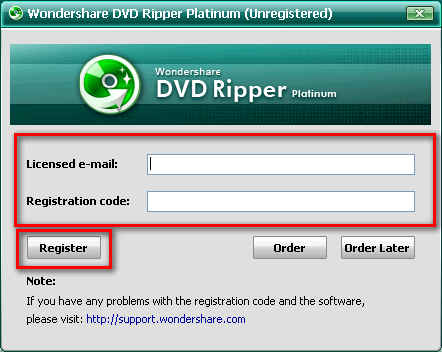
  • Run Wondershare DVD Ripper Platinum. You should be asked to register the software. Register it with the registration information you received via e-mail:
  • Enjoy!

If you have any trouble getting Wondershare DVD Ripper Platinum for free, post below and I will try to help.

Disclaimer: As a knife can be used to cut a pear or slit someone’s throat (or both, if you are a psychopath), Wondershare DVD Ripper Platinum can be used for legitimate purposes, and illegal purposes. Please only use Wondershare DVD Ripper Platinum as allowed by the laws of your country. dotTech is not responsible for any illegal activities done with Wondershare DVD Ripper Platinum.

109 Comments »

  1. Mags May 18, 2010 at 2:34 PM (comment permalink) -

    @JohnD:

    I was using the registration email address, but didn’t work, tried again later and it worked.  Don’t know why it didn’t the first few tries, but I finally got it registered.
     

    76
  2. Francois May 18, 2010 at 3:42 PM (comment permalink) -

    I had the same problem until I filled the adress simply with dvdripper@wondershare.com which was instantly accepted!

    77
  3. OldElmerFudd May 18, 2010 at 6:41 PM (comment permalink) -

    Nothing so far. Tried four times with two different accounts, checking spam folders, etc. I’ll give it another shot during the evening. If it doesn’t come through…well, I didn’t have it before so I won’t lose anything. 8-)

    78
  4. Shueygal May 18, 2010 at 6:55 PM (comment permalink) -

    After repeated attempts to obtain reg. info, it finally worked. Was using multiple accounts with no success, but it finally worked with gmail.[tried it earlier x3, but it worked the 4th time]
    Thanks Ashraf.

    79
  5. Trev May 18, 2010 at 6:55 PM (comment permalink) -

    Wouldnt work Gmail or Hotmail, and not in spam,
    untill I cleared my browser’s cookies as Ashraf suggested.

    80
  6. Ashraf May 18, 2010 at 6:58 PM (comment permalink) -
    Mr. Boss

    @Trev: Yeah I am going to see if we can extend this promotion because of the problems. (Wondershare is based in China so there is a large lead time in response.)

    81
  7. Pegi May 18, 2010 at 7:04 PM (comment permalink) -

    Firefox submission didn’t work with gmail even though it said that I submitted the form ok, but when I rendered the forms page in ie I received the registration code right away…so a firefox issue?

    82
  8. Ashraf May 18, 2010 at 7:07 PM (comment permalink) -
    Mr. Boss

    @Pegi: I don’t think so. I used Firefox and Gmail and it worked. I am starting to think the issue is server side vs. user side (i.e. Wondershare’s script is bugged).

    83
  9. Bruce Fraser May 18, 2010 at 7:44 PM (comment permalink) -

    @Ashraf: 10:43 pm EST.
    Just re-submitted my email addresses on the Wondershare site.
    Still nothing at either “Yahoo.ca” or “Gmail.com” emails; neither in the regular inbox, nor in the spam box.

    84
  10. Bruce Fraser May 18, 2010 at 7:56 PM (comment permalink) -

    @Bruce Fraser:
    EXTRA!!
    I used yet one more email address, this one goes directly to our Internet Service Provider. This one worked.
    Best wishes to everyone else who is having trouble.

    85
  11. James May 18, 2010 at 8:21 PM (comment permalink) -

    Personally I perfer to use Winx DVD Ripper Platinum which was cost of free on GOTD in March. Take a look at the review for Winx and Wondershare on CNET, you will find the truth.
    http://reviews.cnet.com/8301-19512_7-10438934-233.html

    86
  12. willyneu May 18, 2010 at 8:32 PM (comment permalink) -

    I downloaded & installed program this morning & sent my email address, etc. but have not received registration so far.

    87
  13. Ashraf May 18, 2010 at 8:36 PM (comment permalink) -
    Mr. Boss

    @James: I agree WinX DVD Ripper Platinum is really good (read my review at http://dottech.org/commercial-software-reviews/12404) but that article by CNET is fail. Firstly it claims “From a feature standpoint, the two programs are pretty similar.” Yes, they are similar in terms of being able to rip DVDs to many output formats and support for multiple electronic devices, but Wondershare DVD Ripper Platinum has editing features that WinX DVD Ripper Platinum does not have – this is key to note. Secondly, the writer does not mention computer resource usage; from the sound of his article I am thinking Wondershare DVD Ripper Platinum could have been using less cores of the author’s CPU (hence why it took almost twice the time to rip a DVD) vs. WinX DVD Ripper Platinum, but we won’t know for sure because the writer never mentioned it. The only real valid point the author brings up is the fact that WinX DVD Ripper Platinum is $10 cheaper.

    Now I am not saying Wondershare DVD Ripper Platinum > WinX DVD Ripper Platinum or WinX DVD Ripper Platinum > Wondershare DVD Ripper Platinum. I am just saying that article is not a good article to base your judgment off of. I would myself compare the two but I can’t find my Jurassic Park DVD…

    88
  14. Ashraf May 18, 2010 at 8:36 PM (comment permalink) -
    Mr. Boss

    @willyneu: I would try again with a different e-mail address.

    89
  15. willyneu May 18, 2010 at 8:42 PM (comment permalink) -

    I just submitted info & registration came through right away.

    90
  16. Ashraf May 18, 2010 at 8:56 PM (comment permalink) -
    Mr. Boss

    I just talked to Claire, and Wondershare cannot extend this promotion. However, anyone that had problems getting the registration information can e-mail Claire at claire.lee [at] wondershare.com and request the registration information (mention that you tried to get it via dotTech’s recent promotion but you didn’t get the registration information).

    91
  17. harrrrrrr May 18, 2010 at 9:25 PM (comment permalink) -

    OK… finally got this to work.  Yes, cleared my ie browser cookies, etc then used my gmail address… worked.  Had tried many times with 4 different accts on both ie and ffox… clearing the browser seems to be the trick.   Received reply almost instantly. Thanks Ashraf and, of course, Wondershare.

    92
  18. Mike May 18, 2010 at 9:30 PM (comment permalink) -

    Thanks for speaking with Wondershare about the registration issue, Ashraf.
     
    Very odd indeed.  For me, a yahoo email address didn’t work at first (altho I received an email later in the day, many hours later), but a gmail address worked; for other people, the opposite.  Something very weird indeed must be happening with the Wondershare computers …

    93
  19. Franj May 18, 2010 at 9:32 PM (comment permalink) -

    I tried 8 times, with 4 different email addresses. The last times I held the Control button while submitting my addy; it went through. Just keep hitting this button.

    94
  20. Grantwhy May 18, 2010 at 9:48 PM (comment permalink) -

    I registered about a 90 minutes ago (on a hotmail and a gmail account) and nothing came through (tried with both FireFox portable and IE 8).
    I tried again about 45 minutes ago with the *same* email accounts and the registration details came through straight away (although hotmail did put the email in the junk folder :-p).
    I suggest that if anyone has tried to register and got no email, keep trying.

    95
  21. Havilson May 18, 2010 at 9:52 PM (comment permalink) -

    @Ashraf: I used my Gmail account and received nothing.

    96
  22. OldElmerFudd May 18, 2010 at 10:18 PM (comment permalink) -

    The reg info finally came through on Gmail after five attempts. Haven’t checked the fifth try on my ISP account. Installed and registered without a hitch; this will be interesting to try out when the need arises.
    Many thanks for your unflagging efforts, Ashraf.

    97
  23. Rene May 19, 2010 at 12:41 AM (comment permalink) -

    On my gmail address it arrived after the second try.
     
    Thanks for the offer.

    98
  24. jumbi May 19, 2010 at 1:29 AM (comment permalink) -

    have tried 3 emails (2 gmails+another), with 3 browsers (FF, IE, ,Opera) and finally got them :-)

    99
  25. witwas May 19, 2010 at 3:44 AM (comment permalink) -

    Thanks for the offer.

    100

Leave A Response »