dotTech Exclusive: Free Paragon System Backup 9.5 (unlimited licenses – free for everyone) and Paragon Backup & Recovery 10 Suite (30 licenses only)!

May 15, 2010 116 Email article | Print article

Once again dotTech is teaming up with Paragon Software to bring dotTechies some goodies; this time around, however, we actually have two goodies instead of just one. What do I mean exactly? What I mean is free giveaways of Paragon System Backup 9.5 (System Backup 9.5 is the exact same as System Backup 2010 [$29.95 value] except System Backup 9.5 does not have WinPE recovery media while System Backup 2010 does) and Paragon Backup & Recovery 10 Suite [$69.95 value]!

Since this promotion involves the giving away of two different software, I will address each software individually, System Backup 9.5 first then Backup & Recovery 10 Suite.

Giveaway of Paragon System Backup 9.5 (Unlimited Licenses, Free For Everyone)

As I already mentioned, Paragon System Backup 9.5 is the exact same software as Paragon System Backup 2010, except System Backup 9.5 does not come with WinPE recovery media while System Backup 2010 does (System Backup 9.5 still has the Linux based recovery media, though). So, then the question is, what exactly is Paragon System Backup? As described by me in dotTech’s full review on Paragon System Backup 2010

Paragon System Backup is a snapshot backup software. What exactly is a snapshot backup software? Think of a snapshot backup software as a mesh between Windows System Restore and your favorite image backup software. Therefore, a snapshot backup software is, more or less, a software that takes regular “snapshots” (image backups) of your computer, and allows you to restore your computer to any snapshot, similar to how you restore your computer to a “restore point” with Windows System Restore.

Here is the a list of the key features of System Backup as per the developer:
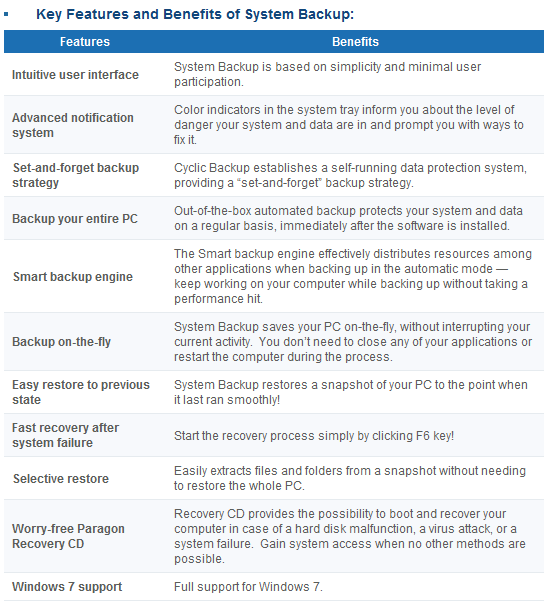
(Click on image to view list in full size.)

If you want to learn about System Backup in more detail, you can read dotTech’s full review or visit System Backup’s homepage. However, when reading up on System Backup features, note that System Backup was just recently updated; new features have been added and improvements made (System Backup 9.5 includes all these new features and improvements) such as Advanced Backup Strategy Configuration (gives you more control over program parameters), Precise Scheduling (gives you more control over how to schedule automatic backups), Adjust Backup Process Priority (CPU processing priority is more intelligently controlled by the software for automatic backups so as to not burden your computer as much when creating snapshots), and Backup Object Selection (you can now select specific partitions/volumes to backup instead of being forced to backup whole computer). In fact the update is so recent System Backup’s homepage has not yet been updated to reflect the new features. Think of dotTech as being honored by Paragon Software in the form of being provided the latest version of a software, even when Paragon’s own website has not been updated to reflect the new changes yet.

That said, I am sure everyone wants me to shut-up and just spill the beans on how to get Paragon System Backup 9.5 for free. Well, wait no longer – read on to learn how you can get Paragon System Backup 9.5 for free:

Please note that this promotion of Paragon System Backup 9.5 is open for three days only, from 01:05 PST (Pacific Standard Time) May 15, 2010 to 01:05 PST (Pacific Standard Time) May 18, 2010. You must grab the registration information and download the program during this time; however you may install the program at a later date if you wish.

Version being given out for free: v9.5 Build 9933 (04.05.10)

Free updates: No

Supported OS: Windows XP/Vista/Win7 [32-bit and 64-bit]

Download size: About 90 MB

Note: This promotion is available to everyone – everyone may get it for free. However, this is a dotTech.org promotion. Please do not upload the installer file to any other website, server, file hosting services, etc. and please do not directly link to the download. If you want to spread information about this offer, you may link to this article by providing a permalink (alternative permalink) to your audience.
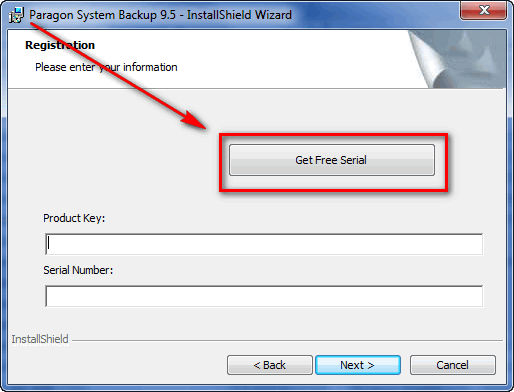
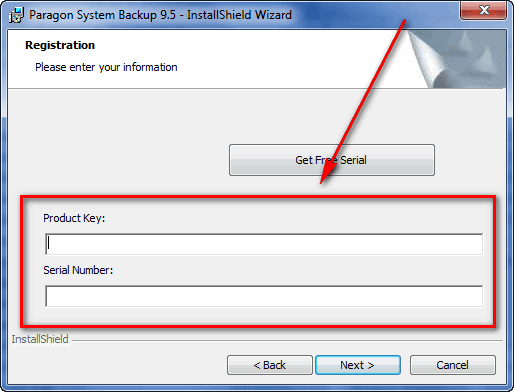
  • During installation you will be prompted to grab your registration information from the registration page and use it to register Paragon System Backup 9.5:

Note: This promotion is available to everyone – everyone may get it for free. However, this is a dotTech.org promotion. Please do not copy, paste, or reprint this registration page link anywhere else including private or public forums, blogs, file hosting services, etc. If you want to spread information about this offer, you may link to this article by providing a permalink (alternative permalink) to your audience.

Click on “Get Free Serial” and the registration page will open, where you will be asked to fill out a short form:

You are not required to opt-in to “receive special offers and software updates” but if you do you will be able to take advantage of a 30% discount on Paragon Backup & Recovery Suite if you ever want to purchase that software.

After you fill out the form, you will get a confirmation message:

  • Check the inbox of the e-mail address you registered with. There should be able e-mail from “eservice@paragon-software.com” with the subject of “Your Product Registration for Paragon System Backup 9.5 (English)”. In the e-mail you will find your registration information:
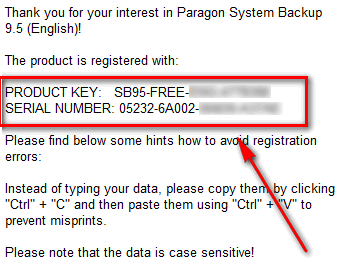
Use that registration information to register the software back at the installer window:
  • Finish installing. You will be asked to restart the computer after installation has finished.
  • Enjoy!

If you have any trouble getting Paragon System Backup 9.5 for free, post below and I will try to help.

Giveaway of Paragon Backup & Recovery 10 Suite (30 Licenses Only)

Paragon Backup & Recovery Suite is your one-stop-shop for “disaster recovery and system migration” needs. In other words, Backup & Recovery Suite is the one program that allows you to perform functions ranging from backing up and restoring data to migrating your data from one computer to another computer, and everything in between. In fact, Paragon System Backup – the software that is being given out to everyone as mentioned above – is a component of Paragon Backup & Recovery Suite. Here is a quick overview of the features of Paragon Backup & Recovery 10 Suite as per the developer:

(Click on image to view list in full size.)

To learn about Paragon Backup & Recovery 10 Suite in more detail, feel free to read the Backup & Recovery 10 Suite datasheet.

As part of the cooperation with Paragon Software, dotTech is able to offer 30 free licenses of Paragon Backup & Recovery 10 Suite to 30 lucky dotTechies! If you would like to win a license of Paragon Backup & Recovery 10 Suite, follow these simple instructions/guidelines:

Version being given out for free: v10

Free updates: Minor updates only

Supported OS: Windows 2000 Professional SP4/XP/Vista/Win7 [32-bit and 64-bit]

  • If you want to be eligible to win one of the licenses, you must post a comment below. In the comment you must post answers to the following questions:
  • What types of files do you primarily need to backup? (I.E. Backing up personal files, work files, school files, documents, programs, etc.)
  • What is your favorite feature of Paragon System Backup?
  • What do you dislike about Paragon System Backup or what can be improved in Paragon System Backup?
  • Do you think $29.95 is a fair price for Paragon System Backup? If not, please state the price you would be willing to pay.

Note: Since everyone has the ability to grab Paragon System Backup for free, answers to the above questions that say “I don’t know because I have not used Paragon System Backup” will not be accepted as a valid entry. Part of this promotion includes providing feedback to Paragon Software, and just saying “I don’t know” is not good enough.

Anyone that does not post answers to all of the four questions will be disqualified.

  • 10 licenses are reserved for dotTech donors, authors, and artists. If you fall in this 10 license reserve category, please specifically state so in your comment (i.e. say “I am a donor” if you are a donor, etc.), otherwise I may not know. Also if you are a donor, please be sure to use the e-mail you donated with in your comment (do not post your e-mail in public, just use the e-mail in the “e-mail” form when posting a comment) so I can confirm.
  • 20 licenses can be won by anyone.
  • I reserve the right to award specific people licenses if I feel they have helped foster the dotTech community by being very active (the people who fall into this category is at my sole discretion).
  • You may only enter once and only win one license. Anyone that tries to enter more than once will be disqualified.
  • By entering this drawing, you give me the right to pass on your e-mail to Paragon Software (they will be the ones distributing the licenses).

When posting a comment, please make sure you enter an e-mail that is 100% valid and an e-mail you will check because the licenses will be distributed via e-mail by me. If you win and don’t have a valid e-mail or an e-mail you don’t check, your license will go to waste. However, please don’t post your e-mail in your comment! You should never post your e-mail on a public form. Just enter the e-mail you want to be contacted at in the “E-mail” field when writing your comment – I will be able to get your e-mail from there. Or if you are a registered dotTechie, just post a comment normally and I will be able to find your e-mail.

The winners of this giveaway will be announced after the giveaway has ended in 72 hours, or on Tuesday May 18, 2010.

Good luck to everyone!

116 Comments »

  1. Phuong May 15, 2010 at 1:18 AM (comment permalink) -

    What types of files do you primarily need to backup? (I.E. Backing up personal files, work files, school files, documents, programs, etc.) –> school files
    What is your favorite feature of Paragon System Backup? –> i like Backup on-the-fly feature best.
    What do you dislike about Paragon System Backup or what can be improved in Paragon System Backup? –> i don’t like Backup your entire PC feature because i like use GHOST.
    Do you think $29.95 is a fair price Paragon System Backup? If not, please state the price you would be willing to pay. –>In my opinion, $29.95 is a fair price :)
    Thank dottech.org!

    1
  2. Adrian May 15, 2010 at 1:19 AM (comment permalink) -

    Yay! Near first comment.
    What types of files do you primarily need to backup? (I.E. Backing up personal files, work files, school files, documents, programs, etc.)
    I like to backup my personal videos/photos that I take on my tours, and also some music that I buy.
    What is your favorite feature of Paragon System Backup?
    I like most the feature that it allows you to backup files on-the-fly.
    What do you dislike about Paragon System Backup or what can be improved in Paragon System Backup?
    I dislike the huge download file size. Most other backup software only have an around 5~10 MB download size at most, compared to sb9.5′s 87 MB.
    Do you think $29.95 is a fair price Paragon System Backup? If not, please state the price you would be willing to pay.
    There are many free alternatives in the market. However, System Backup has a lot more extra “bells and whistles”, so that a price of 29.95 is fair.

    However, a price reduction of around $5 will attract more potential users.

    @Ashraf: I am a contributor/writer.

    2
  3. ha14 May 15, 2010 at 1:34 AM (comment permalink) -

    Thanks for both giveaways concerning Paragon Backup & Recovery 10 Suite here are my answers
    1)Windows backup all in one
    2) ability to convert an image into a virtual hard drive
    3)Faster backup for large file because  70GB of data takes about two hours and 15
    4)Well if its faster then the mentioned price its okay otherwise 20USD

    3
  4. amozai May 15, 2010 at 1:47 AM (comment permalink) -

    Great giveaway from you. Find below are my answers:-
    1. I use to backup my personal files and system backup files.
    2. WinPE recovery media
    3. I don’t see any at the moment
    4. I like paragon programs because they do exactly what they claim to do, and if everyone knows the importance of paragon system backup then I don’t think anyone will complain because of this price.
    Thank you for sharing.

    4
  5. chinaguy May 15, 2010 at 1:48 AM (comment permalink) -

    What types of files do you primarily need to backup? (I.E. Backing up personal files, work files, school files, documents, programs, etc.) I will be backing up the files from my personal computer but the files will be work files, personal files and school files including documents, music, some videos, and programs.
    What is your favorite feature of Paragon System Backup? Probably my favorite feature is that I can migrate my system if I need to, I also like the ability to use a Win PE boot disk.
    What do you dislike about Paragon System Backup or what can be improved in Paragon System Backup? If they do not have it already they should include a feature that will verify the integrity of the backup.
    Do you think $29.95 is a fair price for Paragon System Backup? If not, please state the price you would be willing to pay. I do not generally buy software unless I have to and what I need doesn’t come with the computer or I can’t get it for free, but this software looks quite good. I would probably be willing to buy it for 24.95.

    5
  6. Farrukh May 15, 2010 at 1:48 AM (comment permalink) -

    Waooo, Fantastic offers today :) . I actually need some good backup and restore software.
    Please add me to the draw. Here are the answers:

    Q: What types of files do you primarily need to backup? (I.E. Backing up personal files, work files, school files, documents, programs, etc.)

    A: Almost every kind of data including  source code, articles, downloaded programs etc etc.

    Q: What is your favorite feature of Paragon System Backup?

    A: I haven’t started using it yet. But from the feature’s list, I would like to vote for “Easily restore to Previous state”. BTW I  also like “Set and Forget backup strategy :)

    Q: What do you dislike about Paragon System Backup or what can be improved in Paragon System Backup?

    A: Intuitive user interface, should be improved to give user a Detailed Mode as well, for  more information and customization with instructions and tool tips.

    Q: Do you think $29.95 is a fair price for Paragon System Backup? If not, please state the price you would be willing to pay.

    A: Well, I’m not good at these kinds of calculations, but according to the value of software this is not a bad price.

     
    Hoping to Win this time :)
    Thanks a lot for such great offers.

    6
  7. Pat Perez May 15, 2010 at 1:48 AM (comment permalink) -

    My back up needs consist of a variety of things including school work for my kids, some work related files, alot of programs(i’m a download junkie) and music and pics being the “big” ones.

    I would say my favourite feature would be to do a complete backup as you work on the pc and the fact that you can do external backups.

    My dislike of the program is that it seems you can not resize the “backup capsule” to accomodate a larger backup.

    I suppose the price of $29.95 is a relatively fair price, however, I  personally would not pay it.  I would be willing to pay $19.95.

    Thanks Ashraf

    7
  8. mishasin May 15, 2010 at 2:01 AM (comment permalink) -

    * What types of files do you primarily need to backup? – Programs
    * What is your favorite feature of Paragon System Backup? – Definetely “Backup-on-the-fly”.
    * What do you dislike about Paragon System Backup or what can be improved in Paragon System Backup? – Size of download.
    * Do you think $29.95 is a fair price Paragon System Backup? If not, please state the price you would be willing to pay- It’s a fair price.
    Great offer!  Thank you dottech.org and Paragon.

    8
  9. Benjamin May 15, 2010 at 2:14 AM (comment permalink) -

    1. I will backup my personal files which includes videos, pictures and my big chuck of music, losing those stuffs will surely make me cry till my tears run dry. XD

    2. My favorite feature is the selective restore which allow me to teach which stuffs to restore and i don’t have to restore the whole thing and delete stuffs i don’t need, it will save me a lot of time.

    3. It does not seem to do any compression on the backup files but of course it will be fast as it don’t have to compress those huge files.

    4. I think the price is pretty fair and it gives so many features and is only for $29.95.

    double thumbs up!! d(>w<)b

    Thanks dottech.org and PARAGON Software Group!

    9
  10. armond52 May 15, 2010 at 2:17 AM (comment permalink) -

    Thank you for the opportunity.
    And the answers are:
    1 – Partition images.
    2 – Smart backup engine.
    3 – I think the key feature of the s/w (continuous snapshot or Time-Machine type backups) is not fully conveyed by Paragon in the software’s description, etc.
    4 - Pretty much in the ball park for all the features.

    10
  11. ADDRiVER May 15, 2010 at 2:32 AM (comment permalink) -

    A really great offer today! I like the programs by Paragon, because of the high quality and the compatibility with the operating systems.
    I think with this Suite you become a all in one HDD Tool that you sure sometime need.
    Supported Operating Systems: Windows 7 (32-bit und 64-bit), Windows Vista (32-bit und 64-bit), Windows XP (32-bit und 64-bit), Windows, 2000 Professional SP4
    Internet Explorer 5.0 or higher,Intel Pentium CPU or equivalent with 1 GHz or higher,128 MB RAM (we recommend 256 MB or more),Hard drive with at least 150 MB free space
    Really good that you can use it on a old System too!

    (+ low preconditions)


    I hope I win something!
    Thank you Ashraf !


    11
  12. ?SS May 15, 2010 at 2:41 AM (comment permalink) -

    Thanks!
    Paragon Suite complete back-up software…
    I hope I win licenses!
     

    12
  13. AlanR May 15, 2010 at 2:46 AM (comment permalink) -

    Paragon Backup & Recovery 10 Suite (Questionnaire Response);

    1) All files, especially those written by default to My Documents, AppData etc., on main HDD that are not automatically saved to removeable drives.
    2) Backup-on-the-fly, Easily Restore to Previous State &  System Migration.
    3) Download size – as most from Paragon – is too big, typically because dual Win.32 & 64 versions incorporated in same file.
    4) Price? Suggest  $15~20 would be more attractive.

    13
  14. vhick May 15, 2010 at 2:49 AM (comment permalink) -

    What types of files do you primarily need to backup?

    I usually backup office files and personal files as this is precious to me and very hard to research again if this files lost.

    What is your favorite feature of Paragon System Backup?

    What I really like in Paragon System Backup is very very easy to use for novice users. Just backup and restore snapshot. A first step in backup practices for novice.

    What do you dislike about Paragon System Backup or what can be improved in Paragon System Backup?

    What I dislike about Paragon System Backup is the ability to compress snapshot. As it compare to other snapshot software like Comodo Time Machine. And the lag when doing snapshot while on your work.

    Do you think $29.95 is a fair price for Paragon System Backup? If not, please state the price you would be willing to pay.

    I think $29.95 is fair enough as Paragon products is always reliable and worth piece of software to rely on. But if they lower the price a little more, much better to customers.

    14
  15. Michael May 15, 2010 at 3:01 AM (comment permalink) -

    Hey,
    I would enjoy to get a license for Paragon Backup & Recovery 10 Suite. :-)
    My answers:
    1.  Primarily I have to backup programs and documents.
    2.  The favorite Feature: Easy restore to previous state
    3. I agree, that the size of this download is very big. I think it would be a nice feature, if you add some languages (the most important like German, french, …) I haven’t seen something like that.
    4. I think it is a fair prize, because it is one of the best backup-software with a lot of features.
    Best regards, Michael

    15
  16. pallen May 15, 2010 at 3:15 AM (comment permalink) -

    You call Backup and Recovery free when you have to write an essay,for it.Or maybe this is a job interview,whoever writes the best review gets the job.Easy for you to say,college boys.Well all I can say is”I DON’T KNOW”.Oh, by the way ,when you get back from vacation I want you to write an essay on HOW I SPENT MY SUMMER VACATION,thank you.WOW my fingers hurt now.HA!HA!HA!Just laughs.

    16
  17. Adrian May 15, 2010 at 3:31 AM (comment permalink) -

    This is not an entry in the contest.

    Everyone: Please know before participating in the contest that the download filesize of Paragon Suite is over 100 MB.

    17
  18. Cyrus May 15, 2010 at 3:45 AM (comment permalink) -

    Thank you for giving me the opportunity to take part in this fine giveaway. My need for backup has to do primarily with work and personal files. That includes various kinds of documents, as well as datasheets, with information that is periodically renewed. I’ve been using Paragon System Backup 2010 for about 5 months, because i wanted to try it as an overall solution for my system settings. My favorite feature is that you can set it and forget it – it’s very easy to let it automatically do the task for you every time you connect it to an external hard disk. And also the speed (not the first time – the next times) is fair. But it was not the solution i was searching for, because i’d prefer that it could give the option for file backup or incremental file backup, along with the overall system backup. I think that this could save me some more time. And if it also provided the option of mounting images it would be perfect. But these are included in the Backup and Recover Suite – that’s why i take part in this giveaway hoping to win it. But taking all my specific needs and wishes into account, i think that Paragon Sytem Backup price is not quite fair. In my opinion, they should integrate some more features in their sytem bakup solution and make it really an OVERALL solution (no need for different products).

    18
  19. Unified May 15, 2010 at 4:03 AM (comment permalink) -

    I have a small business in IT Services and Support and I design solutions for small to medium business. So it will mostly the who OS partition backup as well as the backup partition in their PC/Server depends on whether they have any dedicated backup partition. If they don’t have backup partition then it would be straight to their external HDD.
    Rescue or Bootable DVD/CDs.
    I think the time and processing power it takes to run the backup. If these are improved then it would be a fantastic all-rounder.
    I think $29.95 is fair price considering it will do a lot of job and in the event of a disaster it will save a lot of time, money and unwanted hassle.

    19
  20. Tortuga May 15, 2010 at 4:13 AM (comment permalink) -

    Dear Ash :-D
    Yes indeed, please throw my name into the hat for Backup & Recovery 10 Suite
    Yes, I am a donor (but not via this eMail)

    About Paragon:
    •1. Programs; Personal files & my 1T HD of music!
    •2. Ability to continue working while the programs does it’s thing; Selective restore;
    •3. As Chinaguy said, there must be a way to verify integrity, otherwise it’s only when one restores that the bad surprise hits…
    •4. $30. is a fair price

    Thank you Paragon for the offer
    Have a great day
    Peace

    20
  21. Karl May 15, 2010 at 4:17 AM (comment permalink) -

    Oooo … this one is the Paragon’s “Kitchen Sink” offerings .. it has everything including their virtualization software which works quite well with options to create any of the common VMs.  If your into VMs or just need good backup s/w put your name in the hat .. you’ll love this one!  (Ashraf – don’t enter me for this one .. I already have most of what it’s offering)

    21
  22. Jef May 15, 2010 at 4:42 AM (comment permalink) -

    I will backup system drive (with all installed programs) and a data drive with personal things like work documents, downloaded paid software, videos, pictures, and music.
    My favorite feature is the selective restore which is a large gain of time.
    I would like to have some kind of cheksum on individual files to be able to verify periodically the good state of files
    I think thant the price of  $29.95 is fair for the features given

    22
  23. OldElmerFudd May 15, 2010 at 5:33 AM (comment permalink) -

    Hi Ashraf!
    Very nice giveaway offers on the programs – you do come through for your readers! Since I have a paid version of Hard Disk Manager 2010, I’ll pass on these, but thanks for the opportunity.
    Enjoy your vacation.

    23
  24. tj May 15, 2010 at 5:34 AM (comment permalink) -

    The file I would backup are my programs that I installed and of course backing up my OS.

    A favorite feature is to have the WinPe for recovery.

    I would like have a better compression of file. Is the compression speed better that True Image or Norton Ghost15?

    The price seems to be fair but having it as a giveaway or freebie is better. I think the price should be about $20.00 to $28.00. If the cost is more then they should have support and free upgrade for 2years or 3years.

    24
  25. Matthew W May 15, 2010 at 5:43 AM (comment permalink) -

    What types of files do you primarily need to backup?: I’m planning on backing up the whole hard drive before I switch OS’s, but I’m not sure then that’ll be.
    What is your favorite feature of Paragon System Backup?: Backing up things in the first place.
    What do you dislike about Paragon System Backup or what can be improved in Paragon System Backup?: Speed is always an issue, but nothing can really be done about that.
    Do you think $29.95 is a fair price for Paragon System Backup?: For all the unrecoverable files on my drive, this would actually be cheap.

    25

Leave A Response »